Windows K2 Deep Dive: How Microsoft Is Fixing Windows 11's Long-Standing Issues
Windows K2 is Microsoft's systematic plan to fix Windows 11's most criticized problems.
Windows K2 is not a new version of Windows but a comprehensive remediation plan targeting Windows 11's most persistent issues. Key improvements include a more customizable Start Menu and taskbar, a fully configurable right-click context menu, the removal of Copilot branding from across the OS, WinUI design unification, significant performance optimizations, a less intrusive update experience, and a streamlined Insider Program. However, the forced Microsoft account requirement and confusing version numbering remain unresolved.
What Is Windows K2?
If you've been following Microsoft news lately, you've probably heard the term "Windows K2." But what exactly is it? Let's get one thing straight: Windows K2 is not a new version of Windows. It's not a codename for Windows 12, nor is it an entirely new operating system.
Windows K2 is essentially a "fix-it plan" from Microsoft — aimed at addressing the many long-criticized issues plaguing Windows 11. Since its official announcement in March 2016 and roughly five months of development, it's now time to take stock of its major improvements.
Microsoft has a long history of using subsequent releases to fix the mistakes of their predecessors. The most classic example is Windows Vista, which was widely criticized for poor driver compatibility and excessively aggressive UAC prompts. Windows 7 then arrived as the "Vista fix" and became one of the most beloved versions of all time. Similarly, Windows 8 faced backlash for its radical full-screen Metro interface, and Windows 8.1 and Windows 10 gradually restored the traditional desktop experience. Windows K2 continues this tradition, but with a key difference: it's not a standalone new version number. Instead, it's being rolled out as a systematic remediation plan within the Windows 11 framework, reflecting Microsoft's recent strategic shift from "major version releases" to "continuous iteration."
Over the past few years, Windows 11 has been heavily criticized for a series of controversial changes: the deeply integrated Copilot that nobody asked for, numerous features simplified or outright removed compared to Windows 10, noticeably worse performance than its predecessor, and a confusing feature release cadence. In forums and comment sections, many have ranked it among the worst operating systems in Microsoft's history, alongside Windows ME, Vista, and Windows 8. The only difference is that Windows 11 is currently the only supported mainstream version — putting Microsoft in a rather awkward position.
Start Menu and Taskbar: The Long-Awaited Return
When Windows 11 launched, the Start Menu was widely criticized for being overly simplistic and lacking customization options. Microsoft gradually added some customization features afterward, but a major overhaul in early 2016 actually created more confusion — with confusing settings and terrible scaling behavior.
Now, Windows K2 has struck a better balance between "customization" and "simplicity." Users now have the most control over the Start Menu since Windows 11's launch: you can keep or remove any of the three main sections (pinned apps, recent items, app list), and precisely control what appears within each section. More importantly, the Start Menu finally supports independent scaling adjustment, solving the long-standing pain point where it would automatically change based on resolution and scaling settings with zero user control.
The taskbar has also seen noteworthy returns. Windows K2 brings back the ability to move the taskbar to any edge of the screen — though this probably only serves the roughly 2% of users who want it. It also restores the option for a smaller taskbar size, allowing the entire taskbar to shrink down and recreate the compact form factor of older Windows versions.
The Right-Click Menu Is Finally Customizable
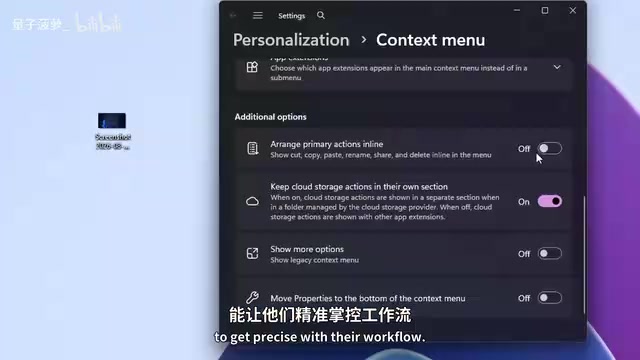
The redesigned right-click context menu that shipped with Windows 11 was extremely controversial: missing features, the inexplicable relocation of cut/copy/paste to the top, slower loading times, and that infuriating "Show more options" button that required an extra click every time you needed legacy functionality.
Microsoft has now made significant improvements to this menu — allowing users to customize the layout and content of the right-click menu. You can move the cut, copy, and paste buttons back to their original positions, add specific options and submenus, and even remove default actions, including the "Show more options" and "Properties" buttons. A nice side benefit: removing enough menu items means Windows loads less content, making the context menu respond faster.
Unfortunately, some legacy applications still can't appear in the new context menu, but this isn't solely Microsoft's problem — app developers also need to update their software to support the new menu. Overall, it's a solid compromise, and the direction is encouraging.
WinUI Design Unification and Copilot's Complete Retreat
UI inconsistency has been a chronic issue in Windows since the Windows 10 era. As part of the Windows K2 initiative, Microsoft is accelerating the adoption of WinUI (Windows 11's native Fluent design language) across core system components: the Run dialog, file properties dialog, print management, autoplay dialog, and other long-neglected interfaces have all been redesigned with full dark mode support.
WinUI (Windows UI Library) is Microsoft's modern native UI framework for Windows app development, built on the Fluent Design System. First introduced in 2017, Fluent Design encompasses five core elements: light, depth, motion, material (such as acrylic and mica effects), and scale. WinUI has evolved from version 1.x to 3.x, with the current WinUI 3 breaking free from the constraints of UWP (Universal Windows Platform) and now usable in traditional Win32 desktop applications. The root cause of Windows 11's UI inconsistency is that many system components are still built using rendering technologies from different eras — Win32 GDI, WPF, and even Windows Forms. Notably, the previous Start Menu was actually built on web technologies — rendered via WebView2/Edge engine using HTML/CSS/JS — meaning a core system component was essentially running an embedded browser. This not only introduced performance overhead but also created visual dissonance with native controls. The new version is built on WinUI, providing a much more solid foundation.
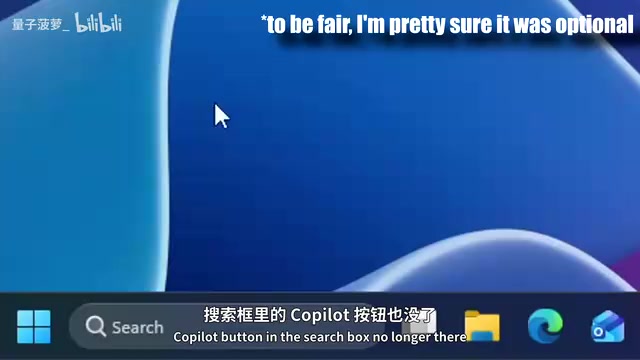
The more noteworthy change is Copilot's complete retreat. Over the past few years, Microsoft shoved Copilot into virtually every corner of Windows — the search box, taskbar, Snipping Tool, Notepad, Edge, Photos, Paint, and all Office apps including Word, PowerPoint, Excel, and Outlook. It even appeared on phone keyboards and physical keyboards.
Microsoft's aggressive Copilot push began in 2023, when OpenAI's ChatGPT sparked an industry-wide AI race. As OpenAI's largest investor (with cumulative investments exceeding $13 billion), Microsoft viewed AI as a core strategic pillar, and the Copilot brand was rapidly deployed across nearly every product line. However, this "carpet bombing" strategy triggered significant user backlash — many features were perceived as forced insertions rather than solutions to real needs. In contrast, Apple's Apple Intelligence took a fundamentally different approach: AI capabilities were deeply integrated through system-level APIs, so users perceived "features getting better" rather than "another AI brand being pushed on them." This was arguably Windows 11's darkest period, and Microsoft clearly recognized it.
The current strategy is clear: the Copilot brand will appear less and less in prominent positions, and AI capabilities will be woven into the system in more subtle, sensible ways. Where that's not possible, Copilot buttons are simply being removed. The Copilot buttons in the Snipping Tool, Photos, and search box have all disappeared. Notepad retains its AI writing assistance feature but has dropped the Copilot branding. Microsoft says it will carefully curate where AI is integrated into the system, rather than plastering it everywhere.
Performance Optimization, Update Experience, and Insider Program Reform
Performance is another major area where Windows 11 has drawn concentrated criticism from users. Compared to its predecessor, it is genuinely slower in multiple scenarios. Microsoft is actively optimizing through the K2 initiative: File Explorer launch and menu loading speeds have noticeably improved, Windows Hello unlock is smoother, and memory management has been specifically optimized for low-end devices with 8GB of RAM.
A recently introduced "low latency profile" feature can briefly burst system resources when needed, then immediately scale back. This feature involves CPU scheduling and power management policies at the OS kernel level. In traditional Windows power plans, the system manages CPU frequency and power consumption through P-States (performance states) and C-States (idle states), but state transitions introduce latency. macOS has had a QoS thread priority system since Monterey, and Linux kernel's schedutil scheduler can adjust CPU frequency and resource allocation in real time based on application demands, achieving millisecond-level responsiveness. The core principle of the low latency profile is: when latency-sensitive tasks are detected (such as audio processing, game input, or video conferencing), the system temporarily boosts CPU frequency and reduces scheduling latency, then immediately returns to power-saving mode once the task completes. This is especially important for laptop users, as it ensures smooth critical operations while maintaining battery life. macOS and Linux have had similar mechanisms for years — Windows is finally catching up.
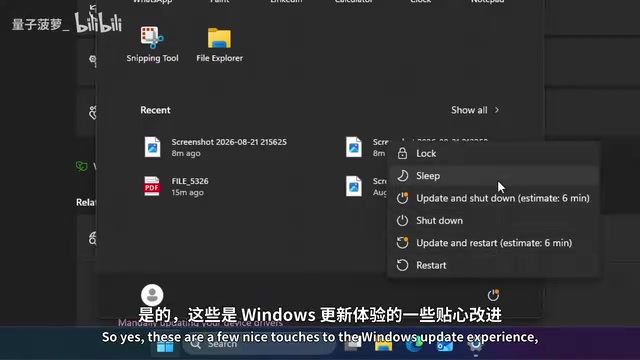
On the Windows Update front, K2 makes the update process less annoying: you can skip the lengthy update screens during initial setup, pausing and deferring updates is more convenient, and you're no longer forced to install updates when restarting or shutting down.
The Windows Insider Program has also been streamlined. Created in 2014, the program is Microsoft's core channel for collecting user feedback and conducting large-scale testing. The original four-channel structure worked as follows: the Canary channel received the earliest, most unstable builds focused on low-level kernel changes; the Dev channel was for long-term development branch testing; the Beta channel was relatively stable and aimed at adventurous everyday users; and Release Preview served as the final validation before official release. This has now been simplified to three channels (Beta, Experimental, and Release Preview), creating a much clearer structure.
At the same time, Microsoft is gradually phasing out the widely criticized gradual rollout (A/B testing) mechanism. A/B testing refers to Microsoft pushing new features to only a subset of users to observe the effects, which meant two computers running the exact same version number could have completely different feature sets — creating enormous confusion for user communication and troubleshooting. This "server-side feature toggle" model is common in web applications but triggered a trust crisis in a desktop operating system. The Feedback Hub has also received a complete UI redesign.
Unresolved Legacy Issues
Despite the many improvements, Windows K2 still has notable blind spots.

First, the forced Microsoft account sign-in requirement remains unresolved. Unless you're using Windows 11 Pro, you're still forced to sign in with a Microsoft account during installation. Even on Pro, setting up a local account requires navigating through a series of unintuitive hidden menus. Microsoft's business motivation is clear: the Microsoft account is the gateway to its cloud services ecosystem (OneDrive, Microsoft 365, Xbox Game Pass, etc.) and serves as the foundation for collecting telemetry data and delivering personalized ads. It's estimated that users with Microsoft accounts spend significantly more within the Microsoft ecosystem than local account users. The community has circulated various workaround methods, such as disconnecting from the internet during initial setup or using the command-line tool OOBE\BYPASSNRO, but Microsoft continues to patch these workarounds. The EU's Digital Markets Act (DMA) may eventually force Microsoft to provide a more transparent local account option, but no specific enforcement action has been taken on this issue yet.
Second, the feature release cadence remains confusing. Versions like 26H2, 25H2, 24H2, and even 26H1 for Snapdragon processors all coexist, and all receive new features through regular Patch Tuesday updates, rendering "version numbers" nearly meaningless. Returning to a Windows 10-style model where "you need to upgrade to get new features" might be clearer — many users today simply boot up one day to discover "the Start Menu changed" with no idea what happened.
That said, Microsoft's overall direction is the right one. The changes brought by Windows K2 are worth looking forward to, and the future of Windows looks brighter than it has in years.
Related articles

Vibe Coding Full-Stack in Practice: AI Programming from Beginner to Enterprise Deployment
From Cursor to Claude Code, this Bilibili AI programming course uses four progressive projects to cover full-stack development, open-source secondary development, and team collaboration. The article analyzes the shock to frontend roles, the efficiency shift from 50 people to 5, and the methodology required for enterprise-grade projects.

David Blaine's Global Quest for Real Magic: From South Africa to Japan and India
David Blaine travels to South Africa, Japan, and India in his Do Not Attempt special, documenting Spinning drivers, black mamba rescuers, iaijutsu masters, and ascetics—exploring the boundary between magic and real human极限 challenges.

Is a Touchscreen MacBook Coming? Vergecast Reveals Apple Executive's Response
Vergecast podcast reveals a conversation between a reporter and Apple executive John Ternus about a touchscreen MacBook and Apple Pencil support. Ternus says iPad is the best device for a stylus, while the reporter bets MacBook will eventually support Apple Pencil.