WordCraft: A Word Clone Built in Pure Rust, Directly Drivable by AI Agents

WordCraft, a Word clone written in pure Rust, lets AI agents operate documents directly through its 422-command layer.
WordCraft is a Microsoft Word clone written in pure Rust that doesn't depend on Electron or Tauri, and it has gained nearly 14,000 stars on GitHub this month. It covers near-Word everyday functionality: docx and multi-format read/write, tracked changes and comments, tables of contents, footnotes, and citations, text wrapping and automatic hyphenation, mail merge, and 21 interface languages. Its architecture is layered into geometry, document model, layout, rasterization, session, and command layers, with egui rendering on top, and paragraph layout caching brings re-layout while typing in a 188-page document to about 1.4 ms. Its standout feature is the 422 commands with IDs that drive the UI, keyboard shortcuts, command line, and MCP server simultaneously, letting AI agents connect to Claude with a single line of configuration and read/write documents directly. The project is in alpha, self-assessed as covering 88% of Word's ribbon commands but only about 60% complete toward actually replacing it.
WordCraft is a Microsoft Word clone written in pure Rust that has recently taken GitHub by storm—nearly 14,000 stars, almost all of them from this month, along with 3,615 forks. What makes it most compelling isn't its recreation of Word's interface, but its underlying design: every operation is a command with an ID (422 in total), and these commands don't just drive the UI—they can also be invoked directly by AI agents through an MCP server.
Feature Coverage: Close to Everyday Word Experience
WordCraft aims to provide the Word operations you're familiar with: pressing Enter continues a list, Tab demotes it, F7 checks spelling, and the style gallery supports live preview. On the file format side, it can open and save docx, and handle ODT, RTF, HTML, Markdown, LaTeX, and plain text.
Review features include tracked changes, margin comment balloons, accept/reject changes, and spelling and grammar checking as you type. Citation features support tables of contents, footnotes, and citations in APA, MLA, Chicago, and IEEE formats, plus indexes and captions. Layout runs deep too: drop caps, text wrapping around images and shapes, automatic hyphenation, line numbers, and page borders.
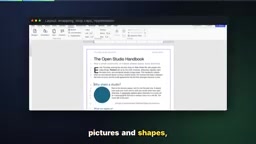
The interface supports dark mode and a multi-level mode (showing formatting marks), and the Insert tab lets you add tables, images, shapes, links, headers, and fields. Tables support merged cells, banded styles, and repeating header rows across pages. Mail merge can pull data from CSV to generate envelopes and labels. The interface language follows the system, covering 21 languages including English, Korean, and Swedish.
Layered Architecture and Performance
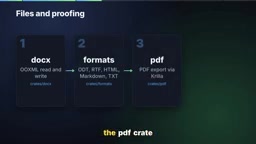
The code uses a clean layered design: at the bottom, a geometry layer handles units; above that, the document model and editing layer; the layout layer handles line breaking and pagination; the rasterization layer draws pages with Velo on the CPU; at the top are the session, undo, and command layers; and above that sits a replaceable egui frontend. The file and proofing modules sit alongside: the docx crate handles OOXML, formats handles ODT, RTF, HTML, Markdown, and text, the PDF crate exports PDFs with real selectable text, and the proof module performs offline spelling, grammar, and hyphenation checks.
Speed benefits from a paragraph layout cache: typing in a 188-page document requires only about 1.4 ms to re-layout, and pages are rendered on demand. No Electron, no Tauri—just native egui running on the GPU. Quality is guaranteed by a single command, cargo xdaskci, which runs formatting, clippy, around 800 tests, asset attribution checks, layering checks, and a WASM build. The repo even provides agents.md and claude.md for contributors.
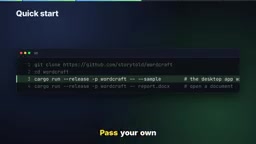
Trying it takes just a few minutes: clone the repo, then run cargo run --release -- --sample to view the built-in sample document, or pass in your own docx to open it. The browser version runs with trunk serve.
egui is an immediate-mode GUI library written in Rust that rebuilds the interface each frame based on current state, rather than maintaining a long-lived widget tree like traditional retained-mode frameworks. This makes it naturally suited to GPU rendering and easy to deploy cross-platform, including compiling to WASM to run in the browser—the trunk serve browser version mentioned above is built on this. Velo, meanwhile, is a CPU rasterization library in the Rust ecosystem that converts the page geometry computed by the layout layer into pixel bitmaps, completing page drawing without relying on the system graphics stack. Together, the two mean WordCraft completely bypasses Electron's Chromium runtime and Tauri's system WebView, resulting in a smaller binary, faster startup, and lower memory usage. The cost of immediate-mode GUI is that complex widgets (such as rich text editing and table interaction) require managing state yourself, which is one reason the project invests so much engineering in the UI layer.
Paragraph layout caching is a key design for document editor performance. Text typesetting involves line breaking, paragraph height calculation, and cross-page splitting; if the entire document were re-laid out on every keystroke, it would inevitably stutter at 188-page scale. WordCraft's approach is to cache the layout result for each paragraph, invalidating and recomputing only when that paragraph's content, available width, or style changes, while reusing the cache directly for all other paragraphs. Thus, typing only requires re-laying out the current paragraph and updating subsequent pagination offsets—measured at about 1.4 ms. On-demand rendering further defers cost to the visible range: only pages within the current viewport are handed to the rasterization layer to be drawn into bitmaps, with incremental generation as you scroll, avoiding pre-rendering all pixels for a several-hundred-page document. Together, these allow the "pure CPU rasterization + no browser runtime" architecture to remain competitive with mainstream editors in interaction smoothness.
The Core Mechanism Driving AI Agents
This is WordCraft's real hook. Every operation is a command with an ID—422 in total. The same set of commands drives the ribbon, keyboard shortcuts, the command line, and the MCP server. A single line of configuration adds it to Claude. You can restrict the agent to specific folders or connect to a running app. Tools include listing commands, executing, batch executing, typing text, and selecting text. Once connected to a running app, it can also take screenshots, click, and press keys. Macros can record arbitrary command sequences and replay them. The command line is equally direct: one line converts docx to PDF, extracts plain text, or inspects document structure as JSON. Agents can inspect their own work via inspect document without needing screenshots.
MCP (Model Context Protocol) is an open protocol proposed by Anthropic in late 2024 for connecting AI models to external tools and data sources in a standardized way. It decouples tool providers (servers) from callers (clients/agents): servers declare a set of tools with names, descriptions, and parameter schemas, and agents invoke them as needed and read structured results. WordCraft's 422 commands with IDs are wrapped and exposed as MCP tools, so agents like Claude can list commands, execute commands, batch operate, or read and write selected text without understanding its internal architecture. Compared with having the model take screenshots and simulate clicks, MCP lets agents operate directly on the document object model—more precise and more token-efficient; once connected to a running app, UI-level operations like screenshots and clicks can be layered on, forming a hybrid mode of "structured commands first, visual operations as a supplement."
Maturity and Use Cases
WordCraft is currently in alpha. It covers 88% of Word's ribbon functionality with commands, but the author estimates that to truly replace Word for real work, it has only traveled about 60% of the way; for basic everyday needs, that number is 63%. The beta phase requires real-world docx testing, round-trip fidelity for charts and SmartArt, closer pagination, stability polish, and native printing.
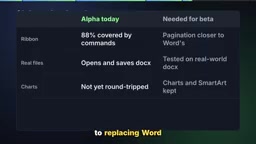
Some gaps matter in practice: spelling and grammar suggestions currently cover only English and Polish; pagination hasn't yet reached the near-Word level the author hopes for; and native printing is still on the to-do list. The desktop app writes log files, retaining previous logs on each launch, with a single log capped at 16MB, and document text is never logged; verbosity can be adjusted via RustLog.
So who is it for? Developers wiring documents into AI agents will love its command layer. Anyone who wants a private, offline Word-style editor on Linux or BSD should give it a try. If you need pixel-perfect Word pagination, round-trip fidelity for charts, or spell checking beyond English and Polish, you can skip it. The code is open source under MIT or Apache 2.0, with the latest version at 0.7. Check the roadmap in the repo before relying on it for real work.
One-line Summary
WordCraft, a Word clone written in pure Rust, lets AI agents operate documents directly through its 422-command layer.
Paragraph Summary
WordCraft is a Microsoft Word clone written in pure Rust that doesn't depend on Electron or Tauri, and it has gained nearly 14,000 stars on GitHub this month. It covers near-Word everyday functionality: docx and multi-format read/write, tracked changes and comments, tables of contents, footnotes, and citations, text wrapping and automatic hyphenation, mail merge, and 21 interface languages. The architecture is divided into geometry, document model, layout, rasterization, session, and command layers, with egui rendering at the top; paragraph layout caching keeps re-layout while typing in a 188-page document at about 1.4 ms. Its standout feature is 422 commands with IDs that simultaneously drive the UI, keyboard shortcuts, command line, and MCP server, letting AI agents connect to Claude with a single line of configuration and read/write documents directly. The project is in alpha, self-assessed as covering 88% of Word's ribbon commands but only about 60% complete toward actually replacing it.
Related articles

Workbuddy for Absolute Beginners: How a Desktop AI Agent Fits Into Real Workflows
A beginner's guide to the Workbuddy desktop AI agent: installation, claiming credits, file management, and building automated workflows—compared with CodeX for fit and cost, helping professionals shift from AI question-askers to AI managers.

OpenAI's New Agent Stack: Computer Use, Decisions API, and Ultra-Fast Workflows
OpenAI Dev Day unveiled a new agent stack: Computer Use outperforms humans, Decisions API delivers ultra-low-latency classification via Luna, Agents API opens the same Computer Use capabilities, and GPT-6.1 Sol costs only one-seventh of Astra. Core updates, benchmark data, and developer insights.

Liang Wenfeng Open-Sources DeepInfo Inference Framework, Takes On U.S. Ban
DeepSeek open-sources its DeepInfo inference framework after its models, featuring GPU/CPU cross-pipelining, small-model prediction with large-model verification, and full Huawei Ascend and NVIDIA chip support—facing the U.S. federal ban head-on. This article analyzes its significance for AI deployment and open-source strategy.