WorkBuddy Agent Complete Guide: From Beginner to Automation in 7 Days

256-episode Tencent WorkBuddy course breakdown: a full-path guide from Agent principles to zero-code development.
Based on the outline of a 256-episode WorkBuddy masterclass on Bilibili, this article systematically breaks down Tencent's AI office workbench core capabilities and learning path. The nine-chapter course covers Agent principles, installation and configuration, office automation (data analysis, PPT, PDF processing), the Skill mechanism, cross-platform connector integration (Feishu, Tencent Docs, etc.), scheduled automation, knowledge base management, AI design and new media operations, and zero-code application development. The article notes comprehensive coverage and beginner-friendly theory-plus-practice teaching, but "7-day mastery" is marketing language—the real learning curve is steep, and results depend on hands-on practice. It recommends professionals, content creators, and e-commerce practitioners follow the order "foundation → practice → Skills and automation → cross-platform and development," completing real tasks each chapter.
Tencent's WorkBuddy is redefining the boundaries of AI-powered office work—it's not just a chatbot, but an agent workbench that can understand instructions, plan tasks, and directly operate your computer. The Bilibili creator "Professional and Systematic WorkBuddy Course" has released a 256-episode comprehensive masterclass, claiming you can go from beginner to expert in 7 days, with previously paid content now available for free. Based on this course's outline, this article breaks down WorkBuddy's core capabilities and learning path to help you decide whether this course is worth your time.
Why WorkBuddy Is Worth Learning: From "Conversation" to "Getting Things Done"
According to the creator, WorkBuddyAd is an AI office workbench launched by Tencent. Its core difference lies in its ability to understand natural language instructions, autonomously plan tasks, and—within authorized scope—process local files, generate documents and spreadsheets, create PPTs, and even assist in developing applications. This means AI's role shifts from "answering questions" to "completing tasks."
The course took three months to prepare. After researching various WorkBuddy tutorials on Bilibili from a beginner's perspective, the creator identified two common pain points: tutorials that only cover features without explaining principles, and those that only show results without the complete operation process. Therefore, this course is positioned as "understandable, learnable, practice-along, and applicable," using a theory + hands-on approach.
Nine-Chapter Course Structure: From Basic Theory to Full-Stack Practice
Foundation: Understanding How Agents Work
Chapter 1 focuses on basic theory, explaining in accessible terms the development stages of AI Agents, how they work, and how WorkBuddy understands requirements, plans tasks, and operates computers. Chapter 2 moves into hands-on practice, covering installation and configuration, interface layout, permission control, and working modes, while clarifying core concepts like experts, skills, connectors, and automated tasks. After completing the first two chapters, you can start using WorkBuddy to batch-process local files.
AI Agent refers to a software system capable of perceiving its environment, making autonomous decisions, and taking actions to achieve goals. Unlike traditional conversational AI (such as chatbots) that merely generates text based on single-turn input, Agents typically possess capabilities like task planning, tool calling, memory, and reflection. Their typical working loop is: understand user intent → break down into subtasks → call external tools (such as file operations, web search, APIs) → observe results and adjust strategy → until the task is complete. WorkBuddy belongs to this category—it ensures operations stay within authorized scope through permission control and extends capability boundaries via Skills and connectors. Understanding the basic principles of Agents helps users anticipate behavioral logic, set permissions reasonably, and effectively debug when tasks fail.
Advanced: Office Automation and the Skill System
Chapter 3 targets daily office scenarios, using real materials like sales data, contracts, and invoices to practice data analysis, Excel processing, PPT creation, PDF handling, and general document processing. Examples include automatically analyzing sales data to generate reports, batch-reading PDFs, and identifying invoice information to fill in reimbursement templates.
Chapter 4 dives deep into the Skill mechanism—think of it as preparing a work manual for WorkBuddy. The course explains the composition, principles, installation, invocation, and management of Skills.
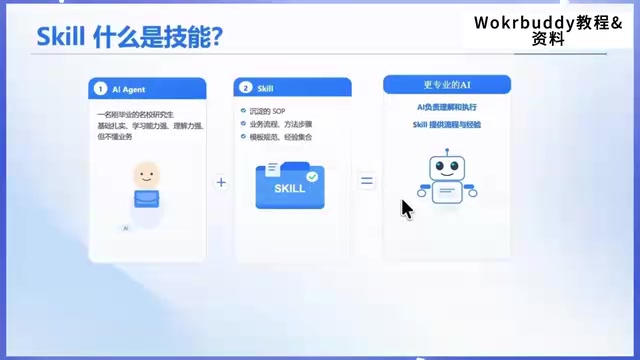
Once mastered, users can both use Skills created by others and encapsulate repetitive workflows into exclusive Skills to share with their team, avoiding the need to rewrite prompts every time.
Skill in WorkBuddy can be compared to a "reusable workflow encapsulation," typically containing trigger conditions, execution steps, required tools, and output format. Unlike simple prompt templates, it packages multi-step operations (such as reading files, calling APIs, generating documents) into a callable unit. Skills can be provided officially, shared by the community, or built by users. Their core value lies in reducing repetitive configuration costs: users don't need to write prompts from scratch each time—they simply invoke or combine existing Skills. The course's emphasis on "encapsulating repetitive workflows into exclusive Skills" is precisely leveraging this mechanism for team-level automation. Understanding Skill composition (such as input parameters, execution logic, error handling) helps users customize and debug according to business needs.
Connectors and Automation: Cross-Platform Workflows
Chapter 5 explains how to connect WorkBuddy with platforms like Feishu, Tencent Docs, Tencent Meeting, and Amap through connectors. Course cases include automatically generating survey questionnaires and syncing to Feishu, automatically downloading resumes from email and scoring them, planning team-building activities combining weather, traffic, restaurants, and budget, and remotely controlling WorkBuddy via WeChat. This chapter upgrades WorkBuddy from a single-point tool to a cross-platform super agent.
Chapter 6 focuses on automated tasks, setting daily and weekly repetitive work to run on schedule. The course builds two cases—"Daily Industry News Report" and "Work Weekly Report"—letting WorkBuddy automatically search for industry trends, generate reports and podcasts, or read files and meeting notes to compile weekly reports.
MCP (Model Context Protocol) is an open protocol for standardizing the connection between AI models and external tools and data sources. It allows AI applications to access various services (such as documents, calendars, maps) through a unified interface without developing separate adapters for each platform. The "Amap MCP Server" mentioned in the course refers to Amap exposing its capabilities (such as route planning and location search) through the MCP protocol for WorkBuddy to call. Connectors are essentially concrete implementations of protocols like MCP, enabling WorkBuddy to execute tasks across platforms. Understanding MCP helps users understand the compatibility scope of connectors and determine which services are already supported and which require additional development during configuration.
Knowledge Base and Content Production
Chapter 7 introduces WorkBuddy's built-in knowledge base and demonstrates integration with the iFlytek Cloud knowledge base, unifying documents, PDFs, web pages, and notes so WorkBuddy can answer questions and generate proposals based on professional materials.
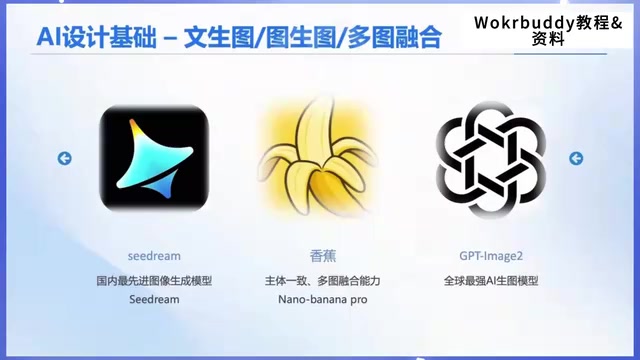
Chapter 8 covers AI design and new media operations: image generation and modification (contract posters, brand VR, e-commerce detail pages, face swapping), connecting third-party image models to build image generation Skills and e-commerce poster Skills; the new media section has WorkBuddy automatically operate browsers to collect information from Bilibili, Douyin, Xiaohongshu, and Taobao, completing video downloads, subtitle downloads, comment collection, and product queries. This workflow suits content creators, e-commerce, and marketing professionals.
Application Development: Building Business Systems with Zero Code
Chapter 9 uses resource sources to help WorkBuddy develop and deploy websites and business applications. The course uses developing an online course platform as an example, walking through the entire process from requirements analysis, feature planning, page design, code development to deployment—even without programming skills, you can quickly turn business ideas into usable systems.
Zero-code/low-code development refers to building applications through visual interfaces, preset components, and configuration-based logic rather than traditional hand-written code. In WorkBuddy's context, users describe requirements in natural language, and AI generates page structures, business logic, and database design, then automatically completes deployment. This approach lowers the technical barrier but is typically suited for standardized business scenarios (such as information display, form collection, simple workflows). For complex business rules or high-performance requirements, manual intervention or code extension may still be needed. The course uses an online course platform as an example, demonstrating the complete process from requirements analysis to launch, but learners should note that AI-generated code needs testing and adjustment and cannot fully replace development experience.
Who This Course Is For: Assessment and Recommendations
From the course structure, this 256-episode content covers a fairly complete range—from Agent principles to Skill encapsulation, cross-platform connections, scheduled automation, knowledge bases, content production, and application development—basically covering the main scenarios of agent-based office work. The creator emphasizes a "theory + hands-on" teaching approach, which is relatively friendly to beginners.
What needs to be viewed rationally: "7-day mastery" is marketing language—the sheer volume of 256 episodes itself indicates the learning curve is not low; course effectiveness depends on whether you practice hands-on, especially for Skill encapsulation and connector configuration, which require repeated debugging. Additionally, for specific features mentioned in the course (such as the iFlytek Cloud knowledge base and Amap MCP Server), it's advisable to confirm WorkBuddy's current version support before learning.
For professionals, content creators, and e-commerce practitioners who want to systematically master AI office automation, this free full course is worth considering as one entry path. It's recommended to progress in the order of "basic theory → office practice → Skills and automation → cross-platform and development," completing at least one real task of your own per chapter rather than just watching videos.
One-line Summary
256-episode Tencent WorkBuddy course breakdown: a full-path guide from Agent principles to zero-code development.
Paragraph Summary
Based on the outline of a 256-episode WorkBuddy masterclass released by a Bilibili creator, this article systematically breaks down Tencent's AI office workbench's core capabilities and learning path. The course is divided into nine chapters, covering Agent working principles, installation and configuration, office automation (data analysis, PPT, PDF processing), the Skill mechanism, cross-platform connector integration (Feishu, Tencent Docs, etc.), scheduled automated tasks, knowledge base management, AI design and new media operations, and zero-code application development. The article notes that the course has comprehensive coverage, combines theory with practice, and is beginner-friendly, but "7-day mastery" is marketing language—the actual learning curve is not low, and effectiveness depends on hands-on practice. It recommends that professionals, content creators, and e-commerce practitioners progress in the order of "foundation → practice → Skills and automation → cross-platform and development," completing real tasks for each chapter.
Related articles

A Single Prompt Triggers a Global PHP Security Storm: Is AI a Savior or a Hidden Risk?
A single AI prompt triggered a global PHP security crisis affecting Wikipedia and the Internet Archive. This article reviews the incident, analyzes the OpenAI-Amazon controversy, and explores the security paradox of lowered vulnerability discovery barriers in the AI era and developer response strategies.

When AI Is Taken Away: How Reliance on Shortcuts Undermines Your Problem-Solving Resilience
A study of 1,222 people found that after using AI to answer questions, once AI was removed, people gave up on more problems than a control group that never used AI. The article analyzes the impact of AI reliance on learning resilience and metacognition, and explores design implications for AI learning tools.

Carta and NewView Partner to Let Startup Employees Cash Out Equity Early
Carta and NewView Capital partner to simplify startup tender offers, helping employees sell equity early. Analysis of the mechanism, liquidity pain points, and impact.