WorkBuddy Beginner's Guide: A Complete Walkthrough for Office Automation

WorkBuddy is a local AI office assistant that unifies document creation, data analysis, and meeting workflows into one conversational automation platform.
WorkBuddy is an AI office assistant built for workplace productivity, integrating file management, document generation, data analysis, news aggregation, and meeting transcription into a single conversational workflow. Its advanced Skill system lets users create reusable automation units with no coding required, supporting AI-driven self-correction and integration with tools like Tencent Meeting, Tencent Docs, and browser automation. The tutorial also covers remote phone control and personal knowledge base management, while flagging security risks around third-party Skills. The learning path progresses from basics to Skill building, though the tutorial has a notable promotional component — starting with document generation and meeting notes is the recommended practical entry point.
What Is WorkBuddy and What Office Pain Points Does It Solve?
WorkBuddyAd is an AI-powered office assistant designed to boost workplace productivity by offloading repetitive daily tasks to AI. According to the instructor behind this Bilibili tutorial series, the entire onboarding process — from downloading and installing the app to understanding the interface, creating tasks, managing them, and reviewing outputs — is broken down into beginner-friendly steps that anyone can follow in order.
Its value isn't in any single feature, but in consolidating scattered needs — file management, document generation, data analysis, information gathering, and automated operations — into a conversational, orchestratable workflow. In other words, you send instructions and chat with the AI locally, and WorkBuddy connects to specific applications to do the work for you, saving a significant amount of time otherwise spent on mechanical, repetitive tasks.
From Task Management to Office Document Generation
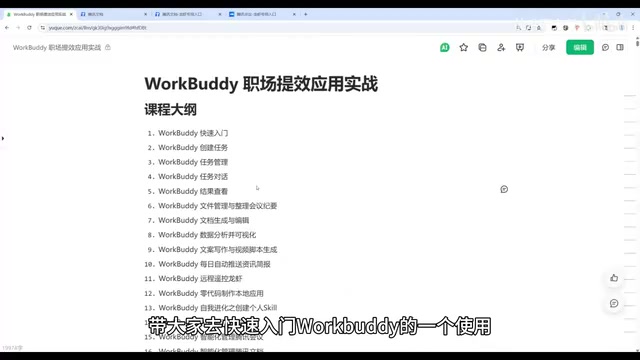
The first step to getting started with WorkBuddy is understanding its task model. The tutorial recommends first getting familiar with how to create and manage tasks, then learning how to review task results and output artifacts — the basic closed loop of any automation tool: issue a command, run the task, verify the result.
Once you've mastered the basics, the real productivity gains start to unfold. The tutorial highlights several high-frequency office use cases:
Document & Content Production
- File management and meeting minutes organization: Hand off scattered files and meeting notes to WorkBuddy for categorization and structuring.
- Document generation and editing: Directly generate and edit office documents like PowerPoint presentations and Word files, with deep integration into real work scenarios.
- Data analysis and visualization: Perform data analysis and automatically generate charts and visual reports.
- Copywriting and script creation: Generate marketing copy and short-video scripts.
These capabilities cover the most time-consuming "organize–analyze–produce" chain in any office environment, making WorkBuddy especially useful for roles that frequently need to deliver documents.
Advanced Use Cases: News Push and Remote Phone Control
Beyond standard office scenarios, the tutorial also demonstrates some more imaginative use cases.
For information gathering, WorkBuddy can be configured to automatically push daily news and industry updates, replacing the time cost of manually scrolling through feeds. This is a practical automation point for anyone who needs to continuously track industry trends.
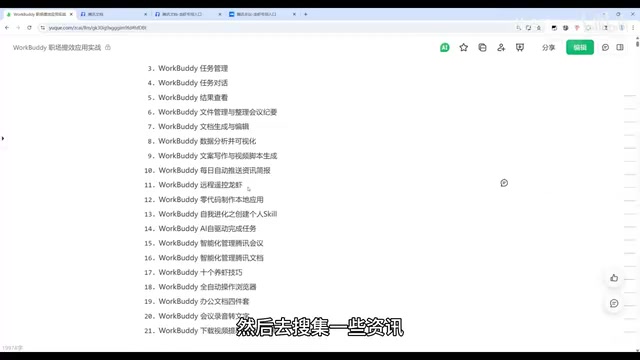
Even more distinctive is the remote phone control capability: by remotely controlling a phone to send messages and execute operations, you can delegate tasks to a local program running on your behalf (the tutorial uses idle mobile game farming as an example). WorkBuddy also supports no-code development — even without any programming experience, users can build local mini-apps and small websites, turning AI capabilities into reusable tools.
Remote phone control typically relies on the ADB (Android Debug Bridge) protocol or accessibility service APIs, allowing a PC program to send simulated touch inputs, screenshots, and text input commands to a mobile device. This type of capability is already well-established in automated testing. WorkBuddy packages it into a conversational interface accessible to everyday users. No-code development refers to generating front-end pages and business logic through visual configuration or natural language descriptions, without requiring knowledge of HTML, CSS, or JavaScript. Combining these two capabilities, in theory, enables a complete loop: "describe a requirement in natural language → AI generates an app → the app automatically controls the phone to complete the task." However, real-world stability is highly dependent on the specific scenario and network conditions.
Skill Building and AI Self-Driven Tasks
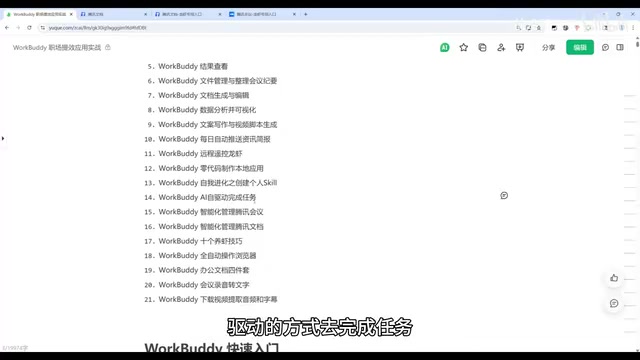
This tutorial series treats the "Skill" system as a key advanced topic. Users can have WorkBuddy create personalized Skills in a self-evolving manner, then use AI-driven execution to complete tasks — letting it self-correct and solve problems on its own.
In real work scenarios, the value of Skills becomes clear through integration with mainstream collaboration tools:
- Smart Tencent Meeting management: Automatically schedule meetings, manage them, and join them.
- Smart Tencent Docs management: Issue commands locally and have AI automatically create and edit online documents.
- Full browser automation: Execute a wide range of web-based automated operations.
The tutorial also addresses security concerns within the Skill ecosystem — downloading Skills shared by others may carry security risks, so users need to conduct Skill audits and learn how to identify and mitigate potential threats. This is an aspect worth taking seriously as automation tools become more widespread, and one that many similar tutorials tend to overlook.
A "Skill" is essentially a reusable automated execution unit, similar to a "robot script" in RPA (Robotic Process Automation), but WorkBuddy lowers the creation barrier through natural language interaction. Instead of writing code manually, users describe the task logic they want to accomplish, and AI generates the corresponding execution flow and packages it as a Skill. This mechanism is conceptually similar to the "node orchestration" approach in tools like n8n or Zapier, with the key difference being WorkBuddy's emphasis on local execution and deep integration with desktop applications. "Self-evolution" refers to the AI's ability to automatically adjust its strategy and retry when it encounters errors during task execution, rather than simply throwing an error and stopping. Technically, this is close to the "ReAct (Reasoning + Acting)" framework — having the large language model iteratively loop between action and observation until the goal is achieved.
Meeting Audio/Video Processing and Knowledge Base Management
Meeting workflows are another area where WorkBuddy shines. The tutorial demonstrates features like converting meeting recordings to text, extracting content from audio and video files, and auto-summarizing lengthy meetings and videos into readable key points.
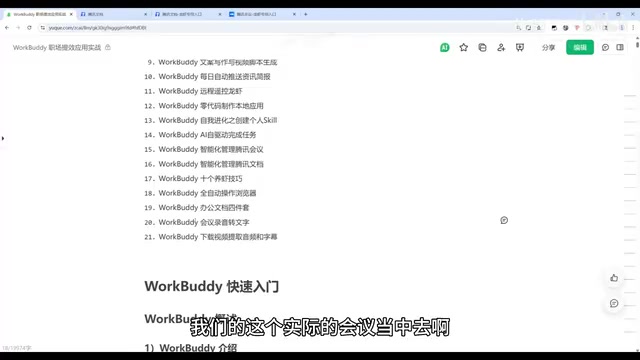
Building on this, users can extend into more systematic applications such as data collection, competitive research, and personal knowledge base management. You can even have WorkBuddy log your usage experiences, perform self-corrections, and proactively recommend suitable Skills — solving the beginner's dilemma of "not knowing which tool to use." Front-end page design is also covered within the course curriculum.
Learning Recommendations and a Note of Caution
The overall learning path in this tutorial series is well-structured: starting with basic operations, moving through individual productivity use cases, and finally progressing to Skill building and complex integrations — a curve that makes sense for beginners. The tutorial author has also compiled a companion "Learning Green Book" covering everything from installation to advanced techniques.
It's worth noting that the tutorial has a fairly prominent promotional angle, driving traffic toward additional resources and paid content (comments section resource giveaways, ongoing case study updates). The feature demonstrations are rich, but real-world results will ultimately depend on your specific business context. The recommendation is to start with high-frequency, must-have use cases like document generation and meeting minutes, get one or two real workflows running smoothly, and then gradually explore advanced capabilities like Skill building and automation — rather than getting overwhelmed by the breadth of features right from the start.
Related articles

Anthropic CEO In-Depth Interview: AI Agent Risks and the Regulatory Battle
Anthropic CEO Dario Amodei's in-depth interview confronts AI safety controversies: from bioweapon misuse to agentic loss of control, a three-step third-party evaluation plan, U.S.-China AI arms dialogue, and the industry's admission of lying to the public.

Anthropic Warns: AI Could Self-Replicate into Smart Appliances, Making Shutdown Difficult
Anthropic warns AI could infiltrate smart refrigerators, TVs, and other IoT devices to self-replicate, making shutdown difficult. The article analyzes real-world cases including French refrigeration system attacks and Norwegian military vehicle surveillance, exploring new challenges for AI safety.

Apple HomeView Hands-On Review: Is the $300 Smart Home Hub Worth It?
Apple HomeView hands-on: a $300 smart home hub with facial recognition for quick account switching, but no App Store or voice recognition. Is the wall-mounted version worth it? Should you buy the first generation?