WorkBuddy Beginner's Guide: A Desktop AI Agent That Actually Does the Work for You

WorkBuddy is a desktop AI Agent that executes tasks on your local machine — no coding required.
This guide introduces WorkBuddy, a desktop AI Agent that goes beyond chat by directly operating local files and automatically executing tasks. Compared to CodeX, WorkBuddy is better suited for non-technical professionals: it works out of the box, integrates with Feishu and DingTalk, and offers free daily credits. The core message: shift from asking AI questions to managing AI like an employee.
From "AI User" to "AI Manager": A Mindset Shift
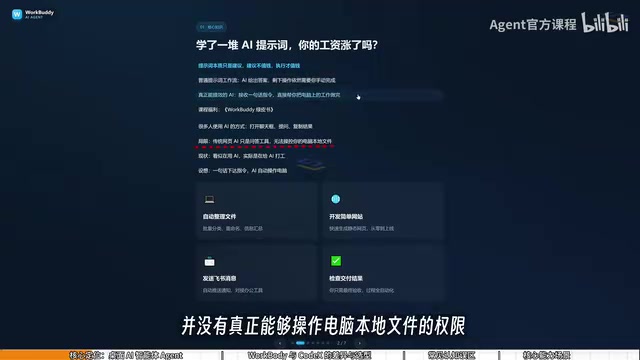
Many people have been using AI for a while now — they've memorized prompt templates, built up a toolkit of tricks — and yet their productivity (or paycheck) hasn't budged. There's a sobering truth behind this: prompts are fundamentally just suggestions, and suggestions don't get things done. What actually creates value is execution.
Traditional web-based AI tools — whether ChatGPT, Doubao, or ERNIE Bot — are, at their core, Q&A systems. You open a chat window, type a question, copy the answer, and then manually carry out every step yourself using your mouse and keyboard. It may look like you're using AI, but in reality, you're doing the work for the AI. The tedious execution layer still falls entirely on you.
This is exactly the problem WorkBuddyAd is designed to solve. It's not a chatbot that gives you advice — it's a desktop AI Agent that can directly operate files on your local computer and complete tasks automatically. The mindset shift required is this: stop asking AI questions and start managing AI to get things done. You're the manager, WorkBuddy is your employee, and your computer is the company.
What Exactly Is WorkBuddy?
WorkBuddy is a desktop AI Agent — not just a chat interface. Most AI large language models follow the pattern of "you ask, AI generates text." More capable ones can also produce music, video, or images. But they all lack one critical ability: directly operating files on your local machine.
WorkBuddy's core value is simple: you describe a task in plain, natural language — just like talking to a real person — and it automatically handles the task breakdown, research, execution, and delivery. Your only job is to review the final result.
Here's a real-world example: say you're recording a tutorial series and your files are named 01, 02, 03, 04. One lesson turns out too short and gets merged into the previous one, leaving you with a sequence of 1, 3, 4. Renaming them manually one by one is a hassle. Just tell WorkBuddy to batch rename them — and it does. This isn't hypothetical. As long as your instructions are reasonable, it will execute them directly.
WorkBuddy belongs to the "AI Agent" category, which has become one of the most important directions in AI development over the past two years — worth a brief explanation. Traditional large language models (LLMs) operate in a simple "input → output" loop: single or multi-turn conversations, with no ability to perceive the external environment, call tools, or execute sustained sequences of steps. AI Agents build on top of LLMs by adding a closed "perceive → decide → act" loop: they can read the external state (e.g., local files, web queries), autonomously break down a goal into subtasks, and sequentially call tools (file systems, APIs, browsers, etc.) until the task is complete. WorkBuddy's ability to "directly operate local files" is a direct expression of this Agent capability — it doesn't just tell you what to do, it acquires operating permissions and does it for you. That's why it's fundamentally different from a regular chat AI, not just a minor feature addition.
WorkBuddy vs. CodeX: The College Student vs. the Special Forces Operator
If more powerful tools like CodeX exist, why bother learning WorkBuddy? A useful analogy captures the difference well:
If CodeX is a special forces operator, WorkBuddy is a capable, obedient college student. Special forces are powerful, but they require commanders who can provide detailed operational plans — you need to specify exact files, directories, execution parameters, and you need real technical skill and experience to do that well. The college student can't handle the most complex missions, but for straightforward tasks — "send this file to someone," "organize these documents by category" — they're perfectly capable.
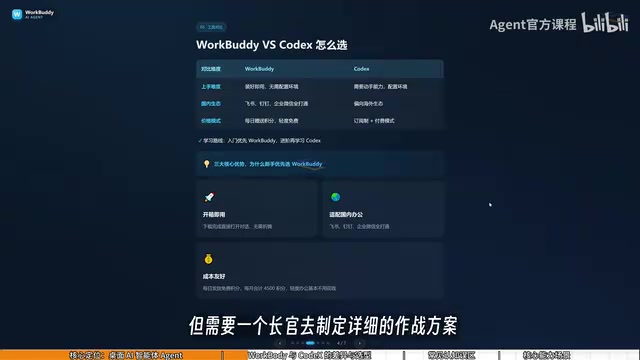
For most working professionals, CodeX is out of reach right now — but directing the "college student" is entirely manageable. Here's a summary of the key differences:
| Comparison | WorkBuddy | CodeX |
|---|---|---|
| Learning curve | Ready to use out of the box; no environment setup or command-line knowledge needed | Requires programming background and technical hands-on ability |
| Domestic ecosystem | Deep integration with Feishu, DingTalk, WeCom, Tencent Docs | Skews toward overseas ecosystems; limited domestic support |
| Cost | Daily free credits via check-in; promotional events offer thousands of bonus credits | Subscription-based; requires real upfront spending |
The cost factor is worth highlighting. WorkBuddy gives you daily credits through the "Buddy Fuel Station" check-in (accessible from the profile icon in the bottom left). Credits accumulate — stick with it for a month and you can easily rack up over 3,000. CodeX, by contrast, runs on a paid subscription model, meaning you're spending real money even while you're still learning.

CodeX is an AI system developed by OpenAI with a core focus on coding capabilities. It excels at understanding and generating programming code and handling complex engineering tasks. Using CodeX effectively typically requires some programming literacy: you need to clearly describe file paths, function logic, and execution parameters, and be able to evaluate whether the generated code is correct. Its strength lies in precisely handling structured tasks — but because it relies heavily on users providing accurate technical instructions, the learning curve is steep for professionals without a development background. WorkBuddy, by contrast, hands off the task interpretation and execution planning to the AI itself. Users only need to describe their goal in everyday natural language. This design feels much more like "delegating to an assistant" than "writing a spec for a developer."
Three Common Misconceptions for Beginners
When learning tools like this, new users tend to fall into three traps:
Misconception #1: WorkBuddy is just a desktop wrapper for GPT. That's not accurate. Beyond conversational responses like GPT, it can read local files, call tools, and automatically execute tasks. The critical distinction is execution, not just answering.
Misconception #2: CodeX is more powerful, so I should just learn CodeX directly. CodeX has a much higher barrier to entry and suits people with a programming background. For most working professionals, using WorkBuddy to actually get work done is the more practical path — and honestly, for the majority of workplace tasks, WorkBuddy alone is more than sufficient. Graduate to CodeX when you've outgrown it; this approach keeps your learning costs as low as possible.
Misconception #3: More features means harder to learn. WorkBuddy's interface is actually very similar to ERNIE Bot, Doubao, or ChatGPT. The learning curve isn't about the UI — it's about shifting your mental model from asking questions to issuing instructions. You can absolutely learn it by following along with tutorial videos.
What Can WorkBuddy Actually Do?
In practical terms, WorkBuddy covers these main workplace scenarios:
- File management: Batch sorting, batch renaming, and summarizing information across multiple documents
- Document and data processing: Writing weekly reports, handling Excel spreadsheets
- Website development: Building simple websites
- Collaborative office tools: Sending messages and collaborating via Feishu and DingTalk
- Recurring tasks: Periodically generating work reports
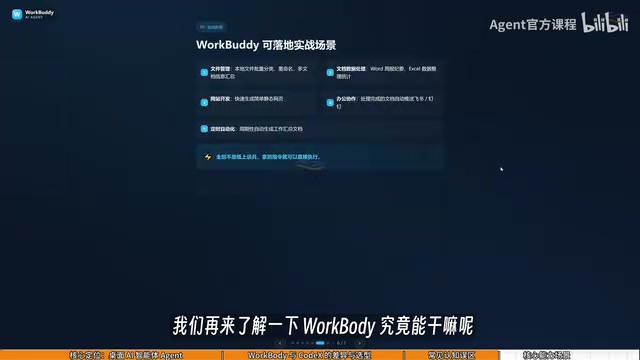
Given reasonable instructions, WorkBuddy handles and delivers all of these directly — no step-by-step guides handed back to you to execute yourself.
Final Thoughts
This guide isn't just about introducing a tool. It's about clarifying two key ideas: the fundamental difference between ordinary AI chat and a desktop AI Agent, and what it means to think of WorkBuddy as an "AI employee."
For professionals who want to work more efficiently but don't have a programming background, WorkBuddy genuinely offers a lower-barrier path. When your thinking truly shifts from "AI user" to "AI manager," that's when AI finally starts working for you. Upcoming lessons in this series are expected to cover installation, environment setup, skill configuration, office automation batch workflows, and more — along with curated learning materials that include hands-on examples and commonly used instruction templates.
Related articles

Chain of Thought Isn't Just for AI: How Humans Can Use CoT to Improve Thinking Quality
Chain of Thought isn't just a prompt trick for large models. Starting from a Hacker News discussion, this article analyzes why CoT works for human thinking too, breaks down actionable ways to transfer it, and highlights the key differences between human CoT and machine CoT.
Cloudflare Teams Up with OpenAI: Closi…
Cloudflare Teams Up with OpenAI: Closing the Loop from Vulnerability Discovery to Defense with AI
Cloudflare uses OpenAI Daybreak to investigate security vulnerabilities and generate reviewable remediation plans, while developers use Codex to boost coding efficiency and quality.

Orca Multi-Agent Orchestration in Practice: A Guide to Parallel Collaboration with Claude and Codex
Orca is Stable AI's free open-source agent workbench supporting 34 agents like Claude Code and Codex in parallel. Learn its Git worktree isolation, multi-model orchestration, and mobile management.