WorkBuddy Beginner's Guide: A Desktop AI Agent That Actually Gets Work Done

WorkBuddy is a desktop AI Agent that executes real office tasks on your computer via natural language commands.
WorkBuddy is a desktop AI Agent designed for everyday office workers. Unlike web-based chat AI that only offers advice, it can read local files, call tools, and autonomously complete tasks like file management, data processing, and integration with Chinese platforms like Feishu and DingTalk. Compared to OpenAI Codex — which is more powerful but requires programming knowledge — WorkBuddy is install-and-go, making it ideal for non-technical users. The article also debunks three common misconceptions and highlights a daily check-in tip for earning free credits. The core mindset shift: stop asking AI for advice, start managing AI to do the work.
From AI User to AI Manager: A Mindset Shift
Most people still interact with AI the same way: open a chat window, ask a question, copy the answer. This workflow feels efficient on the surface, but it reveals an overlooked limitation — traditional web-based AI tools are essentially Q&A systems with no real access to your local files or computer. In other words, you might think you're using AI, but you're actually doing the execution yourself, mouse clicks and all, while the AI just hands out advice.
This is exactly the problem WorkBuddyAd was built to solve. It's not another chatbot — it's a desktop AI Agent. Its core value proposition is simple: you give instructions in plain language, and it handles the planning, research, execution, and delivery, operating directly on your local machine to complete real office tasks.
The original video makes a pointed observation: prompts are just suggestions, and suggestions aren't worth much — execution is. That line cuts to the heart of what separates today's AI tools: the leap from "giving advice" to "getting things done."
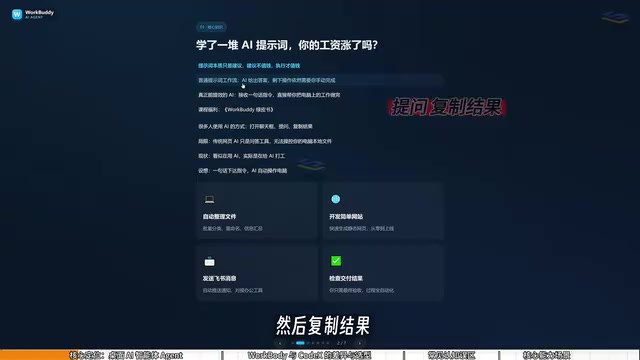
Desktop AI Agents represent one of the most significant evolutionary directions in applied AI. Unlike traditional chat-based AI, an Agent operates in a closed loop of "perceive → plan → act": it not only understands natural language instructions but can also call external tools, access local file systems, execute multi-step tasks, and report results back to the user. Simply put, a chat AI is a "consultant" that gives advice; an Agent is an "executor" that actually does the work. The key technologies enabling this are Function Calling/Tool Use and multi-step task planning, which allow an Agent to break down complex tasks, work through them progressively, and self-correct — much like a real employee. WorkBuddy is built on this framework, packaged as a local product that lets everyday users benefit from Agent-powered automation without any coding knowledge.
What WorkBuddy Can Actually Do
Think of WorkBuddy as a "digital AI employee." You're the manager, WorkBuddy is your staff, and your computer is the office. It covers a surprisingly wide range of use cases:
File Management
Bulk sorting, batch renaming, and consolidating information across multiple documents are among its strong suits. The video creator shared a relatable example: when recording tutorials, files are named sequentially (01, 02, 03), but if one lesson is too short and gets merged into another, the numbering breaks — suddenly you have 1, 3, 4 with a gap. Manually renaming each file is a pain. With WorkBuddy, a single natural language instruction handles the whole renaming job automatically.
Document and Data Processing
Repetitive office work like generating weekly reports, processing Excel spreadsheets, and running data analysis can all be handled through plain-language commands. It can also tackle more advanced tasks like basic web development and scheduled report generation.
Office Software Integration
This is one of WorkBuddy's biggest advantages for users in China — it deeply integrates with Feishu (Lark), DingTalk, WeCom (WeChat Work), Tencent Docs, and other mainstream domestic productivity platforms, enabling automatic message sending and collaborative document handling.
WorkBuddy vs. Codex: College Recruit vs. Special Forces
If Codex already exists and is more powerful, why bother with WorkBuddy? The video uses a vivid analogy: if Codex is a special forces soldier, WorkBuddy is a "college student special forces recruit."
Codex is powerful, but it needs a commanding officer who can write a detailed battle plan — you have to specify which file, which directory, which parameters to use. That requires a fairly solid technical background. WorkBuddy, by contrast, is like a capable and willing college hire: it may not handle highly complex tasks, but for things like organizing files or sending messages, it gets the job done.
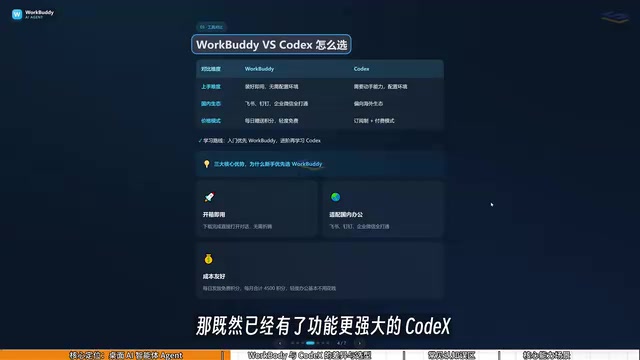
The key differences break down as follows:
- Learning curve: WorkBuddy is ready to use right after installation — no environment setup, no command-line knowledge required. Codex demands more hands-on technical ability and programming fundamentals.
- Ecosystem fit: WorkBuddy is deeply integrated with Chinese productivity tools; Codex leans toward Western ecosystems and has limited support for domestic software.
- Cost: WorkBuddy gives you free credits daily, with bonus credits available during promotions — consistently claiming them over a month can net you around 3,000 credits. Codex uses a subscription model, meaning real money spent from day one of learning.
For most office workers, the recommended learning path from the video is: start with WorkBuddy to get actual work done, then level up to Codex if you find it insufficient. This approach minimizes unnecessary learning costs.
Money-Saving Tip: Daily Check-In for Credits
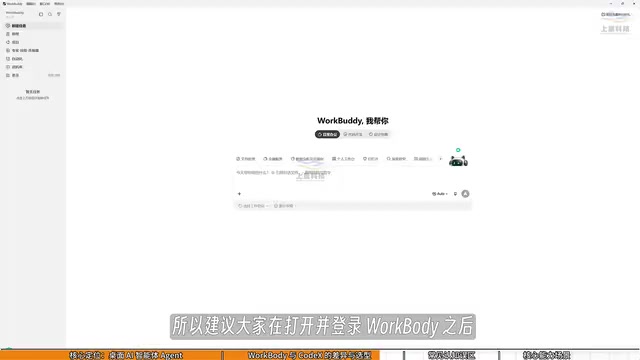
After logging into WorkBuddy, click your avatar in the lower left corner, find the "Buddy Fuel Station" option, and check in to collect credits. Credits accumulate — anything you don't use today carries over to tomorrow. This is the key habit for keeping your usage costs under control.
OpenAI Codex is OpenAI's code generation and execution model, now integrated into ChatGPT's advanced features. It can independently write, run, and debug code in a cloud-based sandbox environment to handle complex engineering tasks. Its power lies in the ability to directly manipulate code repositories, run terminal commands, and generate complete projects — essentially acting as a software engineer capable of independently delivering a finished product. However, this also means using Codex typically requires users to have some programming knowledge: the ability to clearly describe technical requirements, understand directory structures and runtime environments. For non-technical professionals, the onboarding cost is considerably higher. The two tools serve different user groups and task complexity levels — it's not a simple better-or-worse comparison, but a difference in applicable scenarios.
Three Common Misconceptions for Beginners
The video specifically addresses three pitfalls that new users tend to fall into. Understanding them will save you a lot of trial and error.
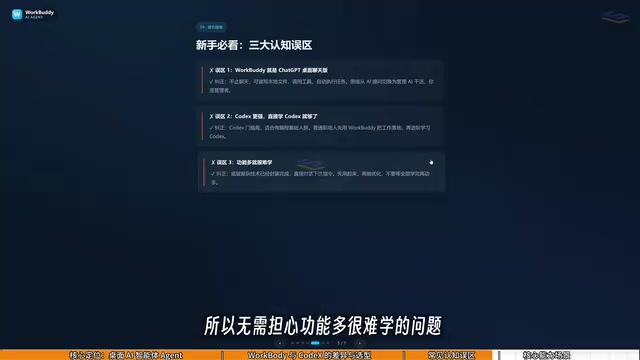
Misconception #1: WorkBuddy is just a GPT wrapper in a desktop chat window. This undersells what it does. Beyond conversational responses like GPT, WorkBuddy can read local files, call tools, and automatically execute tasks. The key mindset shift is moving from "asking AI questions" to "managing AI to do work."
Misconception #2: Codex is more powerful, so I should just learn Codex. Codex has a steeper learning curve and is better suited for people with a programming background. For the vast majority of office work, WorkBuddy is more than sufficient. Chasing a more powerful tool without the foundation only adds unnecessary overhead.
Misconception #3: More features means it's harder to learn. In practice, WorkBuddy's interface is very similar to tools like Doubao or GPT that most people already use. The learning curve isn't really about the interface — it's about shifting how you communicate: from "asking questions" to "issuing commands."
Final Thoughts
The real value of this guide isn't a feature checklist — it's helping users make a mental upgrade: understanding the fundamental difference between a standard AI chat tool and a desktop AI Agent, and evolving from being an "AI user" to being an "AI manager."
For office workers with no technical background, WorkBuddy offers an extremely low-friction entry point — no network environment setup, no command-line operations, install and go, with daily credits to offset costs. If you've spent time learning AI prompting techniques but haven't seen real productivity gains, the problem might not be your technique. It might be that you're still stuck in the "let AI give me advice" stage. Letting AI actually operate your computer and deliver results — that's where the real efficiency leap begins.
Related articles

Chain of Thought Isn't Just for AI: How Humans Can Use CoT to Improve Thinking Quality
Chain of Thought isn't just a prompt trick for large models. Starting from a Hacker News discussion, this article analyzes why CoT works for human thinking too, breaks down actionable ways to transfer it, and highlights the key differences between human CoT and machine CoT.
Cloudflare Teams Up with OpenAI: Closi…
Cloudflare Teams Up with OpenAI: Closing the Loop from Vulnerability Discovery to Defense with AI
Cloudflare uses OpenAI Daybreak to investigate security vulnerabilities and generate reviewable remediation plans, while developers use Codex to boost coding efficiency and quality.

Orca Multi-Agent Orchestration in Practice: A Guide to Parallel Collaboration with Claude and Codex
Orca is Stable AI's free open-source agent workbench supporting 34 agents like Claude Code and Codex in parallel. Learn its Git worktree isolation, multi-model orchestration, and mobile management.