WorkBuddy Beginner's Guide: Evolving from AI Question-Asker to AI Manager

WorkBuddy is a desktop AI agent for Chinese workplaces that executes real tasks — not just answers questions.
The article tackles a core question: why hasn't learning AI prompts improved your productivity or salary? Because traditional web AI only offers suggestions — real execution still requires manual work. WorkBuddy is a desktop AI agent that operates local files and integrates with tools like Feishu and DingTalk, turning suggestions into action. Compared to Codex, it's far more accessible for non-programmers, making "WorkBuddy first, Codex later" the ideal low-cost path to AI-powered office automation.
Why Hasn't Your Salary Gone Up After Learning All Those AI Prompts?
This is a painfully honest question worth reflecting on. Many people have been using AI for a while now — they've memorized prompt engineering techniques and best practices — yet their actual work efficiency hasn't meaningfully improved. The reason is simple: prompts are just suggestions, and suggestions don't pay the bills. Execution does.
Traditional web-based AI tools (like ChatGPT, Doubao, or Tongyi Qianwen) are essentially Q&A systems. You open a chat window, ask a question, the AI outputs text, and then you copy the result and manually carry out the work yourself. This process might look like you're using AI, but you're really doing the heavy lifting for it — because all the actual hands-on work still requires you to operate the mouse and keyboard step by step.
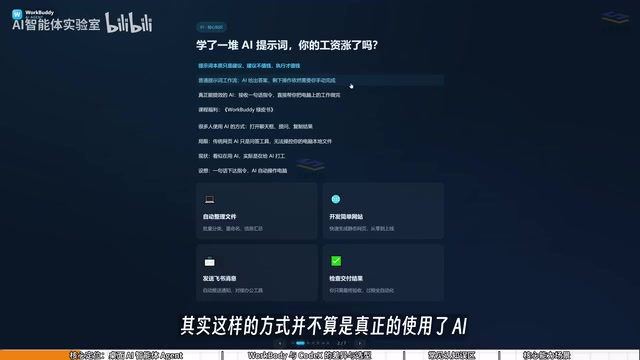
This is exactly the core pain point WorkBuddyAd aims to solve: turning "suggestions" into "execution." It's a desktop AI Agent, not just a chat interface. You describe your task in plain language, and it automatically breaks it down, researches, executes, and delivers results.
What Exactly Is WorkBuddy?
Simply put, WorkBuddy can be understood as a domestically available alternative to Codex — an AI digital assistant that can actually get things done directly on your computer.
The most fundamental difference between WorkBuddy and traditional large language models comes down to permissions. Most AI models, no matter how feature-rich (generating music, video, images), have no permission to access or operate files on your local machine. WorkBuddy's core value is that it can directly operate your local computer to complete real office tasks.
Here's what it can do:
- File management: Batch categorization, batch renaming, and summarizing information across multiple documents
- Document and data processing: Automatically generating and organizing weekly reports, Excel spreadsheets, and more
- Web development: Handling simple software and webpage development tasks
- Collaborative office integration: Deep integration with Feishu, DingTalk, WeCom, and Tencent Docs — automatically sending messages and generating recurring work reports
A practical example: when recording tutorial videos, you might name files 01, 02, 03, 04 — but if one lesson gets merged with another, the sequence becomes 1, 3, 4, and manually renaming everything is a nightmare. With a single instruction, WorkBuddy can automatically rename and reorganize the entire sequence.
WorkBuddy vs. Codex: Which Should You Learn?
Given that Codex is arguably more powerful, why bother with WorkBuddy?
Here's a useful analogy: If Codex is a special forces soldier, WorkBuddy is a "college grad special forces soldier."

The special forces soldier (Codex) is undeniably impressive, but they need a commanding officer to lay out a detailed battle plan — you need to specify which file, which directory, which parameters to use during execution. That requires relatively specialized skills and substantial hands-on experience. The college grad (WorkBuddy), while not equipped for the most complex missions, can absolutely handle everyday tasks like "send this file to someone" or "organize this archive."
As a manager, you might not yet have the expertise to command Codex effectively — but directing a capable, cooperative college grad? That's completely within reach. The key differences between the two come down to three dimensions:
Learning Curve
WorkBuddy works right out of the box — no environment setup, no command-line input, extremely beginner-friendly. Codex requires stronger technical ability and some programming background.
Ecosystem Compatibility
WorkBuddy deeply integrates with Chinese office platforms like Feishu, DingTalk, WeCom, and Tencent Docs. Codex skews more toward international ecosystems and has limited support for domestic Chinese office tools.
Usage Cost
This is what most people care about most. WorkBuddy uses a credit-based system — you receive free daily credits, and special events can yield thousands of additional credits. Checking in every day for a month can easily net you at least 3,000 credits. Codex, by contrast, runs on a subscription model, meaning you're often spending real money before you've even finished learning.
Money-saving tip: After logging in, click your avatar in the bottom-left corner each day, find the "Buddy Refueling Station" option, and check in to collect your daily credits. Credits accumulate — any you don't use today carry over to tomorrow.

Three Common Misconceptions
Beginners often fall into a few mental traps when first encountering desktop AI agents like WorkBuddy or Codex:
Misconception #1: WorkBuddy is just a desktop chat wrapper for GPT.
This misses the point. WorkBuddy isn't limited to chat. Beyond giving advice the way GPT does, it can read local files, invoke tools, and automatically execute tasks. The key shift here is a change in mindset: moving from "asking AI questions" to "managing AI to do work" — you're the manager, WorkBuddy is your employee, and your computer is your company.
Misconception #2: Codex is more powerful, so I should just learn Codex directly.
In practice, Codex has a much steeper learning curve and is better suited for people with a programming background. For most office workers, the right move is to start with WorkBuddy and get actual work done first. In fact, for the majority of workplace scenarios, WorkBuddy alone is more than sufficient. Only when you've genuinely hit its limits does it make sense to level up to Codex — this approach minimizes the cost of learning.
Misconception #3: More features means it's harder to learn.

WorkBuddy's interface looks very similar to Tongyi Qianwen, Doubao, and GPT. The real learning challenge isn't figuring out the interface — it's changing how you frame your requests: shifting from simply asking questions to issuing commands that get WorkBuddy to operate your computer on your behalf. You can learn as you go, following tutorials and experimenting hands-on without worrying about the difficulty.
Evolving from AI Question-Asker to AI Manager
Looking back at everything covered here, the most important takeaway isn't any specific feature — it's an upgrade in how you think.
The fundamental difference between ordinary AI chat and a desktop AI Agent lies in the gap between "outputting suggestions" and "executing actions." WorkBuddy's positioning is clear: it's your AI employee, not just a chatbot.
For everyday professionals in China, the "WorkBuddy first, Codex later" learning path makes a lot of practical sense — it lets you start benefiting from AI-powered office automation at the lowest possible barrier and cost, then level up as needed. The ultimate goal is to help every user complete the transformation from AI question-asker to AI manager.
Related articles

Firebase AI Logic + Gemini Nano 4: A Practical Guide to Android AI Development
How Firebase AI Logic and Gemini Nano 4 help Android developers ship generative AI: App Check and prompt templates ensure security, hybrid routing cuts latency and cost, Spend Caps control budgets, and AI monitoring provides observability.

Microsoft AI Agent Breakthroughs: More Efficient, Better at Code and Weather Forecasting
Microsoft Research Focus Issue 97: ForkPilot cuts agent inference costs, Cabra reveals coding agents' code-understanding gap, Teletune learns workflows from logs, PBC improves extended forecasts, BioEMU-2 opens preview.

Prime Intellect Releases Prime Mega MoE: Trainable Fused MoE Kernel with 3.11x Forward Speedup
Prime Intellect releases Prime Mega MoE, adding backpropagation to DeepSeek's fused Mega MoE kernel for trainability. Up to 3.11x forward speedup and 34% faster Qwen3 MoE training steps in prime-rl.