WorkBuddy Beginner's Guide: Getting Started with AI Agent Productivity — Zero Experience Required

A beginner's guide to WorkBuddy, the AI Agent that executes office tasks end-to-end instead of just giving advice.
This guide explains the core difference between AI Agents and traditional LLMs — Agents autonomously execute tasks and deliver results, not just text advice. WorkBuddy is a workplace-focused AI Agent that supports parallel multi-agent collaboration and can handle document formatting, data analysis, and PowerPoint creation via natural language. Its four strengths are low barrier to entry, deep integration with Chinese workplace tools (including WeCom), budget-friendly pricing with free daily credits, and a built-in skills marketplace with expert agents for various job roles. A hands-on demo shows how to use it to automatically sort a messy local folder.
From Q&A to Real Execution: What Makes AI Agents Different
Most people's experience with AI is still stuck in the "question and answer" phase — you ask, it gives you copy, a plan, or some advice, but the actual hands-on work still falls on you. Take a Word document with chaotic formatting and inconsistent punctuation: a standard large language model will tell you how to fix the layout, but every single step still has to be done manually. The AI handles the thinking; humans handle the doing.
WorkBuddyAd and tools like it — AI Agents — take a fundamentally different approach. You describe what you need in plain language, say "clean up this document," and within its authorized scope, it automatically locates the target file on your desktop, handles the formatting, standardizes the layout, and delivers the finished product — no manual steps required. The result has clean heading hierarchy and consistent formatting. And it doesn't stop at single files: once you set a standard, it can batch-process dozens or even hundreds of documents at a fraction of the time it would take manually.
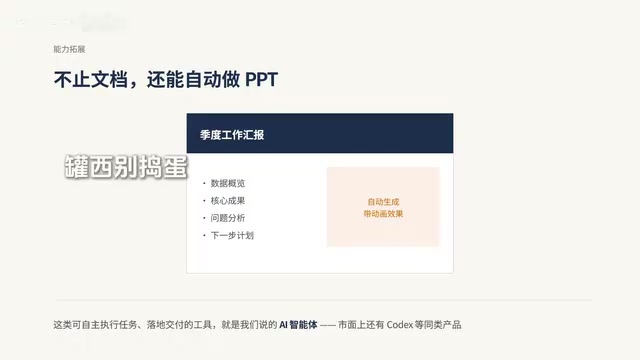
This is the core distinction between traditional large language models and AI Agents: the former specializes in Q&A, analysis, and recommendations; the latter is fundamentally about completing tasks end-to-end and delivering results within user-authorized boundaries. Think of it as a round-the-clock digital employee that can autonomously operate computer tools, plan workflows, and produce finished outputs. Document formatting is just the baseline — it can also generate polished, animated PowerPoint presentations from scratch based on your requirements. Similar tools exist on the market, such as Codex, and the litmus test for distinguishing a traditional AI from an agent is simple: can it autonomously execute tasks and deliver outcomes, rather than just outputting text advice?
The key technical difference between an AI Agent and a standard large language model lies in "tool-calling" capability. A standard LLM is essentially a text prediction system — it can only generate content within a chat window. An Agent, built on top of an LLM's reasoning core, adds the ability to perceive its environment, call external tools (such as the file system, a browser, or API endpoints), and execute multi-step plans. Specifically, an Agent typically consists of three modules: a "brain" (the underlying LLM) responsible for understanding intent and reasoning through decisions; a "toolset" responsible for performing concrete actions (like reading/writing files or controlling software); and a "memory layer" that tracks intermediate steps and history. It's precisely this closed loop of tool-calling and execution feedback that allows an Agent to break down a vague natural-language instruction into a series of executable sub-operations, work through them step by step, and return a final result — rather than just offering written suggestions.
WorkBuddy's Four Core Advantages
Unlike basic agents, WorkBuddy supports multiple agents working in parallel. When faced with a complex task, it automatically breaks down the workflow and dispatches multiple "digital workers" to handle different components — file parsing, data analysis, content creation — simultaneously, with no need for the user to manually switch between applications. For example, you can ask it to analyze all sales data in a folder, automatically compile a review summary, and generate a presentation deck, and it will execute the entire pipeline autonomously.
Why should beginners prioritize this tool? Four reasons:
Minimal Learning Curve
Zero-experience users simply search for the official website in a browser, download, and install. The local deployment process is straightforward and requires no technical background.
Deep Integration with Chinese Workplace Tools
The platform's dedicated "Connectors" serve as authorization gateways for linking various productivity apps, including enterprise tools like WeCom (企业微信). Once authorized, it can automatically organize chat content, compile meeting notes, and help manage work messages. Connectors bridge the gap between AI and daily office workflows, allowing AI to not just understand methods but to integrate into work processes and form a complete productivity loop — aligned with how Chinese workplaces actually operate.
Budget-Friendly Pricing
New users receive credits upon registration, with free daily quotas available — more than enough for everyday light-use scenarios. Compared to most overseas agents that require paid subscriptions and heavy usage before showing value, this tool is far more accessible for the average professional.
Strong Extensibility
The platform includes a built-in Chinese-language skills marketplace with a wide range of pre-built professional skill plugins that can be installed with one click, expanding AI capabilities on demand. It also features multi-role expert agents covering development, HR, operations, sales, administration, and more — call them up with a single click to get help with the corresponding work.

Security is a priority. WorkBuddy includes robust permission controls and a high-risk command interception mechanism. All file access and software operations require user authorization, and dangerous operations are automatically blocked, eliminating risks like data leakage or accidental changes at the source. Two additional advanced features worth noting: multi-model switching, with compatibility across several domestic large language models that can be swapped based on business needs; and MCP Servers extension support, which allows integration with custom business tools to accommodate personalized workflows.
By comparison, tools like Codex offer greater flexibility but require code environment setup and other technical prerequisites — too steep a learning curve for newcomers. WorkBuddy balances ease of use, low cost, and localization, making it accessible to professionals across industries.
What is MCP? MCP (Model Context Protocol) is an open protocol standard proposed by Anthropic in late 2024, designed to standardize the interface between AI models and external data sources or tools. Before MCP, every agent product needed a custom integration layer for each external tool — inconsistent standards and high maintenance costs. An MCP Server is essentially a lightweight service process that follows this protocol; AI models can send standardized requests to it to read files, query databases, or call custom business systems. WorkBuddy's support for MCP Servers means that teams with some technical capability can wrap their own internal systems (such as ERP or CRM platforms) into an MCP Server and have WorkBuddy communicate with them directly — no need to wait for an official integration, dramatically lowering the barrier to enterprise customization.
Download, Installation, and Interface Overview
Open a browser, search for WorkBuddy, and navigate to the official website. The site automatically detects your device and serves the appropriate Mac or Windows version. Always download through the official channel — avoid installation packages from cloud drives or unofficial mirrors to prevent corrupted or tampered files.
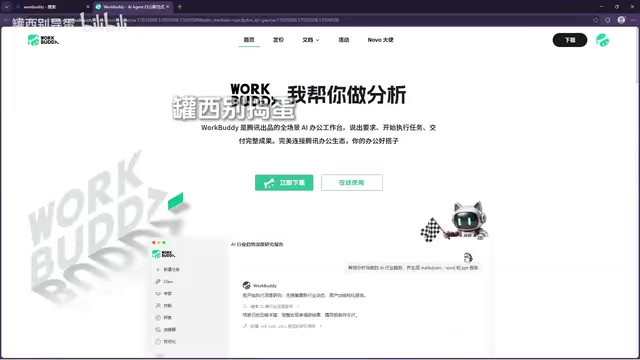
On Windows, double-click the downloaded installer. If a security prompt appears, verify the publisher and source, then follow the setup wizard. On Mac, open the installer package and drag WorkBuddy into the Applications folder, then launch it from there.
After installation, clicking the login button redirects you to a webpage where you can sign in by scanning a WeChat QR code or entering a phone number. The platform awards initial credits upon login, and your balance is visible by clicking your avatar at the bottom of the app. One important note: if you're on a company computer with software installation restrictions, do not try to bypass security policies. Contact your IT administrator first to confirm whether the app can be added to an allowlist or deployed through an enterprise deployment plan.
The interface is divided into three sections: the left panel is the quick navigation sidebar for switching between projects, expert agents, and other feature panels; the center is the workspace where you type and send instructions, with history saved here as well; the right panel is the results preview area where AI-generated outputs can be viewed directly.
Hands-On Practice: Using AI to Organize a Messy Folder
The first practical task is having the AI sort and organize various files in a local folder. Before starting, select your target working directory — pick that cluttered materials folder — then type your instruction: ask it to categorize the contents by date and file type, and add any additional requirements you have.
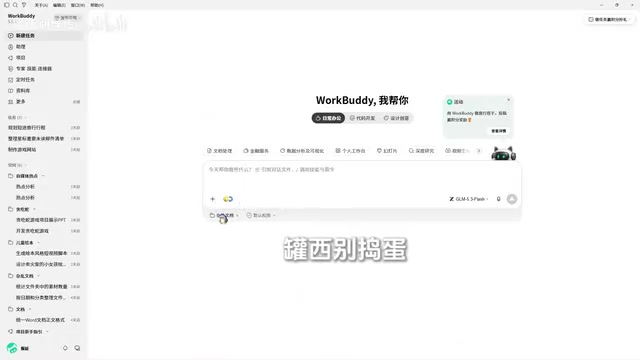
Once you hit send, the interface displays the full reasoning process and execution steps. Regarding concerns about "the AI accidentally deleting files": this comes down to permission settings. Do not enable full access permissions. With full access off, any high-risk or sensitive operation will trigger a prompt asking for your confirmation, which provides much stronger safety guarantees.
During execution, the AI first scans and analyzes the folder, taking stock of all its contents — distinguishing documents, videos, images, and slides — while also reading file modification dates. What was once a jumbled mess becomes clearly structured after this inventory pass. It then performs the categorization and names each subfolder accordingly. Open the folder afterward and you'll find image assets and video assets neatly sorted into their respective categories. Work that would take considerable time to do manually consumed only a small number of credits here, with a significant gain in efficiency.
Think of it as a digital direct report — just assign the task. That said, when experimenting, start with files that don't matter rather than critical documents.
Troubleshooting and Quick Recap
The standard workflow follows four steps: Open the app → Select a working directory → Enter your task instruction → Receive the final result.
For common issues:
- Installer won't open or shows as damaged — Delete the old installer, re-download from the official website, and verify that the package matches your operating system and chip architecture.
- Page unresponsive after login — Check whether your browser is blocking redirects, review proxy or VPN settings, and confirm your system clock is set correctly.
WorkBuddy represents AI's shift from "giving advice" to "getting things done." For professionals who want to experience AI Agents without worrying about technical barriers, it offers a low-cost way to replace repetitive, tedious office work — and it's a great starting point for understanding and experiencing what AI Agents can actually do.
Related articles

Structuring Data for AI Agents: Five Approaches and a Selection Guide
There's no single best way to structure data for AI Agents. This article compares semantic models, knowledge graphs, RAG, Markdown+grep, and open formats, drawing on research from dbt, Microsoft, and Chroma to help you pick the right data architecture based on question type.

Fish Audio Drama 3 Open-Source Launch Sparks Debate: The 35B Speech Model's Selling Points and Licensing Controversy
Fish Audio Drama 3 sparks debate with 35B parameters and open weights, ranking first on pronunciation benchmarks with director-style control and word-level inpainting, but its community license restricts commercial resale, API prices are rising, and local runs need ~39GB VRAM.
LLM Gateway Selection Checklist: Evalu…
LLM Gateway Selection Checklist: Evaluate a Gateway in 10 Minutes
A 10-minute LLM gateway evaluation checklist: from protocol coverage, cache pricing, discount transparency, and credit terms to per-model SLAs and migration cost, filter out unreliable LLM gateways fast.