WorkBuddy Beginner's Guide: How This Chinese AI Agent Handles Real Office Tasks for You

WorkBuddy is a beginner-friendly Chinese AI Agent that autonomously completes real office tasks end-to-end.
This article breaks down the core difference between AI Agents and traditional conversational AI: agents can autonomously control devices, call tools, and complete tasks end-to-end with user authorization — not just offer advice. Using WorkBuddy as the example, it covers four key advantages for beginners: low barrier to entry, compatibility with Chinese office apps like WeCom, affordable pricing, and a built-in Chinese skills marketplace. Compared to more flexible but technically demanding tools like Codex, WorkBuddy is better suited for non-technical users starting with tasks like document formatting and PPT creation. The article also flags privacy considerations around data authorization.
AI Agents are reshaping how we think about AI tools. For years, most people's experience with AI has been a simple back-and-forth: you ask a question, it offers suggestions, and you still have to do the actual work yourself. A new wave of Chinese-built AI agent tools — WorkBuddy chief among them — is trying to close that gap, transforming AI from a strategic advisor into a digital worker that can actually get things done.
This article is based on a comprehensive WorkBuddyAd tutorial on Bilibili. It breaks down the core logic behind this category of tools, what fundamentally separates them from traditional AI, and why they're a strong fit for office workflows in China.
The Core Difference Between Traditional AI and AI Agents
There's a simple way to tell a "regular AI" from a true "AI Agent": Can it skip the middleman and complete a task on your behalf?
Here's a concrete example. Say you have a document with inconsistent formatting, mismatched punctuation, and messy paragraph spacing. Hand it to a traditional AI (like a typical conversational large language model), and it will tell you how to fix it — offering suggestions you then have to implement yourself, line by line. Hand the same document to WorkBuddy, and it will automatically read the file from your desktop, reformat it, standardize punctuation, clean up paragraphs, and beautify the layout — all without you lifting a finger.
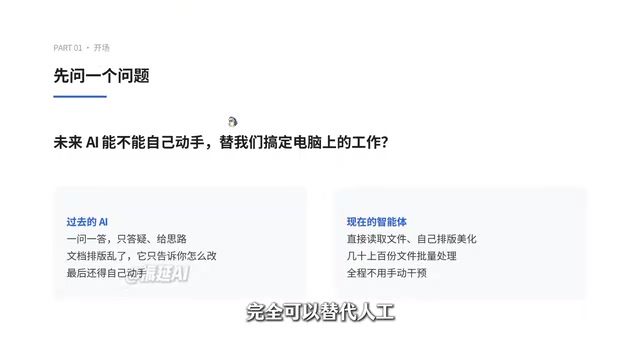
The distinction is clear: traditional large language models excel at answering questions, analyzing data, clarifying logic, and generating recommendations — they're fundamentally in the business of giving advice. AI Agents, on the other hand, offer something fundamentally different: with the user's authorization, they can autonomously control a computer, invoke software tools, and see a task through from start to finish. They're less like a chatbot and more like a dedicated digital employee.
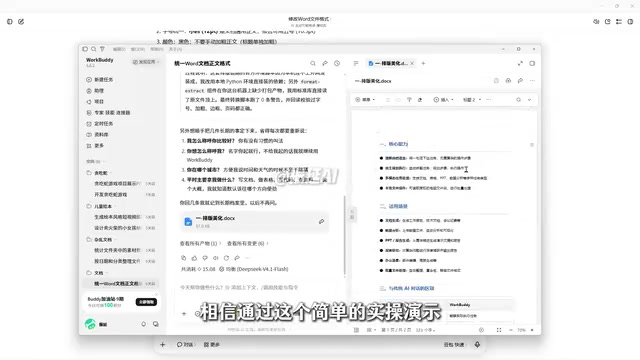
Document formatting is just the most basic use case. According to the tutorial demo, a complete PowerPoint presentation — page layout, content organization, and animation settings — can be independently assembled by the Agent once you hand it the core requirements. Beyond WorkBuddy, tools like Codex and other workflow-oriented agents fall into the same category.
From a technical standpoint, an AI Agent's ability to "act autonomously" relies on a perceive–plan–act feedback loop. The agent first perceives the current environment (e.g., reading a file from your desktop), then invokes a large language model to decompose and plan the task, and finally executes real-world actions by calling external tools — OS APIs, Office interfaces, browser automation, and so on. The results feed back into the model, which decides the next step. This loop continues until the task is complete. By contrast, a traditional conversational LLM (like the ChatGPT web interface) stops at "generating text" — it has neither the permissions nor the mechanism to touch your file system or applications. This "Tool Use / Function Calling" capability is precisely what marks the fundamental technical divide between AI Agents and ordinary chatbots.
Why WorkBuddy Is a Great Starting Point for Beginners
The tutorial author positions WorkBuddy as a "domestic alternative to Codex" and lays out several reasons beginners should try it first.
Minimal Learning Curve
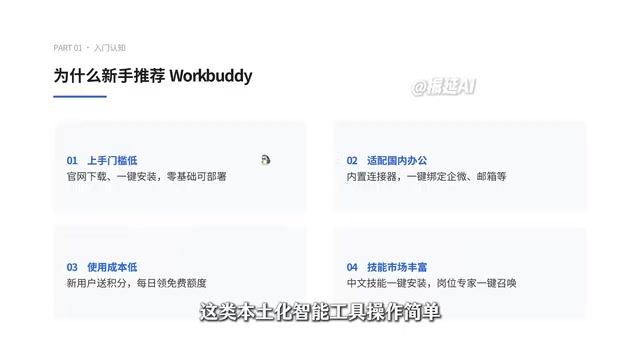
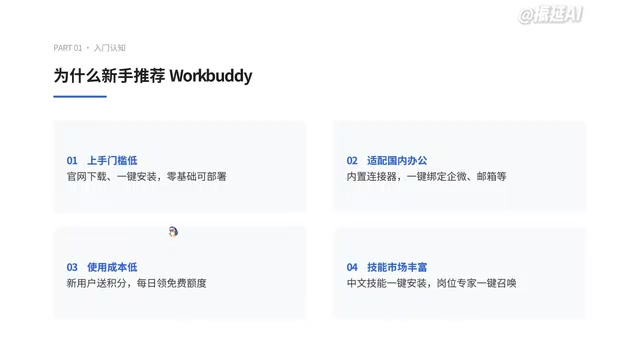
This localized tool is straightforward to get started with. You simply search for the name in your browser, download, and install it. The deployment process is clear and intuitive — no complicated network setup or configuration required. Even a complete beginner can deploy it on a personal computer in one click.
Built for China's Office Ecosystem
WorkBuddy includes a built-in "Connector" feature that lets you bind your everyday office tools with a single click. Connectors are essentially authorization gateways that allow the AI to interface with various workplace applications. For instance, after binding and authorizing WeCom (Enterprise WeChat), it can help auto-reply to messages, organize chat content, summarize communications, and generate documents — making AI a genuine participant in your complete workflow.
Technically, "Connectors" correspond to packaged OAuth authorization and API integration flows. When a user clicks "Bind WeCom," the platform guides them through an OAuth flow, obtains an Access Token for the target app, and from that point the Agent can read messages, send replies, or fetch contact lists via the WeCom Open Platform API. This authorization model means that in exchange for convenience, users are delegating certain data read/write permissions to the platform. In practice, it's worth carefully reviewing the scope of permissions being requested — especially for scenarios involving customer data or internal business information. The principle of least privilege applies to AI tool integrations just as it does anywhere else.
Affordable for Most Users
The platform grants registered users free credits and offers daily free usage quotas. For light-to-moderate office use, most basic tasks can be completed entirely for free. Compared to many overseas equivalents that require monthly subscriptions and heavy usage to justify the cost, this makes the tool far more accessible for everyday users.
Fast Skill and Plugin Deployment
The app includes a Chinese-language Skills Marketplace and Plugin Center, where common office skills and work templates can be installed in one click. Think of a "Skill" as a pre-trained, standardized office capability. The platform also offers role-specific AI experts — covering development, operations, copywriting, strategy, and more — that function like digital employees. Teams building workflows can directly invoke whichever specialist model fits their needs.
In the AI Agent ecosystem, "Skills" typically correspond to packaged combinations of preset prompt templates and tool-calling chains. Developers pre-define the instruction logic, execution steps, and output format for a specific task (e.g., "generate a weekly report" or "summarize meeting notes"), and users can trigger it immediately after one-click installation — no prompt engineering required. This lowers the barrier for ordinary users to run complex workflows, but it also means skill quality depends heavily on the developers publishing them. When using community-contributed skills, it's equally important to review the permissions they request and avoid granting unnecessary data access.
WorkBuddy vs. Codex: How to Choose
To be fair about the tradeoffs: tools like Codex offer greater flexibility, but demand more technical expertise — things like setting up code environments and building custom workflows. That's not a fit for beginners with no technical background.
For the vast majority of first-time users, the higher-value path is choosing an AI Agent that's localized for Chinese workflows, simple to deploy, cost-controlled, and requires no technical prerequisites. The payoff is significant: a 24/7 digital assistant with minimal setup costs, freeing up your hands and boosting productivity.
Final Thoughts
The value of an AI Agent ultimately comes down to four words: execution in the real world. It transforms AI from a consultant that offers recommendations into an operator that can actually control your devices and complete tasks. For everyday office users, this means repetitive, formulaic work can be handed off to a machine in bulk.
That said, the tutorial skews toward introductory promotion. Real-world reliability, output quality on complex tasks, and the privacy implications of data authorization all need to be validated through actual use. For those looking to experiment, document processing and PPT creation are ideal entry points for getting a feel for what AI Agents can — and can't — do.
Related articles

Gemini 4 Argon Hands-On: AI Builds Board Games, Constructs Temples, and Trains Robots Autonomously
Gemini 4 Argon hands-on roundup: AI autonomously builds a desk racetrack and temple in Blender, writes a ray tracing engine, trains a humanoid robot to sink 7 shots, plus API pricing and developer access.

The Magic Octagonal Coin: Why Only 9% of People Can Predict Its Flip?
Only 9% of people can correctly predict the Magic Octagon coin flip. This article explains its spatial rotation mechanism, common cognitive pitfalls, and a new hypothesis based on Relevance Theory, exploring the limits of human spatial reasoning.

Sam Altman: AI Is Entering the Era of Scientific Discovery — Math Breakthroughs Will Replicate in Biology and Energy
Sam Altman says AI is entering the era of scientific discovery — math breakthroughs will replicate in biology, materials science, and energy to help develop new drugs and energy sources.