WorkBuddy Complete Beginner's Guide: Master Agent Workflows in 1 Hour
WorkBuddy is a Tencent Cloud-powered AI workbench that breaks down goals, calls tools, and delivers real results.
WorkBuddy is an AI workbench built to actually execute work, not just answer questions. Backed by Tencent Cloud's enterprise infrastructure — storage, OCR, audio/video, and VectorDB — it uses five core capabilities (Skills, Connectors, MCP, Automation, and Remote Assistant) to transform from a chat tool into a true productivity platform. This guide covers task definition, workspace management, permission control, the five-part Prompt structure, and six real-world scenarios including business reporting, development, education, live streaming, e-commerce, and enterprise knowledge bases, with security and compliance treated as non-negotiable foundations.
What Exactly Is WorkBuddy
The best way to understand WorkBuddy is as an "AI workbench that actually gets things done." A typical chatbot operates on a "you ask, it answers" model — the focus is on delivering a response. WorkBuddy, by contrast, focuses on breaking down a goal, reading source materials, calling tools, generating files, and truly delivering results.
The difference shows up at the execution layer. Say you ask, "Help me analyze this month's sales performance" — a regular AI might just walk you through the methodology. WorkBuddy will go further: read the Excel file, merge the data, generate charts, write up conclusions, produce a report, and even save it as a reusable template for next time. Its coverage is broad — document processing, data analysis, content creation, software development, task automation, connecting external tools, batch processing, information organization, and report generation.
It handles materials scattered across different formats: Word, Excel, PPT, PDF, images, audio, video, compressed archives, and more. In real office work, materials rarely sit neatly in a single spreadsheet — WorkBuddy's value is in connecting all of that together. It suits a wide range of users: teachers, students, operations staff, social media managers, salespeople, customer service reps, developers, product managers, cross-border e-commerce sellers, store supervisors, and more. If your work involves a clear task, some source material, and a deliverable, WorkBuddy is worth trying.
Under the Hood: How WorkBuddy and Tencent Cloud Divide the Work
WorkBuddy itself is the desktop entry point and Agent orchestrator — it handles understanding requirements, planning tasks, calling tools, and organizing output. Tencent Cloud is the capability backbone, providing enterprise-grade storage, recognition, audio/video processing, AI models, knowledge bases, deployment infrastructure, monitoring, and communications.
In practice: storage uses COS, recognition uses OCR, audio/video uses VOD, CSS (Cloud Streaming), and TRTC (Real-Time Communication), speech recognition uses ASR, translation uses TMT, and model and knowledge capabilities can leverage TokenHub, EdgeOne, VectorDB, and the Knowledge Engine. TokenHub serves as a unified entry point for calling multiple models and managing API Keys, making cost management and model switching easier. VectorDB handles vector storage and retrieval to power RAG-based knowledge bases — typical use cases include enterprise knowledge base Q&A, bid document libraries, product information libraries, and customer service knowledge bases.
For enterprises, you don't have to use just one model — the key is choosing the right model for each scenario while managing costs and permissions centrally. You also don't need to learn every cloud product upfront. Just know which category of product to look at when you run into a specific problem.
Background: What Is RAG? RAG (Retrieval-Augmented Generation) is the key concept for understanding VectorDB's value. Traditional large language models have their knowledge frozen in training parameters — they can't access a company's latest internal documents, product specs, or customer service records. RAG works like this: enterprise documents are chunked and converted into vectors (high-dimensional numerical representations), then stored in a vector database. When a user asks a question, the system first retrieves the most relevant chunks from the vector store, then sends those chunks along with the question to the model to generate an answer. This grounds the model's output in real source material rather than generating from memory alone. VectorDB acts as the "memory warehouse" in this pipeline — retrieval speed and accuracy directly affect answer quality. The reason enterprise knowledge bases, bid document libraries, and customer service Q&A systems rely on it is that reliable retrieval is more controllable and auditable than the model's own "memory."
Five Core Capabilities: From "Can Chat" to "Can Work"
WorkBuddy's transformation from a conversational tool to a productivity tool depends on five capabilities working together:
- Skills: Defines what specific tasks it can perform — writing, analysis, spreadsheet creation, diagramming, PPT generation, PDF processing, software development, and more. The value is encoding the experience, templates, and tools for a given task type, so you don't have to describe everything from scratch each time.
- Connectors: Reads information from cloud drives, documents, calendars, knowledge bases, emails, spreadsheets, and business systems — within authorized scope — so the AI no longer depends on you to manually copy and paste.
- MCP (unified interface standard): Lets different tools and services connect via a standardized protocol. Weather services, code tools, data tools, and internal enterprise systems can all be called through a consistent interface.
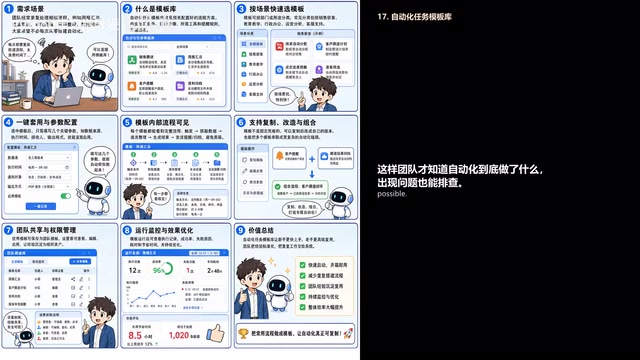
- Automation (workflow engine): Chains together repetitive steps like collecting, organizing, analyzing, generating, and sending notifications — for example, automatically generating a weekly report every week or summarizing leads every day.
- Remote Assistant (executor): Continues running tasks in the background while you're away from the screen. Well-suited for long-running, scheduled, batch, and collaborative tasks — but also requires stronger permission controls and audit trails.
A "weekly report assistant" is a perfect example: connect to email or cloud storage to pull in materials, apply summarization and analysis capabilities to compile the report, then automatically send it to the team. Remember this: Skills are capabilities, Connectors are channels, MCP is the interface standard, Automation is the workflow engine, and Remote Assistant is the executor.
A Closer Look at MCP MCP (Model Context Protocol) deserves its own explanation. It's an open standard protocol proposed by Anthropic in late 2024, designed to let AI applications connect to external tools and data sources in a unified way — without needing custom integration code for each service. Think of it like USB: once you have a universal standard, any compliant device just plugs in and works, without needing a custom cable for every computer. In WorkBuddy's context, MCP means weather services, code execution environments, enterprise databases, and third-party SaaS systems can all be called by the Agent as long as they expose an interface following this protocol — no one-off integrations required. This dramatically lowers the cost of connecting enterprise systems to an AI workbench, which is why it's regarded as foundational infrastructure for AI tool interoperability.
Three Core Concepts: Tasks, Workspaces, and Permissions
When people run into problems with AI, it's usually not because the model isn't powerful enough — it's because tasks, files, and permissions weren't managed properly.
A task isn't a casual question — it's a complete statement of objectives. A good task covers six things: context (why are we doing this), input (where are the materials), output (what format is needed), definitions (how are metrics calculated), constraints (what can't be done), and acceptance criteria (how do we know it's done correctly).
A workspace is the primary folder the current task reads from and writes to. It's best to create a separate directory for each task, organized into Input / Output / Backup / Notes: raw files go in Input, backups in Backup, results in Output, and process notes in Notes. Clear boundaries make it easier to roll back if something goes wrong.
For permissions, hold to these principles: don't grant the AI access to your entire desktop, Downloads folder, or root of a shared drive. For high-risk tasks, only provide copies — especially for batch renaming, format conversion, deletion, overwriting, or migration operations. Always back up first, then validate on a small sample. For high-risk actions like deleting files, running script commands, or making network requests, confirm before granting "full access."
When reviewing results, don't just read the AI's summary — always open the Artifacts panel and inspect the actual output files. If a task fails, don't immediately rerun it. First ask it to explain what failed, at which step, and what a straightforward fix would look like.
Writing Good Prompts: The Five-Part Structure for Consistent Output
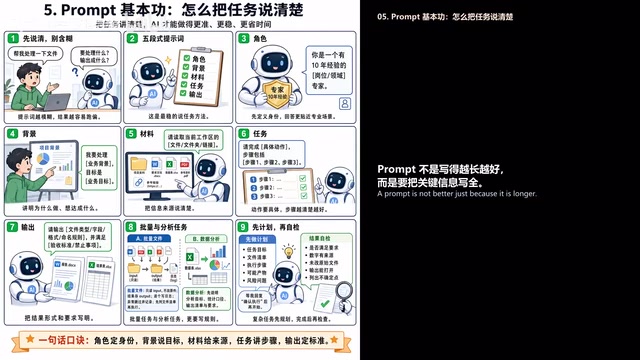
A longer prompt isn't necessarily better — the goal is to include all the critical information. "Help me process this file" is too vague; the AI doesn't know what to process, what to output, or what counts as done. The vaguer the prompt, the more likely the result drifts off course.
The most reliable approach is the five-part structure: Role, Context, Materials, Task, Output.
- Role: For example, "You are a sales operations expert with ten years of experience" — this prompts the AI to apply judgment closer to real business needs.
- Context: Answers "why are we doing this and what do we want to achieve" — for example, "Processing Q2 sales data to identify growth drivers and recommend actions for next quarter." Without context, the AI tends to produce surface-level summaries.
- Materials: Tell it which files, folders, or links to read. For batch tasks, be explicit: "Read only from the Input folder, save results to Output, do not modify originals."
- Task: Be specific about the actions — don't just say "analyze the data." Say "first standardize date and amount formats, then calculate sales by region and product, then flag anomalies and write conclusions."
- Output: Explicitly specify the format (Markdown report, Excel spreadsheet, PPT outline, CSV, JSON, code files, etc.), along with field naming conventions, word count ranges, prohibited content, and acceptance criteria.
For complex tasks, ask it to first produce a task summary covering objectives, file inventory, execution steps, potential risks, and uncertainties — review that before proceeding. After completion, ask it to self-check: Does this meet the requirements? Are all numbers traceable to source files? Were any files modified that shouldn't have been? Can the outputs actually be opened?
A Tour of Real-World Use Cases
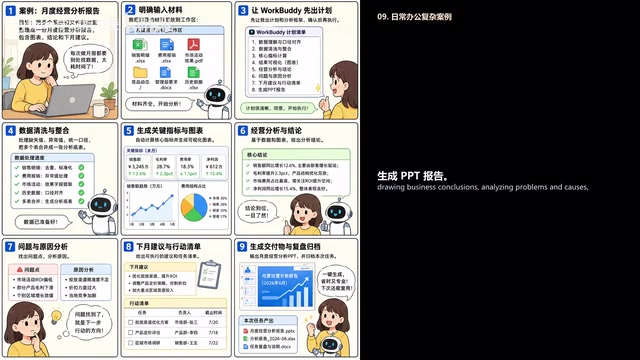
WorkBuddy's approach across scenarios follows the same logic: define the goal → draft a plan → clean and integrate data → generate results → analyze conclusions → produce recommendations and action items → deliver and debrief.
Business Performance Reports: Source materials include sales details, expense reimbursements, marketing campaign results, competitive intelligence, and historical data. Have it draft a plan before executing. All numbers must come from source files; missing or anomalous data should be listed separately, never filled in by inference. Conclusions should clearly distinguish facts, judgments, and recommendations.
Software Development: Covers the full lifecycle — requirements understanding, PRD and prototype generation, technical design and project scaffolding, code generation, debugging and testing, build and deployment, monitoring and optimization, and iterative retrospectives. That said, any generated code must be run, tested, and reviewed before it can be considered production-ready.
Education: Aggregate grades, attendance, assignments, and quiz data across multiple courses to generate student performance reports and personalized recommendations. Pay particular attention to student privacy and data authorization. Content shared with parents should be objective and restrained — avoid labeling or making psychological or medical assessments.
Live Streaming and Video Operations: Combine CSS, TRTC, and VOD to cover the full workflow from planning and scripting through monitoring, recording, editing, multi-platform distribution, and post-event analysis — turning a single live stream into a variety of distributable content assets.
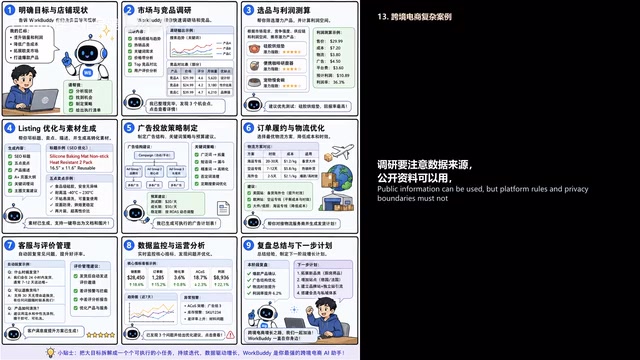
Cross-Border E-Commerce: From product selection and pricing, market and competitor research, Listing optimization, and ad campaigns through logistics, customer service, review management, and data retrospectives. A common mistake is focusing on sales volume without accounting for profit — getting the cost structure right is essential.
Enterprise Knowledge Base: Consolidate materials scattered across policies, contracts, forms, and customer service records — collect, clean, structure, and vectorize them into a searchable, queryable, citable knowledge base. Intelligent Q&A must cite sources; answers about company policies cannot be fabricated.
Security Boundaries: More Power Requires More Guardrails
This is the most overlooked part — and the most critical. WorkBuddy is powerful, but there are hard limits:
- Never let AI finalize contracts, legal documents, financial results, or medical conclusions without human review.
- Never let it batch-delete, overwrite, or migrate files without a backup.
- Never let it directly send high-risk messages to customers.
- Never bypass platform rules, login permissions, or privacy boundaries.
For enterprise use, build a complete governance framework: data classification and tiering, principle of least privilege, end-to-end encryption for data in transit and at rest (HTTPS/TLS throughout), key management via CAM and Key Management Service. Compliance should align with China's Cybersecurity Law, Data Security Law, and Personal Information Protection Law, with key actions being auditable. Accounts should be unified under WeCom or SSO, with role-based authorization, regular revocation of idle permissions, and MFA enabled on critical accounts. On the cost side: use resources on-demand, set budget limits, clean up idle resources, and enable auto-scaling and scheduled start/stop. Security and compliance are the baseline; cost control is a capability; closed-loop management is the foundation for long-term stable operation.
Regulatory Background The three laws mentioned above form the core compliance framework for AI applications in China. The Cybersecurity Law establishes data protection obligations for network operators and requirements for protecting critical information infrastructure. The Data Security Law introduces a data classification and tiering system, requiring stricter protection for important and core data. The Personal Information Protection Law sets clear compliance thresholds for collecting, processing, and cross-border transferring personal information — including obtaining user consent and implementing data minimization. For enterprises using WorkBuddy to process customer information, employee data, or user behavioral data, these three laws collectively define what data can enter AI workflows, how it must be stored, and how it must be deleted. Without understanding this framework, even technically sound permission controls may still carry legal risk in a compliance audit.
Getting Started and Troubleshooting
The most reliable onboarding path for newcomers: start with the Overview to build a mental model, then use the Quickstart to complete your first task end-to-end, then install the desktop client. Individual users can start with the web version. Enterprise users who need team permissions, SSO, or WeCom integration should have an administrator enable those capabilities centrally.
For your first task, don't be ambitious — use a low-risk task to get a feel for the workflow. Upload a copy of task-related files (not an entire directory), use clear file names, and specify the output clearly. For example: "Please summarize the core findings of this research report and present the background, content summary, and recommendations in a table."
When troubleshooting, match the fix to the symptom: if a task gets stuck, break it into smaller pieces and reduce the input scope; if results go off track, check whether the goal, materials, and constraints are complete; if files can't be read, check format, file size, corruption, and permissions; if a connector fails, check the token, permissions, and network; if formatting is inconsistent, explicitly specify the output format and validate on a small sample first. When reporting issues to support, include the task ID, problem description, desensitized sample files, error logs, and what you've already tried — the more complete the information, the faster the issue gets resolved.
Using WorkBuddy well can be summed up in one sentence: Define the goal clearly, prepare your materials, control permissions, draft a plan first, validate on a small sample, then execute at scale, and debrief to build reusable assets. Follow this process and WorkBuddy stops being just a chat tool — it becomes a sustainable AI workbench for you and your team.
Related articles
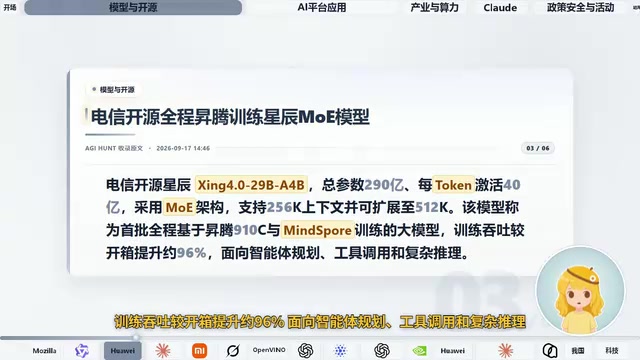
AI Daily Briefing: Qwen3-Omni Full-Modality Model Launches, Huawei Ascend 960 and Grok's New Model Surface
AI Daily: Qwen3-Omni Flash launches with full-modality support and 93% cost cuts; Huawei unveils million-processor AI architecture; Ascend 960 rumored; Grok spotted on GCP; N8N hits CVSS 10 vulnerability.
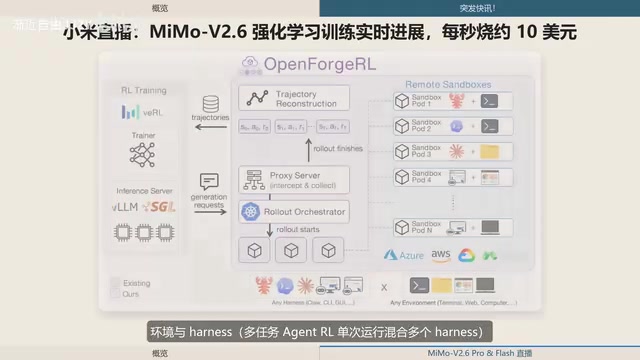
Xiaomi MiMo-V2.6 Live Training: ¥8.55M Spent in One and a Half Days, ~$10 per Second
Xiaomi's MiMo team live-streams MiMo V2.6 Pro/Flash RL training, spending ¥8.55M (~$1.28M) in 1.5 days — ~$10/sec. Covers compute scaling, open-source plans, and DeepSWE benchmarks.
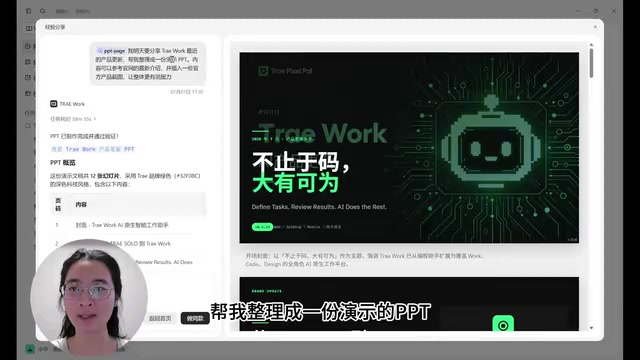
ByteDance Trae Work Getting Started Guide: 11 Use Cases Explained
A hands-on guide to ByteDance's Trae Work AI agent — covering Work, Code, and Design sections across 11 use cases including PPT generation, data analysis, coding, and more.