WorkBuddy for Absolute Beginners: Office Automation with an AI Agent

WorkBuddy is an AI agent that directly operates your computer—the domestic Codex alternative—and this course teaches management-style usage.
This article covers WorkBuddy, an AI agent that directly operates your computer for real tasks like file organization and PPT-to-PDF conversion, unlike chat AI that only gives advice. Compared with Codex, it is ready out of the box, connects to the domestic office ecosystem, offers friendly free quotas and a rich plugin marketplace. It explains the common beginner mistake of treating agents like chat apps and the shift from Q&A to management-style usage.
If you're only going to learn one AI tool this year, WorkBuddy deserves to be at the top of your list. Many users see it as the domestic alternative to Codex—the interface layout and interaction logic are similar, but it's far better suited to the Chinese office environment: no complex setup, friendly free quotas, and direct connections to mainstream office software.
A Bilibili creator spent nearly three months putting together a 28-episode hands-on WorkBuddyAd course, covering everything from basic operations to real-world office cases and advanced workflows, complete with a blue book, 12 commonly used Skills, and practical exercise materials. This article draws on the publicly available content of that course to break down WorkBuddy's core positioning, how it fundamentally differs from chat-style AI, and what sets it apart from similar agents.
What Is WorkBuddy: From "Chatting" to "Getting Things Done"
WorkBuddy is an AI Agent whose core capability is directly operating your computer and taking over repetitive work. Organizing files, generating documents, analyzing spreadsheets, executing repetitive tasks—things that used to require switching back and forth between multiple applications can now all be handed to it.
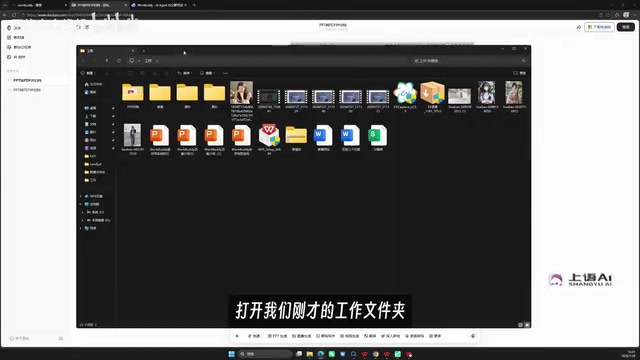
The creator made an intuitive comparison in the course: there's a work folder on the desktop, and all the PPTs inside need to be converted to PDF and archived. After giving the same instruction to Doubao, Doubao could only offer suggestions and had no way to directly access or modify the files. Switching to WorkBuddy and running the exact same prompt, once the task finished, an archive directory automatically appeared in the folder.
This comparison highlights the key difference: traditional AI chat assistants work on a "you ask, I answer" basis and can only offer suggestions; agents like WorkBuddy are like hiring a digital employee—you give the order, and it does the work. The creator also demonstrated using WorkBuddy to generate a PPT directly from a folder location, showing that archiving is just the tip of the iceberg.
AI Agent refers to an AI system capable of perceiving its environment, making autonomous decisions, and executing actions to achieve goals. Unlike traditional chat-style AI (such as Doubao or ChatGPT), which can only generate text replies, an AI Agent has the ability to "act": it can call tools, operate software, access the file system, and even control a browser to complete a series of tasks. Its core architecture typically includes a planning module (task decomposition), a memory module (context storage), and a tool-calling module (executing specific operations). WorkBuddy is a real-world product built on this concept, combining the reasoning power of large models with local computer operation permissions so users can complete practical work like file organization and format conversion through natural language instructions—achieving the leap from "answering questions" to "solving problems."
Why Start with WorkBuddy Instead of Codex?
The course lists four reasons, with the core logic being "hire an employee who can actually do the work at low cost."
Ready Out of the Box, Low Barrier to Entry
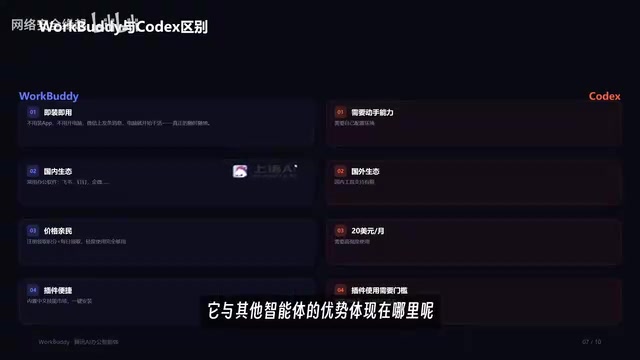
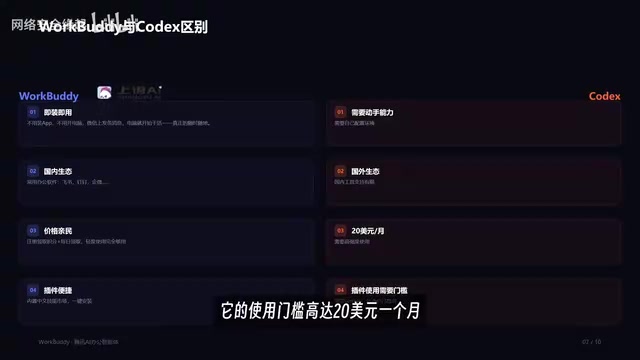
WorkBuddy can be found and downloaded directly through a browser search and deployed to your computer with one click. Codex, by contrast, requires you to configure the environment yourself, which demands hands-on technical skill. For users with no programming background, this gap determines whether they can actually get it working.
Domestic Ecosystem Connections Are the Biggest Differentiator
WorkBuddy comes with built-in connectors that let you authorize it to use common office software. The creator gives an example: after connecting WeCom (Enterprise WeChat), it can help you reply to messages and summarize last week's conversations with clients into a weekly report. This kind of native support for domestic tools is something Codex, built on a foreign ecosystem, struggles to replace.
Connector is the bridge through which an AI agent interacts with external software or services. Through preset API interfaces or authorization mechanisms, it allows the agent to read, write, or operate on data in the target application. For example, WorkBuddy's built-in WeCom connector lets the agent access chat records and send messages after user authorization, enabling tasks like summarizing weekly reports and auto-replying. This design saves users the hassle of manually exporting and importing data and lowers the technical barrier to cross-application automation. The richness of connectors directly determines the practical boundaries of an agent, and deep integration with the domestic office ecosystem is precisely one of WorkBuddy's key advantages over similar foreign products.
Affordable Pricing, Enough for Light Use
Registration gives you 2,000 credits, and you can claim another 100 every day. For light use, that's more than enough. Codex, by contrast, has a barrier of $20 per month and only pays off with heavy usage.
Plugin and Skill Marketplaces Lower the Cost of Extension
WorkBuddy supports one-click plugin installation, similar to a Chinese-language skill marketplace. The "Expert" feature mentioned in the course can be understood as summoning a specific role on demand—for example, if you need a Xiaohongshu operations expert, you can summon one with a single click without actually hiring anyone. "Skills" are toolkits that can be installed with one click, making extension very low-cost. Codex, as an open-source agent, relies on the GitHub ecosystem—highly flexible but requiring some programming skill.
Skill in the context of AI agents usually refers to an encapsulated, reusable functional module or toolkit. A Skill may contain specific prompt templates, API calling logic, and data processing flows; once the user installs it with one click, the agent gains a specialized capability, such as "Xiaohongshu copywriting generation" or "Excel data cleaning." This model draws on the idea of software plugin ecosystems, turning complex custom development into plug-and-play components and greatly reducing the cost for non-technical users to extend an agent's capabilities. WorkBuddy's skill marketplace is like a Chinese-language toolkit library—users can assemble what they need without programming and quickly adapt to different office scenarios.
The Pitfall Beginners Fall Into Most: Treating an Agent Like a Chat App
At the beginning of the course, the creator points out a common problem: many people open WorkBuddy and still only ask a few simple questions—the tool is powerful, but they use it like an ordinary chat app.
The reason is that their usage habits haven't switched over. Chat-style AI is used as "ask a question—get an answer," while an agent is used as "give an order—wait for the result." With the former, you're still the executor; with the latter, you become the manager. The course emphasizes that AI users in this new era directly manage AI, letting an obedient digital employee do the work for them.
To make this switch, you need to learn to break work tasks down into executable instructions rather than staying at the Q&A level. This is also why the course is structured into 28 episodes across an introductory section, a case studies section, an advanced section, and an industry section—progressing from basic operations to real office cases and then to workflow configuration, gradually handing repetitive work over to AI.
Supporting Materials and Learning Path
The course comes with a WorkBuddy blue book covering four major areas—installation, case breakdowns, Skill customization, and industry implementation—plus 12 commonly used Skills and practical exercise materials. As for the learning path: first complete installation and basic operations, then practice with real office cases, and finally move on to workflow configuration and industry scenario implementation.
For users who want to systematically master AI office automation, WorkBuddy is a starting point with a low barrier and an ecosystem suited to the domestic environment. What matters isn't how many tutorials you've bookmarked, but whether you actually follow along and hand your first repetitive task over to it for real.
One-line Summary
WorkBuddy is an AI agent that can directly operate your computer—the domestic alternative to Codex—and this course teaches you to shift from chat-style to management-style usage.
Paragraph Summary
This article introduces the core positioning and advantages of the AI agent WorkBuddy. WorkBuddy can directly operate a user's computer to perform real tasks such as file organization and PPT-to-PDF conversion, unlike chat-style AI that can only offer suggestions. Compared with Codex, it is ready out of the box, connects to the domestic office ecosystem, offers friendly free quotas, and has a rich plugin marketplace. The article points out that a common beginner mistake is treating an agent like a chat app, emphasizing the need to shift from "ask a question—get an answer" to "give an order—wait for execution." Based on a 28-episode hands-on course, this article breaks down WorkBuddy's positioning, its fundamental differences from chat AI, and the learning path, along with a companion blue book and 12 commonly used Skills to help users systematically master AI office automation.
Related articles

Gemini 4 Argon Hands-On: AI Builds Board Games, Constructs Temples, and Trains Robots Autonomously
Gemini 4 Argon hands-on roundup: AI autonomously builds a desk racetrack and temple in Blender, writes a ray tracing engine, trains a humanoid robot to sink 7 shots, plus API pricing and developer access.

The Magic Octagonal Coin: Why Only 9% of People Can Predict Its Flip?
Only 9% of people can correctly predict the Magic Octagon coin flip. This article explains its spatial rotation mechanism, common cognitive pitfalls, and a new hypothesis based on Relevance Theory, exploring the limits of human spatial reasoning.

Sam Altman: AI Is Entering the Era of Scientific Discovery — Math Breakthroughs Will Replicate in Biology and Energy
Sam Altman says AI is entering the era of scientific discovery — math breakthroughs will replicate in biology, materials science, and energy to help develop new drugs and energy sources.