WorkBuddy Getting Started Guide: From AI Chat to Autonomous Desktop Agent
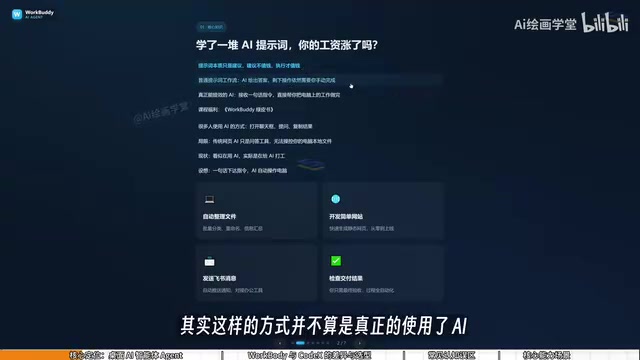
WorkBuddy is a desktop AI agent that executes tasks on your computer — not just a chatbot.
WorkBuddy is a domestically developed desktop AI agent that goes beyond chat by reading local files, invoking tools, and autonomously executing tasks. The article compares it to Codex using a "college student vs. special forces" analogy, highlights its lower barrier to entry, deep integration with Chinese workplace apps, and free daily credits system. It also clears up three common misconceptions and outlines four practical use cases — from bulk file renaming to automated reports — urging users to shift from "asking AI questions" to "directing AI to execute."
You've Been Using AI for a While — So Why Haven't Your Efficiency or Income Improved?
Many people have been exploring AI for some time now — bookmarking prompt templates, trying out chatbots — yet their real-world productivity and income haven't meaningfully improved. The reason is simple: prompts are just suggestions, and suggestions aren't worth much. Execution is what creates value.
Traditional web-based AI tools (like most chatbots) are essentially Q&A engines. You ask a question, they output text, and then you still have to manually carry out the work yourself using your mouse and keyboard. It might look like you're using AI, but in reality, you're doing the legwork for AI. The whole process is cumbersome, and AI never truly takes over your work.

That's the problem WorkBuddyAd is designed to solve. It's a domestically developed desktop AI agent that focuses not on "answering questions," but on directly executing tasks — turning suggestions into action.
What Is WorkBuddy? A Desktop AI Agent That Can Operate Your Computer
WorkBuddy is a desktop AI agent, not just a chat interface. That's the most fundamental difference between it and mainstream large language models.
Most AI models are limited to generating text, images, audio, or video — but they have no access to your local computer's files. WorkBuddy is different. You simply give it a task in natural language — just like telling a real person what you want done — and it automatically handles the planning, research, execution, and delivery.
Core Value: From "Questioner" to "Manager"
Using WorkBuddy requires a mindset shift: you're no longer asking AI questions — you're managing AI to get work done.
Think of it this way: you're the manager, WorkBuddy is your employee, and your computer is the company. You issue instructions and review the final output. All the tedious execution in between is handled by WorkBuddy. This is what it truly means to have AI work for you.
WorkBuddy vs. Codex: College Student vs. Special Forces
If you've heard of WorkBuddy, you've probably also heard of Codex — a more powerful tool. So why bother with WorkBuddy if something stronger exists?
Here's an analogy that captures the difference perfectly:
- Codex is like a special forces soldier: Extremely capable, but requires a skilled commander who can provide detailed operational plans — specifying which files, which directories, which parameters to use. It demands significant technical expertise.
- WorkBuddy is like a capable, obedient college graduate: Maybe not suited for highly complex missions, but perfectly reliable for everyday tasks like "send this file to someone" or "organize these documents."

For most working professionals, you may not yet be in a position to effectively command "special forces." But managing a "college graduate" is well within reach. The recommended learning path is: start with WorkBuddy to get real work done, and only move on to Codex when WorkBuddy genuinely isn't enough. This keeps the learning curve as low as possible.
Three Key Differences Between WorkBuddy and Codex
| Dimension | WorkBuddy | Codex |
|---|---|---|
| Onboarding | Install and use immediately — no environment setup or command line needed | Requires solid technical skills and programming knowledge |
| Ecosystem compatibility | Deep integration with Feishu, DingTalk, WeCom, and Tencent Docs | Oriented toward Western tools; limited support for Chinese-market software |
| Cost | Daily free credits that accumulate; bonus credits during promotions | Subscription-based; costs money even during the learning phase |
On the topic of cost: WorkBuddy gives you free credits every day, and promotional events can add thousands of credits at once. It's worth logging in each day, clicking your avatar in the bottom-left corner, and visiting the "Buddy Refuel Station" to check in and collect your daily credits. Credits accumulate — anything you don't use today rolls over to tomorrow. Stay consistent for a month and you can easily rack up around 3,000 credits.

Three Common Misconceptions About WorkBuddy (New Users Take Note)
When first encountering tools like this, new users often hold some mistaken assumptions. Clearing these up will help you get up to speed faster.
Misconception 1: WorkBuddy Is Just a GPT Wrapper with a Desktop Chat Window
This misses the point. WorkBuddy isn't limited to chat. Beyond giving advice like a standard LLM, it can also read local files, invoke tools, and autonomously execute tasks. That's what sets it apart from a chatbot.
Misconception 2: Codex Is More Powerful, So I Should Just Learn Codex Directly
As discussed, Codex has a higher barrier to entry and is better suited for those with a programming background. For everyday professionals, it's far more practical to start with WorkBuddy and get real work done first. For the vast majority of daily tasks, WorkBuddy alone is more than sufficient.
Misconception 3: It Has So Many Features — It Must Be Hard to Learn
Actually, WorkBuddy's interface is very similar to mainstream AI tools like Doubao or GPT. The learning curve isn't about the UI — it's about shifting how you think: moving from "asking questions" to "issuing commands" and letting it operate your computer. You can absolutely follow a tutorial and practice hands-on at the same time.

What Can WorkBuddy Do? Four Practical Use Cases
As a local AI agent that can operate your computer directly, WorkBuddy covers a wide range of scenarios:
- Bulk file management: Batch sorting, batch renaming, and multi-document information consolidation. For example, if you record tutorials numbered 01, 02, 03 and later merge two lessons — breaking the numbering sequence — manually renaming everything is a pain. Hand it off to WorkBuddy and it's done in one go.
- Document and data processing: Repetitive office tasks like weekly report compilation and Excel spreadsheet processing.
- Basic website development: Building simple websites from scratch.
- Collaborative workflow automation: Deep integration with Feishu and DingTalk for automatically generating periodic work reports.
These aren't hypothetical — as long as you give clear instructions, WorkBuddy will execute them directly.
Conclusion: Evolve from AI Questioner to AI Manager
Here are the key takeaways from this introduction to WorkBuddy:
First, you now understand the fundamental difference between ordinary AI chat and a desktop AI agent — the former only gives advice; the latter actually executes.
Second, WorkBuddy's role is clear: it's your AI employee, not just a chatbot.
Third, you have a solid grasp of how WorkBuddy and Codex differ, when each is appropriate, how their costs compare, and what the sensible learning path looks like.
Most importantly, this represents a genuine mindset upgrade: evolving from an "AI questioner" to an "AI manager." When you stop obsessing over which prompt to use and start learning how to direct AI to execute tasks on your behalf, that's when AI truly begins to create real value for your productivity and income.
Related articles

AI Comic Drama with WorkBuddy from Scratch: A Step-by-Step Skill Pack Installation Guide
Learn how to create AI comic dramas with WorkBuddy from scratch. This guide covers installation, Skill pack import and invocation, plus a script generation demo with manual revision tips to get you through the first step from script to storyboard.

WorkBuddy Agent Runs the Entire GEO Database Mining Pipeline with a Single Prompt
WorkBuddy agent automates GEO database mining: from data search and curation to batch correction, differential analysis, co-expression networks, feature gene screening, and immune infiltration—a single prompt generates a complete bioinformatics report, greatly lowering the barrier to bioinformatics analysis.

PC Memory Wasted? Hacker News Debates Centralized Data Centers
Hacker News users argue that personal computer memory is wasted and should be centralized in data centers, sparking debate on centralized vs. distributed computing resource allocation. This article analyzes the logic behind the claim, the costs of centralization, and new tensions in memory resource allocation in the AI era.