WorkBuddy Getting Started Guide: How Your Desktop AI Employee Does the Work for You

WorkBuddy is a desktop AI Agent that turns you from an AI questioner into an AI manager who delegates real tasks.
This article introduces WorkBuddy, a desktop AI Agent that goes beyond text chat to operate local files, call tools, and execute tasks automatically. Compared to CodeX — which is more powerful but requires technical expertise — WorkBuddy requires no setup, uses a credit-based free tier, and integrates natively with Chinese workplace tools like Feishu and DingTalk. Key use cases include batch file renaming, Excel processing, and automated messaging. The real skill to develop isn't learning the interface, but shifting your mindset from asking AI questions to managing AI like an employee.
From AI Questioner to AI Manager
Many people have been using AI for a long time, memorized countless prompts, and still haven't gotten a raise. The reason isn't complicated — prompts are essentially suggestions, and suggestions aren't worth much. What's actually valuable is execution. Traditional web-based AI is fundamentally just a Q&A tool: you ask a question, it outputs text, you copy the result. The whole process looks like using AI, but in reality you're still the one using your mouse and keyboard to get things done.
WorkBuddyAd is designed to close exactly that gap. It's not a chatbot — it's a desktop AI Agent with permission to operate files on your local computer. You simply give it tasks in natural language, and it automatically breaks them down, researches, executes, and delivers results. You just review the final output. In other words, using it requires a fundamental mindset shift: from "asking AI questions" to "managing AI to do work" — you're the manager, WorkBuddy is your employee, and your computer is your company.
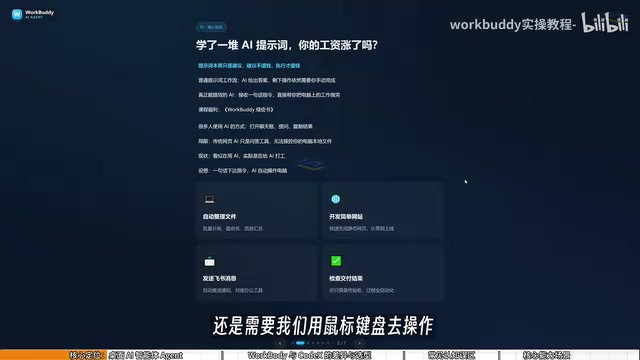
The fundamental difference between a Desktop AI Agent and web-based AI lies in "tool-calling permissions." Web-based AI (like the ChatGPT web interface) runs in a cloud sandbox and cannot access a user's local system. A desktop Agent, through a client program running on the local machine, gains the ability to operate the local file system, call local application interfaces (APIs), and even simulate mouse and keyboard actions. This type of architecture is commonly called a "tool-augmented Agent" — the large language model handles intent understanding and step planning, while the local execution module handles actual tool calls. It's precisely this extra "execution arm" that allows an Agent to transform AI output from "text suggestions" into "completed tasks," shifting the user's role from operator to reviewer.
WorkBuddy vs. CodeX — Which Should You Learn First?
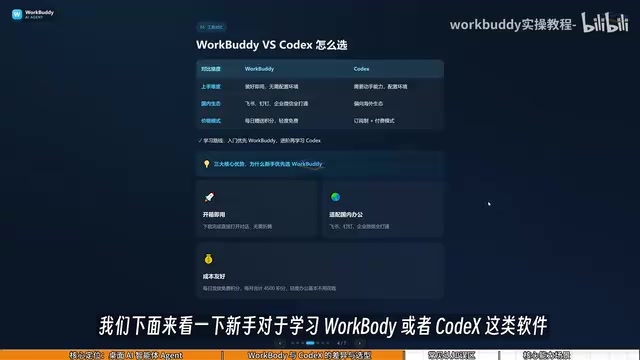
Given that the more powerful CodeX already exists, why bother learning WorkBuddy? The video creator uses a fitting analogy: if CodeX is a special forces soldier, then WorkBuddy is a "college student special forces soldier."
CodeX is powerful, but it needs a knowledgeable commander to lay out detailed battle plans — specifying exact files, directories, and execution parameters. That requires fairly specialized skills and experience. WorkBuddy, on the other hand, is like an obedient college intern: complex tasks might be beyond it, but everyday work like "send this file to someone" or "organize this batch of documents" is well within its capabilities. For most professionals who aren't yet ready to handle CodeX, learning to direct this "college student" is actually the more practical approach.
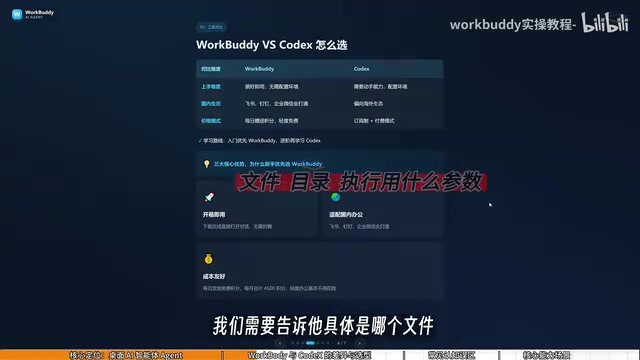
The core differences between the two can be summarized in three points:
Learning Curve
WorkBuddy is ready to use right after installation — no environment setup, no command-line work required. CodeX demands stronger hands-on technical ability and is better suited for people with a programming background.
Ecosystem Compatibility
WorkBuddy is deeply integrated with Chinese workplace tools like Feishu, DingTalk, WeCom, and Tencent Docs. CodeX is more oriented toward overseas ecosystems and has limited support for domestic office software.
Cost
WorkBuddy uses a credit-based system with daily free credits. During promotional events, users may receive thousands of extra credits — consistently claiming daily credits for a month can accumulate at least 3,000 credits. CodeX uses a subscription model, meaning real money out of pocket even while you're still learning.
A practical tip: after logging into WorkBuddy, click your avatar in the bottom left, find the check-in option in "Buddy加油站" (Buddy Fuel Station) to claim your credits. Credits accumulate, so unused credits today carry over to tomorrow.
OpenAI CodeX (referring here to CodeX CLI or the Codex Agent, not the earlier code completion API) is a code-execution Agent launched by OpenAI. It can autonomously read and write files, run code, and call command-line tools in a terminal environment. Its strengths lie in complex software engineering tasks, but operating it requires users to clearly describe file paths, execution environments, and expected outputs — which isn't beginner-friendly for non-technical users. Additionally, CodeX is currently optimized primarily for overseas users, with relatively weak native support for Chinese workplace ecosystems (Feishu, DingTalk, WeCom, etc.). Understanding this context helps explain why WorkBuddy is the more cost-effective entry point for everyday professionals in China.
Three Common Misconceptions for New Users
Misconception #1: WorkBuddy is just GPT in a desktop chat wrapper. Not quite. Beyond chatting and giving advice like GPT, it can also read local files, call tools, and automatically execute tasks. The mindset must shift from "asking AI questions" to "managing AI to do work."
Misconception #2: CodeX is more powerful, so just learn CodeX. CodeX has a higher barrier to entry and is suited for people with programming experience. For most workplace tasks, WorkBuddy alone is more than sufficient. Only move on to CodeX once you've genuinely outgrown WorkBuddy — this learning path minimizes costs.
Misconception #3: More features means harder to learn. WorkBuddy's interface is actually very similar to tools like Doubao and GPT. What you really need to learn isn't the interface — it's changing how you give instructions, shifting from "asking questions" to "issuing commands" so it can operate your computer.
What WorkBuddy Can Actually Do
Real-world use cases center on office automation:
- File Management: Batch sorting, batch renaming, and multi-document information consolidation for local files. The creator shared a real example — when recording courses, files are named 01, 02, 03, but if one lesson is too short and gets merged into the previous one, the sequence breaks to 1, 3, 4. Manually renaming each file is tedious; just let WorkBuddy handle the renaming automatically.
- Document and Data Processing: Weekly report organization, Excel spreadsheet processing.
- Website Development: Building simple websites.
- Collaborative Work: Connecting to Feishu and DingTalk to send messages and periodically generate work reports.
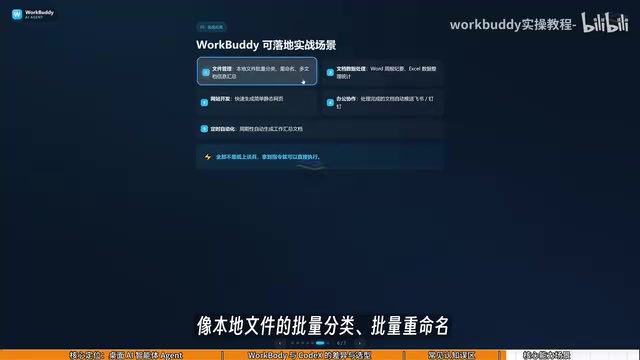
None of this is theoretical. With clear instructions, WorkBuddy can execute directly and deliver results.
Takeaway: Evolve Your Mindset from Questioner to Manager
The core of this introductory guide is helping you understand the essential difference between ordinary AI chat and a desktop AI Agent. WorkBuddy's role is clear — it's your AI employee, not a chatbot. It and CodeX each have their own applicable scenarios and cost structures, and for workplace professionals, using WorkBuddy to get work done first is the lower-cost learning path.
Ultimately, the key to getting the most out of tools like this isn't memorizing features — it's a mindset shift: evolving from someone who asks AI questions into a manager who delegates tasks and reviews results.
Related articles

ChatGPT Space Launches: Team Collaboration and New Pages Features Explained
ChatGPT Space is OpenAI's new team collaboration feature with Pages, real-time collaboration, and Slack/Google Drive sync. We break down its privacy design, multi-platform integration, and the full workflow from conversation to document.

Migrating Apache Spark UDFs to GPU Acceleration with AI Agents
NVIDIA developer blog explains how AI Agents rewrite Apache Spark UDFs for GPU acceleration, covering migration criteria, agent rewriting and verification workflows, plus pitfalls like result consistency and CPU-GPU transfer overhead.

Zed Editor v0.40.4-rc2 Released: Usage Credits Now Available Without Upgrading
Zed editor releases v0.40.4-rc2, allowing users to use usage credits for AI features without upgrading to a paid plan, lowering the trial barrier.