WorkBuddy Getting Started Guide: Turning AI from a Chatbot into an Office Employee
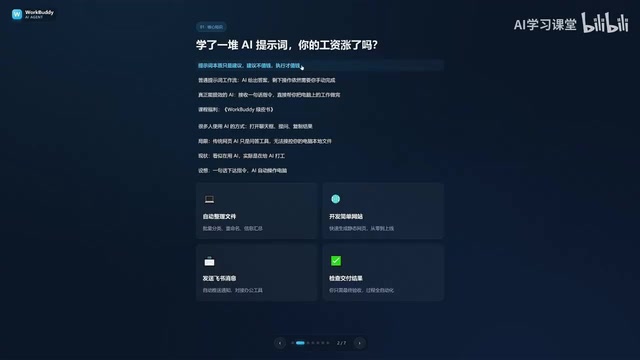
WorkBuddy is a desktop AI Agent that executes real office tasks — not just answers questions.
This article introduces WorkBuddy, a desktop AI Agent that goes beyond chatting to directly operate your local computer — handling file management, document processing, and messaging on platforms like Feishu and DingTalk. Compared to OpenAI Codex (powerful but high-barrier and coding-dependent), WorkBuddy is beginner-friendly, deeply integrated with Chinese workplace tools, and offers free daily credits. The central argument: prompts are just suggestions; real value comes from execution. The key mindset shift is moving from passively asking AI questions to actively managing AI as your employee.
Many people have been using AI for a while now — they've learned a ton of prompts, yet their salaries haven't budged. The reason is simple: prompts are essentially suggestions, and suggestions don't pay the bills. What actually creates value is action that gets executed. WorkBuddy is exactly the tool that turns "suggestions" into "execution" — it doesn't settle for answering questions; it directly operates your computer and completes real office tasks on your behalf.
What Exactly Is WorkBuddy
WorkBuddyAd is a desktop AI Agent, not just a chat window. Most large language models work like this: you ask a question, the AI outputs a text answer. Even the most feature-rich ones can generate images, music, or video — but they fundamentally lack permission to touch the files on your local computer.
This means traditional web-based AI is more like a Q&A tool. It may look like you're "using AI," but the hands-on execution still falls on you — clicking through menus, typing commands, step by step. WorkBuddy is different: you simply give it a task in plain language, just like talking to a real person, and it automatically handles the entire process — from research and planning to execution and delivery.
Its core value lies in being able to directly operate your local computer to complete real office work — not just hand you advice or a how-to guide. Think of it as a friendlier, lower-barrier desktop alternative to Codex — no complicated network setup, no tedious configuration required.
The fundamental difference between an AI Agent and a standard large language model comes down to tool-calling capability. A standard LLM can only generate text within a chat window. An Agent framework, however, allows the model to actively invoke external tools during its reasoning process — including the file system, browser, API endpoints, and even simulated mouse and keyboard input — converting language output into real computer operations. This architecture is often called the "perceive–plan–execute" loop: the Agent first understands user intent, then breaks the task into sub-steps, and finally calls the appropriate tools to complete each step while feeding results back into the next round of reasoning. WorkBuddy, as a desktop Agent, essentially runs this loop locally — which is why it can read and write files on your computer, open applications, and interact with them, all without relying on a cloud-based remote desktop.
How WorkBuddy Differs from Codex
If Codex already exists and is more powerful, why bother learning WorkBuddy? The video uses a vivid analogy: if Codex is a "special forces soldier," WorkBuddy is a "college-student special forces soldier."
Codex is powerful, but it needs a skilled commander to draw up a detailed battle plan — specifying the exact file, directory, execution parameters, and so on. That demands a fair amount of professional knowledge and experience. WorkBuddy is more like an eager college student: maybe not built for the most complex missions, but perfectly capable of simple tasks like "send this file to someone" or "organize these records." For someone just starting out, managing a "college student" is obviously far easier than commanding a "special forces soldier."
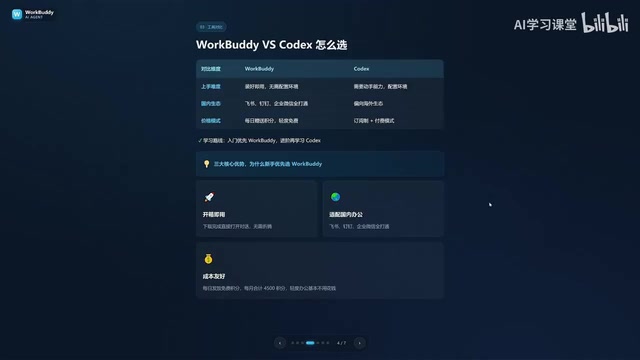
The two tools differ across three dimensions:
- Learning curve: WorkBuddy works right out of the box — no environment setup, no command-line knowledge required. Codex demands stronger technical skills and a programming foundation.
- Ecosystem fit: WorkBuddy integrates deeply with Chinese workplace tools like Feishu, DingTalk, WeCom, and Tencent Docs. Codex leans toward Western ecosystems and has limited support for domestic office software.
- Cost: WorkBuddy gives away free credits daily, with bonus credits available during promotions — consistently claiming them over a month can net you at least 3,000 credits. Codex operates on a paid subscription model, meaning real money from day one of learning.
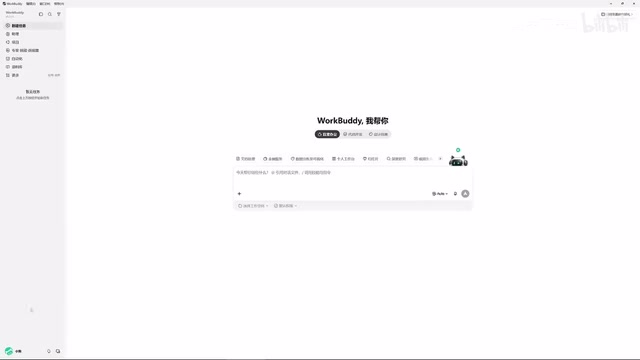
After logging into WorkBuddy, it's worth clicking your avatar in the lower-left corner every day, finding the "Buddy Refueling Station," and checking in to collect your daily credits. Credits accumulate — anything you don't use today carries over to tomorrow.
The recommended learning path: regular office workers should prioritize WorkBuddy to get real work done — it's more than sufficient for most scenarios. Only when you genuinely hit its limits should you invest in learning Codex. This approach keeps the learning cost as low as possible.
OpenAI Codex is a model designed specifically for code generation and execution. Its workflow depends on a sandboxed code execution environment: you describe a requirement, Codex generates a script, and the script runs in an isolated environment to handle file operations or data processing. This means users need at least a basic grasp of programming concepts — enough to verify whether the generated script matches their intent and to specify paths and parameters correctly. Without that, it's easy to end up in a situation where "the AI misunderstood the task and you can't even tell." On top of that, Codex is currently bundled into ChatGPT's paid subscription tier, adding an extra access barrier for users in China. This is the technical reality behind the "special forces soldier needs a professional commander" analogy: the tool is powerful, but the cost of using it is equally high.
Three Common Misconceptions
New users often fall into a few traps when first encountering tools like this. Clearing them up early helps build the right mindset.
Misconception #1: WorkBuddy is just a repackaged desktop chat panel. That's not accurate. Beyond chatting and offering suggestions like ChatGPT, WorkBuddy can read local files, call tools, and automatically execute tasks. The key shift in using it is moving from "asking AI questions" to "managing AI to do work" — you're the manager, WorkBuddy is your employee, and your computer is your company.
Misconception #2: Codex is more powerful, so I should just learn Codex directly. Codex has a steeper learning curve and is better suited for people with a programming background. For the average office worker, starting with WorkBuddy is a smarter investment. For most job functions, WorkBuddy alone is plenty.
Misconception #3: More features means harder to learn. In reality, WorkBuddy's interface closely resembles familiar AI tools like Doubao, Tongyi, and ChatGPT. The learning focus isn't the interface itself — it's shifting how you think about prompting: from simply asking questions, to issuing commands that tell it to operate your computer. You can absolutely learn it by following along with videos while practicing hands-on at the same time.
What WorkBuddy Can Do for You
WorkBuddy's capabilities cover a wide range of everyday office scenarios — and these aren't theoretical. Give it a clear instruction and it executes directly.
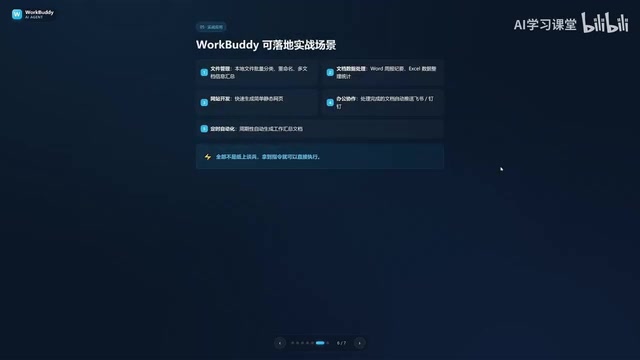
File management is the most intuitive use case: bulk categorization, batch renaming, and aggregating information across multiple documents. The video's author shared a real pain point of their own: when recording tutorials, files get named 01, 02, 03, 04 — but if one lesson is too short and needs to be merged with the previous one, the sequence suddenly becomes 1, 3, 4. Renaming every folder by hand is tedious. Letting WorkBuddy handle the renaming automatically takes only seconds.
Beyond that, it handles document-related tasks like drafting weekly reports, organizing Excel spreadsheets, and building simple websites. It also supports collaborative work — sending messages on Feishu or DingTalk, generating periodic work summaries, and more. From writing proposals, building spreadsheets, and analyzing data, to creating content, designing posters, developing software, and even taking over your browser to operate various apps — WorkBuddy delivers the finished result directly to you.
Evolving from "AI Question-Asker" to "AI Manager"
The core goal of this introductory content is to help you understand the fundamental difference between a standard AI chat tool and a desktop AI Agent. The former only offers suggestions; the latter actually gets things done.
Once you understand WorkBuddy's role — it's your AI employee, not just a chatbot — and you've grasped the differences between it and Codex, its applicable scenarios, and its costs, you'll be ready to make a key mental shift: from being a passive "AI question-asker" to becoming an active "AI manager."
Real efficiency gains come from simply issuing instructions, checking the final deliverable, and handing off all the tedious execution to AI. For office workers who want AI to genuinely work for them, this is a far more valuable skill than memorizing prompts.
The practical foundation of the "AI manager" mindset is learning to break a vague goal into a concrete sequence of instructions that an AI can execute. An effective instruction typically contains three elements: the target (which file/app/platform), the desired outcome (what the result should look like), and constraints (format, time, scope, etc.). For example, "Summarize the sales figures from all xlsx files in the reports folder on the desktop into a new spreadsheet, sorted by month" is far more likely to be executed correctly than "help me organize the reports." This style of task description requires no programming background, yet it significantly improves AI execution accuracy — and it's the key skill that lets ordinary office workers actually capture the efficiency gains AI promises.
Related articles

WorkBuddy in Practice: How Tencent's AI Agent Is Reshaping Office Workflows
An in-depth analysis of Tencent WorkBuddy AI agent: it reads local files, executes multi-step tasks, runs on schedules, and supports remote control—how is it fundamentally different from conversational AI? This article combines practical cases to help you understand its core capabilities and use cases.

Codex App Complete Guide: From Installation to Hands-On Practice — AI Automatically Organizes Files and Builds Reports
Codex App complete guide: install from the app store, configure everyday work mode, and use real coffee shop data to practice file organization, Excel reports, and visual dashboards. Learn Plan Mode and the little pet feature — master Codex's AI automation workflow in one episode.

Getting Started with Langfuse: Building a Financial Analysis Agent and Evaluation Platform
A Langfuse tutorial: explore the core capabilities and boundaries of this open-source AI Engineer platform, and learn how to build an enterprise-grade log tracing, evaluation, and observability platform for a Harness-architecture financial analysis multi-agent system, covering prompt management, token cost analysis, and integration with frameworks like LangChain.