WorkBuddy in Practice: How Tencent's AI Agent Is Reshaping Office Workflows

Tencent WorkBuddy turns AI from an advisor that only gives suggestions into a digital employee that can operate files and execute tasks.
Using Tencent's AI agent desktop tool WorkBuddy as an example, this article analyzes the paradigm leap in AI-powered office work from "content generation" to "task execution." Traditional conversational AI can only provide steps and suggestions, while WorkBuddy can directly read and write local files, automatically decompose and execute multi-step tasks, and also supports scheduled unattended operation, remote control, MCP external system integration, and Skill extension. Through an HR case of batch-processing 80 resumes, it demonstrates the difference of completing the entire process with a single instruction and compares traditional AI with execution-oriented agents across six dimensions, finally offering getting-started advice.
From "Telling You How" to "Doing It for You": The Essential Leap in AI-Powered Office Work
In the past, when we used conversational AI like ChatGPT or Doubao, we were essentially asking a "smart consultant" a question—it would tell us the steps, generate code or copy, but all the actual execution still required us to do it ourselves. WorkBuddyAd is changing this paradigm. According to a step-by-step tutorial by a Bilibili creator, WorkBuddy is Tencent's AI agent desktop toolkit, officially positioned as an "all-scenario workplace AI assistant." Its core difference is: it doesn't just talk—it takes action.
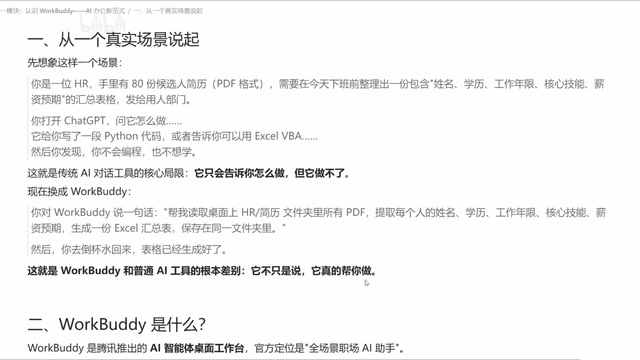
Take a typical HR scenario: you have 80 candidate resume PDFs and need to extract names, education, years of work experience, core skills, and salary expectations, then compile them into an Excel summary. Traditional AI would generate a Python script and guide you to run it manually; WorkBuddy, however, only needs a single instruction—"Read the resume PDFs in the specified folder, extract the above fields, generate an Excel summary table, and save it"—and it will automatically handle file reading, information extraction, and table generation. All the user needs to do is check whether the output meets requirements.
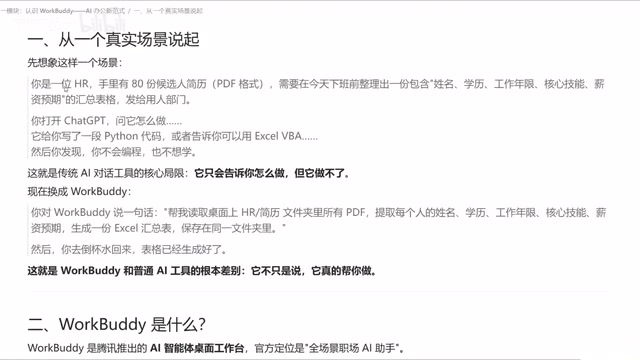
This combination of "brain + hands + automation engine" allows WorkBuddy to truly take over repetitive work on a local computer. The creator points out that this is the fundamental dividing line between WorkBuddy and ordinary Q&A AI.
Breaking Down WorkBuddy's Core Capabilities: What Can It Actually Do?
1. Local File Operations and Multi-Step Task Execution
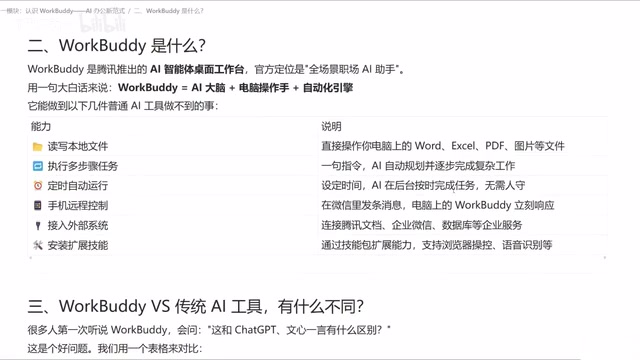
WorkBuddy can read and write local files, supporting formats such as Word, Excel, PDF, and images. When faced with complex requirements, it can understand intent, automatically plan an implementation path, and execute multi-step tasks step by step. If problems arise midway, it can redesign the path. In the video, the creator emphasizes that this dynamic replanning capability is difficult for ordinary AI tools to match.
Multi-step task execution and dynamic replanning is the core capability that distinguishes an agent from single-turn Q&A. Its technical foundation is typically referred to as the ReAct (Reasoning + Acting) paradigm: the model operates in a "think—act—observe" loop, first decomposing goals, selecting tools, executing operations, and then judging the next step based on returned results. Dynamic replanning means that when a step fails or environmental feedback does not match expectations (e.g., abnormal file format, missing fields), the agent does not simply error out and terminate; instead, it re-evaluates the current state and adjusts the subsequent path. This is fundamentally different from the traditional "one-shot script generation" approach—the latter fails entirely once a single line of code goes wrong, while the former has fault tolerance and adaptability, which is the key reason execution-oriented agents can take over complex tasks in real office scenarios.
2. Scheduled Tasks and Unattended Operation
WorkBuddy has a built-in automation engine that can turn solidified workflows into scheduled tasks. For example, it can automatically compile and send weekly reports every week—as long as WorkBuddy remains running on the computer, no manual supervision is needed. This stands in sharp contrast to traditional AI, which requires "a person on site to issue instructions."
3. Remote Control and Cross-Device Collaboration
Through a mobile mini-program or WeChat client, users can send instructions to WorkBuddy on the computer, remotely trigger operations, and receive results. This means that even when you are not at your computer, you can have WorkBuddy handle urgent tasks.
4. External System Integration and Skill Extension
WorkBuddy supports connecting to external systems such as Tencent Docs, WeCom, and databases via MCP (Model Context Protocol), breaking down data silos. At the same time, users can install extension skills to enhance capabilities, such as browser data scraping, screenshots, and audio-to-text summaries. The creator specifically mentions that these extensions continuously broaden WorkBuddy's applicability.
MCP (Model Context Protocol) is a standardized protocol proposed and open-sourced by Anthropic in late 2024, designed to let AI models connect to external data sources and tools in a unified way. You can think of it as the "USB-C interface" of the AI world: in the past, every AI application that wanted to connect to Tencent Docs, a database, or WeCom needed a separately developed custom integration; with MCP, as long as the external system provides a protocol-compliant "server," the AI client can plug and play its read, write, and query capabilities. MCP typically includes three types of primitives—resources (data that can be read), tools (operations that can be executed), and prompt templates—and supports both local process and remote service transport. For execution-oriented agents like WorkBuddy, MCP is key infrastructure for breaking down data silos and extending "desktop automation" into enterprise-level process automation.
Skill is a pluggable module in agent platforms used to encapsulate specific capabilities, typically including a documentation section, invocation logic, and required permission declarations. Unlike the underlying protocol MCP, a Skill is more of a "task-oriented capability package"—for example, browser data scraping, screenshots, and audio-to-text summaries are essentially packaged sets of fixed operations that the agent automatically loads and invokes when it recognizes the corresponding intent. The significance of this design is that the agent's core reasoning capability remains unchanged, but installing different Skills can quickly expand its applicability, avoiding the need to modify the main program every time a new requirement arises. Users can also combine skills according to their industry scenarios to form personalized workflow capability sets.
Comparison with Traditional AI Tools: See the Differences in One Table
In the course, the creator systematically compares them across six dimensions:
- Core positioning: Traditional AI is a conversational tool; WorkBuddy is an execution agent.
- File operations: Traditional AI cannot read or write local files; WorkBuddy can.
- Multi-step tasks: Traditional AI is one question, one answer; WorkBuddy can automatically decompose and execute step by step.
- Unattended operation: Traditional AI requires manual triggering; WorkBuddy supports scheduled tasks running in the background.
- Output: Traditional AI returns text; WorkBuddy delivers final file products (Word, PDF, Excel, etc.).
- Suitable task types: Traditional AI is suitable for single-step information queries; WorkBuddy is suitable for complex, cross-application process-based work.
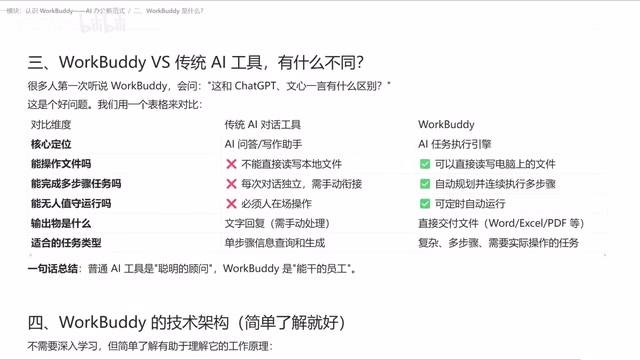
In the creator's words, ordinary AI is a "consultant," while WorkBuddy is an "employee with hands and feet."
Who Is WorkBuddy For? Getting-Started Advice and Caveats
WorkBuddy requires no complex configuration, is compatible with mainstream domestic office software, and offers a free version, making it friendly to Chinese users. The creator spent nearly three months polishing a 28-lesson practical course covering four sections: getting started, case studies, advanced topics, and industry applications—from basic operations to real office cases and advanced workflows.
For beginners, it is recommended to start with a single repetitive task (such as resume summarization or weekly report organization), become familiar with the process of issuing instructions and verifying results, and then gradually try scheduled tasks and external system integration. Note that WorkBuddy's automation capabilities depend on the desktop program running, and complex tasks still require users to clearly describe requirements and check outputs. It is not magic—it is an efficiency lever.
Conclusion: AI-Powered Office Work Enters the "Execution Era"
The trend WorkBuddy represents is AI moving from "content generation" to "task execution." When AI can operate files, plan steps, run on a schedule, and connect to external systems, the barrier to office automation is greatly lowered. For professionals hoping to escape repetitive work, this may be a new tool worth investing time to master.
One-line Summary
Tencent WorkBuddy turns AI from an advisor that only gives suggestions into a digital employee that can operate files and execute tasks.
Paragraph Summary
Using Tencent's AI agent desktop tool WorkBuddy as an example, this article analyzes the paradigm leap in AI-powered office work from "content generation" to "task execution." Traditional conversational AI can only provide steps and suggestions, with actual operations still requiring manual completion; WorkBuddy, however, can directly read and write local Word, Excel, and PDF files, automatically decompose and execute multi-step tasks, and also supports scheduled unattended operation, remote control via WeChat mini-program, MCP external system integration, and Skill extension. Through an HR case of batch-processing 80 resumes, the article intuitively demonstrates the difference of "completing the entire process with a single instruction" and compares traditional AI with execution-oriented agents across six dimensions including core positioning, file operations, and multi-step tasks, finally offering getting-started advice to begin with a single repetitive task.
Related articles
 Tech Frontiers
How Do You Stop AI Agent Emails From Sounding Like AI? One Developer's Solution
AI agent emails always sound like AI? A developer shares reright: a rewrite step that validates numbers, names, and links, preventing humanizers from tampering with key info. Test data and integration details inside.
 Tech Frontiers
Starlink Mobile: SpaceX's Carrier Ambitions and the 5G Deployment Challenge
SpaceX plans to make Starlink Mobile a mainstream carrier, deploying thousands of direct-to-cell satellites and building a terrestrial 5G network to challenge AT&T, Verizon, and T-Mobile. This article analyzes its dual-track strategy, 5G deployment challenges, and the competitive landscape.
 Tech Frontiers
OpenAI Raises Another $11 Billion, Valuation Hits $1.25 Trillion
OpenAI has raised an additional $11 billion in a new funding round at a valuation of $1.25 trillion. The deal is not yet closed and is expected to be completed in the coming weeks, further consolidating its leading position in AI.