WorkBuddy in Practice: Mastering AI Agent Office Automation with Skills

WorkBuddy's three-tier system — Skills, Experts, Expert Teams — turns AI into a composable automation agent.
This article breaks down WorkBuddy's core capability architecture: Skills are atomic execution units (e.g., generating PPTs or sending emails); Experts layer domain knowledge on top of Skills for business-specific roles; Expert Teams coordinate multiple Experts for complex workflows. A hands-on demo shows AI reading a Snake game HTML file and generating a structured PPT. Beginners are advised to start with Office-suite Skills and iterate with multi-turn prompting.
The Soul of WorkBuddy Isn't the Tool Itself — It's the Skills
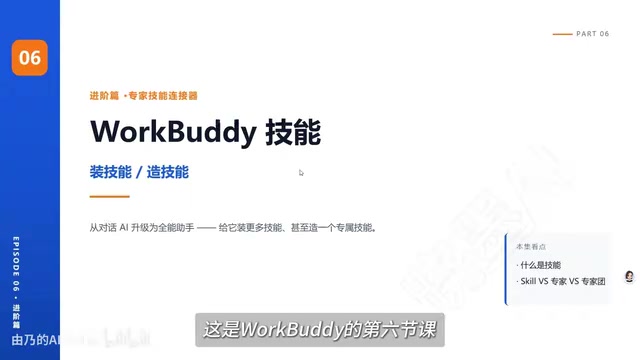
Many users feel underwhelmed the first time they try WorkBuddyAd (referred to as "WorkBody" in the video series). The problem is almost always the same: they never tap into its core capability — Skills. This product, flagged as a strategic priority, derives its real potential from the ability to attach powerful Skills that evolve AI from a chat tool into an Agent that actually gets work done.
As explained by the instructor of this Bilibili course series, a Skill is essentially a specific execution capability granted to the AI — for example, the ability to send emails or manipulate PowerPoint files. These capabilities aren't conjured from thin air; they're reusable modules built through continuous training and refinement.
From a product architecture perspective, WorkBuddy's Skills closely mirror the concept of "Tool Use" in the broader AI Agent space. Large language models on their own can only generate text. By wrapping external tools as callable Skills, AI breaks out of the pure text-generation box and can actually manipulate files, send emails, or read and write databases. This design philosophy is the same as OpenAI's Function Calling and Anthropic's Tool Use — at its core, it's about letting the model decide when to invoke which capability during reasoning. WorkBuddy's differentiator is productizing these capabilities into a "Skill Library," so non-developers can extend the AI's execution boundary by clicking to install rather than writing code.
How to Install and Invoke Skills
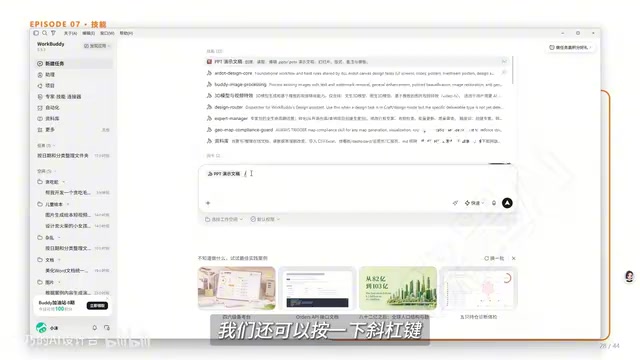
Inside WorkBuddy, opening the "Skills" panel reveals a range of commonly used capabilities. The "PPT Presentation" skill, for instance, gives the AI the ability to create, read, and edit PowerPoint files once installed. The process is straightforward: browse the Skill Library, click Install, and the skill becomes available in your conversations.
Invocation is flexible. The video demonstrates three methods: pressing / to pull up the skill list, clicking the + button next to the chat input to select a skill, or loading a local skill. The "Experts" feature covered in a previous lesson is accessed from the same location. This unified entry point significantly lowers the barrier for first-time users.
Hands-On Demo: From an HTML Game to a Project Showcase PPT
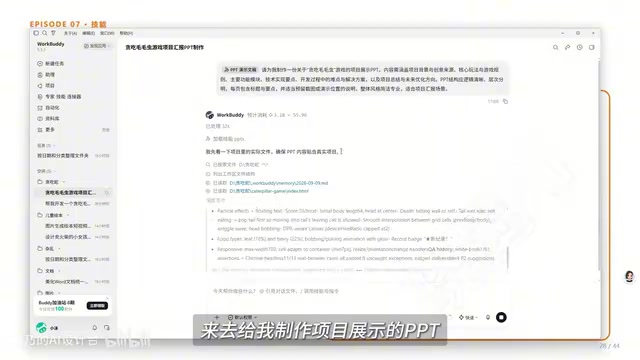
The course uses a concrete example to demonstrate Skills in action. The instructor takes a previously built "Snake Game (Caterpillar Snake)" game document and instructs the AI to turn it into a project showcase PPT — running the prompt through the "Enhance Prompt" feature before sending it for good measure.
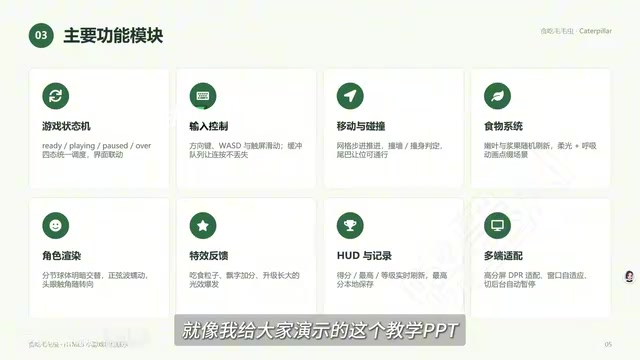
The AI genuinely reads the completed Snake HTML file in the workspace and generates a PPT based on it. The cover slide features a screenshot of the running game — proof that it actually "looked at" the game rather than fabricating content. The subsequent slides cover project background, core gameplay, key features, technical highlights, development challenges, and a summary. The structure is thorough, and the copy is largely written by the AI autonomously.
One practical takeaway worth noting: the AI's first output is rarely ready to use as-is. The instructor openly admits that even his own teaching slides went through multiple rounds of revision. The user's real job is steering the direction and iterating through conversation — adding animation requests, for example — with the AI accommodating each round of feedback. In other words, Skills provide a starting point for productivity, not the finish line.
Skills vs. Experts vs. Expert Teams
The course clarifies three concepts that are easy to conflate — and understanding them is key to grasping WorkBuddy's Agent architecture.
Skill
A Skill gives the AI the ability to do something. It's the most fundamental execution unit — generating a PPT, sending an email. It answers the question: "Can this be done?"
Expert
An Expert layers domain knowledge on top of capabilities, making it an "AI role that understands a specific field." An Expert can typically invoke multiple Skills, making it far more suited to real-world business scenarios than a single Skill alone.
Expert Team
An Expert Team is composed of multiple Experts working together, designed for complex tasks that require multi-role collaboration. The video notes that building the Snake game called for an Expert Team — a single Skill or Expert couldn't cover the full development workflow on its own.
To put it simply: Skills give AI the ability to act, Experts give AI domain know-how, and Expert Teams give AI the capacity to collaborate. Together, they form a complete capability ladder from atomic actions to team-level coordination.
This three-tier system maps neatly onto a more universal AI Agent framework: Skills correspond to "Atomic Tools," Experts to "Single Agents," and Expert Teams to "Multi-Agent Systems." The core value of multi-agent collaboration lies in task decomposition and parallel execution — a complex project like building a full game can be broken into subtasks (requirements analysis, coding, testing) and distributed across different Experts running concurrently, with a coordinator aggregating the results. This architecture dramatically improves efficiency on complex, cross-domain tasks, but also places higher demands on task orchestration and context passing. That's precisely why the video emphasizes that Expert Teams are better suited for "full-process development" rather than simple single-step operations.
Getting Started: Advice for Beginners
This course series emphasizes learning by doing — not bookmarking tools and never opening them again. For users looking to get started with AI Agent automation, a practical path looks like this: begin with Skills related to the Office suite (Excel, Word, PowerPoint), since these are high-frequency needs with immediate, visible feedback. Then gradually experiment with Experts and Expert Teams to handle more complex, multi-step tasks. Finally, make consistent use of "Enhance Prompt" and multi-turn conversation to refine AI output to a deliverable standard.
The series is also paired with a structured "Blue Book" covering four modules: installation guide, case breakdowns, Skill customization, and industry applications — bundled with 12 commonly used Skills. For beginners, this kind of structured reference material can dramatically cut down on trial-and-error time. All in all, WorkBuddy's value isn't in "generating everything from a single sentence" — it's in modularizing and composing AI capabilities so that everyday office users can build their own automated workflows.
Related articles

Chain of Thought Isn't Just for AI: How Humans Can Use CoT to Improve Thinking Quality
Chain of Thought isn't just a prompt trick for large models. Starting from a Hacker News discussion, this article analyzes why CoT works for human thinking too, breaks down actionable ways to transfer it, and highlights the key differences between human CoT and machine CoT.
Cloudflare Teams Up with OpenAI: Closi…
Cloudflare Teams Up with OpenAI: Closing the Loop from Vulnerability Discovery to Defense with AI
Cloudflare uses OpenAI Daybreak to investigate security vulnerabilities and generate reviewable remediation plans, while developers use Codex to boost coding efficiency and quality.

Orca Multi-Agent Orchestration in Practice: A Guide to Parallel Collaboration with Claude and Codex
Orca is Stable AI's free open-source agent workbench supporting 34 agents like Claude Code and Codex in parallel. Learn its Git worktree isolation, multi-model orchestration, and mobile management.