WorkBuddy Mini Program Development in Practice: A Complete Guide to No-Code Building and Monetization
Zero-foundation WorkBuddy mini program monetization requires clarity on boundaries, scenarios, and costs first.
Based on episode 1 of a Bilibili creator's paid course, this article breaks down key concepts for building mini programs with WorkBuddy from zero: WorkBuddy handles page code generation, cloud service integration, code uploads, and review submission—but account registration, entity verification, filing, and compliance are on you. The account always belongs to you. Five applicable scenarios include brand showcase, appointment services, event services, internal collaboration, and lightweight tools. The decision formula: "information display + form submission + simple queries" works; real-time communication, high-frequency interaction, and high-performance rendering don't. Regulated industries without qualifications won't pass review—submitting doesn't guarantee approval. Costs split into three accounts: time (generation is fast, review takes days), account (long-term operation needs your own), and cloud services (resource points per tier, per application).
Why Can't You Build a Mini Program After Watching So Many Tutorials?
At the start of the video, the Bilibili creator throws out a sobering statistic: 90% of people fail to learn how to build mini programs with WorkBuddyAd—not because the tool is hard to use, but because online tutorials only scratch the surface. Nobody tells you where the boundaries are, where the pitfalls lie, or where the review process gets stuck. He spent 12 days building a fully automated mini program development workflow with WorkBuddy. Last month, he uploaded 5 mini programs to WeChat, each earning an average of 2,100 yuan. Combined with small data-organization gigs, his passive income reached 24,000 yuan. These numbers may not apply to everyone, but the fact that it took him only half a month to go from zero to a working monetization pipeline shows that the path itself is replicable.
This article is based on the publicly available first episode of the creator's 32-lesson paid course, combined with WorkBuddy's official capability documentation. It breaks down "building mini programs through conversation with zero foundation" into three key modules: understanding boundaries, judging scenarios, and managing cost expectations. No coding, no developer tools to install—but you do need to set your expectations and methodology straight first.
What WorkBuddy Actually Does for You—and What It Doesn't
The biggest misconception among beginners is thinking that "AI-generated" means "fully automated launch." The creator lays out the division of labor very clearly, and here's his breakdown directly:
Four things WorkBuddy does for you:
- Generates mini program page code—You don't need to understand the project structure, and you don't need to install WeChat Developer Tools locally. Cloud-based generation is officially supported.
- Connects cloud services on demand—When you need data storage, user login, or image uploads, it prompts you to enable the corresponding cloud services. It handles the configuration—you don't touch any technical parameters.
- Uploads code—The most tedious step in the traditional workflow (clicking upload in Developer Tools, filling in version numbers, writing release notes) is handled for you.
- Submits for review, generates trial versions, and publishes tasks—Note the wording: it submits on your behalf, not gets it approved on your behalf.
Four things you must do yourself:
- Clearly articulate your requirements—AI doesn't know how many locations your store has or how your booking time slots work. This is the focus of episode 2.
- Register a mini program account—You can scan a QR code to try the trial version, but long-term operation requires your own account.
- Entity verification and filing (ICP registration)—Hard requirements from WeChat that nobody can do for you.
- Review rules and operational compliance—Content compliance and category matching are your responsibility.
The creator especially emphasizes this official statement: The mini program account always belongs to you. This means you're not publishing under someone else's shell—asset ownership is clear, and that's the foundation for this to work long-term.
The standard WeChat mini program development process involves several mandatory steps: registering a mini program account on the WeChat Public Platform and obtaining an AppID, downloading and installing WeChat Developer Tools, writing or generating code locally, uploading code through Developer Tools with version numbers and release notes, submitting for review in the backend, and publishing after approval. "Entity verification" means validating account ownership with enterprise, sole proprietorship, or other organizational credentials. Individual entities can also register but with limited features. "Filing" refers to ICP registration required by the Ministry of Industry and Information Technology before a mini program can officially go live. These two steps are hard legal and platform-level thresholds that no tool can bypass.
Match Your Idea to One of Five Scenarios: Can It Be Done?
The creator lists five officially supported trial scenarios, each with concrete examples, so you can map your own needs directly onto them.
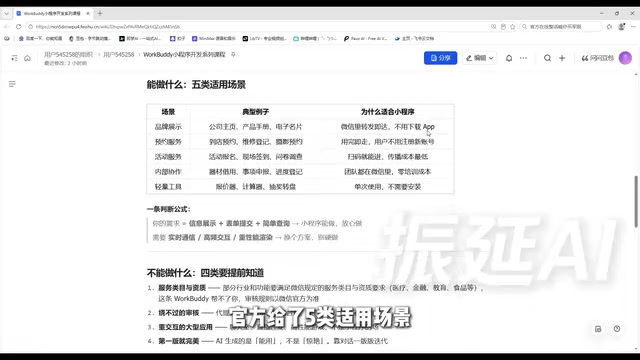
Category 1: Brand showcase—Company homepages, product catalogs, digital business cards. The advantage is that sharing within WeChat means instant viewing—no app download, no URL typing. A digital business card mini program is more effective than sending a PDF or asking someone to save your phone number.
Category 2: Appointment services—In-store bookings, repair registrations, photography appointments. Essentially "form + record table": users fill out and submit, the merchant sees it in the backend, and it's done—no account registration needed just to book.
Category 3: Event services—Event registration, on-site check-in, surveys. The biggest advantage is scan-to-enter with minimal distribution cost—just put up a QR code at any physical location.
Category 4: Internal collaboration—Equipment borrowing, request submissions, progress tracking. Your team is already in WeChat; the learning curve of installing an extra app is 10 times higher than opening a mini program. Zero training cost is the core value.
Category 5: Lightweight tools—Quote calculators, calculators, lucky draw wheels. Single-use scenarios where users would never install an app for it.
Decision formula (distilled from the creator's own words): If your need can be broken down into a combination of "information display + form submission + simple queries," a mini program can handle it—go ahead with confidence. If you need real-time communication, high-frequency interaction, or high-performance rendering, choose another approach—don't force it. This formula helps you avoid half the pitfalls before you even start.
Things You Don't Know Now That Will Waste Your Time at Launch
The creator says this part is "not pleasant to hear but must be said upfront," because discovering it at launch is too late.
Regulated categories won't pass review. Medical consultation, financial advisory, education and training—these are industries with clear qualification requirements. Building a consultation service, selling courses, or recommending stocks—it's not that it can't be technically built, but without the corresponding category qualifications, it won't pass review. WorkBuddy can't help you here. The recommendation is: your first step shouldn't be generating pages, but checking category requirements on the WeChat Public Platform.
Submitting for review doesn't guarantee approval. Whether content is compliant, whether the category matches, whether there's any induced sharing—that's on you. Read the WeChat mini program operational guidelines beforehand, and don't put yourself in a gray area.
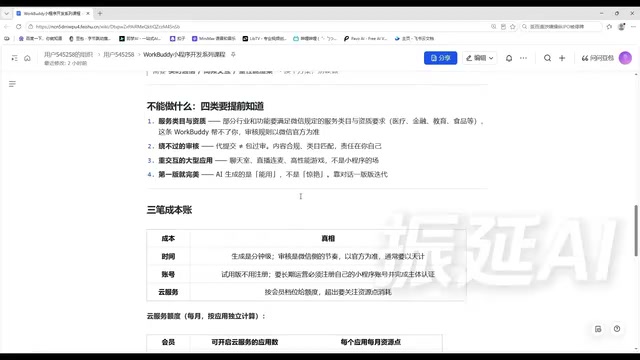
Heavy-interaction large applications aren't suitable. Chat rooms, live streaming with co-hosting, high-performance games—mini programs are designed to be lightweight and disposable. Forcing real-time battles will inevitably result in a poor experience.
Don't expect perfection in version one. The AI-generated first version is "usable," not "stunning." Ugly pages and clunky interactions are normal. The right approach is iterative conversation: say what doesn't look good, and improve version by version.
WeChat mini programs enforce category qualification management for certain industries: medical, financial, education, social, and live streaming categories must select the corresponding service category on the Public Platform and upload industry licenses or filing documents before submitting for review—otherwise the review will be directly rejected. Category selection must also match the actual functionality; wrong or missing selections will also cause review failure. Additionally, operational guidelines explicitly prohibit induced sharing, induced following, and false advertising—violations may lead to review rejection or even account bans. Checking category requirements before development is far less costly than fixing things afterward.
Get the Three Cost Calculations Right to Avoid Disappointment Later
The creator breaks down cost expectations into three accounts—a framework more practical than most tutorials.
Time account: Generation is minute-level—one sentence and you can see a clickable mini program in minutes. But review follows WeChat's pace, typically measured in days. Your mental expectation should be "build fast, wait patiently"—plan your launch timeline in advance.
Account account: The trial version lets you generate an accessible version by scanning and authorizing, but with clear limitations. Long-term operation requires registering your own account on the WeChat Public Platform and completing entity verification and filing—this is the mini program's legal identity. Don't skip it.
Cloud service account: Data storage, login, and image uploads consume resource points, calculated independently per membership tier and per application. The creator's tier reference: Trial version—10 applications / 5,000 points per application per month; Standard—30 applications / 25,000 points; Advanced—50 applications / 50,000 points; Flagship—99 applications / 150,000 points. Exhausting one application's quota doesn't affect others. Resource points start counting from the day cloud services are activated and auto-refresh on a monthly cycle.
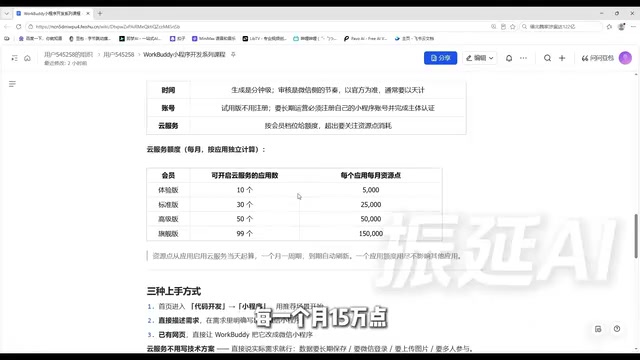
A reminder: these numbers may change with version updates. Refer to what's actually displayed in your account—don't treat them as a commitment.
WorkBuddy's cloud services use a "resource point" billing model. Resource points offset consumption from backend operations such as data storage, user login, and image uploads. Each application's quota is calculated independently—exhausting one application's points won't affect others. Resource points start from the day cloud services are enabled and auto-refresh on a monthly cycle. Membership tier determines the number of applications you can create and the monthly point ceiling per application, increasing from Trial to Standard to Advanced to Flagship. Since the platform may adjust tier and point rules, actual values should be based on what's displayed in your account.
Three Ways to Get Started and One Copy-Paste Prompt Template
The creator offers three entry points—pick whichever feels most natural:
- From the homepage, go to Code Development → Select Mini Program. The platform offers recommended scenarios—pick one close to your needs and modify it. Best for people who haven't figured out their specific requirements yet.
- Describe your requirements directly—the most flexible and commonly used approach, but with a hard requirement: your description must contain the words "WeChat mini program." Writing "help me build a booking tool" versus "help me build a WeChat mini program for bookings" can mean the difference between a web page and a mini program.
- Convert an existing web page into a mini program—the easiest path, suitable for those who've already built H5 event pages.
For cloud services, you don't need to write technical specs—just speak plainly: "data needs to be stored long-term," "needs WeChat login," "needs image uploads," "needs multi-user participation." It understands, and will prompt you to enable what's needed.
The creator provides a copy-paste prompt template built around six elements: who's using it, what they're doing, what pages are needed, whether login is required, whether data storage is needed, and what style. Each of these six elements directly affects the generated result—episode 2 will break them down one by one.
Episode 1 Doesn't Teach Operations, But It's the Foundation for the Other 11
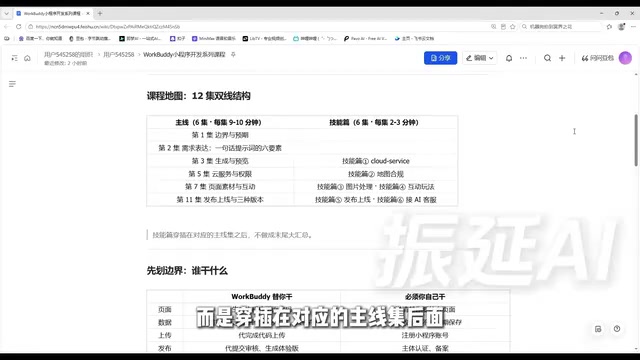
The course has 12 episodes across two tracks: the main track has 6 episodes at about 9–10 minutes each, covering the full journey from idea evaluation to launch. The skills track has 6 episodes at 2–3 minutes each, interspersed after the corresponding main episodes—each covering one skill that complements mini program development, with a copy-paste trigger prompt and one common pitfall. Total runtime is just over 70 minutes.
The episode 1 summary can be condensed into five sentences: Code and uploads—let it handle them. Accounts and reviews—you handle them. What it can do: information display, form submission, simple queries. What it can't do: bypass qualification review and heavy-interaction large applications. Generation is fast but reviews take patience—long-term operation requires your own account. Three entry points—speak plainly for cloud services.
This episode has zero operations, but if you now know which category your idea falls into, how much time it'll take, and whether you need qualifications, every step ahead will be much more stable. The next episode covers the six elements of requirement expression—the creator says that articulating your needs clearly is the only skill in this course that truly requires real effort.
Related articles

After the Right to Vote Was Lost: The Hidden Costs to American Democracy
Exploring how restrictive state voting laws, Supreme Court erosion of the Voting Rights Act, and partisan gerrymandering affect voter participation and fair representation after Democrats failed to pass the John Lewis Voting Rights Advancement Act and the Freedom to Vote Act.

Two Critical PHP Vulnerabilities Nearly Took Down the Internet: A Warning About the Fragility of the Web's Foundation
Two critical PHP vulnerabilities nearly shook the entire internet. This article analyzes why PHP vulnerabilities have such strong leverage effects, what real-world obstacles the patch chain faces, and what lessons infrastructure-level software security governance offers.
Musk Sounds the Alarm for Europe: A Wa…
Musk Sounds the Alarm for Europe: A Wave of US Tech Replacement Is Coming
Steve Blank's blog post sparks Hacker News debate: Musk's actions are prompting Europe to reconsider its reliance on US technology. This article sorts through the core arguments, the feasibility and divisions over replacing the US tech stack, and the practical impact on developers' technology choices.