WorkBuddy Practical Guide: How to Set Up Tencent's Desktop AI Employee

Complete setup guide for WorkBuddy, Tencent's local-first desktop AI agent with three-endpoint sync.
WorkBuddy is Tencent's desktop AI agent built on the OpenCloud ecosystem, designed for local deployment and data security. It reads and writes local files directly and connects to WeCom, Feishu, databases, and more. This guide covers its key differences from ByteDance's CodeBuddy, and details three critical setup points: install outside the C drive to prevent file buildup, use WeChat login to unify the desktop client, Mini Program, and mobile app, and choose the right mode (Craft/Chat/Plan) for optimal results in finance, reporting, and document automation workflows.
What Is WorkBuddy?
WorkBuddyAd is a desktop-level AI agent launched by Tencent within the OpenCloud ecosystem. Its positioning is simple: an "AI employee installed on your computer, available 24/7." Unlike the cloud-based conversational AI we're used to, its core selling point is local deployment — it doesn't run purely in the cloud. Instead, it installs directly on your machine, reads local files, accesses local resources, and can even connect to WeCom (Enterprise WeChat) or personal WeChat for remote task scheduling.
Bilibili creator Ye Fei offers an interesting industry observation: in the AI race among China's major tech companies, ByteDance's product matrix (Doubao, Jimeng, Feishu, Volcano Engine, etc.) is densely packed, while Tencent's most viable desktop AI product right now is WorkBuddy. Regardless of your field, if you're looking to pick a desktop AI agent from the crowded "lobster" category (a nickname for Claude-type products), WorkBuddy is worth trying first.
A bit of context worth clarifying: OpenCloud is a downloadable open-source agent framework originally from abroad. Using it as-is for everyday office work carries two risks — first, insufficient security controls that may accidentally delete system or local files; second, uncontrollable token consumption with no subscription model, meaning a single task could generate unpredictable costs. WorkBuddy is built on top of OpenCloud with extensive localization work that addresses both of these issues.
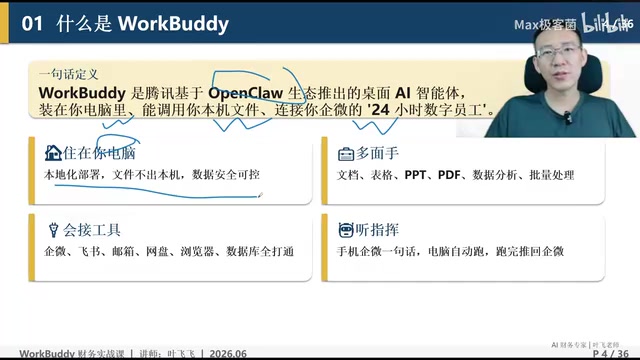
OpenCloud (also written as Open Cloud or OpenAgentCloud) is an open-source AI agent runtime framework that provides foundational capabilities like tool invocation, task planning, and memory management. Anyone can use it to build their own agent applications. Its design philosophy goes beyond "chatting" — it enables AI to proactively call external tools like file systems, browsers, and APIs to complete real-world tasks. Domestic vendors building on top of it has become a common approach: by adding permission management, cost controls, and Chinese UI adaptation, they polish the raw open-source framework into a commercial product for everyday users. WorkBuddy follows exactly this path. Its core modifications focus on sandbox isolation (preventing the agent from accidentally touching critical system directories) and token usage caps — allowing businesses and individual users to deploy it in production environments without worrying about runaway file deletions or skyrocketing bills.
Core Capabilities and Safety Design
WorkBuddy's capabilities fall into several dimensions. Local deployment means it can process data on your machine without uploading files first, eliminating the upload-then-process step that cloud AI requires. More critically, all files it generates — whether PPT, Excel, or Word reports — are saved directly to your local machine, never passing through cloud storage.
Being a "generalist" is another defining trait. According to the tutorial, if a task can be handled on a computer, WorkBuddy can generally do it. This is backed by its connector functionality, which integrates with virtually every mainstream tool on the market: WeCom, Feishu, email, cloud storage, browsers, databases, and even business lookup services like Qichacha and Aiqicha. Ye Fei uses a vivid analogy — WorkBuddy wants to be the "WeChat of the AI world." Just like having WeChat on your phone is enough to get by anywhere in China, WorkBuddy connects to whatever it needs to get the job done.
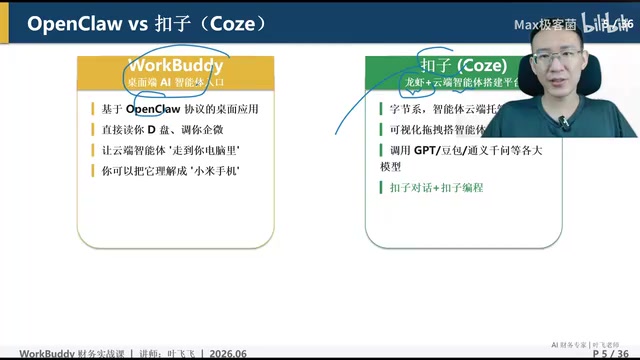
Remote Scheduling
"Taking orders remotely" refers to its remote control capabilities. With WorkBuddy running on your desktop, you can dispatch tasks to it via WeCom on your phone, the WorkBuddy app, or its WeChat Mini Program — even after you've left the office or are traveling. The tutorial emphasizes that the desktop version of WorkBuddy is the most powerful, and remote scheduling is precisely what keeps this "workhorse" running around the clock.
In terms of capability matrix, WorkBuddy covers five areas: natural language understanding, autonomous planning and execution, multimodal processing, local file operations, and third-party system integration. Ye Fei considers third-party system integration to be WorkBuddy's strongest differentiator. Comparing it against several domestic desktop agents — including 360 Security Cloud, Kimi Cloud, MiniMax, Zhipu's Auto Cloud, and ByteDance's Argo Cloud — he concludes that WorkBuddy leads in this category.
"Multimodal processing" in WorkBuddy's context means the agent can simultaneously understand and generate text, tables, images, and simple charts — not just plain text. In real-world finance or administrative workflows, you often need to read PDFs containing screenshots or scans, or render data analysis results as visual charts embedded in reports. Multimodal capability determines whether an agent can truly replace human effort in end-to-end document processing, rather than just handling text. It's worth noting that actual multimodal performance depends heavily on the underlying large language model being used (e.g., whether it supports vision input). WorkBuddy as a "shell" doesn't set the ceiling itself — users need to check whether the model they configure has vision or image generation capabilities enabled.
WorkBuddy vs. CodeBuddy: Which Should You Choose?
Many people confuse WorkBuddy and CodeBuddy. The tutorial draws a clear distinction between the two.
Different ecosystems: WorkBuddy is Tencent's product. CodeBuddy (referred to as "code" in the tutorial) is ByteDance's. CodeBuddy is essentially a two-in-one product: a conversational "lobster" interface plus an agent development platform.
Different form factors: WorkBuddy has no browser-based desktop interface — it's desktop client only. CodeBuddy offers both a web interface and a desktop client.
Different capability strengths: In terms of overall capability, CodeBuddy's conversational version is generally weaker than WorkBuddy. However, CodeBuddy has a clear edge in execution speed — it's significantly faster on average, which is why the creator tends to reach for CodeBuddy first for lightweight everyday tasks. CodeBuddy also includes an agent development platform, and the agents (i.e., "agents") built there tend to be higher quality and more stable than the "experts" created within WorkBuddy.
For local file operations, CodeBuddy's desktop client can read local files, but its level of local file manipulation falls short of WorkBuddy's. This explains why finance work — which involves processing large volumes of local Excel files and reports — is better suited to WorkBuddy.
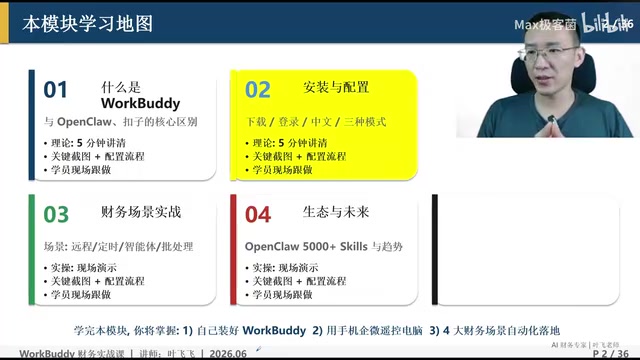
Key Installation and Configuration Details
Installation looks straightforward on the surface, but there are several common pitfalls to watch out for.
Download and Installation Location
The installer is around 400+ MB. When accessing the official website, pay attention — it automatically detects your processor architecture (e.g., Windows x64, Apple ARM, or x64) and recommends the right version, which is a genuinely smart touch. Also note that WorkBuddy and CodeBuddy are two different products — make sure you download the right one.
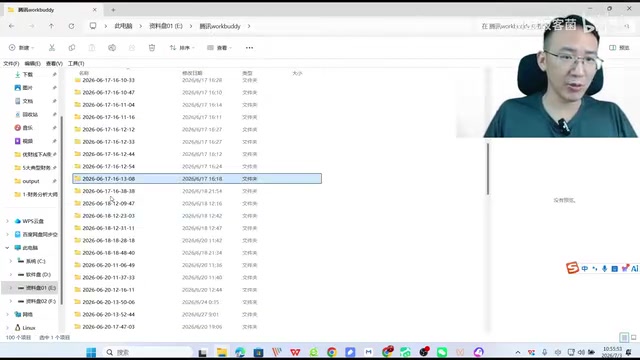
One rule during installation is emphasized repeatedly: never install to the C drive. The reason: WorkBuddy stores all locally generated files in the installation directory by default. Every task creates a new folder named with a timestamp, and over time the number becomes staggering. Ye Fei showed his own installation directory — after regular use, it had accumulated 1,522 files and 427 folders, up from fewer than 20 folders at the start. Installing on the C drive means these files will pile up quickly, filling your system drive and slowing your computer to a crawl. The right approach is to create a dedicated folder on a non-C drive.
Choosing Your Login Method
Only two login methods are recommended: personal WeChat scan or phone number verification. Between the two, the tutorial strongly recommends WeChat login. The reason comes down to account unification: logging in with your personal WeChat lets you search for the WorkBuddy Mini Program within WeChat, and combined with the WorkBuddy app, all three endpoints (desktop client, WeChat Mini Program, and mobile app) share the same account with naturally synchronized data.
If you choose phone number login, make sure to use the phone number linked to your WeChat — that way the three endpoints can still be unified. The practical value of this unification: after leaving the office, you can remotely control your desktop WorkBuddy using the WeChat Mini Program or mobile app. The enterprise version uses a local deployment approach and follows a separate logic entirely.
Mode Selection
After logging in, you'll reach the mode configuration screen. Versions downloaded from the China site default to Chinese — no manual switching needed. If you downloaded the international version in English, you'll need to manually switch the language to Chinese.
Mode selection is treated as "critically important" in the tutorial, covering different work modes including Craft, Chat, and Plan. Ye Fei warns that choosing the wrong mode will significantly undermine your results — this is the make-or-break configuration step, and the right choice depends on the type of task at hand.
Craft, Chat, and Plan correspond to fundamentally different task execution strategies. Chat mode is closest to a standard AI conversation — ideal for lightweight needs like Q&A, explanations, and brainstorming that don't require tool invocations. It consumes the fewest tokens. Plan mode prompts the agent to first generate a structured step-by-step plan, confirm each step before acting, and is suited for complex multi-step tasks involving file operations. It significantly reduces the risk of going off-track but takes longer. Craft mode leans toward directly generating complete content or finished files (like an Excel report or a full written report), skipping the planning and confirmation steps for maximum efficiency — but it demands more precise task descriptions. Choosing the wrong mode not only affects output quality but can also waste tokens unnecessarily. Before assigning any task, identifying the right mode based on task type is a fundamental skill for using WorkBuddy effectively.
Summary
WorkBuddy represents a clear direction for desktop AI agents: moving from "giving advice" to "actually doing the work." Unlike traditional conversational AI that only outputs text recommendations, WorkBuddy can operate on local files, integrate with third-party systems, and deliver real, tangible outputs. This has significant implications for roles like finance and administration that involve heavy volumes of repetitive document processing.
For first-time users, three decision points matter most: choose the right product (don't confuse it with CodeBuddy), install in the right location (stay off the C drive), and use the right login method (WeChat first for three-endpoint unification). Getting these fundamentals right is what unlocks WorkBuddy's true value as a "digital employee" in real-world scenarios like bookkeeping, tax filing, expense reimbursement, and report generation.
Related articles

JobRunner MCP Server: AI Agents Can Now Fix Failed Java Jobs
JobRunner launches an open-source MCP server enabling AI agents to view cluster status, diagnose failures, and recover Java jobs—incident response from any cloud coding environment or existing agent.

MLAI Digital Launches 9 Security Agents: MCP Server Safeguards the Full Lifecycle of Agentic AI
MLAI Digital launches Security MCP Server with nine built-in specialized security agents covering vulnerability discovery, attack simulation, prompt injection detection, API and infrastructure assessment, and accelerated remediation—embedding security validation across the full Agentic AI lifecycle from development to production.

Running Isaac Lab on H100 GPUs: Exploring Better Approaches
Exploring optimization methods for running Isaac Lab on NVIDIA H100 GPUs, including MIG configuration, mixed precision, TensorRT acceleration, and community experience to improve robotics simulation and reinforcement learning efficiency.