WorkBuddy Step-by-Step Tutorial: How AI Agents Are Reshaping Office Automation

Tencent WorkBuddy is an AI agent desktop workbench that reads/writes local files, executes multi-step tasks, and delivers file products.
Based on a systematic Bilibili tutorial, this article outlines the core capabilities and boundaries of Tencent's AI agent desktop workbench WorkBuddy. Unlike traditional conversational AI that only returns code or text, WorkBuddy can directly read and write local Word, Excel, PDF, and other files, autonomously break down multi-step tasks, and deliver final file products. It also supports scheduled tasks, WeChat remote control, MCP external system integration, and skill package extensions. Technically, it integrates multiple large models such as Hunyuan, DeepSeek, GLM, and Kimi with automatic task-based routing. Billing uses a Credits system, with new users receiving about 3,000 credits; precise task descriptions, using Ask mode for simple tasks, and batch execution can reduce consumption. Applicable scenarios cover repetitive work in administration, HR, finance, operations, sales, data analysis, content creation, and personal file organization.
In an era where AI tools keep multiplying, most products remain at the "Q&A" level—you ask, it answers; you ask for code, it gives you code, but execution is still up to you. Tencent's WorkBuddy attempts to break this boundary: it is not just a smart advisor, but an AI agent desktop workbench that can "roll up its sleeves and get things done." Based on a systematic tutorial series on Bilibili, this article breaks down WorkBuddy's core capabilities, applicable scenarios, and usage costs to help you decide whether it deserves a place in your workflow.
What Exactly Is WorkBuddy: From "Telling You How" to "Doing It for You"
According to the tutorial, WorkBuddy is an AI agent desktop workbench launched by Tencent, officially positioned as an "all-scenario workplace AI assistant." In plainer terms, it is a combination of "AI brain + computer operator + automation engine."
The best way to understand this definition is through a concrete scenario. Imagine an HR professional with eighty candidate resumes on hand who needs to compile an Excel summary table containing name, education, years of work experience, core skills, and expected salary before end of day. With traditional conversational AI like ChatGPT or Doubao, what you get is usually a Python script and operating instructions—the subsequent reading, extraction, and table-building still require you to do step by step. Give the same request to WorkBuddy, and it can read PDF resumes in a specified directory, extract fields, and directly generate an Excel file saved in the target folder—all you need to do is check whether the results meet expectations.
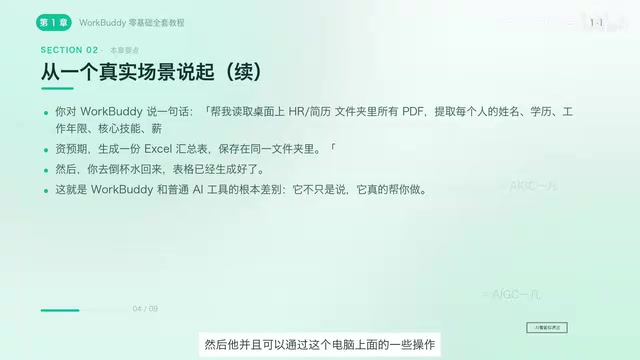
This ability to "both talk and do" is the most fundamental distinction between WorkBuddy and traditional AI tools. The tutorial repeatedly emphasizes a metaphor: ordinary AI tools are "smart advisors," while WorkBuddy is "an employee with hands and feet."
Core Capabilities: What Lets It Operate Your Computer
Local File Reading/Writing and Multi-Step Task Planning
WorkBuddy can directly read and operate local Word, Excel, PDF, image, and other files. More importantly, it has automatic multi-step task planning capability: after receiving a request, it breaks down the execution path itself and completes it step by step; if it discovers problems with the plan along the way, it can redesign the path. The tutorial considers this one of WorkBuddy's "more impressive aspects"—complex tasks are not completed through a single Q&A but advanced through dynamic planning.
Scheduled Tasks and Remote Control
WorkBuddy has a built-in automation engine that can turn fixed operational processes into scheduled tasks. For example, it can automatically compile and send you a weekly report every week without manual triggering each time. As long as WorkBuddy on your computer is running, tasks can execute in the background even when you are not at the computer.
Remote control further extends the use cases: by sending instructions through the WorkBuddy mini-program on your phone or the WeChat client, the WorkBuddy on your computer can execute operations and return results—results can stay on the computer or be sent back to your phone.
Unattended execution refers to an agent running tasks automatically based on preset trigger conditions without a person issuing instructions in real time. It relies on two prerequisites: first, the task process has been solidified into a repeatable script or workflow; second, the runtime environment (here, the WorkBuddy client on the user's computer) remains online. Unlike cloud SaaS automation tools, WorkBuddy's scheduled tasks run on the local desktop, which means it can directly access the local file system and logged-in applications, but it also requires the computer not to shut down or sleep. Understanding this helps set reasonable expectations: scheduled tasks are suitable for scenarios like "processing local files at a fixed time every day/week," while critical business with extremely high availability requirements still needs to account for interruption risks such as power outages, network disconnection, or the client exiting.
External System Integration and Skill Extension
Through MCP (a method for connecting external systems), WorkBuddy can connect to Tencent Docs, WeCom, and even databases, bringing external data in and expanding its capability boundary. It also supports installing skill packages to extend capabilities, such as browsing data in a browser and taking screenshots, or converting a recording into summarized text.
MCP (Model Context Protocol) is an open protocol standard that enables AI models to connect to external tools, data sources, and services in a unified way. Think of it as the "USB interface" of the AI world: previously, each external system (such as a database, document platform, or enterprise IM) required a separately developed adapter layer, whereas MCP defines a universal communication specification—AI clients and tool providers each implement the protocol and can interoperate. For WorkBuddy, MCP lets it connect to external systems like Tencent Docs, WeCom, and databases at lower cost, so users don't have to wait for official one-by-one integrations—third parties in the ecosystem can also provide their own MCP services to expand the capability boundary. This is also an important trend in the current AI agent field—beyond model capability, connectivity determines the actual scope of work an agent can reach.
Comparison with Traditional AI Tools: Where the Difference Lies
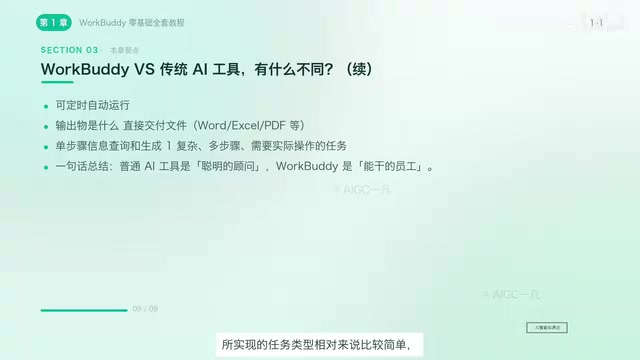
The tutorial compares them across multiple dimensions. Here are several key differences:
File operation capability. Traditional conversational tools cannot read or write local files and can only output content in the conversation; WorkBuddy can read and write local files.
Task complexity. Traditional tools excel at single-step information lookup and return; WorkBuddy can understand requirements, break down steps, complete complex tasks, and dynamically adjust along the way.
Output form. Traditional tools generally return text; WorkBuddy delivers final file products—Word, Excel, PDF, or format conversion results. As long as the requirement is clearly described, "basically anything you can do on a computer, it can do."
Unattended capability. Traditional tools require a person to issue instructions in front of the device to run; WorkBuddy relies on scheduled tasks and can execute without human intervention.
Technical Architecture: The Complete Chain Behind a Single Task
WorkBuddy's execution flow can be broken into several stages: the user issues an instruction containing the requirement and target result; the AI brain understands the intent and breaks down the steps; it then calls tools (read files, write files, search online, run code, call APIs) to complete each item; finally it integrates the results and delivers them to the user for review. If the result falls short of expectations, the user can continue issuing instructions, and WorkBuddy repeats this process, gradually approaching the goal.
You may not have noticed the design at the model layer. WorkBuddy is integrated with multiple mainstream large models, including Tencent's own Hunyuan, DeepSeekAd, Zhipu GLM, Kimi, MiniMax, and others. Different models have different strengths in handling tasks—the tutorial gives examples: for code execution tasks, DeepSeek may be more suitable; for copywriting, Hunyuan may be more appropriate. WorkBuddy automatically selects the appropriate model based on the instruction, and users can also specify one manually.
Model Routing is an easily overlooked but quite representative design in WorkBuddy's architecture. Different large models have varying strengths in code generation, long-form writing, logical reasoning, Chinese understanding, and other dimensions, and a single model struggles to perform optimally on all tasks. The multi-model routing approach is: the scheduling layer automatically dispatches requests to the most suitable model based on task type, instruction content, and even context length, and users can manually override this choice. The benefit of this design is balancing effectiveness and cost—simple tasks can be routed to lightweight models to save credits, while complex tasks call stronger models; the cost is increased system complexity, and output styles may differ across models. For enterprise users, multi-model integration also means reduced dependence on a single vendor.
Who It's For: A Scenario List from HR to Content Creators
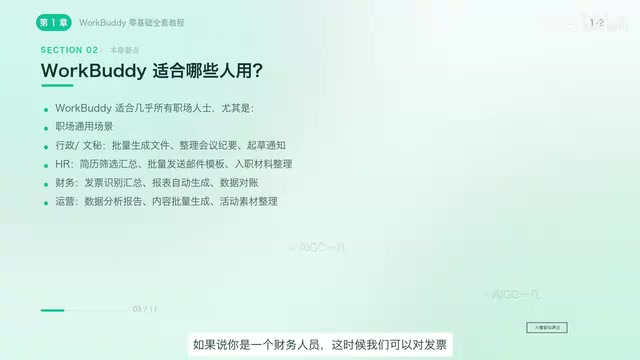
The tutorial's conclusion is that WorkBuddy is suitable for almost all workplace professionals. Specific scenarios include:
- Administration: batch file generation, meeting minutes organization, notice drafting
- HR: resume information aggregation, batch email template sending, employee profile organization
- Finance: invoice recognition and aggregation, automated report generation, data reconciliation
- Operations and Sales: data analysis report generation, batch content generation, event material organization, batch quotations, customer profile organization
- Data Analysis: data cleaning, visualization chart generation, report merging and statistical aggregation
- Content Creation: batch article generation, video scripts, multi-version material rewriting, content calendar maintenance
- Personal Use: organizing messy download folders, scheduled diary/weekly report generation, study material archiving
Cost Mechanism: How to Save Credits
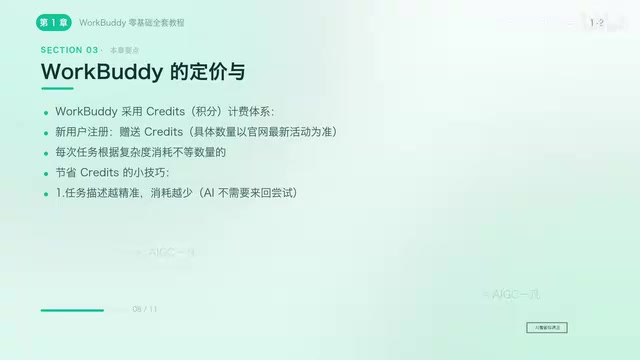
WorkBuddy uses a Credits points billing system. Every interaction with WorkBuddy consumes credits, and the amount varies with task complexity. The tutorial mentions that new users generally receive 3,000 credits upon registration, and when credits run out, users can upgrade their plan to get more quota.
If you want credits to last longer, the tutorial offers several practical suggestions:
- Describe tasks more precisely. The more precise the description, the more likely WorkBuddy understands the requirement in one go, reducing extra consumption from multiple rounds of interaction. The tutorial uses ordering food as an analogy: saying only "tell me what's good to eat" yields broad results, while clearly stating "where I am and what flavors I like" gets precise recommendations.
- Use Ask mode for simple tasks. This mode only asks questions and does not operate the computer, consuming fewer credits.
- Use automation tools wisely. Batch completion saves more credits than completing tasks individually many times.
The distinction between Ask mode and execution mode is key to understanding the credit consumption logic. Ask mode is essentially close to traditional conversational AI: it only performs understanding, Q&A, and suggestion output without triggering actual operations on local files or systems, so it consumes fewer computing resources and credits. Execution mode requires calling toolchains, reading/writing files, running code, multi-round planning and validation, with each step potentially generating model calls, so credit consumption is naturally higher. This design effectively splits "consulting" and "doing on your behalf" into two pricing tiers, and users can choose based on task nature: use Ask for looking up information and asking for plans, then switch to execution mode when you actually need to produce files. Developing the habit of thinking clearly before acting is often more effective at controlling costs than simply compressing description length.
Core Value: Liberating People from Repetitive Labor
The tutorial's summary of WorkBuddy's core value is quite apt: it liberates people from repetitive mechanical operations, leaving time for higher-level thinking—understanding market demand, planning what you truly want to do, and then handing ideas to WorkBuddy to realize step by step.
The standard for judging whether you need WorkBuddy is also simple: if you do the same things every day, need to process large amounts of files and data, or need to update spreadsheets weekly, organize meeting minutes, repeatedly copy and paste report materials, and regularly aggregate data to report to leadership, these tasks can all be handed to it. The section ends with an exercise: think about the most repetitive and time-consuming task in your work, then try letting WorkBuddy complete it and see how the results turn out.
From the overall design of the tutorial, this course is divided into three parts: Fundamentals, Advanced, and Practical Applications. Fundamentals walks you through installation and interface familiarization; Advanced covers batch file modification, automatic bug fixing, installing plugins, and automated tasks; Practical Applications focuses on actual outputs such as websites, mini-games, mini-programs, PPTs, spreadsheets, images, and videos, accompanied by a green book and material package. For zero-foundation users, this path from installation to practical application makes it easier to form a complete understanding than scattered feature introductions.
The direction WorkBuddy represents deserves attention: AI tools are moving from "generating content" to "executing tasks." When AI can truly operate your computer and deliver usable file products, the meaning of office automation is redefined.
One-line Summary
Tencent WorkBuddy is an AI agent desktop workbench that can read and write local files, execute multi-step tasks, and deliver file products.
Paragraph Summary
Based on a systematic Bilibili tutorial series, this article outlines the core capabilities and boundaries of Tencent's AI agent desktop workbench WorkBuddy. Unlike traditional conversational AI that can only return code or text, WorkBuddy can directly read and write local Word, Excel, PDF, and other files, autonomously break down multi-step tasks, and deliver final file products. It also supports scheduled tasks, WeChat remote control, MCP external system integration, and skill package extensions. Technically, it integrates multiple large models such as Hunyuan, DeepSeek, GLM, and Kimi with automatic task-based routing. Billing uses a Credits system, with new users receiving about 3,000 credits; precise task descriptions, using Ask mode for simple tasks, and batch execution can reduce consumption. Applicable scenarios cover repetitive work in administration, HR, finance, operations, sales, data analysis, content creation, and personal file organization.
Related articles

Nothing CMF Buds 2A Drops to $17.89 on Black Friday: A New Low for ANC Earbuds
Nothing CMF Buds 2A wireless earbuds Black Friday deal: just $17.89 on Amazon, about $11 off retail and a record low. ANC earbuds at an entry-level price.

When AI Creation Gets Accused of "Spitting": Hacker News Heats Up Over the Glaude Controversy
A Hacker News post, "Spitting in the Face of Glaude," sparks debate on AI creation transparency and attribution ethics. This analysis examines the blurred creator identity behind the controversy and offers practical advice for AI content production.

Akai Embraces Custom Firmware: MPC Sample 1.4 Lets Users AI-Program Their Sampler
Akai embraces the modding community with MPC Sample 1.4 firmware, supporting vibe-coded custom firmware and effects. We analyze the impact of this open strategy on music hardware and AI-assisted programming.