WorkBuddy Step-by-Step Tutorial: Master AI Office Automation from Scratch in 7 Lessons

Bilibili's 7-lesson WorkBuddy hands-on tutorial lowers the barrier to AI Agent office automation.
The article introduces the 7-lesson WorkBuddy hands-on tutorial on Bilibili, positioning it as a domestic alternative to Codex — an Agent-type product that receives tasks, breaks down steps, invokes tools, and delivers results, rather than an ordinary chat tool. The tutorial covers typical office scenarios including proposals, spreadsheets, data analysis, content creation, poster design, software development, and browser automation, emphasizing that beginners can follow along to complete a full automation workflow. It also cautions that single-step tasks have high success rates, but multi-step chained tasks, tasks requiring external tools, or tasks with strict accuracy requirements carry higher error rates — browser automation is especially vulnerable to page changes. It recommends building a capability map first, then selecting high-overlap scenarios for deep practice, while maintaining the division of labor where AI produces drafts and humans verify.
AI Agents are moving from concept to everyday office scenarios, but there are few tools that are truly ready to use. This WorkBuddy hands-on tutorial series on Bilibili aims to lower the entry barrier as much as possible with just 7 lessons — even if you've never touched an AI Agent before, you can follow along and walk through a complete automation workflow.
What Is WorkBuddy: An AI Workbench That Can "Take On Jobs"
According to the video author, WorkBuddyAd can be understood as a domestic alternative to Codex. This analogy captures the core: it's not just a chatbot, but an Agent-type product that can receive tasks, break down steps, invoke tools, and deliver results.
The interaction pattern of traditional AI chat products is "you ask a question, it answers" — and the output is often a block of text that you need to further process. WorkBuddy's logic is closer to "assigning a job": you describe the goal, and it plans the path and executes step by step. This difference may seem like just a product form difference, but it actually determines whether it can truly be embedded into daily workflows.
One point repeatedly emphasized in the video is that you don't need to master prompt engineering or programming knowledge beforehand — just follow the demonstrations. For ordinary office users who have been scared off by various AI tool tutorials, this is probably the most appealing statement.
Codex is a code generation and task execution system built by OpenAI on top of the GPT series models. It was initially offered as an API and later evolved into a programming Agent capable of understanding natural language instructions and autonomously writing and debugging code. The so-called "domestic alternative" means that WorkBuddy is similar to Codex in product form — both take natural language as input and deliver tasks as output — but has been localized for Chinese office scenarios. It should be noted that Codex itself is not a consumer-grade product; ordinary users are more familiar with chat interfaces such as ChatGPT and Claude. Therefore, comparing WorkBuddy to Codex emphasizes its "Agent attributes" rather than a one-to-one feature match. Understanding this analogy helps set expectations for WorkBuddy's capabilities: it excels at breaking goals into executable steps and invoking tools to complete them, rather than providing encyclopedic Q&A.
Capability Boundaries Covered by the Seven Lessons

The tutorial breaks WorkBuddy's capabilities into several typical office task categories, with fairly broad coverage:
- Documents and spreadsheets: Writing proposals and creating tables — the most easily transferable basic scenarios for daily work;
- Data and content: Analyzing data and creating content — testing the Agent's ability to handle both structured and unstructured information;
- Design: Making posters — meaning the output form extends from plain text to visual materials;
- Development: Developing software — the embodiment of the Agent's upper capability limit and a key indicator distinguishing a "chat tool" from a "productivity tool";
- Browser automation: Letting AI operate a browser to perform office tasks — an advanced use case of cross-application collaboration.
From this list, it's clear that WorkBuddy's product ambition goes beyond "helping you write something" — it attempts to link actions scattered across multiple software applications in office scenarios into a single chain. Browser automation deserves particular attention — a large number of real office workflows (filling forms, scraping data, moving information across systems) happen on web pages. Whether it can reliably operate a browser directly determines the Agent's practical value.

Browser automation refers to the technology of controlling a browser through programs to perform actions such as clicking, typing, pagination, and scraping. Common implementations include frameworks such as Playwright, Puppeteer, and Selenium. In AI Agent scenarios, the large model is responsible for understanding page semantics and deciding the next action, while the automation framework handles actual execution. Combined, the Agent can operate web pages like a human. Its value in office scenarios lies in bridging "information silos": many enterprise systems do not expose APIs and can only be operated through web interfaces, making browser automation the only feasible automation path. However, factors such as frequent changes in page structure, CAPTCHAs, and expired login sessions can significantly reduce stability — which is why this type of capability looks impressive in demos but requires extensive debugging in real deployment.
The Gap Between "Can Use" and "Can Use Well"
Tutorial content naturally tends to showcase the smooth path, but as a user you need to stay clear-headed: the actual experience of similar Agent products often depends on task complexity and tolerance for error.
Simple single-step tasks — such as generating a draft proposal according to requirements or organizing a spreadsheet — usually have a high success rate. But once a task involves multi-step chaining, requires invoking external tools, or has strict accuracy requirements, the Agent's execution chain lengthens and the probability of errors rises accordingly. Browser automation falls into the latter category: changes in page structure, expired login states, and pop-up interference can all interrupt the automation flow.

So a more reasonable way to use this tutorial is to first treat it as a capability map — figuring out what WorkBuddy can do in each direction — and then pick the scenarios that overlap most with your daily work for in-depth practice. The author also mentions that related notes are pinned in the comment section, and using them alongside the videos can reduce the learning curve.
Who Should Take This Course
If you fall into the following situations, the return on investment for these 7 lessons will be considerable: you have a large volume of repetitive document and spreadsheet processing needs in your daily work; you want to let AI handle the groundwork for data organization and content drafts; or you simply want to understand what AI Agents can actually do for people.
Conversely, if your work has extremely high accuracy requirements for output and lacks a manual review step, handing the entire workflow directly to an Agent still requires caution. A safer approach is to let AI handle "draft generation" and "workflow setup," while humans are responsible for "verification" and "decision-making."
AI office tools are iterating quickly, and the capability boundaries of products like WorkBuddy today may be redrawn in a few months. What's truly worth spending time internalizing is not the location of a particular button, but the mindset of breaking down tasks for the Agent and then validating its output — and that is exactly where the value of this tutorial lies.
One-line Summary
Bilibili's 7-lesson WorkBuddy hands-on tutorial lowers the barrier to getting started with AI Agent office work.
Paragraph Summary
The article introduces the 7-lesson WorkBuddy hands-on tutorial launched on Bilibili, positioning it as a domestic alternative to Codex — an Agent-type product that can receive tasks, break down steps, invoke tools, and deliver results, rather than an ordinary chat tool. The tutorial covers typical office scenarios such as writing proposals, creating spreadsheets, data analysis, content creation, poster design, software development, and browser automation, emphasizing that beginners can follow along to complete a full automation workflow. The article also cautions that single-step tasks have a high success rate, but multi-step chained tasks, tasks requiring external tools, or tasks with high accuracy requirements have a higher probability of errors — browser automation is especially vulnerable to page changes. It recommends first building a capability map, then selecting high-overlap scenarios for in-depth practice, while maintaining the division of labor where AI produces drafts and humans perform verification.
Related articles
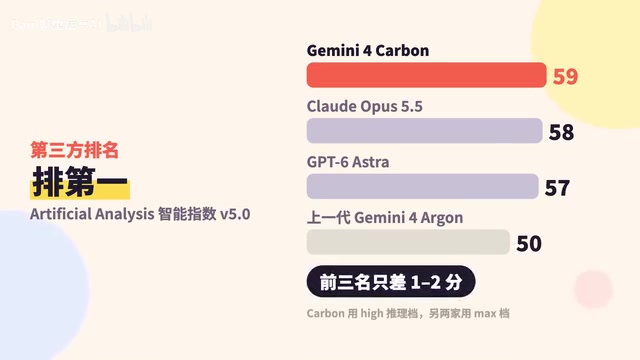
Google Releases Gemini 4 Carbon: Its Strongest Model Yet, Debuting with a Cybersecurity Focus
Google releases Gemini 4 Carbon, calling it its strongest model, with a cybersecurity focus. It tops the third-party composite ranking at 59 points but leads by only one or two. This article analyzes its security test results, staged rollout, token pricing, and the divergence between self-reported and third-party tests on hallucinations.

LangChain Adds SchemagateRetriever: On-Demand Table Retrieval Cuts Text-to-SQL Prompts by 92.9%
LangChain docs add SchemagateRetriever: retrieves only the tables needed for text-to-SQL with permission filtering, cutting median prompt size by 92.9% on Spider 2.0 large schemas via offline BM25 selection with no model calls.

Multi-Step AI Agent Guardrail in Practice: Fact-Change Detection Drives False-Alarm Rate to 0%
Developer shares first version of a multi-step AI Agent guardrail: re-verifying dependency facts before irreversible actions cut false alarms from 50% to 17% across 23 scenarios, then to 0% via conservative normalization without lowering catch rate. Runs on local qwen2.5-7b.