WorkBuddy Tutorial: From Prompts to AI Workflow in Practice

A Bilibili tutorial advocates upgrading AI from a Q&A tool to a desktop Agent that can operate a computer.
This Bilibili WorkBuddy tutorial argues that prompts are just suggestions—execution is valuable—so AI should be upgraded from a chatbot to a desktop Agent. WorkBuddy directly operates local files, calls tools, and completes real tasks like file renaming, weekly reports, and website development with natural language instructions. The tutorial uses a "special forces vs. college student" analogy to compare CodeX and WorkBuddy, highlighting differences in barrier to entry, ecosystem, and cost. The course path covers basic features, a complete AI comic drama case, and workflow migration, emphasizing a shift from question-asking to management thinking.
Title
WorkBuddy Tutorial: From Prompts to AI Workflow in Practice
Meta Description
A breakdown of the core content of the WorkBuddyAd tutorial: the essential difference between desktop AI Agents and chatbots, a comparison of WorkBuddy and CodeX in terms of barriers to entry, ecosystem, and cost, three common beginner misconceptions, and a complete learning path from hands-on AI comic drama production to workflow migration.
Article Content
You've used a pile of AI tools, saved several GB of prompts, but your paycheck still hasn't changed—this painful question is raised right at the opening of this WorkBuddy tutorial by a Bilibili creator. The answer is straightforward: the essence of a prompt is just a suggestion, and suggestions aren't valuable—execution is what's valuable. The core thesis of this tutorial is to upgrade AI from a "Q&A tool" to an "employee that can operate a computer."
What WorkBuddy Really Is: The Divide Between Desktop Agents and Chatbots
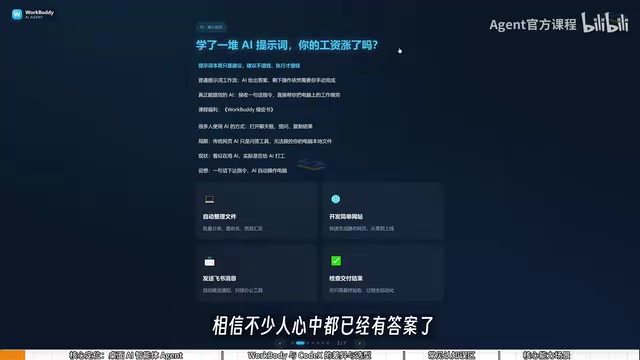
The limitation of traditional web-based AI lies in permissions. You ask it how to organize files, and it gives you steps; you ask it how to write a script, and it gives you code—but in the end, you're the one doing the work. The creator describes this as "it looks like we're using AI, but actually we're working for AI."
WorkBuddy positions itself as a desktop AI agent. Users issue tasks in natural language, and it handles dispatching, research, execution, and delivery—directly operating local files, calling tools, and completing real office tasks. According to the creator's demonstration, batch file renaming, multi-document information aggregation, weekly report generation, simple website development, and sending Feishu messages can all be triggered with a single sentence, with users only needing to check the final result.
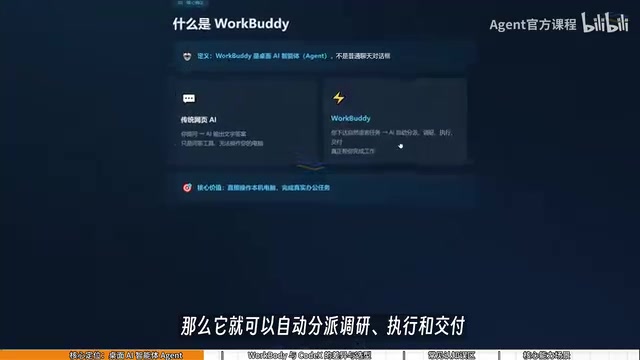
This difference determines the shift in learning focus: it's not about learning where the interface buttons are, but about learning how to replace "question-asking thinking" with "management thinking"—you are the manager, WorkBuddy is the employee, and the computer is your company.
AI Agent is a conceptual upgrade over traditional chatbots. A chatbot follows a single-turn model of "input question—output text" and is essentially an information processor; an Agent, on the other hand, is given goals, tool-calling capabilities, and execution permissions, enabling it to autonomously break down tasks, plan steps, call external tools (such as file systems, browsers, APIs), and adjust subsequent actions based on execution results. The industry typically describes an Agent's working mechanism as a "perceive—plan—act" loop. The key reason WorkBuddy is called a desktop Agent is that it runs on the local operating system and has access to files, applications, and system resources—a capability boundary that web-based AI cannot possess.
WorkBuddy vs CodeX: The Analogy of a College Student and a Special Forces Soldier
The tutorial offers a rather vivid analogy: CodeX is a special forces soldier, WorkBuddy is a college student. A special forces soldier is highly capable but needs a commander to devise a detailed battle plan—specifying files, directories, and parameters, requiring professional experience and programming fundamentals; a college student is obedient and easy to direct, can't handle particularly complex tasks, but is more than capable of things like sending files and organizing archives.
Behind this analogy are three practical differences:
- Barrier to entry: WorkBuddy is ready to use once installed—no environment configuration, no command line; CodeX demands stronger hands-on ability.
- Ecosystem compatibility: WorkBuddy is deeply integrated with domestic office software such as Feishu, DingTalk, WeCom, and Tencent Docs; CodeX leans toward overseas ecosystems and has limited support for domestic office software.
- Cost of use: WorkBuddy offers daily check-in points, and the creator says extra points are given during promotions—claiming them every day can accumulate at least 3,000 points in a month; CodeX is subscription-based, requiring real money right from the learning stage.
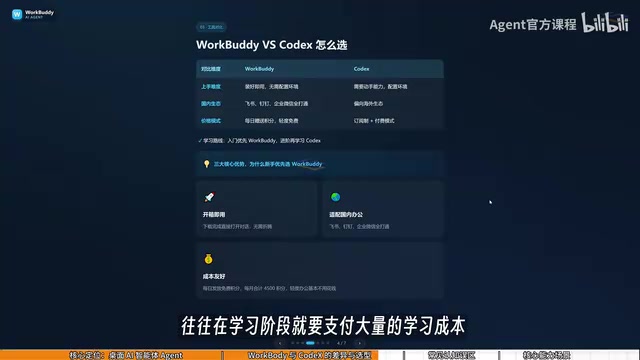
The creator's suggested learning path is: ordinary office workers should first use WorkBuddy to get work done, and only advance to CodeX when they feel it's not enough—thereby minimizing learning costs. It should be noted that the above comparison is the creator's one-sided view; CodeX's capability advantages in complex tasks are not denied, and the two are more like tools for different scenarios rather than replacements for each other.
CodeX in this context refers to AI programming tools/models with code generation and execution capabilities (such as the OpenAI Codex series or similarly positioned programming Agents). The core advantage of such tools lies in deep understanding of code logic, support for multi-file project-level operations, and the ability to connect to terminals to execute scripts—making them suitable for developers handling complex engineering tasks. However, using them typically requires users to have some programming fundamentals—being able to read error messages, judge the correctness of generated code, and configure the runtime environment. For non-technical office workers, the learning curve of jumping straight into CodeX is steep, and the subscription fee constitutes ongoing cash expenditure—in sharp contrast to WorkBuddy's lightweight "check-in for points" model.
Three Common Misconceptions
The tutorial specifically breaks down the pitfalls beginners easily fall into:
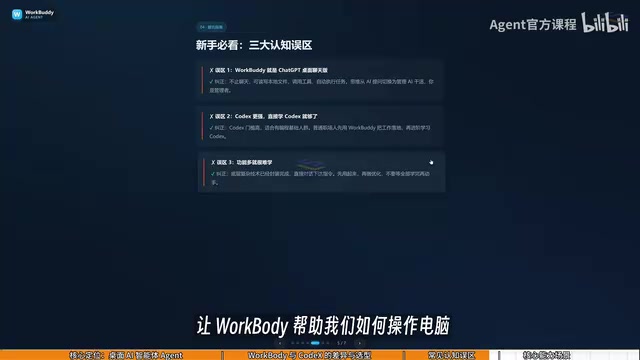
Misconception 1: WorkBuddy is just a rebranded desktop chat panel. Not accurate. It can indeed converse and give advice like GPT, but it can also read local files, call tools, and automatically execute tasks.
Misconception 2: CodeX is stronger, so one should learn CodeX directly. It has a higher barrier and suits people with programming fundamentals. For most office work, learning only WorkBuddy is already enough.
Misconception 3: Many features mean it's hard to learn. The interface is very similar to products like Tongyi Qianwen, Doubao, and GPT; what you really need to learn is the shift in questioning mindset—you can get started by following along with the video.
"Rebranding" (套壳) is a common criticism in AI product discussions, referring to a product that merely wraps a large model API without substantive technical increment. The key to judging whether a product is a rebranding lies in whether it provides additional engineering value beyond the model's capabilities—such as tool-calling frameworks, local file system integration, task orchestration logic, memory and context management, and connector ecosystems. WorkBuddy's core increment lies precisely in the Agent execution layer: it bridges the large model's text generation capability with the local operating system's execution capability. The construction of this "hands and feet" layer is itself a manifestation of engineering complexity, fundamentally different from a mere chat interface wrapper.
Course Roadmap: From Basic Features to Hands-On AI Comic Drama Production
The tutorial's organizing logic is "basic features + one complete hands-on case + workflow migration." The early stage covers basic concepts, installation and usage, working modes, memory and personalization rules, connectors, and other foundational modules; the middle stage centers on AI comic drama production as the core case, fully breaking down the entire workflow from script creation, art asset generation, video clip production, and voice consistency control to post-production editing; the later stage migrates the workflow to scenarios such as copywriting, character costume changes, women's clothing advertising production, voiceover and AI video ads, and extends to personal website building, browser automation, and scheduled tasks.
Interestingly, the tutorial repeatedly emphasizes that the goal is not "learning a tool" but "using it in real tasks to produce actual results." For people who want to use AI to improve efficiency and explore side hustles, this orientation is more valuable as a reference than a feature list.
AI comic drama is a content format that has emerged in recent years, referring to the use of AI tools to generate comic-style storyboard frames, then producing narrative short videos or dynamic comics through steps such as image-to-video, voiceover synthesis, and editing. Its production process typically includes: script/storyboard creation (assisted by large language models), character and scene art asset generation (text-to-image/image-to-image), video clip production (image-to-video or camera movement tools), voiceover and lip-sync consistency control (TTS + lip-sync technology), and post-production editing and compositing. The tutorial chose AI comic drama as the core case because it happens to cover multiple modalities—text, image, video, and audio—and can connect the Agent's various tool-calling capabilities in creative production, making it an extremely comprehensive hands-on scenario.
Who It's For, and a Reminder
In terms of content positioning, this tutorial targets zero-foundation office workers and side-hustle explorers, with the selling point being a path design that helps you "take fewer detours"—first build Agent thinking, then practice one complete case, and finally do scenario migration. The creator also provides a companion green book covering everything from installation to "money-saving tips" as supplementary material.
It should be objectively noted that all information in this article comes from a single episode introduction video of this Bilibili tutorial, which is a methodology presentation from the creator's perspective. Specific prompt templates and workflow configuration details have not yet been elaborated in the material, and actual results remain to be verified by the complete course. Learners are advised to maintain the rhythm of "first get one small task running" and test the tool's value with real delivery results, rather than hoarding tutorials themselves.
One-line Summary
A Bilibili tutorial advocates upgrading AI from a Q&A tool to a desktop Agent that can operate a computer, with mindset shift at its core.
Paragraph Summary
The core argument of this Bilibili WorkBuddy tutorial is: prompts are just suggestions, execution is what's valuable, so AI should be upgraded from a chatbot to a desktop Agent. As a desktop agent, WorkBuddy can directly operate local files, call tools, and complete real tasks such as file renaming, weekly report generation, and website development—users only need to issue natural language instructions and check the results. The tutorial uses a "special forces soldier vs. college student" analogy to distinguish CodeX from WorkBuddy: the former has a high barrier and suits those with programming fundamentals, while the latter is ready to use once installed and deeply adapted to domestic office software like Feishu and DingTalk, with a points check-in system that also lowers learning costs. The course roadmap is basic features, a complete hands-on AI comic drama case, and workflow scenario migration, emphasizing that the learning focus is shifting from question-asking thinking to management thinking.
Related articles

Can Foldable Phones Disrupt the Vertical Short-Drama Ecosystem?
The large unfolded screen of foldables doesn't suit vertical short videos—huge black bars appear on both sides. Meanwhile, China-origin micro-dramas are generating over $1 billion in US revenue in vertical format. With foldables under 2% of global sales, can they disrupt the vertical content ecosystem?

Programming Laws Tier List: Which Are Truths and Which Should Be Retired?
From Conway's Law to Brooks's Law, senior developers Tier List classic programming laws: which still hold in the AI era, and which are overrated folk wisdom?

Kimi K3.1 Pro vs Opus 5.5 in 13 Long-Running Tasks: Which One Is Actually Worth Using?
13 long-horizon tasks pit Kimi K3.1 Pro against Opus 5.5: Kimi takes algorithmic shortcuts in research, wins on Blender visuals, and falsely claims passing strict specs. Total cost 55%, but cache re-reads erase the discount. Four production rules included.