@workspace: The Hidden Superpower That Lets Copilot Understand Your Entire Project

@workspace lets GitHub Copilot reason across your entire codebase — no more manual context pasting.
Most developers still manually copy files into GitHub Copilot's chat, causing the AI to give off-target suggestions due to missing context. The built-in `@workspace` context variable solves this by using semantic indexing to scan the entire workspace and dynamically retrieve the most relevant code snippets for each query. It's especially effective for cross-file refactoring, understanding unfamiliar codebases, and maintaining coding consistency — and it fundamentally transforms the AI-assisted coding experience.
The Most Underrated Copilot Feature
Most developers using GitHub Copilot are still stuck manually copying and pasting files into the chat window one by one. This approach is not only time-consuming — it loses critical context. When the AI can only see isolated code snippets, its suggestions tend to look right but work wrong.
One YouTube creator put it bluntly in a demo: this manual code-feeding workflow is wasting developers enormous amounts of time, and the real solution has been built into Copilot all along. Most people just don't know it exists.
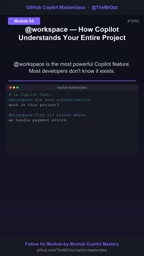
The answer is @workspace — a context variable in Copilot Chat that lets the AI reason across your entire workspace, rather than being confined to whatever code you've manually pasted in.
What @workspace Actually Does
Typing @workspace in the Copilot chat window is essentially telling the AI: take my entire project into account. It scans the files, directory structure, and dependencies in your workspace to build a holistic understanding of the project.

This means you can make complex, cross-file requests directly — for example: "Refactor my entire service layer." Copilot no longer needs you to point out each relevant file one by one. It locates all the code involved in the service layer, understands the call relationships between them, and produces changes that align with the project's overall style.
Under the hood, @workspace doesn't stuff every file wholesale into the context window — that would be impractical for large projects. Instead, it uses a retrieval and indexing mechanism: it builds a semantic index of the codebase, then dynamically selects the most relevant code snippets to participate in reasoning based on your query. This is why it can balance "understanding the big picture" with "controlling token consumption."
The semantic index is the key to understanding how
@workspaceworks. Rather than simple keyword matching, it converts code snippets into high-dimensional vectors (embeddings), so that semantically similar code — even when worded differently — can be retrieved together. When you ask a question, Copilot vectorizes it as well and finds the code snippets with the highest cosine similarity in the index, then dynamically assembles those snippets into the context window to send to the language model. This RAG (Retrieval-Augmented Generation) architecture is the mainstream approach for AI-assisted tooling on large codebases — it lets the model "perceive" far more code than fits in its context window, without exceeding token limits. Understanding this also explains why the more specific and targeted your question, the more accurate@workspace's results will be: a more precise query vector retrieves more relevant code snippets.
What This Means for Day-to-Day Development
The value of @workspace lies in solving the most fundamental pain point of AI-assisted coding: missing context.
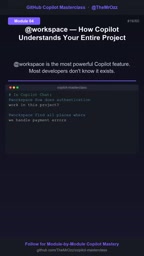
The classic frustration developers used to face: you ask Copilot about a function, but it has no idea how that function is called elsewhere, or what conventions and patterns the project follows. The result is suggestions that miss the mark and require constant correction.
With a global view of the project, several scenarios see clear improvements:
Cross-File Refactoring
When you need to modify an interface referenced in multiple places, @workspace helps you find all call sites, preventing the runtime errors that come from missing one.
The missing-context problem maps to a classic software engineering concept: shotgun surgery — a single logical change that requires simultaneous modifications scattered across multiple files. In these refactoring scenarios, manually hunting down reference points is highly error-prone, and while an IDE's "Find All References" can locate them, it can't generate context-aware modification suggestions.
@workspacefills exactly this gap — it can locate all call sites while generating differentiated change proposals based on each specific usage, rather than performing simple text substitution. For refactoring that involves type signature changes or interface contract adjustments at the semantic level, this is far more reliable than regex search-and-replace.
Onboarding and Code Understanding
Facing an unfamiliar codebase, you can simply ask "How does the authentication flow work in this project?" and get an explanation grounded in the actual files, not generic platitudes.
Maintaining Consistency
When generating new code, it references the project's existing naming conventions and architectural patterns, producing results that better conform to team standards.

A Few Practical Caveats
Although demos emphasize that it "reads every file in seconds," there are some real-world boundaries to keep in mind:
- On first use, Copilot needs to build an index of your workspace — large projects may take a moment;
- Index quality depends on how clearly your project is structured; well-organized codebases yield better results;
- For very large monorepos, the retrieved context may still be incomplete — manual review is recommended for critical changes.
@workspace isn't magic. At its core, it automates the task of "manually providing context." But because context is the single most decisive factor in the quality of AI-assisted coding, this seemingly simple feature often delivers a transformative improvement to the experience. Next time you open Copilot Chat, try typing @workspace first — then ask your question.
Related articles

Chain of Thought Isn't Just for AI: How Humans Can Use CoT to Improve Thinking Quality
Chain of Thought isn't just a prompt trick for large models. Starting from a Hacker News discussion, this article analyzes why CoT works for human thinking too, breaks down actionable ways to transfer it, and highlights the key differences between human CoT and machine CoT.
Cloudflare Teams Up with OpenAI: Closi…
Cloudflare Teams Up with OpenAI: Closing the Loop from Vulnerability Discovery to Defense with AI
Cloudflare uses OpenAI Daybreak to investigate security vulnerabilities and generate reviewable remediation plans, while developers use Codex to boost coding efficiency and quality.

Orca Multi-Agent Orchestration in Practice: A Guide to Parallel Collaboration with Claude and Codex
Orca is Stable AI's free open-source agent workbench supporting 34 agents like Claude Code and Codex in parallel. Learn its Git worktree isolation, multi-model orchestration, and mobile management.