Xteink X4 Pro Review: A Mini E-Reader That Fits in Your Pocket, Now More Affordable
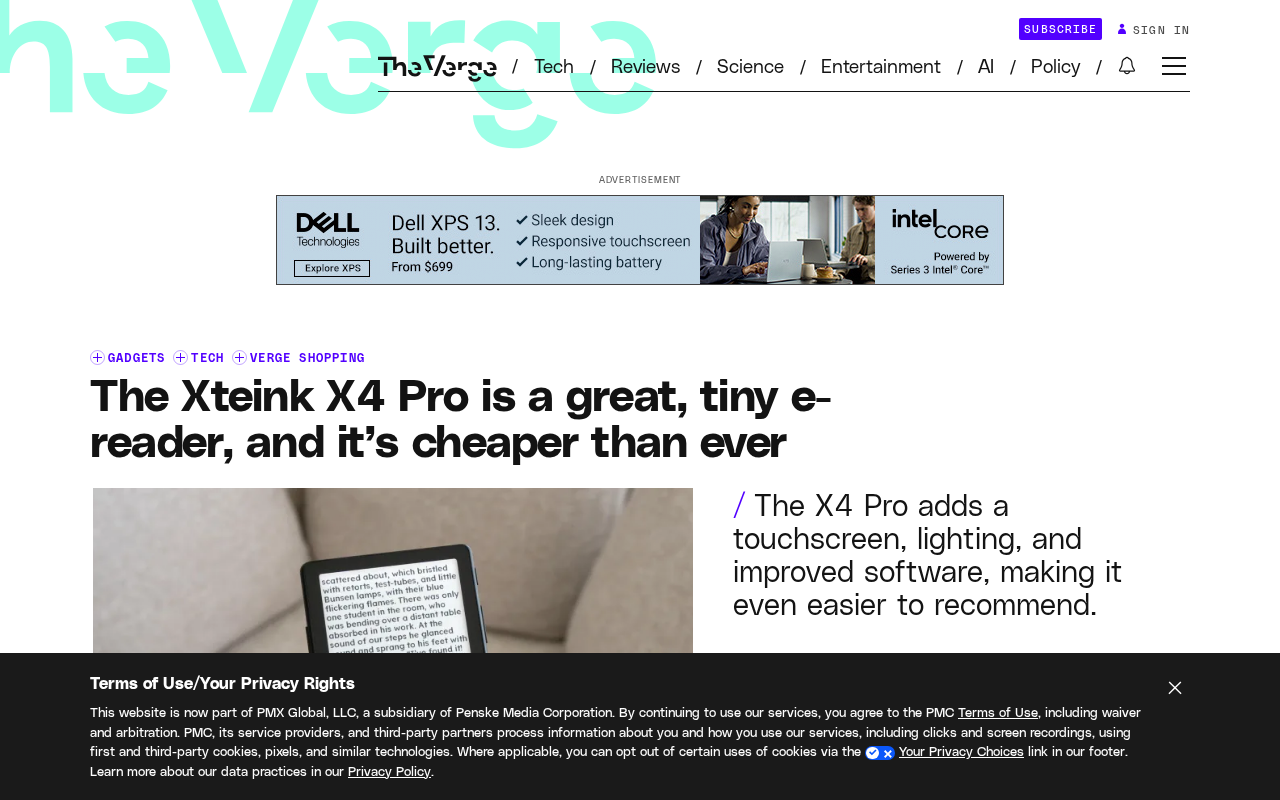
The Xteink X4 Pro taps into fragmented commute reading with a 4.26-inch mini E Ink screen, magnetic phone attachment, and a low price.
The Xteink X4 Pro is a mini e-reader focused on portability and low price, featuring a 4.26-inch, 800 x 480 E Ink display that's smaller and thinner than even the smallest 6-inch Kindle and easily fits in a pocket. Its most distinctive design is the ability to magnetically attach to the back of a phone, essentially giving your phone an eye-friendly E Ink screen — the phone handles computing and connectivity while the device handles display. Priced lower than before, it's positioned as an entry-level fragmented reading tool. The small screen offers easy one-handed holding and better focus, but requires frequent page turns and provides a poor experience for PDFs and comics — better suited for plain text. It targets commuters, heavy phone users, those needing a backup device, and budget-conscious buyers, rather than users who need a large-screen, multi-functional main reading device.
When an E-Reader Is Small Enough to Slip Into Your Pocket
If you think a 6-inch Kindle is still too big to carry around comfortably, the Xteink X4 Pro might completely change your idea of how small an e-reader can be. This device features a 4.26-inch, 800 x 480 resolution E Ink display, and the body is much smaller and thinner than even Amazon's smallest 6-inch Kindle.
Its positioning is clear: it's not meant to replace your main reading device, but to fill the gaps in fragmented reading scenarios. Waiting for the bus, standing in line for coffee, or during a lunch break — just pull it out of your pocket and read a few pages. This "effortless carry" experience is something most e-readers can't deliver.
Design: Magnetic Attachment to Your Phone Is Its Hidden Trick
One of the most interesting design choices of the Xteink X4 Pro is that it can snap onto the back of a phone with magnetic attachment capability. This means you don't need to carry an extra device — just stick it to your phone, and it's like giving your phone an external E Ink screen.
The design philosophy here is actually quite clever. The phone handles computing, connectivity, and content management, while the X4 Pro handles the display. Used together, they're actually more portable than a standalone e-reader. For users who frequently read on their phones but find LCD/OLED screens harsh on the eyes, this is a low-cost eye-friendly solution.
Of course, details like whether the magnetic attachment is secure enough and how compatible it is with different phone cases will directly affect the real-world experience. But at least conceptually, the X4 Pro has found a differentiated angle.
Two Technical Approaches to Magnetic Attachment
Currently, there are two main ways to give a phone an "external" E Ink screen. One relies on the phone's own magnetic array — Apple's MagSafe magnetic ring introduced since the iPhone 12, with Android devices having similar Qi2 magnetic standards. The advantage of this approach is that no additional power or communication cables are needed — just snap and go. The limitation is that magnetic force is limited, so the device can slip off if it's too heavy, and the phone case needs to support magnetic attachment or have a built-in magnetic ring.
The other approach is a device with its own magnets and independent connectivity — for example, transferring content via Bluetooth and having a small built-in battery for refreshing. This approach offers better compatibility and can attach to almost any phone, but it adds weight and cost, and requires separate charging.
When actually shopping, pay attention to three things: whether the magnetic strength is sufficient to handle daily movement, whether the back panel blocks the phone's camera or wireless charging coil, and how hot the phone and E Ink screen get after continuous attachment. These details often matter more than specs in determining whether "stick-on use" is actually convenient.
Screen and Reading Experience
At 4.26 inches with an 800 x 480 resolution, these specs qualify as "micro" in today's e-reader market. For comparison, mainstream 6-inch e-readers typically have resolutions of 1440 x 1072 or higher, with a clear advantage in pixel density.
But small screens have their benefits:
- Effortless one-handed holding: Your thumb can easily cover most of the screen area, making page-turning feel natural
- Maximum portability: It fits into a shirt pocket or pants pocket without any bulge
- Better focus: A small screen shows limited text per page, which actually reduces the urge to "skim" and encourages closer to word-by-word reading
The trade-offs are obvious too: you need to turn pages more frequently, and PDFs or comics will be a struggle. The X4 Pro is better suited for plain text reading, such as novels, articles, and RSS feed content.
What Is Pixel Density (PPI)?
Pixel density refers to the number of pixels packed into each inch of screen, measured in PPI (Pixels Per Inch). The higher the number, the more pixels are displayed in the same area, the smoother text edges appear, and the less likely the human eye is to notice a "jagged" look. The calculation is roughly: take the square root of the sum of the squares of the horizontal and vertical resolutions, then divide by the screen's diagonal measurement in inches.
Taking the two devices mentioned in this article as examples: the 4.26-inch, 800 x 480 X4 Pro has a PPI of about 219; while a 6-inch, 1440 x 1072 model has a PPI close to 300. 300 PPI is generally considered the "print-quality" threshold — at this level, pixel grain is virtually invisible at normal reading distances. Therefore, the X4 Pro will be noticeably less sharp with small fonts or complex Chinese characters.
However, the viewing experience of an e-reader doesn't depend solely on PPI — it's also related to screen background color, grayscale levels, front light uniformity, and font rendering algorithms. For small-screen devices, appropriately increasing font size and choosing fonts with simpler strokes can effectively alleviate the roughness caused by low pixel density.
Price: Cheaper Now, But Is It Worth It?
According to the original report, the Xteink X4 Pro is currently priced lower than before. Although the specific number isn't given in the summary, the positioning of "cheaper than the smallest Kindle" is inherently appealing.
Entry-level Kindles typically cost around $100. If the X4 Pro can be priced even lower, it's targeting a very pragmatic user group: people who don't need fancy features and just want to quietly read something on their commute.
That said, it's worth noting that low prices often mean trade-offs. Screen quality, battery life, system responsiveness, content ecosystem — in these areas, the X4 Pro likely can't compete head-on with Kindle or Kobo. It wins on "small" and "cheap," not on "all-around."
Price Reference Points for Entry-Level E-Readers
To judge whether the X4 Pro is truly a good deal at its "cheap" price, it helps to understand the current market price ranges. Amazon's entry-level Kindle has long hovered around $100, dropping to around $80 during sales; 6-inch entry-level models from brands like Kobo, iReader, and Boox are mostly in the 500 to 800 RMB range. Going higher, models with front light, waterproofing, and higher resolution generally exceed 1,000 RMB.
Low-priced devices typically cut these features: front light (requiring an external light source at night), waterproofing, higher pixel density, larger storage and longer battery life, as well as a full-featured official bookstore and cloud sync. For users who only read public-domain books or import their own TXT and EPUB files, these omissions have limited impact; but if you rely on a legitimate bookstore and cross-device sync for highlights and notes, the ecosystem shortcomings will be more apparent. When evaluating, it's worth listing "money saved" alongside "features given up" to see if it truly matches your usage habits.
Who Should Buy the Xteink X4 Pro?
This device isn't for everyone, but the following types of users may find it very practical:
- Commuters who read: Those who squeeze onto subways and buses every day and need a reading device that doesn't take up space
- Heavy phone users: Those who want to reduce screen time but don't want to carry an extra "big item"
- Backup device needs: Those who already have a main e-reader and want a supplementary device small enough to take out anytime
- Budget-conscious users: Those who don't want to spend much on an e-reader and just want to read text content
Conversely, if you mainly read PDFs, comics, or need handwriting notes and large-screen annotation features, the X4 Pro clearly isn't for you.
Summary: The Niche for Small-Screen E-Readers
The Xteink X4 Pro represents a "subtraction" approach: not pursuing a larger screen, higher resolution, or richer features, but nailing "portability" and "low price." In a market dominated by a few major players, this kind of small-screen, low-price product has found its own path.
It's not perfect, but its existence reminds us: reading devices don't have to keep getting bigger and more expensive. Sometimes, a small thing that fits in your pocket is actually more likely to keep you reading.
Related articles

Niobia Uses AI Inspection to Crack the Costliest Errors in Battery and Chip Production Lines
San Francisco startup Niobia uses AI to help battery and chip makers detect production line defects, reducing downtime and costly misjudgments. This article analyzes its technology entry point, industry challenges, and competitive variables.

Conductor AI Search vs OmniForce: A Guide to Choosing AI Visibility Tools
Compare Conductor AI Search and OmniForce for AI visibility tracking, and learn how to choose SEO tools in the answer engine era—citation tracking, structured data, and content decay detection.

Running Claude Code and Codex in Parallel: A Practical git worktree Guide
A tested workflow for running Claude Code and Codex in parallel on one repo: git worktree allocation, common pitfalls, cross-agent diff review, multi-account switching for usage limits, plus a verification checklist.