Yardlet: An Open-Source Tool for Managing Codex and Claude Code on Mac

Yardlet is a free, open-source Mac app that unifies multiple AI coding agents without touching their configs.
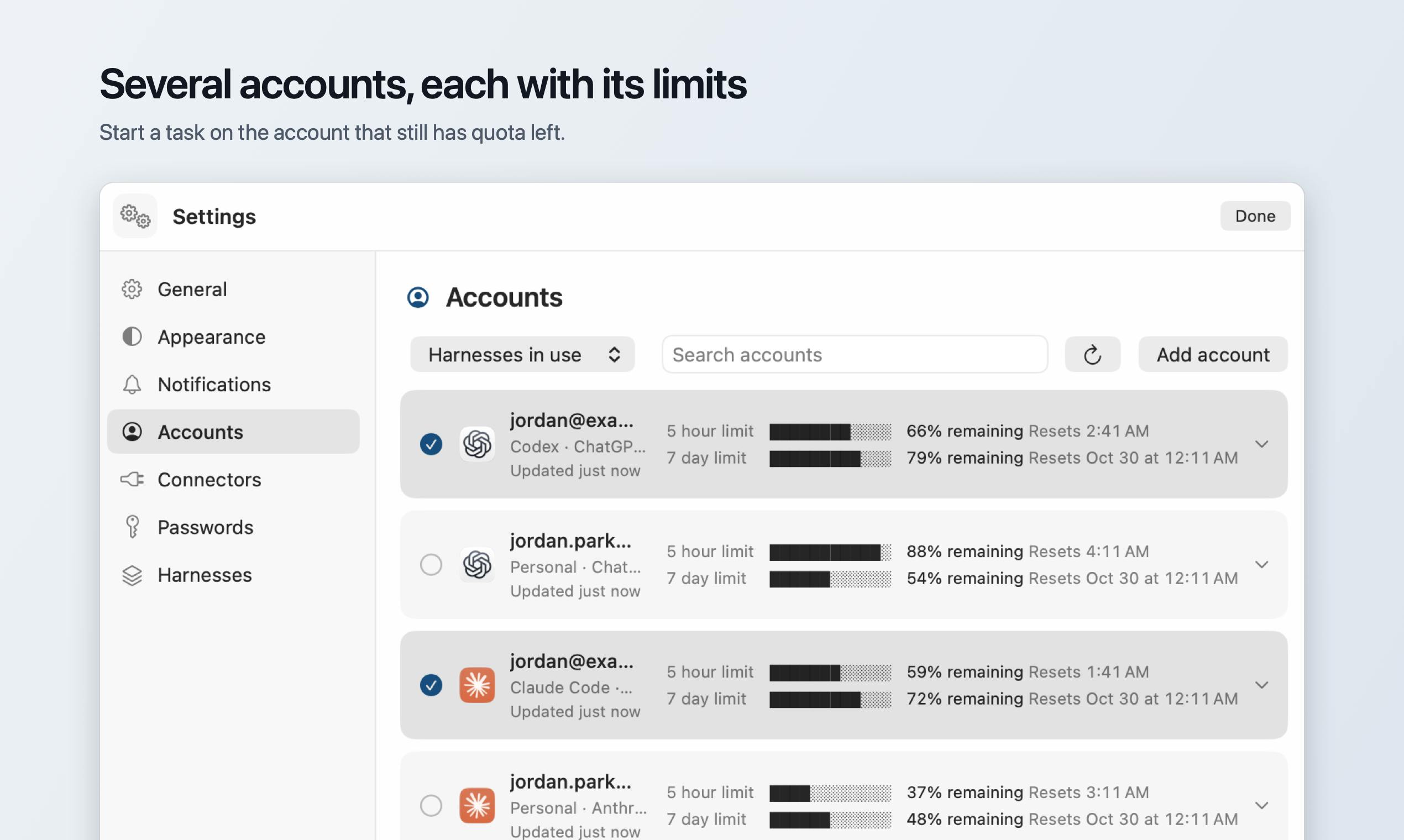
Yardlet is a free, open-source Mac app that solves the pain of switching between multiple AI coding assistants (such as Codex, Claude Code, and OpenCode) and scattered sessions. It provides a unified GUI that aggregates session management, a composer, approval cards, a diff view, and a PR tab while preserving each agent's original CLI and login flow. Yardlet is non-intrusive: it does not store session data or write to agent config files, so users can stop using it at any time with no residue. It suits Mac developers who already have multiple agents configured and improves multi-agent workflow efficiency, but it does not provide agent capabilities itself and currently supports only Mac.
Why Is Such a Tool Needed?
Developers are increasingly comfortable using multiple AI coding assistants, such as Codex, Claude Code, OpenCode, and others. Each tool has its own command-line interface, login method, and interaction logic. Constantly switching between them not only interrupts your train of thought but also tends to scatter your sessions. Yardlet attempts to solve this pain point: it provides a unified Mac app that lets you manage multiple coding agents in a single interface without changing the way they work.
According to its Product Hunt page, Yardlet is a free, open-source Mac app that supports launching coding agents such as Codex, Claude Code, and OpenCode while preserving their respective CLIs and login flows. This means you don't need to reconfigure the agents or migrate existing sessions.
AI coding agents are AI tools capable of understanding natural-language instructions and autonomously performing coding tasks (such as writing code, debugging, and refactoring). They typically run as command-line interfaces (CLIs) with their own login authentication, configuration files, and session management. Common coding agents include OpenAI's Codex, Anthropic's Claude Code, and the open-source OpenCode. The core capability of these tools is "agentic": they not only generate code snippets but can also invoke the terminal, read and write files, run tests, and even open Pull Requests. Because each agent has different design philosophies and underlying models, developers often use several at once to leverage their respective strengths or to compare and validate results.
Core Design: Non-Intrusive, No Lock-In
Yardlet's design philosophy is "lightweight aggregation." It does not store agents' session data in its own database; instead, each agent continues to use its own storage. As a result, tasks you start in Yardlet can still be opened in the Codex app. This is practical for developers who need to collaborate across tools.
Another notable feature: Yardlet does not write anything into the agents' configuration files. The official description states "It writes nothing into the agents' configuration," which means you can stop using Yardlet at any time without leaving behind residual configuration or dependencies. For developers who care about a clean toolchain, this lowers the psychological barrier to trying a new tool.
CLI (command-line interface) is the primary way coding agents interact with users. Each agent provides its own CLI command, such as codex or claude, and users start sessions and send instructions through the command line. CLI tools typically store configuration in hidden files under the user's home directory (such as ~/.codex/config), and login credentials are managed by each tool's own authentication flow. Yardlet does not change how these CLIs are invoked; instead, it starts agents by wrapping or calling the original commands, so login state and session history are fully maintained by the agents themselves, with Yardlet acting only as a front-end interface layer. This design avoids data migration and configuration conflicts, but it requires users to have already installed and logged in to each agent's CLI.
Feature Overview: Sidebar, Approval Cards, and PR Tab
Yardlet integrates interactions with multiple agents into a single interface, including:
- Unified sidebar: View and manage sessions across different agents in one place.
- Unified composer: Send instructions to different agents from one place.
- Approval cards: When an agent needs confirmation for an action, it is presented as a card for quick approval.
- Diff view: Review code changes.
- Pull Request tab: Manage pull requests directly.
- Connectors and browser: Agents can drive the browser, with support for connector extensions.
These features cover the common operations in everyday coding tasks and reduce the number of times you need to jump between tools.
Approval cards are an interaction mechanism through which coding agents request user confirmation before performing sensitive operations (such as deleting files, modifying system configuration, or making network requests). In traditional CLIs, such confirmations usually appear as text prompts and are easily overlooked amid large amounts of output. Yardlet turns them into graphical cards that centrally display the operation content, risk level, and options, so users can approve or reject with one click. This improves both safety and reduces misoperations. Similarly, the Diff view visually compares code changes, and the PR tab integrates GitHub pull request management so developers can review and merge code without leaving the app. Together, these features aggregate operations scattered across multiple CLIs into a unified interface.
Open Source and Free: Lowering the Cost of Trying
Yardlet is open source and offered for free on Product Hunt. According to the page, the project was developed by Jeongki Park and is categorized under Mac, open source, developer tools, and GitHub. Although it currently has 80 votes and 7 comments and ranks 20th, as an early-stage project it already shows a clear product direction.
Being open source means developers can review the code, build it themselves, and even contribute features. For a tool that involves code and session data, open source also helps build trust.
Use Cases and Limitations
Yardlet is suitable for developers who already use multiple coding agents and want to complete most operations within a single window. It is especially well suited to scenarios that require frequent switching between agents for comparison or collaboration.
However, because it relies on each agent's existing CLI and login, users still need to install and configure these agents in advance. Yardlet itself does not provide agent capabilities, nor does it replace the agents' original functionality. In addition, it currently supports only Mac, so users on other platforms cannot use it.
Conclusion
Yardlet is a clear-headed open-source tool. It does not try to reinvent coding agents; instead, it improves the efficiency of multi-agent workflows through an aggregated interface. For Mac developers, if you are already using Codex, Claude Code, or OpenCode, Yardlet is worth a try. Its non-intrusive design lets you fall back to your original workflow at any time, so the cost of experimentation is very low.
Related articles
 Tech Frontiers
Claude Multi-Email Connection Feature Launches: Privacy and Practical Risks Behind the Convenience
Claude launches multi-email and Google Drive connectors, with Reddit discussion focusing on staged rollout, screenshot privacy risks, and AI sending emails from the wrong account, recommending starting with read-only permissions.
 Tech Frontiers
MaxxBench Questions DeepSWE Leaderboard: Is the Impressive Score Genuine?
MaxxBench questions the authenticity of DeepSWE's high scores on Hacker News, exploring the common dilemma of AI code generation benchmarks and reminding developers not to worship scores but to validate model capabilities in real scenarios.
 Tech Frontiers
Playing Games with AI Controllers: Real-World Boundaries and Feasible Paths
A Reddit developer asks: Can AI play games through a physical controller? This article breaks down the tech stack, reinforcement learning bottlenecks, and ethical boundaries, offering a feasible path from simulators to physical controllers to help beginners set reasonable goals.