Your Terminal Is Slowing You Down: A Productivity Rethink for the Multitasking Era

The terminal's linear design collapses under multitasking — it's time to reassess tool-to-work fit.
The terminal has long been a cornerstone of developer identity, praised for low mental overhead once its upfront learning cost is paid. But modern development is highly parallel — monitoring multiple services, tracking deployments, switching contexts constantly. When parallel tasks exceed cognitive limits (typically around the sixth task), the terminal's spatial memory demands flip from an advantage to an attention drain. The author isn't calling for abandoning the terminal, but urging developers to honestly evaluate tool fitness and embrace modern tools that externalize context management.
Terminal: A Developer's Religion, or a Productivity Shackle?
For many seasoned developers, the terminal is practically a religion. One creator openly admitted to spending most of their time in a terminal since age 13 — running programs, working, auditing code, handling daily tasks, almost everything done inside that black-and-white window. This deep attachment isn't unusual; it's a shared habit across an entire generation of engineers.
And yet, a pointed argument is gaining traction: the terminal may no longer be suited for the kind of work we do today, and it's time to stop pretending it is.
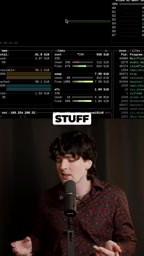
That might sound like heresy. After all, the terminal has been battle-tested for decades — stable, fast, scriptable, and the backbone of countless workflows. But the core argument isn't a rejection of the terminal's value. It's a pointed observation: when the shape of your work fundamentally changes, the shape of your tools needs to be reconsidered too.
The Terminal's Economic Equation: Low Mental Overhead, High Upfront Cost
A sharp analogy captures the terminal's fundamental trade-off: "less mental overhead and slightly more upfront cost."

That phrase is worth unpacking. The "upfront cost" refers to the learning curve: you need to memorize commands, master keyboard shortcuts, and understand the logic of pipes and redirects. That barrier keeps plenty of people out.
But once you're past it, the terminal's "mental overhead" genuinely is low — you're dealing with plain text, with no flashy GUI to distract you. Everything is predictable, composable, and automatable. For single tasks or linear workflows, this model is nearly perfect. You type a command, get a result, move to the next step — your chain of thought stays clean and unbroken.
The problem is that this economic model rests on an assumption of doing one thing at a time. Modern developers stopped working that way a long time ago.
Model Collapse Under Multitasking: From Three Panes to the Sixth Task
The real breaking point emerges in multitasking scenarios. Every heavy terminal user knows this frustration intimately:
"When you're working on three or more things at a time, keeping track of what is where is even more annoying. You have to remember which shortcut goes to which window."

To cope with multitasking, we start constructing a spatial management system inside our heads:
- The first three panes are assigned to three fixed tasks
- The fourth pane is reserved for a specific purpose
- The fifth pane is a "flex panel" for handling whatever comes up
This system works well enough when the number of tasks stays manageable. It essentially offloads the organizational burden onto human working memory — you become the living index of your own terminal layout.

But here's where the fragility lies: "Then you have a sixth thing, and your model breaks down."
That's the crux of it. Human short-term working memory has a limited capacity — cognitive psychology's famous "7±2" rule — and when parallel tasks exceed a certain threshold, that carefully constructed mental map collapses instantly. You start getting lost between windows, you can't find the session that was running your tests a moment ago, you mix up two similar log outputs. At that point, the terminal's "low mental overhead" advantage completely reverses. It becomes an attention black hole instead.
A Shape Mismatch: When the Tool No Longer Fits the Work
The recurring keyword here is "shape." The terminal's shape — linear, text-stream-based, dependent on memory for navigation — was designed for a computing paradigm that's decades old. Back then, tasks were serial and context was singular.
Today's development work is saturated with parallelism:
- Monitoring logs from multiple services simultaneously
- Running tests, checking databases, and tracking deployment status while writing code
- Constantly switching between multiple projects and contexts
When your work itself becomes a highly parallel activity requiring continuous tracking of multiple states, a tool that asks humans to mentally "render" spatial relationships is clearly no longer the optimal choice. The terminal hasn't gotten worse — the shape of the work has changed, and the terminal's shape hasn't kept up.
A Rethink: Not Abandoning the Terminal, but Reassessing It
To be clear, this argument isn't a call to abandon the terminal. The critique comes precisely from someone with deep affection for it and decades of use. That's what makes it credible.
The real takeaway is this: we shouldn't blindly cling to a tool out of habit or identity. We should honestly evaluate how well it actually performs in our current work context.
For single, linear tasks, the terminal remains the efficiency king. But when you find yourself frantically juggling six or seven panes and constantly losing context, the problem may not be that you're not skilled enough — it may be that the tool's shape and the task's shape have fundamentally diverged.
With AI-assisted coding, integrated development environments (IDEs), and a growing ecosystem of visual multitasking tools maturing rapidly, developers should stay open-minded. Acknowledge that tools capable of externalizing context management and reducing working memory load may offer something in the multitasking era that the terminal simply cannot. Stopping the pretense that old tools fit new work — that in itself is a form of progress.
Related articles

Vibe Coding Full-Stack in Practice: AI Programming from Beginner to Enterprise Deployment
From Cursor to Claude Code, this Bilibili AI programming course uses four progressive projects to cover full-stack development, open-source secondary development, and team collaboration. The article analyzes the shock to frontend roles, the efficiency shift from 50 people to 5, and the methodology required for enterprise-grade projects.

David Blaine's Global Quest for Real Magic: From South Africa to Japan and India
David Blaine travels to South Africa, Japan, and India in his Do Not Attempt special, documenting Spinning drivers, black mamba rescuers, iaijutsu masters, and ascetics—exploring the boundary between magic and real human极限 challenges.

Is a Touchscreen MacBook Coming? Vergecast Reveals Apple Executive's Response
Vergecast podcast reveals a conversation between a reporter and Apple executive John Ternus about a touchscreen MacBook and Apple Pencil support. Ternus says iPad is the best device for a stylus, while the reporter bets MacBook will eventually support Apple Pencil.