Zerg Client: A Coding Agent That Opens Its Own Terminal Panes

Zerg Client lets coding agents directly drive terminal panes to run interactive programs like Vim and htop.
Zerg Client is a coding agent harness for Apple-chip Macs, currently in evaluation beta. Its core idea is to make the terminal itself the agent's operating interface rather than confining the model to a chat box. Agents can launch interactive programs like Vim and htop in panes beside their own, and panes can nest more agents, each running on a different model, enabling parallel workflows for editing code, running tests, and watching logs. It received 79 votes and 4 comments on Product Hunt, ranking #17—early attention within a small developer circle. The article sees "terminal as interface" as a weighty product judgment, but permission boundaries, session stability, and orchestration mechanisms under multi-agent parallelism remain to be verified.
When Coding Agents Learn to "Open Windows"
Most AI coding tools are designed around a chat box where you paste code in and copy it out. Zerg Client takes a different approach: it turns the terminal itself into the agent's operating interface. On Product Hunt, the product launched with the tagline "The coding agent harness that drives its own terminal panes," and it is currently in evaluation/testing stage.
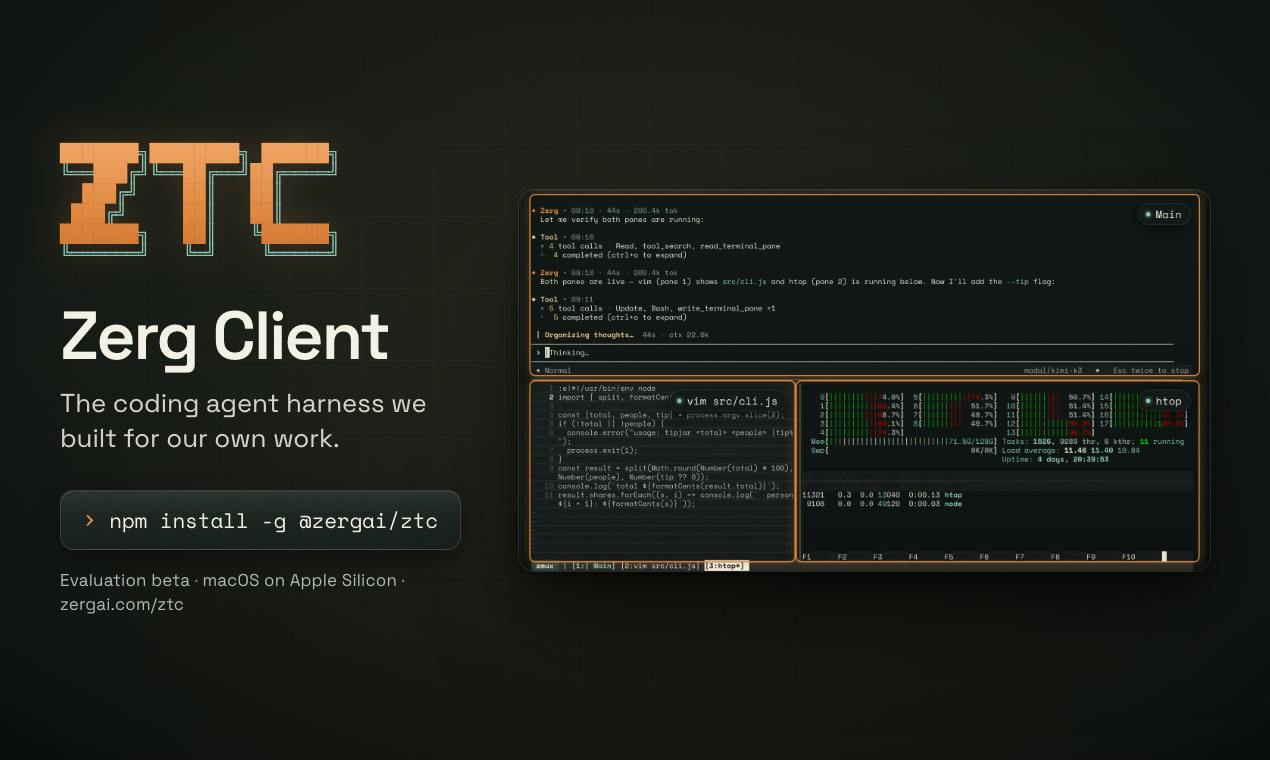
According to the official description, you can simply ask it to open Vim or htop, and the agent will run that interactive program in a pane next to its own. This detail may seem simple, but it gets at the real meaning of the word "harness"—it's not just a chat interface, but a runtime framework capable of orchestrating terminal sessions.
Multiple Panes, Multiple Agents, Multiple Models
Zerg Client's pane design supports nesting, and these panes can host more agents, each running on its own model. This means workflows can be broken down in parallel: an agent in one pane modifies code while an agent in another runs tests, watches logs, or even uses htop to monitor resource usage.
Available models depend on the user's login method and each provider's provisioning permissions; the product does not list a unified model roster. On the hardware side, it is explicitly limited to Macs with Apple chips—not uncommon among similar tools, since local terminal interaction has heavy system-level dependencies, and starting with a single platform is a common trade-off.
Looking at Product Hunt data, the product received 79 votes and 4 comments, ranking #17. That's not explosive traction, but it shows it has caught the attention of a small circle of developers.
What "harness" means in the agent context
In AI engineering, a harness refers to the runtime framework wrapped around a model that translates the model's output into real actions and feeds execution results back to the model. It typically includes mechanisms such as tool calling, session state maintenance, error retry, and context injection. For coding agents, the harness determines whether the model can read and write files, execute commands, and observe output. Zerg Client calling itself a harness emphasizes that it is not a mere chat frontend, but a middle layer responsible for orchestrating terminal sessions and managing pane lifecycles; the model itself only makes decisions, while the harness does the actual "hands-on" work.
Terminal as Interface: A Direction Worth Watching
Treating the terminal as the agent's "hands" rather than its "output port" is a weighty product judgment. Traditional AI coding assistants stop at generating code; actually running it, debugging it, and observing it still falls to humans. Zerg Client tries to fill that gap: letting the agent directly drive interactive programs like Vim and htop amounts to handing it the "read-modify-run-observe" loop.
This also raises some practical issues. Interactive programs depend on keyboard input and TTY state, so an agent driving them needs stable session management capabilities. When multiple panes and multiple agents run in parallel, how to avoid interference and how to define permission boundaries are all points that need verification during the evaluation stage. The official information released so far is fairly restrained, with no public details on the specific orchestration mechanism.
How TTY and interactive programs affect agent driving
TTY (teletypewriter) is the abstraction of terminal devices in Unix systems. Interactive programs like Vim and htop rely on it to determine whether they are running in a real terminal, and use that to enable full-screen rendering, keyboard event listening, and similar behaviors. Such programs typically require a pseudoterminal (pty) to be allocated; otherwise they degrade to non-interactive mode or fail outright. To drive them, an agent cannot simply send ordinary pipe input—it needs to maintain a persistent session with a pty, handling cursor positioning, escape sequences, and window size changes. This is also why terminal agents are far more complex than pure text code generation: the stability of session management directly determines whether interactive programs can be reliably controlled.
Who Should Pay Attention
If you already use AI coding tools but are tired of the "copy-paste-switch windows" back-and-forth, Zerg Client's pane model offers a different interaction paradigm. It is currently an evaluation beta, available only for Apple-chip Macs, and suits developers willing to try new things and tolerate the stability of an early-stage product.
For broader teams, it's safer to wait and see for now—the permissions and reliability of multi-agent collaboration often only become clear in real projects.
Related articles

Sugra MCP: One-Click Access to 200+ Data Sources, Connecting Mainstream AI Applications
Sugra MCP connects mainstream AI apps like Claude, ChatGPT, and Cursor through a unified MCP protocol, offering 200+ data sources and 1,600+ endpoints. Listed in Anthropic, OpenAI, and GitHub directories—integrate with one command.
 Tech Frontiers
T3 Code: Free, Open-Source, and a Unified Way to Manage All AI Coding Agents
T3 Code is a free open-source app that aggregates AI coding tools like Cloud Code and Codex into one interface, with conversation handoff, branch isolation review, automatic PR creation, and remote access.
 Tech Frontiers
Conductor Cloud Service Shutting Down? A Comparative Review of Three Parallel AI Coding Agent Solutions
Conductor's cloud service is shutting down—how can developers keep running AI coding agents in parallel? This article compares three alternatives: Orca, Codex, and Cursor: Orca is open-source and free and compatible with old workspaces, Codex is built into the ChatGPT desktop app and supports cloud handoff, and Cursor offers multi-agent windows within the editor. Choose the tool that best fits your workflow.