Zero-Code Bioinformatics Tutorial: Building a Bioinformatics Workstation with AI Agents

A guide to building a complete AI-powered bioinformatics workstation without writing any code.
This tutorial explains how biomedical researchers with no coding background can leverage AI Agents to perform complete bioinformatics analyses. It covers three core concepts—Agent (executor), MCP (tool connector), and Skills (professional SOPs)—compares Claude Code and Codex tools, and introduces four specialized Skills packages for scientific analysis, writing, and quality control.
For biomedical researchers with zero coding background, bioinformatics analysis has long been an insurmountable barrier—even when AI can generate analysis code, configuring environments, running scripts, and fixing errors remain daunting. Bilibili content creator Jeremy's tutorial series "Using Agents for Zero-Code Bioinformatics Analysis" offers a completely new path: instead of teaching you to code from scratch, it teaches you to leverage AI Agents to go from topic selection, data acquisition, analysis, and visualization all the way to producing a complete draft of a bioinformatics research paper. This article is based on the first lesson of that series, summarizing the core methodology and practical essentials.
Why Regular ChatGPT Can't Handle Bioinformatics Analysis
Many researchers still think of AI in terms of a "question-and-answer" chat mode. You ask AI to write a transcriptomics analysis script, and it delivers. You ask how to draw a volcano plot, and it gives you that too. But the problem lies precisely here—what do you do after you get the code?
For those with zero coding background, simply installing R can be a showstopper. R is a programming language designed specifically for statistical computing and data visualization, and it's practically standard in bioinformatics—core analysis packages like DESeq2, edgeR, and clusterProfiler are all built on the R ecosystem. However, R installation involves version selection, dependency library configuration, and package manager setup, and for researchers without programming experience, every step can produce errors that are impossible to troubleshoot independently. Having code but not knowing how to run it is exactly where the vast majority of bioinformatics beginners get stuck.
This is the fundamental difference between an Agent and regular AI chat. A regular chatbot can only tell you the general steps, while an Agent can actually enter your project directory: reading files, creating scripts, running scripts, checking errors and modifying scripts, and finally generating results directly. Unlike traditional conversational AI, an Agent has a "perceive-plan-execute-feedback" loop capability—it can dynamically adjust its next action based on execution results rather than giving a one-time static answer.
Here's a practical example: when doing Bulk RNA-seq analysis, you can simply tell the Agent—"Based on the expression matrix and grouping information in the current folder, please complete differential analysis, KEGG enrichment analysis, and GSEA analysis, organize all results into a result folder, and generate an analysis report." Bulk RNA-seq (bulk transcriptome sequencing) is a technique that quantifies gene expression levels by high-throughput sequencing of all mRNA from tissues or cell populations. Its typical workflow includes raw data quality control, sequence alignment, gene quantification, differential expression analysis, functional enrichment, and result visualization—each step involving different software tools and parameter configurations. KEGG enrichment analysis associates differentially expressed genes with known biological pathways (such as metabolic pathways and signal transduction pathways) to reveal the biological significance behind gene changes. GSEA, on the other hand, doesn't rely on pre-selected differentially expressed genes but instead ranks all genes by expression change and tests whether specific gene sets are significantly enriched, capturing coordinated subtle changes. The Agent acts like an on-call bioinformatics analyst, automatically executing the entire workflow.
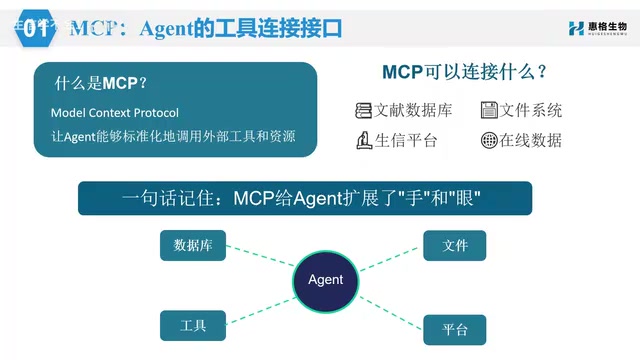
Three Core Concepts: Agent, MCP, and Skills
To understand this zero-code bioinformatics workflow, you need to clarify three key concepts.
Agent: The One Who Actually Does the Work
The Agent is "the person doing the work" in this entire system. It accepts your task instructions and actually executes operations in your local computer's project directory. It's smart enough on its own, but needs tools and methods to truly deliver results.
MCP: A Standardized Interface for Connecting External Tools
MCP (Model Context Protocol) can be understood as a standardized interface for Agents to connect with external tools. This protocol was proposed by Anthropic in late 2024 and adopts a client-server architecture: the AI Agent acts as a client making requests, while MCP Servers encapsulate specific tool capabilities (such as database queries, file operations, and API calls). This standardized design means the same Agent can flexibly connect to different tools, and tool developers only need to implement interfaces according to MCP specifications to be called by any MCP-supporting Agent, greatly reducing the complexity of tool integration. An Agent by itself only has internal memory and cannot access external databases—this is precisely the root cause of AI frequently "hallucinating" references.
Through MCP, Agents can truly connect to literature databases like PubMed for retrieval, avoiding fabricated citations. PubMed is a biomedical literature database maintained by the U.S. National Library of Medicine, containing over 36 million article abstracts and serving as the primary literature search platform for biomedical researchers. In bioinformatics scenarios, MCP can be used to connect to literature databases, file systems, code environments, data analysis tools, and even certain specialized analysis platforms. Simply put: MCP is responsible for extending the Agent's tool capabilities.
Skills: Professional Operation Manuals for Bioinformatics
Skills can be understood as a set of professional operation manuals or standard process packages prepared for the Agent—essentially SOPs (Standard Operating Procedures).
Taking transcriptomics analysis as an example, it typically includes data reading, quality control, differential analysis, enrichment analysis, visualization, and report compilation. If you had to explain the workflow step by step to AI every time, it would be extremely tedious. Once this workflow is packaged into Skills, the Agent will follow the established standard procedures whenever it encounters similar tasks.
The relationship between the three can be summarized as: The Agent is the executor, MCP is its channel for connecting external tools, and Skills are the professional method library it follows.
Agent Tool Comparison: How to Choose Between Claude Code and Codex
The tutorial uses two mainstream local Agent tools as examples: Anthropic's Claude Code (abbreviated CC) and OpenAI's Codex. The author specifically emphasizes that you don't need to agonize over which is better—the core logic of both is completely identical: open terminal → navigate to project folder → launch Agent → authorize read/write access to current project → issue clear task instructions.
The main differences between the two are:
- Model support: Claude Code defaults to Claude models and can be switched to domestic models like DeepSeekAd through environment settings; Codex only supports OpenAI's GPT models and requires Plus membership or above.
- Ease of use: Codex features a desktop design that's more beginner-friendly, with a chat-like conversational experience; Claude Code is primarily used in the terminal, with a slightly higher barrier but greater flexibility.
- Special features: Codex supports browser access (Computer Use, which can actively operate your computer and show each step), has a built-in image generation model, and can be remotely controlled from a phone; Claude Code leans more toward professional developers.
- Pricing: Codex's Plus version costs $20/month, which is sufficient for getting started; Claude's API subscription is relatively strict—frequently changing IPs or using domestic Chinese IPs can trigger risk controls, so most users opt for API or proxy solutions.
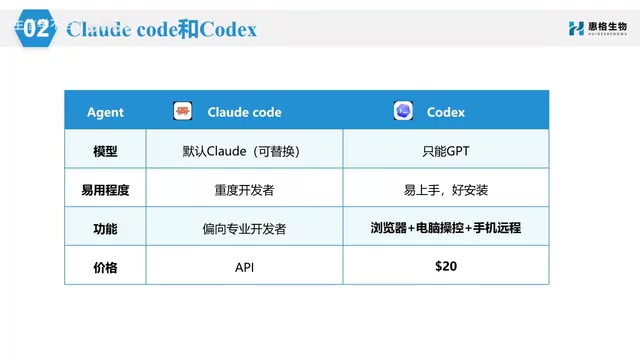
For beginners with zero bioinformatics background, Codex is sufficient; and since both share the same logic, learning one means you can quickly pick up the other.
Three Principles You Must Know Before Installation
Before getting hands-on with installation, the author repeatedly emphasizes three important principles worth remembering for every learner.
First, always refer to the official website. AI tools update extremely fast—roughly every two weeks there's a major version update, and commands demonstrated in videos may be completely different a few months later. Therefore, what you should learn is the installation logic, not memorize specific commands.
Second, always verify after installation. Installation complete doesn't mean success—you need to enter the corresponding launch command in the terminal to confirm that the Agent opens normally, can log in, and can access the current directory.
Third, pay attention to permissions and data security. Don't give the Agent full disk access from the start. The correct approach is to create a separate project folder and only let the Agent work within that directory—both safe and controllable. This is especially important for researchers handling patient data or unpublished experimental data, preventing sensitive information from being accidentally read or uploaded.
Additionally, before installation, confirm that your computer has a terminal environment: Windows comes with PowerShell and CMD, macOS comes with "Terminal." The terminal is our window for communicating with the computer's underlying system—previously you had to type commands yourself, but now you hand this window to the Agent and let it determine what commands to run.
Using Claude Code as an example, the installation process is roughly: first install Git (Mac can skip this) → install Node.js (choose the LTS version) → install Claude Code via PowerShell and record the installation path → add the path to system environment variables → configure the LLM API. Node.js is a JavaScript runtime environment based on the Chrome V8 engine that Claude Code depends on to run; LTS (Long Term Support) versions offer long-term maintenance and greater stability. Since Claude is more strictly controlled in China, you can use third-party tools like CC Switch to switch to domestic models like DeepSeek, entering the API Key and address and replacing the main model with the latest version.
Four Bioinformatics-Specific Skills: Turning Your Agent into a Domain Expert
The tutorial recommends four Skills particularly useful for bioinformatics analysis. Once installed, they significantly enhance the Agent's professional capabilities in research scenarios.
- Scientific Agent Skills: Currently the most comprehensive scientific skill collection, containing 147 practical skills covering over 100 scientific databases across bioinformatics, drug discovery, clinical research, machine learning, and data visualization.
- Claude Scientific Writer: A professional scientific writing skill set for academic papers, literature reviews, clinical reports, and more. It can retrieve real references from databases like PubMed, evaluate paper quality through built-in systems, and supports meta-analysis, peer review, PDF/Word processing, and chart generation. Meta-analysis is a statistical method that systematically and quantitatively combines results from multiple independent studies to improve the precision of effect size estimates, and is considered the highest level of evidence in evidence-based medicine.
- Bio Skills: A skill package specifically for bioinformatics analysis, containing 385 skills across 67 categories, covering FASTQ file processing, sequence manipulation, database access (NCBI/UniProt/BLAST/SRA), alignment file processing, variant calling, phylogenetic tree construction, single-cell analysis, transcriptome differential expression, methylation analysis, ChIP-seq, and virtually all common bioinformatics scenarios. NCBI (National Center for Biotechnology Information) is the world's largest bioinformatics resource platform, and SRA (Sequence Read Archive) is its hosted raw high-throughput sequencing database where researchers can download raw sequencing data from published studies for re-analysis.
- Nature Skills: Addressing the biggest risk in AI writing—"overstepping and fabricating." It has strict editing rules and evidence verification processes built into each skill, preventing ordinary results from being written up as "first revelation" or treating unverified mechanisms as proven. Suitable for SCI paper writing and polishing, Nature-style figures, CNS literature interpretation and citation, point-by-point responses to reviewer comments, full-text paper reading and translation, and even conversion to PowerPoint. CNS here refers to Cell, Nature, and Science—the three top comprehensive academic journals whose paper formats and writing standards are often regarded as benchmarks for academic writing.
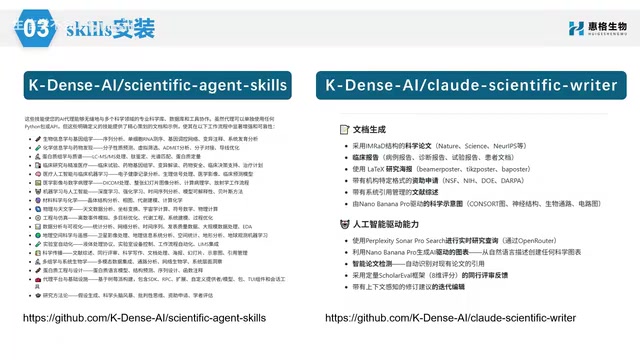
It's worth noting that installing these Skills doesn't require manually typing commands—since you've already installed the AI Agent, simply type "help me install [specific Skills]" in the dialog box, and it will complete the installation automatically. Once fully equipped, your Agent essentially has built-in experts in bioinformatics analysis, paper writing, and rigorous peer review.
Summary: From AI Advisor to AI Bioinformatics Assistant
The core value of this methodology is that it transforms AI from "an advisor who gives suggestions" into "an assistant who actually does the work." Through the combination of Agent + MCP + Skills, researchers with zero coding background can run through complete bioinformatics analysis workflows around real projects.
According to the content creator, subsequent lessons will have the Agent help install R, RStudio, and R packages, gradually giving the AI bioinformatics workstation real analytical capabilities—covering the full pipeline from environment configuration, database acquisition, bulk transcriptome and single-cell code execution, result interpretation, to paper compilation. The course also specifically includes a manual code execution step to verify AI results—this is particularly important, reminding learners not to blindly trust AI output but to always maintain scientific scrutiny of results.
Related articles

Chain of Thought Isn't Just for AI: How Humans Can Use CoT to Improve Thinking Quality
Chain of Thought isn't just a prompt trick for large models. Starting from a Hacker News discussion, this article analyzes why CoT works for human thinking too, breaks down actionable ways to transfer it, and highlights the key differences between human CoT and machine CoT.
Cloudflare Teams Up with OpenAI: Closi…
Cloudflare Teams Up with OpenAI: Closing the Loop from Vulnerability Discovery to Defense with AI
Cloudflare uses OpenAI Daybreak to investigate security vulnerabilities and generate reviewable remediation plans, while developers use Codex to boost coding efficiency and quality.

Orca Multi-Agent Orchestration in Practice: A Guide to Parallel Collaboration with Claude and Codex
Orca is Stable AI's free open-source agent workbench supporting 34 agents like Claude Code and Codex in parallel. Learn its Git worktree isolation, multi-model orchestration, and mobile management.