Zero-Code Cinematic Websites: A Complete Guide Using GPT Image 2 + Claude Code

Build a cinematic scroll-driven website using GPT Image 2, Claude Code, and Vercel — zero coding required.
This guide walks through a complete no-code workflow for building a cinematic, scroll-driven brand website: generate scene images with GPT Image 2, convert them to video clips using AI interpolation, merge in Canva, then have Claude Code generate the entire site from a single structured prompt. GitHub and Vercel handle hosting and deployment for free. The result is a commercially viable showcase site — no programming background needed.
Building a Cinematic Website Without Writing a Single Line of Code
Not long ago, creating a brand website with cinematic visuals and scroll-driven storytelling required a team of designers, motion engineers, and frontend developers working for weeks. Scroll-driven narrative (also known as Scrollytelling) is a web interaction paradigm that tightly binds user scrolling behavior to animations and video playback. Under the hood, it relies on JavaScript's Intersection Observer API or animation libraries like GSAP to map scroll position to video playback progress or element animation states. The industry benchmark for this effect is Apple's product pages — as users scroll down, product models rotate or disassemble, creating an immersive feeling of "the user controls the timeline." These pages have historically been expensive to build; debugging the animation logic alone could take a senior frontend engineer several days, making this a playground exclusively for large brands.
Now, a content creator on Bilibili has built a stunning scroll-driven narrative website for a fictional premium Indian tea brand — all without writing any code. As you scroll down the page, a tea bag slowly opens, ingredients drift into a cup, and two hands cradle the finished drink, with smooth video playback and exquisite lighting details throughout.
The core logic of the entire workflow is: use AI to generate assets, then use AI to generate code. The specific pipeline is: "GPT Image 2 generates images → ElevenLabs converts to video → Canva merges clips → Claude Code generates the website → GitHub hosts the code → Vercel deploys it." No programming background required — and the result is a custom, commercially viable showcase website.
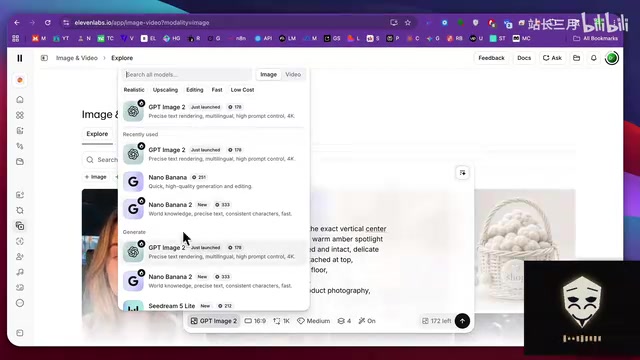
Step 1: Generate Scene Images with GPT Image 2
The key to video storytelling is first breaking down every screen of the website into static images. The creator took a very systematic approach: mapping out the presentation sequence — a tea bag appears first, ingredients pop out as you scroll, then the pouring scene, then hands cradling the cup — each video shot corresponding to one starting image.
For tooling, the creator used the GPT Image 2 model within ElevenLabs' image generation feature, with parameters set to 16:9 aspect ratio and 2K resolution. GPT Image 2 is a multimodal image generation model released by OpenAI in 2025, with major improvements in semantic understanding of prompts and text rendering within images. Compared to previous DALL·E models, it shows significant gains in lighting detail, material texture, and compositional consistency. It's particularly precise in responding to "brand tone" prompts — capable of translating abstract aesthetic descriptors like "premium," "minimalist," and "cinematic" into visual output. Notably, the creator chose to access this model through the ElevenLabs platform rather than directly through ChatGPT, reflecting a trend in the AI tool ecosystem toward "capability aggregation platforms" — single platforms integrating top models from multiple providers for on-demand switching.
A total of 9 images were generated and systematically renamed as Image-1 through Image-6 and so on. This seemingly mundane step is critical for ensuring error-free video sequencing and code references later.
One telling detail: the creator repeatedly emphasized that "all the prompts are in the document — just follow them." This reveals the essence of AI workflows like this: the key to success lies in having solid prompt templates, not in the operational complexity of the tools themselves.
Step 2: Image-to-Video with First and Last Frame Control
With the static images ready, the next step is converting them into dynamic video clips. The technique here is clever: set the first image as the starting frame and the second image as the ending frame, letting the AI video model automatically generate the transition animation between them. This "keyframe completion" approach is technically known as Video Interpolation — modern AI video generation models use diffusion models to interpolate semantic information between two frames in latent space, producing visually coherent transition sequences. This method naturally ensures consistency in color tone, lighting, and object motion direction across different scenes, without requiring any manual keyframe design. This is where the site's "cinematic feel" comes from — the visual trust created by continuity and predictability.
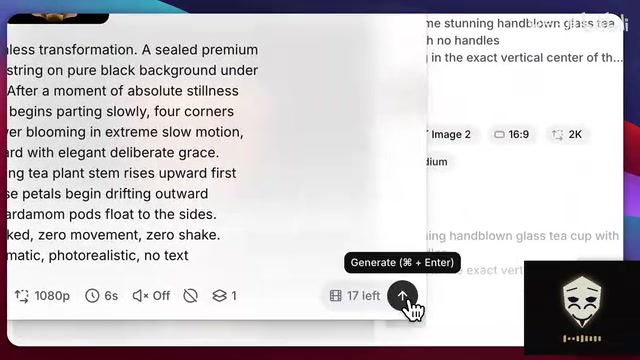
For the video model, the creator chose VO 3.1 Lite to conserve credits, noting that Seedance 2.0 delivers better results when credits allow. Parameters were set to 16:9, 1080p, 6 seconds, with audio disabled. Using the "first frame + last frame + prompt" method, the creator generated five video clips — tea bag, drifting ingredients, pouring into cup, hands cradling cup — downloaded them all and renamed them systematically.
The five clips were then imported into Canva (using a landscape video template), arranged in narrative order, merged into one complete video, and exported at 1080p. At this point, all core visual assets for the website were ready.
Step 3: Claude Code Generates the Entire Site in One Prompt
This is the most "magical" part of the entire workflow. The creator first installed the Claude Code extension in VS Code, logged in, created a new project folder, and dragged the merged video into it.
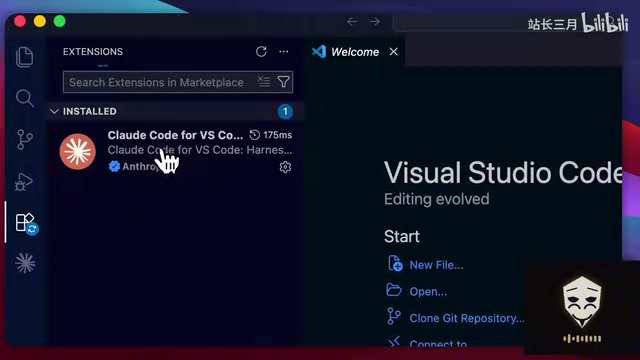
Claude Code is an agentic code generation tool from Anthropic, designed to understand full project context, autonomously read and write multiple files, execute terminal commands, and debug errors. Its key distinction from standard code completion tools (like GitHub Copilot) lies in its agentic autonomy — it doesn't just generate code snippets; it plans project structure, installs dependencies, and starts local servers. Claude Code interacts with the file system and terminal through a tool use / function calling mechanism, powered by large language models like Claude 3.7 Sonnet.
The creator then entered a carefully crafted prompt into Claude Code. This wasn't a simple "build me a website" request — it specified in detail: building a scroll-driven narrative website for a premium Indian tea brand, clearly outlining the tech stack, core interaction mechanics, loading animations, fixed navigation bar, scroll progress indicator, text overlay layers, and the path to the video file.
After hitting enter, Claude Code automatically generated the full HTML and supporting code files and launched a local server. Opening the link and scrolling through the page, the video played smoothly — the results were genuinely impressive. A structured, detail-rich prompt is the decisive factor in getting AI to produce high-quality code — the model's code quality ceiling is already high enough; the precision of your description is the real bottleneck for actual output quality.
Step 4: Iterating and Adding Product Cards
With the site skeleton in place, the creator moved into the iteration phase. Three product images — Dawn, Dusk, and Night — were generated using GPT Image 2, dragged into the project folder, and the creator instructed Claude to bind each to its corresponding card, add a gradient effect at the bottom of each image for a natural blend into the background, and preserve the existing card styling.
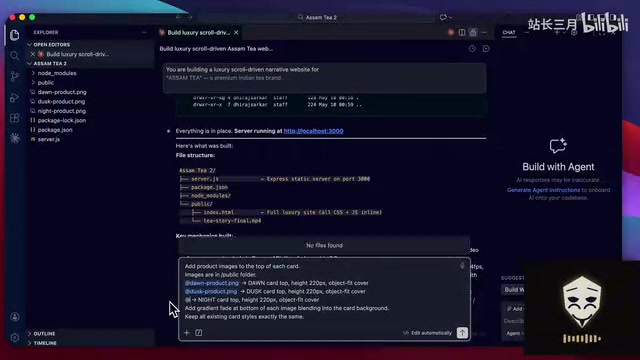
A real "fail and fix" moment happened here: after the first round of changes, the images didn't show up and the page appeared blank. Rather than digging through the code himself, the creator simply reported the problem back to Claude — "Please identify and fix this issue." Claude located and resolved the bug, and after a refresh, all three product images rendered perfectly with a premium look and feel.
This detail perfectly illustrates another advantage of AI-driven development workflows: regular users don't need to understand error messages — they just describe what they're seeing in plain language and let the AI debug itself.
Step 5: GitHub Hosting and Vercel Deployment
The final step is getting the site live. GitHub is the world's largest code hosting platform, built on Git's distributed version control system, providing version history, collaboration, and backup capabilities. Vercel is a cloud deployment platform designed specifically for frontend projects, with deep GitHub integration — every code push can automatically trigger a build and deployment (CI/CD, continuous integration/continuous deployment), with global CDN acceleration for static assets. For a pure frontend showcase site, Vercel's free tier is more than sufficient to handle normal commercial traffic — this is the infrastructure foundation that makes the entire zero-cost workflow genuinely viable.
The creator created a new repository on GitHub, copied the URL, and simply told Claude Code: "Please push all project files to this GitHub repository." The AI automatically handled the Git push — version control managed by AI too. The repository was then imported into Vercel, deployed with one click, and a live URL was available within seconds. Testing confirmed the live experience matched local exactly, with scroll-driven storytelling running smoothly.
The Value and Limits of This Workflow
The significance of this case isn't "how to build a tea website" — it's demonstrating a viable path where the entire pipeline from asset generation to code generation is AI-driven. It reduces what was once a highly specialized profession to "finding the right tools + using the right prompts + knowing how to describe what you need."
That said, it's worth being realistic about the limitations:
- Prompt templates are a hidden barrier. Every effect shown in the video depends on a pre-existing prompt document. Real customization ability still comes down to prompt-writing skill.
- Frontend display vs. backend functionality. The workflow described here only covers frontend presentation. Features like shopping carts and payments require separate implementation — there's still a significant gap between a pure showcase site and a full e-commerce system.
- AI output still needs human oversight. The image display bug is a reminder that AI-generated code doesn't always work on the first try — creators still need the ability to spot problems and formulate feedback.
For content creators, indie developers, and small-to-medium brands, this "multi-AI tool chaining" workflow is already capable of producing high-quality, commercially usable showcase websites. Its deeper implication is this: the productivity gap of the future may no longer be "can you write code" — but "can you direct AI."
Key Takeaways
Related articles

LangChain Retry Middleware Configuration: Practices and Selection Guide
Based on Reddit community discussion, this article analyzes LangChain ModelRetryMiddleware retry parameter configuration practices, covering the selection logic and alternatives for key options like max_retries, backoff_factor, and jitter.

Texas Senate Race in Trouble: Why Are Republicans Nervous?
Texas Senate race stirs Republican anxiety. Based on street interviews, this article analyzes the Democratic offensive in funding, organization, and running everywhere, and how Republicans are defending "Texas, Texas" amid the political pendulum effect.

Gemini Chat Now Generates and Edits Google Docs Directly, a New Breakthrough in Office Productivity
Google Gemini's chat interface now generates and edits PDF, Google Docs, Sheets, Slides, Markdown, TXT, and code files. Available to all users; web supports all formats, mobile only PDF for now.