Zero-Code Mac Menu Bar App Built in One Hour Using Codex: A Practical Guide

Non-programmer builds a Mac menu bar app in one hour using AI Codex
A creator with zero coding experience successfully developed and packaged a Mac menu bar app in just over an hour using OpenAI Codex through natural language conversation. The app supports real-time storage capacity display and custom quick actions. This case demonstrates how AI programming tools are lowering the software development barrier to simply describing requirements in natural language, ushering in a new paradigm for personal lightweight tool development.
From Zero to One: A Non-Programmer's First Mac Application
A creator who claims to have never learned coding successfully developed and packaged a Mac menu bar app in just over an hour using OpenAI's Codex tool. This case once again demonstrates that AI programming tools are lowering the barrier to software development to unprecedented levels.
What Can This Mac Menu Bar App Do?
A Mac Menu Bar App is a special lightweight application form in macOS that resides in the status bar area at the top-right corner of the screen. It doesn't occupy Dock space and is ideal for utility software that needs to be accessed at any time without requiring a full window interface. This menu bar app is lightweight in size but quite practical in design, featuring two core modules:
1. Real-Time Display of Computer Storage Capacity
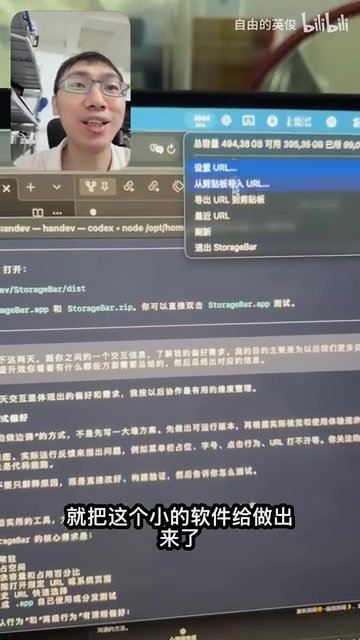
The program stays in the Mac's top menu bar, allowing you to check storage space usage at any time without opening System Settings—everything is visible at a glance. For users frequently troubled by insufficient storage space, this is an extremely thoughtful feature.
2. Custom Quick Actions
Clicking the menu bar icon triggers preset quick actions. These shortcuts support custom configuration—for example, you can set them to open the system storage page or launch frequently used apps like Obsidian with a single click.

The Development Process: Programming Through Natural Language Conversation
The entire development process was completed entirely through conversation with Codex. OpenAI Codex is an AI system based on the GPT series of large language models, specifically fine-tuned for code generation tasks and trained on billions of lines of public code. It can understand natural language descriptions and transform them into executable code in multiple programming languages. The new-generation Codex agent version launched in 2025 is no longer just a code completion tool—it's an autonomous programming agent capable of understanding project structure, running tests, debugging errors, and completing entire development workflows.
The creator only needed to describe the desired functionality in natural language, and Codex generated the corresponding Swift code—Apple's officially recommended language for Mac app development, paired with the AppKit framework and NSStatusItem API to create and manage the menu bar icon. From feature implementation to final packaging as a standalone app, the entire process took just over an hour.

You might not have noticed, but this isn't merely generating a runnable script—it completes the entire application packaging workflow. The final output is a standalone app that can be placed in the Applications folder and launched with a double-click.
Packaging code into a standalone Mac application (.app format) involves multiple technical steps, and this is often the final hurdle where non-programmers get stuck. A macOS .app is essentially a specifically structured folder (Bundle) containing executable binaries, resource files, Info.plist configuration manifests, and other components. The complete distribution workflow also involves Code Signing—Apple requires applications to be signed with developer certificates to pass Gatekeeper security checks. The fact that Codex can guide users through this entire series of steps means AI isn't just playing the role of "code writer" but also serves as a full-process technical consultant, bridging the engineering gap between code and usable product.
Why This Zero-Code Development Case Deserves Attention
Truly "Zero-Barrier" Software Development
Low-Code and No-Code platforms are not new concepts—representative products like Bubble, Webflow, and Airtable emerged as early as the 2010s. These platforms allow non-technical users to build web applications or automation workflows through visual drag-and-drop interfaces and pre-built modules. However, these platforms have clear limitations: users still need to learn the platform's proprietary logic system, customization capabilities are bounded by platform constraints, and they typically exist as SaaS subscriptions where the resulting applications cannot run independently outside the platform.
The new generation of AI-powered programming tools is fundamentally different—it uses natural language as its interface and generates real, portable source code. Users have complete ownership and control over the final product. Through AI programming tools like Codex, users only need to clearly describe their requirements—without even understanding code logic—to obtain usable software products. This represents a qualitative shift rather than a quantitative change in the personal software development paradigm.
A New Paradigm for Lightweight Personal Tools
Often what we need isn't complex, feature-heavy software but small tools that solve specific pain points. In the past, such needs meant either putting up with the inconvenience, spending time learning to code, or hiring someone to develop it. Traditionally, even "lightweight" applications like menu bar apps required developers to be familiar with the Xcode development environment, understand macOS application sandboxing mechanisms, and master code signing and packaging workflows—a steep learning curve. Now, AI programming makes "think it, build it" a reality.
A Complete Loop from Code Generation to App Packaging
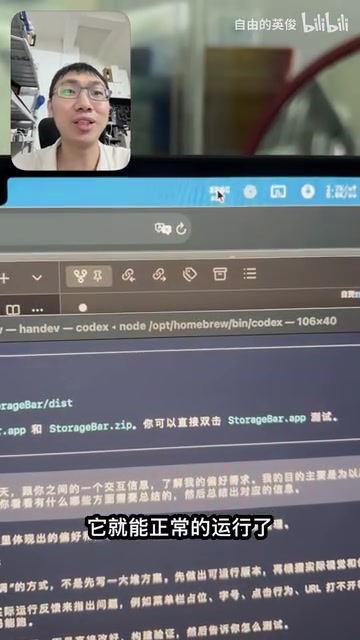
Codex can not only write code but also guide users through subsequent steps like packaging and deployment. This means the output isn't a one-off code snippet but a complete application that can be used long-term and launched at any time.
How Ordinary Users Can Develop Their Own Tools with AI Programming
If you have similar small tool needs, here's a practical approach to consider:
- Define your requirements: First, think clearly about what problem you want to solve. The more specific your functional description, the more accurate the AI-generated code will be
- Describe step by step: Break complex features into multiple small steps and communicate with the AI incrementally
- Iterate and optimize: The first version doesn't need to be perfect—continuously refine through ongoing conversation
- Complete the packaging: Let AI help you finish the last step from code to executable program, generating a truly usable app. For personal-use tools, you can bypass Gatekeeper restrictions by running the
xattr -crcommand in Terminal, or use self-signed certificates for local deployment
The significance of this case isn't about how powerful this small app is in itself, but rather that it demonstrates a completely new personal productivity paradigm: with AI programming tools like Codex, everyone can become the developer of their own needs, quickly turning ideas into runnable software.
Key Takeaways
- A user with zero coding experience developed a Mac menu bar app in one hour using OpenAI Codex
- The app supports two major features: real-time storage capacity display and custom quick actions
- The final output is a fully packaged standalone application for long-term use
- AI programming tools are lowering the software development barrier to the level of describing requirements in natural language
- Personal lightweight tool development has entered a new paradigm of "think it, build it"
Related articles
 Product Reviews
The Programmer's Desk Setup Guide: Building a Workspace That Feels Like Home
Discover how programmers build productive, comfortable workspaces. From multi-monitor setups to ergonomic design, explore the desk philosophy that drives focus and flow.
 Product Reviews
Qoder vs Cursor Real-World Comparison: Which $20/Month AI IDE Is Better?
Hands-on comparison of Qoder vs Cursor AI IDEs: Agent autonomy, human interaction count, and architecture decisions. Qoder needed only 2 interactions vs Cursor's 8.
 Product Reviews
Cursor Cloud Agent Demo: Eliminating Bottlenecks Across the Entire Software Development Lifecycle
Deep analysis of Cursor's Cloud Agent demo showing how cloud VMs, automated test artifacts, and a full-chain control plane systematically eliminate human bottlenecks across the software development lifecycle.