Zero-Cost AI Manga Drama Production: A Complete Breakdown Using Doubao + Jimeng + CapCut

A beginner's guide to producing AI manga dramas for free using Doubao, Jimeng, and CapCut across a full 7-step pipeline.
The AMNG Production Starter Course, created by a Bilibili UP creator, deliberately avoids high-barrier tools like GPT, Midjourney, and ComfyUI in favor of three accessible tools — Doubao (scripting), Jimeng (image & video generation), and CapCut (editing) — achievable at near-zero cost through current promotions. The course breaks production into seven steps: script → shooting script → character design → scene keyframes → video generation → voiceover & music → final edit, clarifying key distinctions such as Seedream vs. Seedance, universal reference vs. first-last frame video modes, and the outsized impact of audio quality on viewer immersion. The central philosophy: master the workflow logic first, and switching to any new tool or platform becomes straightforward.
AI short dramas and AI manga dramas are becoming a new frontier in content creation — but many aspiring creators are shut out by complex toolchains and steep learning curves. A Bilibili UP creator's "AMNG Production Starter Course" offers a completely different approach: using just three tools — Doubao, Jimeng (即梦), and CapCut — to walk through the entire AI manga drama production pipeline, with near-zero cost under current promotional conditions.
Why Build a "Starter Course" at All
The creator candidly admits that previous courses used "advanced" tools like GPT, Midjourney, and ComfyUI. But the real-world feedback was telling: many students simply couldn't follow along — network issues, shaky foundations, and the result was that even the most basic tutorials couldn't be reproduced step by step on their own machines.
So the toolchain was radically simplified down to just three components: Doubao as the large language model for scriptwriting, Jimeng for image and video generation, and CapCut for final editing. The core logic behind this design is transferability — once you've internalized the workflow itself, you can quickly adapt to whatever models, platforms, or third-party APIs a future employer or project might require, because the underlying logic stays the same.
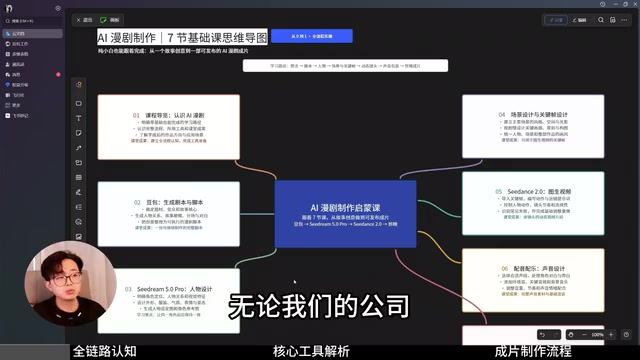
Cost control is also worth highlighting. Except for Jimeng's Seedance video model and Seedream image model, every other part of the pipeline is free. And both paid models can be accessed within the Doubao desktop app — thanks to an official promotional offer tied to Doubao's workflow (agent mode), new users get 30 days of the standard membership for free, with students receiving three months. Under current conditions, this course can essentially be completed at zero cost.
The Full Pipeline: Seven Steps from Script to Finished Video
The creator breaks the entire AI manga drama production process into clearly defined stages: Script → Shooting Script → Character Design → Scene Keyframes → Video Generation → Voiceover & Music → Editing & Final Cut. This workflow applies equally to manga-style dramas and live-action AI short films — the only divergence comes during character design and generation.
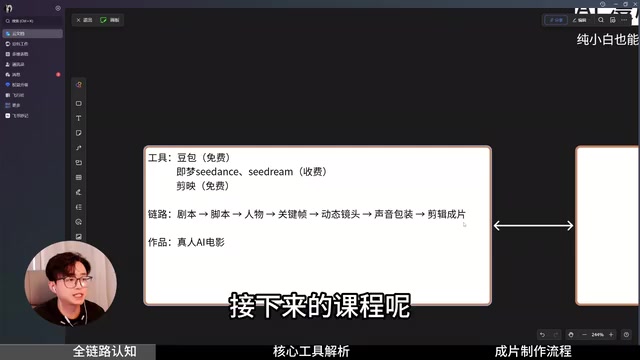
Interestingly, the course actually targets "live-action AI film" rather than typical short dramas. The creator produced a PV (promotional video) titled Immortal Island specifically to raise the overall quality benchmark.
Script vs. Shooting Script: Understanding the Difference
A script is like a novel or storybook — it gives you a holistic understanding of the entire story. Think of classic works like Dou Po Cang Qiong or Tunshi Xingkong: the original novels are the scripts. A shooting script, on the other hand, is the execution document. For AI video production, it should at minimum include: shot number, shot size, camera movement, duration, visual content description, narration, and voiceover/music notes — so that whoever executes it knows exactly what the next frame should look like and how to write the prompt. This step is handled entirely in Doubao.
The concepts of shot size and camera movement in the shooting script are foundational to filmmaking — and equally critical for AI video creation. Shot size refers to the distance relationship between the camera and the subject: extreme wide shot (showing the macro environment), full shot (full body in context), medium shot (waist up, ideal for dialogue), close-up (chest up, emphasizing expressions), and extreme close-up (facial or detail shots, amplifying emotion). Camera movement refers to how the lens moves: push in (moving forward, creating tension or focus), pull out (moving back, revealing the environment or conveying loneliness), pan (horizontal or vertical sweep), and tracking shot (following a character's movement) are the most common types. Explicitly specifying shot size and camera movement in your AI prompts significantly improves the narrative quality of generated video and prevents the model from randomly selecting camera language that disrupts story pacing.
Image Stage: Character Design and Scene Integration
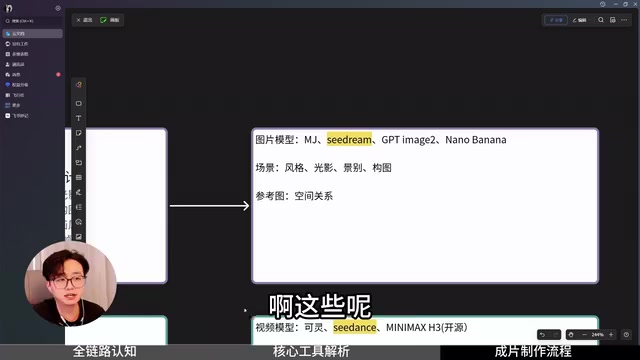
Both character design and scene generation fall under image generation. Available models include Midjourney, Seedream, GPT Image, Nano Banana, and others — but this course standardizes on Jimeng's Seedream. The creator emphasizes a key distinction: Seedream is the image model; Seedance is the video model. They belong to the same product family but serve different purposes and are easy to confuse.
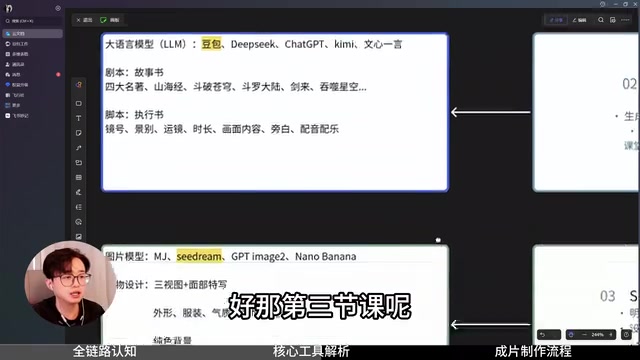
For character design, the goal is to generate a full-body three-view reference and a facial close-up, paying careful attention to appearance, costume, temperament, expression, and posture — with a clean, solid-color background to avoid interference when using the character as a reference later.
Scene generation involves extracting key prompts from the shooting script, with the primary goal of blending the character into the scene — focusing on style, lighting, composition, and shot size. Keyframes serve to establish spatial relationships: where the character is positioned within the scene, and how multiple characters occupy the frame.
Video Generation: Universal Reference vs. First-Last Frame — When to Use Each
The video stage uses Jimeng's Seedance 2.0/2.5, or open-source models like MiniMax. The current mainstream generation mode is "universal reference" — tagging each prepared reference image with the @ symbol so the model gets a clearer picture, combined with well-structured, segmented prompts.
The creator also makes a professional judgment call: when there is a clearly defined motion trajectory and you can generate both the starting and ending frame images, you should switch to "first-last frame" mode. Universal reference is ultimately an act of AI imagination, whereas first-last frame constrains the motion path to a defined trajectory. Both approaches have their place.
The "first-last frame" mode is a more deterministic method of controlling video generation: the user provides both the first and last frame of the video, and the model automatically fills in the transition animation in between. Its advantage lies in constraining the motion trajectory — for example, a character walking from the left side of the frame to the right, or a door transitioning from closed to open, can both be precisely defined this way. By contrast, "universal reference" mode only provides reference images and text prompts, giving the model more creative freedom over motion details — making it better suited for scenes where strict motion accuracy isn't required but stylistic consistency matters. In practice, both modes are used interchangeably: the majority of shots are batch-generated quickly with universal reference, while key plot moments with signature actions are switched to first-last frame for accuracy.
Audio: The Most Overlooked Immersion Killer
The course repeatedly hammers a point that's easy to underestimate: the biggest weakness of AI short dramas is usually not the visuals — it's the audio. Many productions feature stunning character designs, but the moment a character speaks, the immersion collapses, because the voice has timbre but no emotion.
The creator's solution is to use open-source TTS models for film-grade audio production: reference audio locks in a character's voice, emotion controls determine joy, anger, sadness, and happiness, speech rate and pauses sculpt the performance rhythm, and dialogue, narration, and ambient sound are all imported together. To ensure consistent narration voice throughout the production, voiceover is processed through a ComfyUI workflow for voice cloning — the creator has pre-packaged the configured workflow, so all you need is a short audio sample to bring a character to life. For those worried about ComfyUI's learning curve, this ready-to-use workflow dramatically lowers the barrier to entry.
TTS (Text-to-Speech) technology has undergone a major leap in recent years — from rule-based synthesis to neural network generation. Early TTS could only produce robotic-sounding readings, while modern open-source TTS models built on deep learning (such as CosyVoice and Fish Speech) now offer fine-grained control over timbre, emotion, speech rate, and pauses. Voice cloning is the key capability here: given just a few seconds to tens of seconds of reference audio, the model extracts the speaker's vocal characteristics and applies them to synthesize any text, keeping a character's voice consistent throughout the entire production. ComfyUI is a node-based AI workflow tool widely used for its high customizability and powerful model integration, though its interface is not beginner-friendly. The "pre-packaged workflow" mentioned in the course essentially consolidates complex node configurations into a ready-to-run template — users only need to swap in their own audio sample, with no need to understand the underlying node logic.
Editing: The Final Step in Controlling Rhythm
Music and sound design can often be generated directly alongside video using current video models. Final editing is handled in CapCut. The creator notes that editing itself requires judgment — knowing which clips to cut, how to control shot pacing — and these details will be covered in later lessons.
Takeaway
The value of this course isn't in how cutting-edge the tools are — it's in how it demystifies the complete industrial workflow of AI manga drama production for newcomers. For anyone looking to break into AI video creation, running through the full pipeline once with free or near-free tools is far more practical than jumping straight into advanced tooling. The core philosophy remains constant: master the workflow logic, and you can migrate to any model quickly.
Related articles

Chain of Thought Isn't Just for AI: How Humans Can Use CoT to Improve Thinking Quality
Chain of Thought isn't just a prompt trick for large models. Starting from a Hacker News discussion, this article analyzes why CoT works for human thinking too, breaks down actionable ways to transfer it, and highlights the key differences between human CoT and machine CoT.
Cloudflare Teams Up with OpenAI: Closi…
Cloudflare Teams Up with OpenAI: Closing the Loop from Vulnerability Discovery to Defense with AI
Cloudflare uses OpenAI Daybreak to investigate security vulnerabilities and generate reviewable remediation plans, while developers use Codex to boost coding efficiency and quality.

Orca Multi-Agent Orchestration in Practice: A Guide to Parallel Collaboration with Claude and Codex
Orca is Stable AI's free open-source agent workbench supporting 34 agents like Claude Code and Codex in parallel. Learn its Git worktree isolation, multi-model orchestration, and mobile management.