Zero-Cost Claude Code: A Guide to Configuring ModelScope's Free API

Use ModelScope's free API with a protocol conversion tool to call domestic large models in Claude Code at zero cost.
The article presents a zero-cost alternative for using Claude Code: keep Claude Code as the front-end interface, and use the SystemService protocol conversion gateway to forward requests to ModelScope's free inference API, actually calling domestic models like DeepSeek. Setup involves five steps—registering on ModelScope, binding Alibaba Cloud for real-name verification, creating an API Key and recording the inference-tagged model ID, configuring the Provider and model mapping in SystemService, and verifying connectivity in VS Code. The author highlights three pitfalls: not selecting a model version with the Inference API tag, incomplete profile information blocking quota issuance, and incomplete API Key copying. Testing confirms the Claude Code interaction is unchanged and can handle code generation and other tasks.
Claude Code's coding experience has won over many developers, but the $20 monthly subscription is a barrier for students and part-time developers. A Bilibili creator shared an alternative: using ModelScope (魔搭社区)'s free API quota, combined with VS Code and a protocol conversion tool, to call domestic large models for coding in Claude Code at zero cost.
Why Choose the ModelScope Alternative
ModelScope is a model community under Alibaba. After registering, users receive a certain amount of free API calls each day. According to the creator, these credits support roughly 100 to 400 calls per day, which is more than enough for personal learning. The platform offers models such as DeepSeekAd and Tongyi Qianwen, covering text generation, text-to-image, image-to-video, and more.
The core logic of this setup is straightforward: Claude Code remains the front-end interface, while the underlying requests actually go to domestic models on ModelScope. Users get the Claude Code experience at zero cost.
ModelScope and Its Free Quota Mechanism
ModelScope (魔搭社区) is an open-source model platform launched by Alibaba DAMO Academy in 2022, positioned similarly to Hugging Face, aggregating a large number of pre-trained models and datasets from around the world. One of its core resources is the "Model Inference API": users can directly call cloud-hosted models via HTTP requests without deploying a local GPU environment. The platform grants registered users a certain number of free calls each day, typically tied to real-name verification status and model type. Free quotas for different models are independent, so the actual available total depends on the chosen model. Free quotas refresh daily and do not accumulate. Since platform policies may change, it's recommended to check the real-time quota in your personal center before use.
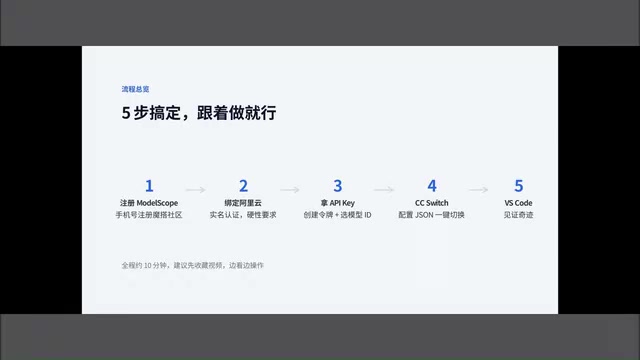
Five Steps to Configure: From Registration to Running
The creator breaks the process into five steps. Prerequisites require three tools: VS Code, the Claude Code extension, and a desktop protocol conversion gateway called SystemService.
Registration and Real-Name Verification
The first step is to register on ModelScope with a phone number, which is simple. The key is the second step: you must bind an Alibaba Cloud account and complete real-name verification—this is mandatory. The creator demonstrated completing it in about a minute via Alipay QR code scan plus facial recognition. Without real-name verification, API calls will fail outright.
Creating a Token and Choosing a Model
The third step is to create an access token to get an API Key. Click "New" on the token page, enter any name, choose a validity period (long-term or a specific date), and leave the default "large model inference" checked. After creation, you'll receive a key starting with MS—copy and save it in full.
There are clear criteria for model selection: in the model library, search for models with the "Inference API" tag. These models display a lightning bolt icon, indicating free call credits and error-free use. The creator used a DeepSeek model as an example, demonstrating how to copy the model ID for later use.
Key SystemService Configuration Points
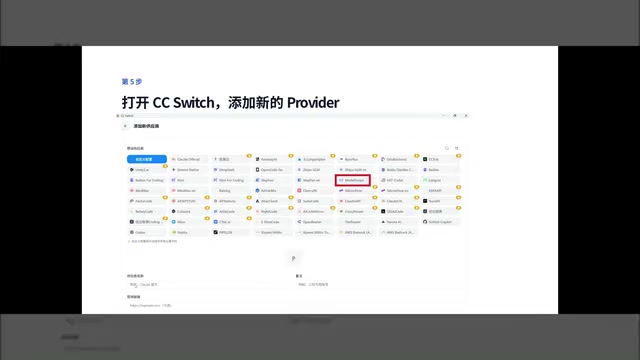
The fourth step is to create a new Provider in SystemService: select API Convert as the type, choose ModelScope as the provider, and fill in the API Key and request URL. There's an easily overlooked detail here: you need to set up model mapping in SystemService. Because Claude Code by default requests its own model names, but the actual target is DeepSeek, you must map the display name to the model ID copied from ModelScope, and set the same for the fallback model.
Finally, the JSON configuration: just replace the API Key with the one from ModelScope. The creator notes that if the configuration parameters are filled in properly, the code is usually auto-generated; if incomplete, you can use tools like Doubao to check it.
Why Protocol Conversion and Model Mapping Are Necessary
When the Claude Code extension sends requests, it follows the API protocol format defined by Anthropic and specifies Claude-series model names (e.g., claude-sonnet-4-20250514) in the request body. ModelScope's inference endpoint uses OpenAI-compatible Chat Completions protocol, and the two differ in request paths, authentication headers, and message structures. SystemService's API Convert mode acts as a middle layer: it listens on a local port, receives Anthropic-format requests from Claude Code, converts them to OpenAI format and forwards them to ModelScope, then converts the responses back to Anthropic format for the extension. Model mapping tells the conversion layer "when a request for a Claude model name comes in, which ModelScope model ID should actually be used instead." Without this step, requests fail because the model doesn't exist.
Three Pitfalls to Avoid
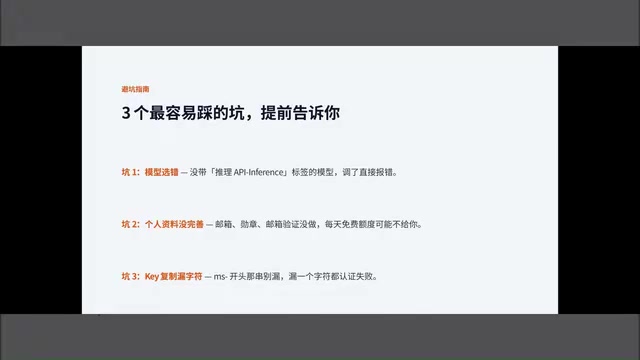
The creator specifically highlights three common mistakes. First, choosing the wrong model—selecting a model without the Inference API tag causes immediate errors. Second, incomplete profile information—missing ModelScope account details may prevent daily quota from being issued. Third, incomplete API Key copying—the MS-prefixed string must be pasted completely and accurately.
The Difference Between the Inference API Tag and Regular Model Pages
In the ModelScope model library, not all models offer free online inference. Models with the "Inference API" tag (lightning bolt icon) indicate that the platform has deployed online inference services for them, and users can call them directly via API with daily free credits. Models without the tag typically only offer weight downloads; forcing an API request will return a permission or service-unavailable error. Additionally, different versions of the same model (e.g., 7B vs. 67B) may or may not carry the inference tag separately—when copying a model ID, confirm that the selected version itself supports online inference.
Real-World Experience: Claude Code Interaction Unchanged
After configuration, the creator ran a real test in VS Code. After creating a new project and opening the Claude Code chat window, he confirmed that the SystemService program was running and the Provider was enabled, then tested model connectivity. He asked the AI to write a React todo list, and the AI successfully called the DeepSeek model on ModelScope to generate the code.
During the conversation, the AI also automatically generated a Markdown file outlining MVP features and offered suggestions. The creator noted that the AI could continue to handle the full workflow: prototyping, technical solution selection, coding, testing, and local deployment.
The value of this setup lies in lowering the barrier to trying AI coding tools. Although ModelScope's free quota is limited, it's sufficient for daily use in learning and small-scale experiments. For developers who want to experience the Claude Code workflow without bearing the subscription cost, it's worth trying this process once. Note that the specific available models and call counts for free quotas may change with platform policies—check your current quota in the ModelScope personal center before configuring.
One-line Summary
Use ModelScope's free API with a protocol conversion tool to call domestic large models in Claude Code at zero cost.
Paragraph Summary
The article presents a zero-cost alternative for using Claude Code: keep Claude Code as the front-end interface, and use the SystemService protocol conversion gateway to forward requests to ModelScope's free inference API, actually calling domestic models like DeepSeek. Configuration involves five steps—register on ModelScope, bind Alibaba Cloud for real-name verification, create an API Key and record the model ID with the inference tag, configure the Provider and model mapping in SystemService, and verify connectivity in VS Code. The author highlights three common pitfalls: not selecting a model version with the Inference API tag, incomplete profile information preventing quota issuance, and incomplete API Key copying. Testing shows the Claude Code interaction remains unchanged and can complete tasks like code generation.
Related articles

The Harness Is the Core of an Agent: Three Keys to Industrial-Grade Multi-Agent Deployment
From a Bilibili hands-on demo, we analyze why the Harness is the core of an Agent: Master-Worker dual-Agent architecture, mindset consistency constraints, three autonomous iterations, and reusable framework essentials for industrial multi-Agent deployment.

Pi Agent: A Practical Guide to a Minimalist Open-Source Coding Agent
Pi Agent is a minimalist open-source coding agent benchmarked against Codex and Claude Code, with growing GitHub Stars. Learn its rise, design philosophy, and a practical path from principles to extensions.

Claude Code Source Leak Breakdown: Hands-On with the Harness Agent Architecture
Starting from the Claude Code source leak, this breaks down the Harness agent architecture and enterprise implementation path: what the 1,902 leaked source files reveal, why sandbox isolation is the biggest challenge in building AI coding tools, and the engineering skills programmers need to transition into AI.