Loop Engineering in Practice: Designing and Deploying a Multi-Agent Collaborative Development System

How to design a multi-agent Loop Engineering system for automated, high-quality AI-driven software development.
Loop Engineering automates the Plan→Implement→Check→Fix development cycle using multiple AI agents. This article explores a practical multi-agent system built on three principles: local execution, no direct agent-to-agent communication, and a three-layer architecture (UI, Scheduler, Runner). The key insight: output quality depends not on agent count, but on clear requirements and explicit validation criteria.
What Is Loop Engineering
Recently, the concept of Loop Engineering has been gaining traction in the AI programming community. Its core idea is to have agents continuously cycle through a sequence of actions — Plan → Implement → Check → Fix — forming an automated development feedback loop.
Loop Engineering is rooted in the software engineering principle of "feedback loops," philosophically aligned with CI/CD in DevOps. At its core, it transforms the traditionally human-driven iteration cycle into one autonomously driven by AI agents. The concept also shares similarities with the OODA loop (Observe–Orient–Decide–Act) from reinforcement learning, except the actor shifts from a human developer to an AI agent.
The idea itself isn't complex — the real challenge lies in engineering it into reality: How should multiple agents be organized and divided? What is each responsible for? At which checkpoints should validation be triggered? And what happens when issues are found? All of these require systematic design.
Multi-agent development has one notable advantage: having different models review each other's work tends to surface more potential issues. This effectiveness stems from an important property of LLMs — the reasoning pathways activated during generation differ from those activated during evaluation. The same model may overlook an edge case when generating code, yet accurately identify it when evaluating someone else's. This asymmetry between "generation blind spots" and "evaluation sensitivity" is the underlying reason why multi-agent review catches more problems. Additionally, differences in training data and alignment strategies between models (e.g., Claude vs. GPT-series) allow them to complement each other's knowledge gaps during code review. Compared to a single chat window, this approach is far more stable when handling complex projects. Based on this reasoning, the author has built a multi-agent collaborative development system grounded in their own web coding practice.
Three Core Characteristics of the System
This system differs meaningfully from many multi-agent solutions on the market, primarily across three dimensions.
Local Execution and Project Isolation
The system runs entirely locally, with no dependency on any cloud services. Each project has its own workflow, task state, and runtime environment — projects are fully isolated and do not interfere with one another.
No Direct Communication Between Agents
This is the most controversial — and most critical — design decision: agents do not communicate directly with each other. Many multi-agent systems favor having agents "talk" to one another — for example, a product agent guiding a development agent, which then receives feedback from a testing agent.
This system takes the opposite approach: each agent is an independent execution unit. It receives the information needed for the current task, completes its work, and exits. The next step then launches a new agent to carry on.
From an architectural standpoint, this pattern corresponds to a variant of the Shared-Nothing Architecture. Agent-to-agent communication in traditional multi-agent systems (such as AutoGen or CrewAI's dialogue modes) is flexible, but introduces two engineering problems: first, linear context window growth causes costs to grow exponentially; second, "goal drift" occurs in long conversation chains — agents tend to over-accommodate the output of the previous agent rather than faithfully executing the original requirement. This system addresses both by centralizing state management in the Scheduler layer, turning each agent into a stateless, pure-function execution unit. It sacrifices some flexibility in exchange for greater predictability and cost control.
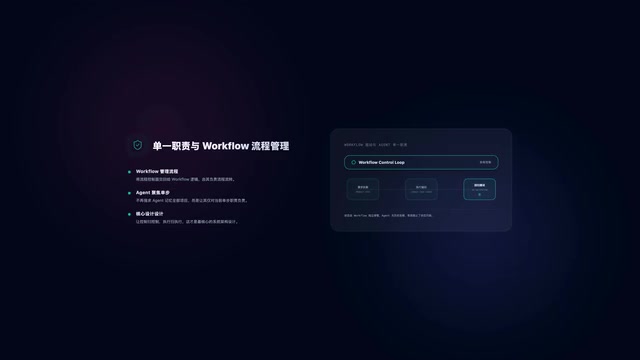
This design stems from two practical observations: first, a cost problem — continuously accumulating context causes token consumption to rise rapidly; second, a stability problem — the more conversation turns there are, the more likely agents are to drift from the original goal. The system's core design philosophy is therefore: the workflow manages the process; each agent is only responsible for the current step — not for maintaining memory of the entire project.
How It Works in Practice
Getting started is straightforward. After globally installing the CLI tool in your terminal, navigate to your project directory and run the start command (port 8848 by default, configurable via parameter), then open the corresponding address in a browser to access the Web UI management interface, where you can configure and manage the entire workflow.
Upon startup, the tool automatically detects any Agent CLIs installed on the system. Currently, only a specific set of platforms are supported, since each CLI's startup command and token-counting method must be individually adapted — user-defined CLIs are not yet supported.
Editable Development Workflow Templates
The system ships with a complete project development workflow by default, covering: environment check, product design, UI design, architecture design, task breakdown, coding, code review, testing, and integration.
This workflow isn't a fixed pipeline — it's more of a freely customizable template. If you're only modifying a small feature, the product, UI, and architecture design steps can be removed entirely. For simple projects, the testing step can also be skipped, since most Agent CLIs already include basic testing capabilities. You can also add custom steps — for example, inserting an architecture review after architecture design, or moving testing to after integration.
Each step supports custom startup commands, allowing you to specify particular models or append special parameters. Note that misconfigured commands will directly block the workflow.
Human Confirmation at Key Checkpoints
The product design and task breakdown stages support human confirmation checkpoints.

The necessity of this design lies in the fact that agents' biggest current weakness is often not "inability to execute," but rather "not truly understanding the requirement." Retaining human review at critical checkpoints — continuing if satisfied, or providing feedback to regenerate if not — effectively prevents directional errors from compounding across subsequent steps.
Prompts and Step Protocols
The information passed between steps in a workflow alone is not sufficient to support high-quality agent execution. Each step requires a clearly defined objective, boundary constraints, and output specifications. As a result, every step has its own dedicated prompt that tells the agent: what the current goal is, what actions are off-limits, and what format the output should take.
Beyond that, there is an internal "step protocol" layer that defines the underlying rules of the workflow — including required deliverables for each phase, non-skippable stages, and mandatory output format constraints. This layer acts as the foundational constraint for the entire system and is currently not user-modifiable.
Two Important Runtime Parameters
Two key configuration options deserve particular attention:
- Max rework runs: Controls the maximum number of rework iterations for a single task. For example, after development completes, it enters review; if review finds issues, it returns for revision, which triggers another review. If the task still fails to pass after multiple iterations, the system marks it as
blockedand hands it off to the user to decide whether to switch agents or skip the task. - Max concurrent tasks: Controls the maximum number of tasks running simultaneously across the entire system — covering all parallelized steps in the workflow, not just development tasks.
Task Execution and Validation
Once configured, you can create a Go by entering your task requirements. One important recommendation: if you have clear acceptance criteria, provide a validation script alongside the task.
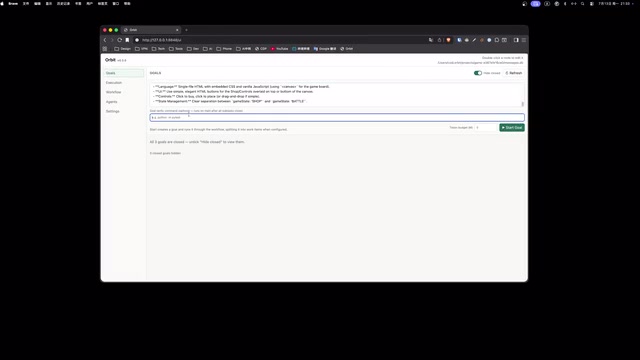
The more explicit the validation criteria, the higher the guarantee of agent execution quality — validation failures trigger continued fixes, followed by re-validation, until the task passes. If no validation command is provided, the system defaults to treating all steps as complete when the Go is considered done.
The system also supports token budget settings. The Token Budget mechanism is essentially about bringing LLM compute costs into the realm of engineering resource management. Similar to CPU/memory quotas in traditional software, token consumption directly maps to API call costs — the most central cost variable in AI engineering. Current mainstream LLMs charge separately for input and output tokens, with longer contexts increasing the cost per call. When the budget is exceeded, the Go pauses and stops creating new tasks; users can choose to add budget and continue, or terminate. For enterprise deployments, token budgets often need to be integrated with a task priority system — high-priority tasks can exceed budget limits, while low-priority tasks are paused first when resources are constrained.
Taking the development of a browser-based tower defense game as an example: the entire development process advances automatically through the workflow, and the final result is fairly close to expectations. On the task detail page, you can view the assigned agent information, task output, execution time logs, the full prompt, and CLI execution results. If a task fails, you can switch agents and re-initiate execution.
The System's Three-Layer Architecture
The entire system consists of three layers:
Web UI Layer
Handles user interaction — inputting Gos, viewing task status, and configuring the workflow.
Scheduler Layer
Handles task scheduling — advancing tasks through the workflow, updating state, and detecting anomalies.
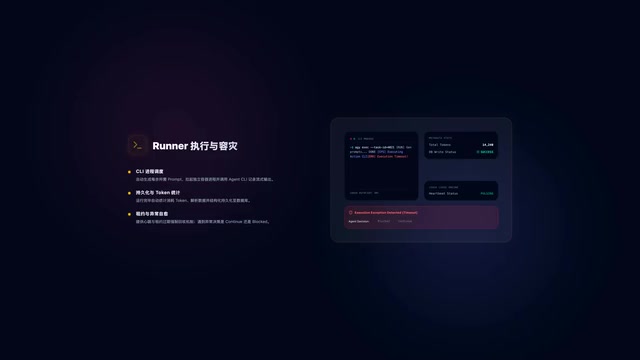
Runner Layer
The core layer where tasks are actually executed. The Runner generates the prompt for the current step, launches an independent process to call the Agent CLI, records output in real time, and upon completion tallies token consumption, parses results, and writes them to the database. The Runner also employs a lease and heartbeat mechanism: the Lease & Heartbeat pattern is a classic approach in distributed systems for handling process failures. When a task starts, it is issued a "lease" with an expiration time; the executing process must periodically send heartbeat signals to renew it. If the heartbeat is interrupted beyond a threshold, the scheduler declares the process dead and reclaims the task. This mechanism addresses two typical failure modes in AI agent calls — LLM API call timeouts causing process hangs, and agents entering infinite loops consuming resources. Introducing distributed fault-tolerance patterns into a single-machine environment reflects this system's emphasis on engineering stability, while also leaving architectural room for future horizontal scaling to multi-machine deployments. Tasks time out and terminate automatically; when anomalies occur, the agent decides whether to continue executing or enter a blocked state.
Why There Are No Role Definitions
This system has no Role definitions — a design choice worth noting. The author candidly admits that roles were included initially, but in practice were found to offer limited value while simply adding token overhead.
Most agents today are already CLIs built for development scenarios. There's no need to tell one "you are a senior engineer" — you simply describe what needs to be done right now and what to avoid. Each agent also benefits from code isolation via worktree — a built-in Git feature (git worktree) that allows the same repository to have multiple branches checked out simultaneously in different directories. Each directory shares the .git metadata but has its own independent working files. In multi-agent parallel development, worktree gives each agent an isolated code sandbox: Agent A modifies the payment module in worktree-task-1 while Agent B develops the user module in worktree-task-2 in parallel, with no file conflicts. The Scheduler layer then merges each branch's results back into the main line. This is far lighter than cloning the full repository for each agent, while also being safer than sharing a working directory directly. Each agent receives context through its prompt — it doesn't need to understand the full picture of team collaboration, only to focus on completing the current step.
That said, Role definitions do retain some value in creative stages like product design and UI design. But if requirements are specific enough, those steps can simply be removed. Fully relying on agents to design products autonomously still tends to produce inconsistencies, so the default workflow retains the design steps as a reference framework.
The Two Things That Determine Quality
Finally, the author offers a practically valuable conclusion: the key to Loop Engineering lies neither in the number of agents nor in the complexity of the workflow. Only two things truly determine output quality:
- Whether requirements are sufficiently clear;
- Whether validation criteria are sufficiently explicit.
With vague requirements and no validation, even the most capable agent will struggle to produce ideal results. But when goals are clear enough, even a moderately capable agent can complete surprisingly complex engineering tasks. This insight is worth taking seriously for anyone exploring AI-automated development.
Related articles

Xberg v1 Open-Source Document Extraction Engine: CPU-Only Local Processing Supporting 101 Formats
Xberg v1 is an MIT-licensed open-source local document extraction engine. CPU-only, supporting 101 formats with built-in SPLADE and ColBERT retrieval, Rust-powered for RAG and ML pipelines.

KlientFlow Review: A Follow-Up Reminder CRM Designed Specifically for Freelancers
KlientFlow is a lightweight CRM built for freelancers, focused on follow-up reminders rather than data logging. This review analyzes its positioning, features, use cases, and limitations.

AI Engineer Growth Roadmap: From Programming Fundamentals to RAG and MCP Agent Development
A systematic AI engineer learning roadmap covering programming, math, ML, and data engineering foundations, plus frontier AI technologies like LLM, RAG, Agents, and MCP with free open-source resources.