10 Rounds of Prompts + 8 Skills: DeepSeek Harness Industrial-Grade Knowledge Base in Action

Bilibili creator builds an industrial-grade LMWiki knowledge base from scratch using 10 rounds of prompts, 8 Skills, and 1 Agent preset with DeepSeek Harness.
The article presents a complete development workflow from a Bilibili creator's DeepSeek Harness tutorial: using only 10 rounds of prompts, 8 Skills, 1 Agent preset, and 2 plugins to build LMWiki, an industrial-grade knowledge base with document management, dual-form knowledge graphs, traceable Q&A, and online evaluation optimization. The core lies in Harness's "assembly-style" philosophy — assembling Agent presets, Skills, and plugins as three layers of capability units. The development is split into 11 stages from environment setup to functional acceptance, with the creator claiming stability and efficiency exceeding Codex and Cloud Code, plus one-click environment scripts and full learning materials for beginners.
With just 10 rounds of prompts, 8 Skills, and 1 Agent preset, can you build an industrial-grade knowledge base from scratch with document management, dual-form knowledge graphs, and traceable Q&A? This is the complete development workflow demonstrated by a Bilibili creator in a DeepSeek Harness practical tutorial.
What This Knowledge Base Can Actually Do
According to the Bilibili creator's live demonstration, the LMWiki knowledge base is not a simple demo but a fully functional industrial-grade application. It features a beautifully styled workbench Dashboard that integrates document management, compilation, upload, and other core functions.
Specific capabilities include: viewing Wiki compilation results, providing incremental document compilation, viewing the complete dual-form knowledge graph, and performing traceable knowledge base Q&A — any response can be linked back to the original knowledge fragments rather than being generated out of thin air.
The system also has built-in online evaluation and optimization modules that can reverse-optimize compilation methods and retrieval workflows based on metrics like retrieval hit rate and evidence coverage. This means the knowledge base is not static but continuously self-iterates based on usage data.

Traceable Q&A and Dual-Form Knowledge Graphs
"Traceable Q&A" is a key metric distinguishing current knowledge base systems from ordinary RAG. Traditional Retrieval-Augmented Generation (RAG) only ensures that "materials were used" but not "which segment of material the answer corresponds to." Traceability means the system outputs the original knowledge fragments supporting each sentence of its response, which users can click to verify, greatly reducing the trust risk caused by hallucinations.
"Dual-form knowledge graph" typically refers to presenting the same knowledge in two structures simultaneously — for example, an entity-relation graph (for machine reasoning) and a directory-hierarchy graph (for human browsing) — which can jump between each other and mutually verify. Combined with evaluation metrics like "retrieval hit rate" and "evidence coverage," the system can continuously identify which knowledge fragments are frequently referenced and which are under-recalled, then reverse-adjust document segmentation and compilation strategies, forming a self-iterating closed loop.
Why DeepSeek Harness Is the Core
The most striking aspect of the entire development process is efficiency. The creator stated that from setting up the development environment to final project completion, only 10 rounds of professional prompts were applied to DeepSeekAd Harness, plus 8 Skills, 1 Agent preset, and 2 functional plugins.
The development process was "exceptionally stable with extremely high efficiency," and the creator's personal assessment is that it exceeded the development experience of Codex and Cloud Code. This judgment needs verification from more developers, but judging from the metric of completing an industrial-grade project in 10 rounds of prompts, Harness has indeed demonstrated differentiated advantages in Agent orchestration capabilities.
The key lies in Harness's "assembly-style" development philosophy — you don't need to write code from scratch but rather assemble tool functionalities according to development goals.

Agent Harness and Agent Orchestration
In the AI programming field, "Harness" (literally meaning "harness") refers to a complete runtime framework wrapped around the underlying large model, responsible for managing context, tool calls, state persistence, error retries, and multi-step task decomposition. It does not train new models but structurally enables the same model to perform more disciplined and controllable in complex engineering tasks.
"Agent Orchestration" refers to combining models, tools, memory, subtasks, and external plugins according to established workflows, enabling Agents to advance projects in stages like an assembly line. DeepSeek Harness's "assembly-style" philosophy originates from this: developers are not writing business code but declaring "which parts this machine consists of and in what order they work together." This is why the author could complete an industrial-grade project with 10 rounds of prompts — much of the complexity is absorbed by Harness's orchestration mechanisms.
How Agent Presets, Skills, and Plugins Work Together
To make good use of DeepSeek Harness, the core is functional assembly based on actual development goals. The creator detailed the assembly plan for the LMWiki project in the tutorial:
Skills Layer: Used for supplementing intent information and assisting development. These Skills are not written on the fly but are selected combinations extracted from a library of over 400 Skills provided to paid students as "Reusable Agents."
Plugin Layer: Two key plugins were installed — DSH Diagram for assisting in drawing flowcharts and viewing project structure at any time; DSH Build-in Browser for assisting in functional acceptance testing of product pages.
Agent Preset Layer: This is the "most powerful hidden feature" that the creator particularly emphasized — a dedicated Agent was created specifically for the LMWiki development task to strictly execute the project development workflow and flexibly call related plugins and Skills.
The creator's exact words: "Using it well can achieve leapfrog improvements in your Agent's performance." This shows that Agent presets are not just a configuration item but the core mechanism determining an Agent's behavior patterns and execution discipline.

Differences Between Agent Presets, Skills, and Plugins
These three are often conflated, but in Harness's architecture, their roles are clearly distinct:
- Agent Presets: Define "who this Agent is" — its role, goals, behavioral guidelines, and execution workflow discipline. It is the highest-level "behavior pattern," determining how the Agent makes decisions when encountering forks.
- Skills: Reusable capability packages, equivalent to the Agent's "toolbox." Each Skill encapsulates a specific type of operation (such as reading documents, drawing diagrams, validating output). They themselves do not determine workflow but are called by the Agent when needed.
- Plugins: Lower-level capability extensions that directly connect to the development environment or external tools, such as DSH Diagram (drawing and structure viewing) and DSH Build-in Browser (page functional acceptance), enabling the Agent to "see" and "operate" real outputs.
The logic of their collaboration: presets determine workflow, Skills provide means, plugins connect to the environment. If any layer is missing, the Agent degenerates into a model that can only chat.
An 11-Stage Standardized Development Workflow
LMWiki is a relatively complex project, with the entire development split into 11 stages, strictly following the standard workflow of environment setup → project foundation development → core functional module development → functional acceptance.
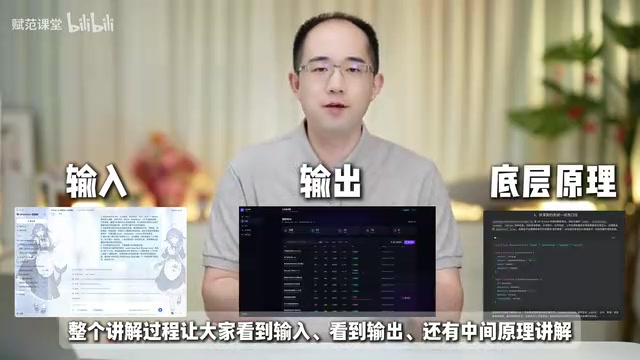
The creator will introduce the input prompts for each stage one by one, demonstrate the execution process and supplementary prompt content, and interpret the stage results. They will also explain from a professional perspective what code each stage generates and its respective role.
This approach of "seeing input, seeing output, plus intermediate principle explanations" is relatively friendly to zero-foundation learners. You don't need to understand principles and code upfront — just follow the prompt workflow to achieve results step by step.
The creator calls this the "only complete practical tutorial of its kind online," backed by the continuous investment of a technical team.
How to Quickly Prepare the Development Environment
For zero-foundation users, the biggest concern is often environment configuration. The creator provides a complete one-click installation script for the development environment — after receiving the course materials, double-click the script to complete the full assembly of the basic development environment, then directly enter the DeepSeek Harness page to start development.
Currently, the LMWiki knowledge base has officially launched on the team's self-developed DeepSeek Harness Studio desktop client, ready to use with one click. The full set of learning materials — including installation packages, project source code, Agent presets, development knowledge base, Skills, and architecture diagrams, round-by-round prompts, conversation run screenshots, and stage result screenshots — have all been published to the relevant community.
From this case, a trend is visible: AI programming tools are evolving from "assisting code writing" to "assembling capability units to complete complex projects." DeepSeek Harness's three-layer architecture of Agent preset + Skills + plugins is essentially an Agent orchestration solution for industrial-grade projects, worthy of in-depth study by readers interested in Agent development paradigms.
Related articles
uGAP: An AI Platform Unifying 100+ African Geospatial Datasets
uGAP is an African geospatial AI platform by a University of Cape Town team, unifying 120+ African datasets with a Python SDK for discovery, processing, and model training, already used in cyclone flood mapping.

Cursor Can Now Control Your Computer: AI Agents Can Drive Desktop Apps for Testing
Cursor adds desktop control: AI agents can drive desktop apps like the iOS Simulator to test their own features. We analyze the impact on dev workflows, possible technical approaches, and reliability concerns.

Vibecoding a Custom Inference Engine: High Hopes, Harsh Reality
A Reddit developer shares the real experience of vibecoding a custom inference engine: running GGUF Q4 models in the browser with WebGL2 and GLSL, only to fall into tokenizer debugging hell. This article analyzes the engineering challenges of browser-side LLM inference and why cloning llama.cpp is the more rational choice.