1,000 Hours of Claude Code in Practice: Six Levels from Beginner to Expert
A thousand-hour user distills Claude Code experience into a six-level progression system and its applicable boundaries.
The article breaks down Claude Code proficiency into six progressive levels: Level 1 covers the two lifesaving habits of committing and reading diffs, plus a one-page CLAUDE.md project memory that records only "decisions"; Level 2 uses Plan mode to catch errors most cheaply at the planning stage, and replaces vague requests with precise prompts that name files and state completion criteria; Level 3 makes "done" truly verified through test-first implementation, type checking and linters, hooks, browser integration, and second opinions from clean contexts, plus Skills that capture reusable workflows; Level 4 manages token budgets and context—understanding /context and /usage, restarting sessions in time, or using handoff files; Level 5 uses subagents, work trees, and scheduled tasks to parallelize work, but with narrow scope and checkable results. It ends with applicable boundaries: a few known changes are cheaper to write yourself, and the approach applies to other coding agents too.
Claude Code is not a chat window—it's a coding agent that directly edits files and runs commands. A creator who has invested over a thousand hours in Claude Code has distilled all that experience into a six-level progression system. The value of this system isn't in teaching you which button to click, but in helping you judge where you currently stand and what you should work on next.
Level 1: Two Lifesaving Habits and Project Memory
The fundamental difference between Claude Code and ordinary conversation tools is this: it modifies your project files. A bad edit isn't like a chat response that can be ignored—it's already sitting in your code. So from day one, develop two habits: commit before every session so Git always has a clean point to return to, and read the diff before every approval, because the permission prompt is showing you exactly what's about to happen.
After these two habits, the focus shifts to making bad edits less likely in the first place. The core is that file Claude reads before every action—CLAUDE.md. This is the "project memory" you control, loaded at the start of every session. But most people's approach wastes tokens or plants hidden landmines.
The four most common mistakes: treating an auto-generated draft as a finished file (it describes folder structures Claude could learn by reading the code, and every extra line costs you on every prompt); writing "descriptions" instead of "decisions" ("the project uses React" conveys nothing; "use pnpm, never npm" is a rule); trying to write all the rules on day one (effective rules come from corrections—Claude does something wrong, you fix it, then add a line to prevent recurrence); and letting it go stale (you swapped a library, deleted a folder—the rules need to be updated too).
Three things should never go in there: passwords and API keys (if the file goes into Git, that's a risk), style rules your linter already enforces (the linter is cheaper and won't forget), and long documents. Also, rules that only make sense for the backend should go in a CLAUDE.md inside the backend folder, while cross-project preferences (like commit message conventions) go in the .claude folder in your home directory, keeping them out of the team repo.
Level 1's passing criteria: CLAUDE.md is under one page, you can explain what error each line prevents, and Claude has stopped asking you for permission fifty times a day.
Level 2: Plan Mode and Prompt Precision
Below the input box, you can switch between Normal, Accepting edits, and Plan mode (Shift+Tab cycles through them). In Plan mode, Claude can only read and search—it changes nothing and ultimately delivers a written plan.
Plan mode isn't a silver bullet. If you already know exactly what to change and it only involves one file, the research phase is pure token waste. It's genuinely worth it when the task spans multiple files, or when you yourself aren't sure how to proceed. The plan is the cheapest place to catch errors—if Claude misunderstood the task, you can spot it in a dozen lines of text rather than discovering it after eight files have been modified. Changing a plan takes one message; changing code means reviewing, reverting, and running again, burning the same tokens all over again.
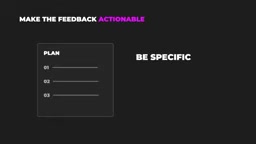
When reviewing a plan, read it like a newcomer's pull request. Vague steps ("update the relevant components") usually mean Claude never found the code to change; watch for libraries you already have; watch for unrelated file changes or cleanup. If no step explains how the result will be verified, send it back. Be specific when sending it back: point out that step three should use the existing date library, delete step five, and add a step at the end to run the existing tests.
Prompts work the same way. Claude excels at executing what you say and is terrible at guessing what you mean. Compare two prompts: "add dark mode" is a complete request where Claude will trawl through every stylesheet, pick its own approach, and maybe even pull in a new library. But "add a dark theme using the CSS variables in src/style/theme.css, no new dependencies, put the toggle in the header next to the profile menu, save the choice to localStorage, don't touch the email templates"—same feature, but the latter tells it where to look, what not to touch, and what counts as done. When you're unsure yourself, flip it: have Claude ask you questions before writing the plan.
Level 2's passing criteria: you read every plan before approving it, you've revised or rejected a few, and your prompts name files and state completion criteria.
Level 3: Make "Done" Actually Verified
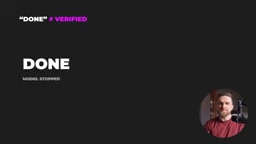
When Claude says done, that only means the model stopped—not that the code runs. This level is about giving it the means to check itself.
The order of testing is critical: request the test first, confirm the test describes the behavior you actually want, then have it write the implementation. If code comes first and tests follow, the tests often just describe what the code currently does—bugs included. Guard against another shortcut: when tests fail, the model sometimes changes the tests instead of fixing the code. Add a line to CLAUDE.md: "only change tests when I say to."
Take a bug example: an expired coupon still works. Don't have it fix the bug directly—first have it write a test that reproduces the problem: a code that expired yesterday must be rejected today. Run it; it should fail, and that failure is useful because it proves the test actually catches the bug. Then request the fix, on the condition that the test stays unchanged. When it goes green, you know the fix handles this case, and the test stays in the project so the next change can't let the same bug slip back in.
Exhaustive checks: type checking and linters run in seconds. Put them in CLAUDE.md's completion criteria so they catch a whole class of errors before you even see the diff. If you don't want to rely on the model's diligence, use hooks—commands Claude Code runs automatically at fixed points in the session, like running the linter after every edit, or blocking any change that touches .env or the migrations folder.
Visual tasks have another problem: Claude writes CSS but has never seen the page. Give it a browser through a Chrome integration or a browser MCP like Playwright, and it can open the app, click through flows, and screenshot what it built. Browser checks are token-hungry (every screenshot and page snapshot goes into context), so save them for the final round—don't use them for every tweak.
There's also a zero-cost check—a second opinion from a clean context. After a feature is done, open a new session or have a subagent review the diff against your original requirements. Remember to paste in the original task, because the new session doesn't know what to compare against. It didn't live through that long conversation and doesn't carry the assumptions built up along the way, so it's more likely to spot omissions.

This level also includes Skills. A Skill is a folder containing SKILL.md, with a name and a one-line description at the top—that description is the only part Claude always keeps in context. Below it are steps written as if explaining to a new colleague: where routes go, what validation to use, write tests first, run checks, update docs. When you request a new endpoint, Claude matches the request against the description and loads the full steps, or you invoke it manually with a slash command. So write the description in "when to use" form. The key difference between a Skill and CLAUDE.md: CLAUDE.md is read every time, so it should only hold what matters every time; a Skill costs almost nothing until it's used, so it can be long and detailed.
Skills and MCP servers are often confused. The distinction is simple: a Skill is "knowledge"—it tells Claude how to do something; an MCP server is "access"—it lets Claude reach things beyond the code, like databases, issue trackers, design files, or browsers. If the problem is that Claude does things the wrong way, write a Skill; if the problem is that Claude can't see what it needs, then consider an MCP server. And first confirm you actually need it—if the tool already has a command-line version (GitHub CLI, database clients), Claude can often just run it in the shell without occupying context until it's actually used.
How hooks work and where to configure them: Hooks are shell commands Claude Code triggers automatically at fixed points in the session lifecycle. Available events include PreToolUse (before a tool call), PostToolUse (after a tool call), UserPromptSubmit (when a prompt is submitted), Notification, and Stop. Configuration lives in .claude/settings.json or a settings.local.json in the project root, grouped by event name, with each hook declaring a matcher (e.g., matching the Edit/Write tools) and the command to run. The command receives a JSON description of the event via stdin (tool name, file path, etc.) and can control flow through its exit code: exit code 2 blocks the operation and feeds stderr back to Claude. So "run the linter automatically after edits" is typically written as a PostToolUse hook matching Edit|Write that runs formatting or checks; "block changes to .env" is better as a PreToolUse hook that rejects with exit code 2 when the path matches. Hooks run in your local shell with your permissions, so verify the command's source is trustworthy before configuring, and note that they don't consume model tokens.
What MCP (Model Context Protocol) is: MCP is an open protocol for exposing external systems to models in a standardized way—each MCP server declares a set of tools, resources, and prompt templates, and the client (like Claude Code) discovers these and turns them into interfaces the model can call. This explains the cost structure described above—"tool names preloaded, details fetched on demand": once a server connects, its tool list enters context as JSON Schema, and the more tools there are, the more space it takes. A server with dozens of tools can eat a significant chunk of the window at once. For transport, local processes typically use stdio and remote services use HTTP/SSE, with credentials configured by the user on the client side—so evaluate the server's permission scope before connecting. The test for whether to build your own server is simple: if the target system already has a stable CLI or HTTP API, having Claude call the command line directly is usually cheaper; only wrap something as MCP when it needs to be structured, reusable, and the model isn't familiar with the interface.
Level 4: Token Budget and Context Management
With a subscription, tokens are money. Claude Code counts tokens—what it reads, what it writes, every tool output. Usage on Pro and Max plans is calculated over a rolling 5-hour window, with a weekly cap on top. So two prompts that make Claude read half the repo can cost more than twenty precise small prompts.
Two tokens can fill the context window, which is the session's working memory; and quality starts degrading before the window is full—instructions from early in the session get less attention, Claude repeats checks it's already done, or quietly overturns a decision you made an hour ago. A bigger window gives you more space, but it won't make a long, messy session behave like a fresh one.
Type /context to see what's sitting in the current window: system prompt, system tools, MCP tools, memory files (CLAUDE.md), skills, conversation messages, and remaining space. It's worth running once in a fresh session before you type a single word, because that number is the fixed cost of every session before you even open your mouth. MCP servers usually show up in this breakdown too. Newer versions of Claude Code only preload tool names and fetch details on demand, but if you turn that mechanism off or mark a server as always loaded, all its tool descriptions land in context—some servers have dozens of tools. Connect five servers for a one-off task and forget to disconnect, and you pay for it in every session. Run /mcp to see what's connected and turn off what this project doesn't need.
Another number is /usage, which shows how much of the current 5-hour window and weekly cap you've used and when they reset. It's worth a glance before any large-scale action (like a full-project refactor, or a loop you plan to leave running). Finding out you can't finish is much cheaper than finding out halfway through.
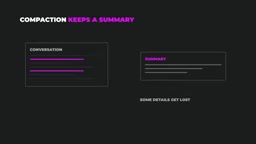
When the window fills up, it auto-compacts, summarizing the conversation and continuing. But summaries lose details, and auto-summarization doesn't know which details matter to you. If you really must continue in the same session, run /compact yourself and tell it what to preserve—e.g., keep the API decisions and the list of failing tests. Most of the time the better move is a separate session per task: finish, /clear, start the next one. If Claude starts paging through files unrelated to the task, press Escape to correct it immediately, because every file it opens is tokens. Not every task needs the biggest model—/model lets you switch, and routine edits are most economical on a cheaper model.
A simple rule: if you're still on the same task and everything in the window is still relevant, continue; if the task changed, Claude starts contradicting itself, or /context shows the window nearly full, start over. Before clearing, have Claude write a short handoff file—what was done, what decisions were made and why, what's left—read it and fix errors, then point the new session at that file. There's a middle option too: the opus plan setting in /model uses Opus in Plan mode and switches to Sonnet once implementation begins, so the expensive model does the thinking you'll actually review and the cheap one does the typing.
Be restrained with pasted content too: cramming an entire log file into context isn't worth it—usually the error message and the last few lines are enough, or tell Claude which file the log is in and what to look for. A few small commands save more time than they take: double-tapping Escape or typing /rewind rolls the conversation and Claude's code changes back to an earlier point (it only tracks Claude's own file edits, not changes made by shell commands, so it doesn't replace Git); after accidentally closing the terminal, claude continue picks up the last conversation in that folder, and claude resume gives you a list of past sessions; a message starting with an exclamation mark runs as a normal shell command, and the output lands in the conversation where Claude can see it; /status line sets a status line at the bottom of the terminal showing the current model and context usage.
The nature of context windows and compaction: The context window is the upper limit of all tokens the model can see in a single inference—system prompt, tool definitions, memory files, conversation history, and tool outputs all squeeze into the same budget. Models typically use information in the middle of context less effectively than the beginning and end, a phenomenon known as "lost in the middle," which is one reason quality degrades before the window fills; instructions get diluted attention over a long conversation, so the model repeats checks or overturns earlier decisions. Compaction works by handing the existing conversation to the model itself to generate a summary, then replacing the original text with the summary to continue—it's lossy compression, and what gets dropped tends to be specific values, failing test names, and convention details, while the summarizing model doesn't know which of those matter to you. So manually running /compact with preservation instructions, or simply using a handoff file plus a new session, is more reliable than relying on auto-summarization. This is also the design logic behind subagents: keep large explorations in their own windows and bring only conclusions back to the main session.
Level 5: Letting Claude Work on Its Own
A subagent is a separate Claude instance the main session hands an independent task to—digging through docs, reviewing a diff—it works in its own context window and returns only a summary, keeping the main session clean. Create one with /agents, or describe what you need and have Claude build one. The cost is that each subagent is a full conversation; run several in parallel and your limit drains several times faster. Subagents live as markdown files in the .claude/agents folder, with a name, a description telling the main session when to hand off, the allowed tools, and the model to run. For example, an agent that reviews a finished diff: give it only read and search tools, no edit tools, no shell (its job is to report, not fix), running on Sonnet so the review doesn't cost full-price Opus.
Work trees solve a different problem: it's a second working copy of the same project, in a separate folder and on a separate branch, where you can run independent Claude sessions that won't overwrite each other's files. There's a work tree toggle below the input box; turn it on and a new session creates a separate copy. Note that the new copy may not have dependencies installed—just have Claude install them; when the task is done, have it commit and merge the branch back. Work trees themselves don't consume tokens, but every parallel session draws from the same limit, and you still have to review the output, so after two or three sessions it's time to converge.
Further up is running on a schedule or until a condition is met: loop repeats a prompt at intervals, but only works while the session is open—it's not an overnight task by itself; goal keeps Claude working until some condition is true, like all tests passing and type checking clean; claude -p runs a single prompt non-interactively. A true overnight task needs an independent scheduler—cron on the machine or a scheduled CI job—that calls claude -p. All of these run without anyone able to stop them in time, so give them narrow tasks with checkable results: running tests nightly and opening issues for failures is a good example; building an entire feature while you sleep is not.
Summary and Applicable Boundaries
If you could give someone on day one only one piece of advice from this whole system, it would be this: a three-line change you already know how to write—just write it yourself. Explaining it to Claude takes longer than typing and costs extra tokens. There are three situations where you should type it yourself—you know the exact change and it's only a few lines; explaining the context takes longer than writing the code; you're learning and want the knowledge in your head, not just in the repo. There's one more: if Claude gets the same thing wrong twice, a third try with the same prompt usually just burns tokens for the same result—either fix it yourself or step back and figure out what's missing from the prompt.
Most of this approach applies to other coding agents too, like Codex CLI, OpenCode, and GitHub Copilot. Claude Code is a powerful tool, but results come from how you drive it, not how many features you turn on—control, precise prompts, and checks matter more than any plugin.
Related articles
 Tech Frontiers
Coldframe: A Honeypot Disguised as a Supermarket Freezer Controller
Coldframe is a honeypot disguised as Danfoss AK-SM 800A and Dixell XWEB freezer controllers, built as a single Python file that detects CVE-2025-41450 attempts and is identified as real devices on Shodan.
 Tech Frontiers
GRFNet: A Lightweight PyTorch Model Designed for Multichannel Time-Series Classification
GRFNet is a lightweight PyTorch model for multichannel time-series classification, originating from EEG decoding research. With only 3,847 parameters, it is based on the ROCKET architecture, combining random convolution kernels with learnable spatial filters, supports arbitrary input lengths, and will soon be evaluated on the PhysioNet dataset.
 Tech Frontiers
CUDA-Accelerated Rocket League Simulator: A Player-Made Hardcore Experiment
A Reddit post shows a "100% Accurate" Rocket League simulator accelerated with CUDA. We analyze its technical context, CUDA's value in game physics simulation, and the significance and limitations of such community projects.