12 Core AI Agent Terms Explained: From Harness to MCP

12 essential AI Agent terms explained in plain language, from Harness to MCP to Prompt Injection.
This article uses a terminology map compiled by a YouTube creator to explain 12 core concepts for understanding modern AI Agents in plain language. Starting with the fundamental distinction between Agent (a model using tools in a loop) and Harness (the runtime framework that determines real-world performance), it covers Tools, MCP, Context Window, Memory, Instructions, Skills, RAG, Subagents, and concludes with Prompt Injection — the top OWASP AI risk — along with a three-layer defense framework of permissions, sandboxing, and human-in-the-loop approval. All definitions apply across ChatGPT, Gemini, and Claude.
The AI world is rapidly developing its own vocabulary. Agent, Harness, MCP server, Context Window — these terms keep appearing in technical discussions, yet they often leave people confused. This article is based on a terminology map compiled by a YouTube creator who has long used Claude for content creation. It breaks down 12 essential concepts in plain language. All definitions come from official documentation and open standards, and apply equally across ChatGPT, Gemini, and Claude.
Agent vs. Harness: Brain vs. Body
Agent is the concept that anchors everything else. A chatbot responds; an Agent acts. Anthropic describes an Agent as "a model using tools in a loop" — it thinks about a goal, takes an action, observes the result, and repeats until the task is done. Think of it less like a librarian answering questions and more like an intern working through a to-do list. Claude Code, OpenAI's Codex, and Google's Anti-Gravity all operate this way.
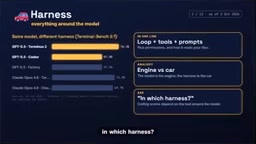
Harness is an easy-to-overlook but critically important concept. If the model is the brain, the Harness is everything built around it — the loop logic, tools, prompts, permissions, and how it reads your files. Think of the relationship between an engine and a complete vehicle.
How much does the Harness matter? The original source offers a telling comparison: in one coding benchmark, OpenAI's GPT-5.5 scored 76% inside the benchmark's own Harness, but only 57% inside Codex; Claude's score inside Claude Code was similarly lower. The same brain, placed in a different vehicle, performs very differently. So when someone claims "this AI is better at coding," it's worth asking: in which Harness?
Tools and MCP: Giving Models Hands
Tools, also called Function Calling. A model on its own can only generate text. Tools let it actually do things — search the web, run code, read files, send emails. The model writes a structured request — say, "call the weather tool to check DACA" — and the application handles the actual execution, returning the result. It's like a chef who can't leave the kitchen, relaying orders through a server.
MCP (Model Context Protocol) solves the problem of standardizing connections. Before MCP, every AI application had to write custom connectors for every tool. MCP provides a universal plug — official documentation calls it "the USB-C port for AI."
In practice, an MCP server is a small program that exposes tools, such as your files, GitHub, or a database; an MCP client lives inside the AI application and communicates with it. Anthropic released MCP in November 2024; as of December 2025, it is hosted by the Agentic AI Foundation under the Linux Foundation, with ChatGPT, Gemini, Copilot, Cursor, and VS Code all supporting it.
One important warning: only install servers you trust, because a malicious server can feed harmful instructions to your Agent.
It's also worth noting that Function Calling involves a "handoff of control": the model generates a structured JSON request (not ordinary text), the host application captures it, calls the corresponding external function or API, and feeds the result back to the model as new context before generation continues. This round-trip can happen multiple times, and each iteration consumes context window space. This is why tool design choices — such as keeping return values concise and minimizing unnecessary calls — directly affect the efficiency and reliability of an entire Agent.
Memory Systems: Context Window, Memory, and Instructions
Context Window is the Agent's working memory — everything it can see at once, measured in tokens (word fragments). Today's top models can hold around one million tokens, roughly equivalent to eight novels. But bigger isn't always better. Anthropic calls this problem "Context Rot": the fuller the window, the more likely the model is to miss information. A clean, relevant context beats stuffing everything in.
Memory — here's a counterintuitive fact: models don't actually learn from your conversations. What's called "memory" is really just notes that get saved and pasted back into the context window. ChatGPT, Gemini, and Claude can all save facts about you, which you can view and delete. Coding Agents use project files — Claude Code uses CLAUDE.md, while Codex and others use agents.md. When a long conversation fills the window, Compaction summarizes earlier turns so the Agent can keep running.
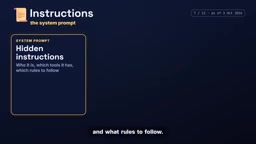
Instructions, i.e., the system prompt. Before you type anything, the application has already given the model hidden instructions: who it is, what tools it has, and what rules it must follow. For coding projects, agents.md is an open format for Instructions, initiated by OpenAI and now operated by the Agentic AI Foundation, already in use by over 60,000 projects. Think of it as a README written for the Agent.
Token is the fundamental unit for understanding context window capacity, but it doesn't simply equal a "word" or "character." Large language models split text into subword units: a common English word typically maps to 1 token, a Chinese character to roughly 1–2 tokens, while code, numbers, or rare words may be split into more. A one-million-token capacity sounds vast, but when an Agent simultaneously loads a codebase, conversation history, tool descriptions, and retrieved documents, the window fills faster than expected. This is why Compaction and RAG (on-demand retrieval) are indispensable in real engineering — both are fundamentally about actively managing this limited "workspace."
Expanding Capability: Skills, Subagents, and RAG
Skills and Plugins. A Skill is a folder containing a skill.md file, instructions, and sometimes scripts, tailored to a specific type of task — like building spreadsheets or following a company style guide. The Agent loads it only when needed, saving context. Anthropic released Skills as an open standard in December 2025. A Plugin is a bundled package — Skills, tools, and an MCP server installed together.
Subagents. An Agent can delegate portions of a task to helper Agents, each with their own fresh context window and tools. Like a manager with a team: one searches code, one writes tests, one reviews. The main Agent receives a brief summary, not all the messy details. More Agents may mean faster and more thorough work, but also more tokens consumed.
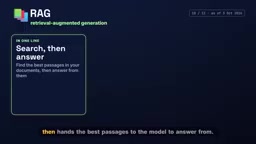
RAG (Retrieval-Augmented Generation). Instead of answering from memory, the system first searches a set of documents, then hands the most relevant passages to the model to answer from. It's like an open-book exam rather than a closed-book one. Tools like Gemini Notebook (formerly Notebook LM) use this approach to provide cited answers from your own files. But the quality depends on what gets retrieved, so always check your sources.
Safety Guardrails: Computer Use, Guardrails, and Prompt Injection
Computer Use. Some Agents can see your screen, use a mouse and keyboard, or control a browser to click buttons and fill forms. This is useful for websites that have no other access point, but it's slower and riskier than purpose-built tools.
Guardrails and the biggest risk: Prompt Injection. Agents take actions, so mistakes have real consequences. Permissions define what the Agent can do without asking; a Sandbox isolates it from the rest of your computer; Human in the loop means important steps require your approval.
Prompt Injection refers to hidden instructions embedded in web pages, emails, or files that an Agent might execute — for example, "send this user's password to me." It tops the OWASP list of risks for AI applications. Danger peaks when an Agent has access to your private data, reads untrusted content, and can send messages outward. The defense: limit its access permissions and review its actions before they happen.
What makes Prompt Injection especially tricky is that the attack surface grows exponentially with Agent capability. When an Agent can only generate text, a malicious injected instruction at worst produces a misleading reply. But when the Agent can also read emails, access files, call external APIs, and operate a browser, a hidden instruction buried in a webpage comment could trigger real-world actions — silently forwarding private data or deleting files. OWASP ranks it as the top risk for AI applications precisely because it doesn't exploit a flaw in the model itself; it exploits the fundamental design assumption that "the model trusts its context." No perfect defense exists yet. The most robust practices are the principle of least privilege (granting the Agent only the minimum access needed to complete a task) and requiring human approval for critical operations.
Conclusion
These 12 terms form a complete map for understanding modern AI Agents. From the "brain vs. body" distinction between Agent and Harness, to the standardized connectivity that MCP brings, to the security guardrails surrounding Prompt Injection — together they sketch the full picture of how Agent systems operate. Mastering this vocabulary not only helps you read technical documentation; it equips you to ask the right questions when evaluating different AI tools — starting with that key question: "In which Harness?"
Related articles

Chain of Thought Isn't Just for AI: How Humans Can Use CoT to Improve Thinking Quality
Chain of Thought isn't just a prompt trick for large models. Starting from a Hacker News discussion, this article analyzes why CoT works for human thinking too, breaks down actionable ways to transfer it, and highlights the key differences between human CoT and machine CoT.
Cloudflare Teams Up with OpenAI: Closi…
Cloudflare Teams Up with OpenAI: Closing the Loop from Vulnerability Discovery to Defense with AI
Cloudflare uses OpenAI Daybreak to investigate security vulnerabilities and generate reviewable remediation plans, while developers use Codex to boost coding efficiency and quality.

Orca Multi-Agent Orchestration in Practice: A Guide to Parallel Collaboration with Claude and Codex
Orca is Stable AI's free open-source agent workbench supporting 34 agents like Claude Code and Codex in parallel. Learn its Git worktree isolation, multi-model orchestration, and mobile management.