13 Practical AI Tips: Save Money, Protect Privacy, Upgrade Your Digital Life
13 actionable AI tips—the core is treating AI as a process tool, not magic.
The article compiles 13 everyday AI application tips from The Explainer, covering six scenarios: saving money, privacy, productivity, learning, offline emergency preparedness, and physical world interaction. The core judgment: AI excels at preparation and assistance, not universal answers. AI agents can organize customer service negotiations and privacy deletion requests, but can't guarantee savings or complete data removal; coding agents can diagnose computers but you must avoid executing unknown system commands; local models provide offline reference but can't replace first aid or professional medical care; multimodal pose analysis is only structural guidance. The industry is shifting from passive Q&A to proactive automation agents, with human oversight, privacy protection, and output verification remaining the user's responsibility.
AI discussions are often full of hype, but what's truly valuable is turning it from a chat box into a daily assistant. The YouTube channel The Explainer has compiled 13 AI applications you can put to use immediately, covering scenarios like saving money, travel, privacy, productivity, learning, offline knowledge, and interaction with the physical world. The common thread running through these tips: AI excels at preparation and assistance, not magic.
1. Wallet and Privacy: Let AI "Negotiate" and "Clean Up" for You
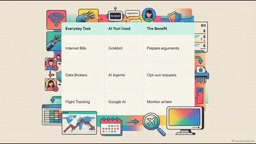
The first category of tips revolves directly around money and privacy. Using AI agents (tools like Grokbot) to handle customer service communications is a typical approach: it can compare different internet plans, organize negotiation arguments, and help you avoid hidden fees. Another high-frequency pain point is data deletion—data brokers like Apollo, ZoomInfo, and RocketReach collect and sell personal information, leading to a constant stream of marketing spam calls. AI agents can identify official privacy procedures under laws like CCPA or GDPR and draft personalized deletion requests.
But the video explicitly warns: AI is not a magic wand—it cannot guarantee specific savings or instantly find half-price flights; a single automated request also doesn't equal removal from all databases, and you still need to keep records of submissions. According to The Explainer's view, the value of such tools lies in organizing cumbersome processes, not providing cheat codes.
For travel, Google's AI search feature allows you to describe your needs in natural language and track historical flight prices to help judge the right timing for a trip.
Data Brokers and CCPA/GDPR
A data broker refers to a commercial entity that specifically collects, aggregates, and resells personal information. Their data sources include public records, web scraping, app SDKs, loyalty programs, and more. After aggregation, they form personal profiles containing names, phone numbers, addresses, spending habits, and even family relationships, which are then sold to marketing companies, background check platforms, and others. Apollo, ZoomInfo, and RocketReach are among the more well-known players in the B2B space, primarily providing enterprise contact databases.
CCPA (California Consumer Privacy Act) grants California residents the right to request that businesses delete their personal data and to know how their data is being used; GDPR (General Data Protection Regulation) applies to all entities processing EU residents' data, with stricter rules and heavier penalties. Both require businesses to process and respond to verifiable deletion requests within a specified timeframe. The role of AI agents is to automatically locate each company's privacy request portal, generate properly worded request letters based on legal provisions, and record submission times and response status. However, because there are numerous data brokers with varying processes, a single request typically covers only one company—batch and continuous follow-up are needed to see results.
2. Upgrading Your Digital Life: From Diagnosing Computers to Remotely Monitoring Progress
The fourth tip is using coding agents like Claude Code to diagnose computer performance issues. It can check background processes, identify memory bottlenecks, and verify hardware compatibility, potentially saving you the expense of buying a new laptop. The video emphasizes a key safety rule: AI is good at identifying problems and offering suggestions, but never execute unknown system commands or change critical settings without understanding the consequences—always back up your data and verify the solution first.
The next three tips focus on simplifying daily workflows. For users who easily get lost with text-only instructions, AI tools with visual annotation capabilities can directly circle button or menu locations on the screen. Remote Claude allows you to manage long-running coding agents via your phone, so you can check progress and unblock tasks even when away from your desk.
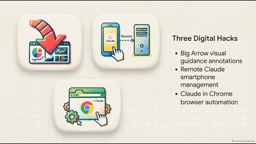
Browser agents (like Claude in Chrome) can observe mouse movements and clicks to automate repetitive data entry. The video reminds that automated operations involving payments or business accounts must be reviewed item by item. The eighth tip is a prompting technique: ask AI to adopt a concise, direct technical manual style, removing flowery adjectives and promotional language—this improves readability and reduces token consumption.
Differences Between Coding Agents, Visual Annotation, and Browser Agents
A "coding agent" refers to an AI system that can read codebases, execute terminal commands, modify files, and iterate based on runtime results—Claude Code is one such example. Its key difference from ordinary chatbots is that it has operational permissions on the local environment, so it can inspect processes, read system logs, and compare memory usage—but it also means mistakes can genuinely affect the machine's state. This is precisely why the original article emphasizes "don't execute unknown commands if you don't understand the consequences."
"Visual annotation capability" refers to a model's ability to locate and outline the coordinates of UI elements on screenshots, typically achieved through multimodal models combined with screen captures—suitable for guiding operations rather than performing them directly. "Browser agents" go a step further, able to observe page structure, simulate mouse clicks and form filling, and complete repetitive cross-page workflows. The three have increasing levels of permission: visual annotation is read-only, browser agents manipulate pages, and coding agents manipulate the system—the intensity of review should increase accordingly.
3. Learning and Offline Knowledge: From Interactive Search to Local Models
The ninth tip uses Google AI Mode to turn search into interactive learning. When facing abstract concepts like pH values, AI can generate context-aware explanations and support natural language follow-up questions, gradually approaching understanding like a conversational tutor. Its significance lies in connecting "finding information" with "truly understanding."
The tenth tip turns to an often-overlooked vulnerability: when the internet goes down, all cloud-based AI fails. The video calls this a major weakness of cloud tools. Local language models (like Survival LLM) rely on downloadable knowledge bases and run entirely on local hardware without needing continuous internet access, serving as a reference tool for emergency preparedness and survival documentation. But the video draws a clear boundary: they are limited by local storage and must never replace proper first aid training, calling emergency services, or consulting professional medical personnel.

How Local Language Models Work
Local language models refer to small models whose weight files are downloaded to the user's own computer or phone and run inference entirely on the local CPU/GPU. A common approach is loading quantized model files through runtimes like Ollama or LM Studio (4-bit quantization can compress size to a few GB), combined with a local knowledge base for retrieval augmentation, enabling answers to questions based on specific documents even when offline. Projects like Survival LLM package survival manuals, first aid essentials, and other materials into a local knowledge base.
Its limitations come from hardware: model parameter count is constrained by memory, inference speed by computing power, knowledge is frozen at the version downloaded, and it cannot call online tools. Therefore, it's suitable for "reference you can look up" but not for tasks "requiring real-time information or professional judgment." The original article emphasizes it cannot replace first aid training and professional medical care precisely because offline models cannot verify information timeliness or bear diagnostic responsibility.
4. The Physical World: In-Car Voice, Motion Analysis, and Smart Glasses
The eleventh tip integrates Claude through Apple CarPlay, turning your commute into hands-free learning time. You can ask educational questions by voice without typing. The video notes that regional and platform availability will vary, and safety comes first: never operate the screen while driving—voice interaction is precisely the precondition for its feasibility.
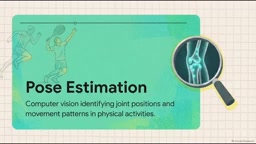
The twelfth tip uses multimodal AI for motion analysis. Leveraging pose estimation and keypoint detection, AI can analyze joint positions and body alignment in tennis or running videos, providing structured technical feedback. The video describes this as putting a biomechanics lab in your phone, but makes clear it's only structural guidance and cannot replace clinical assessment or a professional coach.
The thirteenth tip is one-off AI vision in smart glasses technology: the system uses computer vision to identify objects in the environment and draws digital bounding boxes in real time in front of your eyes, useful for logistics, agriculture, or identifying plants while hiking. The prerequisite is clear camera permissions and respecting privacy in public spaces.
5. Future Direction: From Q&A Bots to Action Agents
The Explainer concludes by pointing out that AI's true value is no longer just how smart the model is, but how effectively it can act. The industry is shifting from passive Q&A to proactive automation agents that are beginning to manage household affairs, personal productivity, and even small business operations.
Along with this shift comes responsibility. The video suggests starting small, using AI in low-risk scenarios first, and understanding each tool's capabilities and boundaries. Human oversight, personal information protection, and output verification remain the user's responsibility. AI is the assistant—you're still the boss.
These 13 tips aren't mysterious; the core is treating AI as a configurable process tool: use it to prepare for negotiations, organize privacy requests, diagnose devices, simplify operations, assist learning, and maintain a fallback capability in offline or mobile scenarios. The real dividing line isn't how powerful the tools are, but whether you clearly know when to let them act and when you must check things yourself.
One-line Summary
13 practical, actionable AI tips—the core is treating AI as a process tool, not magic.
Paragraph Summary
The article compiles 13 everyday AI application tips from The Explainer, covering six major scenarios: saving money, privacy, productivity, learning, offline emergency preparedness, and physical world interaction. The core judgment: AI excels at preparation and assistance, not providing universal answers. AI agents can organize customer service negotiations and privacy deletion requests, but cannot guarantee savings amounts or completely erase data; coding agents can diagnose computers and save on replacement costs, but you must avoid executing system commands you don't understand; local models can provide reference when offline but cannot replace first aid or professional medical care; multimodal pose analysis is only structural guidance. The article concludes that the industry is shifting from passive Q&A to proactive automation agents, and human oversight, privacy protection, and output verification remain the user's responsibility.
Related articles

Anthropic's Agent Memory Architecture: The Memory Philosophy of Less Is More
Anthropic's Pokemon Red experiment reveals a counterintuitive conclusion about agent memory: a Claude saving 413 files performed worse than one maintaining a short dashboard. This article analyzes the four-layer memory architecture, the Dreams offline correction mechanism, and CLAUDE.md best practices.

What Happens When AI Sleeps? Anthropic Agent Memory #TechMalayalam #AgenticAI #ClaudeAI
Starting from Anthropic's Claude and Agent Memory mechanisms, this article explains how AI agents load, organize, and discard memory between sessions, and what self-evaluation loops and note-taking rules mean for developers.
Behind the Nvidia CEO Scandal: The Key Person Risk of AI Infrastructure
Jensen Huang's scandal triggers an independent Nvidia board probe as chip stocks rally and Nvidia falls alone. We break down AI infrastructure's key person risk and how real estate investors can protect deals with a three-step check.