15 Essential Prompts for Vibe Coding: Keep AI from Wrecking Your Code

Use 15 staged prompts to turn AI coding from casual chat into a reproducible engineering process.
The article presents a 15-step prompt system for Vibe Coding, ordered by project stage: from PRD, design rules, tech stack and directory structure, and database relationships, to API endpoints, AI guardrails, Readme, implementation roadmap, local run instructions, feature breakdown, authentication and security, MCP external connections, payment and model integrations, and finally testing and debugging. The core principle is that each prompt treats the previous output as the single source of truth, minimizing context drift across files. The author argues the value lies not in prompt tricks but in turning scattered instructions into a structured engineering chain—spending a few extra minutes up front on requirements and architecture often saves significant rework later.
Why Vibe Coding Needs a Prompt System
Anyone who has written code with AI has probably run into this: you toss out a casual request, the AI spews out a pile of files, nothing runs without errors, and fixing one spot breaks another. According to the creator of this short YouTube video, the problem usually isn't the model's capability but the order and constraints of your prompts. His solution is 15 prompts used in sequence as a project progresses, with one core principle: each prompt treats the previous output as the single source of truth, so the AI doesn't have to guess back and forth across multiple files.
The value of this approach is turning "chatting with AI" into "collaborating with AI." Scattered instructions let the model improvise freely, while structured prompts lock down product intent, technical choices, and boundary constraints layer by layer, naturally narrowing the AI's output into a controllable range.
From Idea to Product Plan: The First Four Foundation Layers
PRD: Turning Vague Ideas into a Product Plan
The first prompt is the PRD (Product Requirement Document). In the creator's words, it turns "your idea into a complete product plan." Skip this step and everything after it is built on quicksand—the AI will fill in feature boundaries on its own and drift further off course.
Background A PRD (Product Requirement Document) is a standard document a product manager hands to the engineering team, usually covering target users, core scenarios, a feature list, priorities, and acceptance criteria. In the AI coding context, the PRD's role changes: it's no longer a deliverable for humans but a "constraint file" for the model. A qualified PRD must spell out what to build, what not to build, and what counts as done, so the AI's freedom is limited to a verifiable scope. Without a PRD, the model fills in requirements based on common patterns in its training data, leading to feature creep and drift.
Design: The Rulebook for the UI
The second prompt handles design, producing a "rulebook" for the entire interface. It constrains not just colors and layout but also how components are reused and how interactions stay consistent. Without this rulebook, every round of AI-generated pages may look different.
Architecture: Locking Down the Tech Stack and Directory Structure
The third prompt is architecture. According to the screenshot, this step specifies the "tech stack and folder structure." This is the step most easily skipped and most prone to problems—once the directory structure is a mess, every subsequent file lookup by the AI is like wandering a maze.

Database: Defining Tables and Relationships Up Front
The fourth prompt handles the database, fixing table structures and relationships ahead of time. Thinking it through at the design stage is far less work than having the AI "figure it out" later and then redoing it.
APIs, Rules, and Engineering: The Middle Five Layers
API and Agents: Both Connectivity and Control
The fifth prompt generates all API endpoints, and the sixth sets rules and guardrails for the AI. The latter is often overlooked but directly determines whether the AI will "overstep"—for example, modifying modules it shouldn't touch or introducing undeclared dependencies. According to the screenshot annotation, this step specifically "sets rules and guardrails for the AI."

Readme, Plan, and Setup: Making the Project Handover-Ready
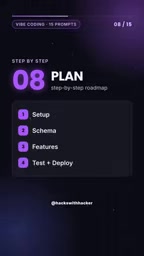
The seventh prompt produces a Readme as the project overview and guide; the eighth is a step-by-step implementation roadmap; the ninth explains how to run it on a local machine. Together they solve a real problem: an AI-generated project must also be understandable, handover-ready, and reproducible by humans. The screenshot describes Setup as "how to run the project on a local machine."
Features, Security, and Integrations: The Last Six Layers
Features: One Step per Feature
The tenth prompt breaks each feature into a step-by-step build guide. Smaller steps mean a smaller scope to locate when something goes wrong—the same old software engineering wisdom as "commit in small increments."
Authentication and Security: Login Is Not an Afterthought
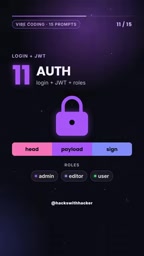
The eleventh prompt covers authentication and security, including login, JWT, and role permissions. If you let the AI improvise this kind of logic, it's easy to miss permission checks; framing it with prompts up front beats auditing it afterward.
MCP Connection: Connecting AI to Tools and Servers
The twelfth prompt handles MCP connections, enabling the AI to interface with external tools and servers. According to the screenshot, this step's purpose is to "connect the AI to tools and servers." For projects that need to call external capabilities, this is the key leap from "writing code" to "running it."
Background MCP (Model Context Protocol) is an open protocol proposed and open-sourced by Anthropic to standardize how AI models connect to external tools and data sources. Before MCP, every external service (database, file system, third-party API) required its own adapter code; MCP abstracts these capabilities into a unified "server–client" interface, and models discover and invoke tools through the protocol. For the Vibe Coding workflow, the MCP connection prompt ensures the AI knows exactly which external capabilities are available and how to call them, preventing it from inventing interfaces during integration.
Integrations: Payments, Models, and Storage
The thirteenth prompt covers integrations, involving external services such as payments, OpenAI, and storage. These capabilities usually have their own integration specs; a unified prompt keeps the AI from mixing up how different services are called.
Testing and Debugging: The Two Closing Safeguards
The last two prompts cover testing and debugging. The fourteenth plans unit tests and end-to-end tests; the fifteenth is used to locate and fix errors when code breaks. Putting testing near the end makes sense—if the structure isn't settled, there's nothing to test against.
What This Prompt System Really Solves
Looking back at these 15 prompts, they're no magic spell but a complete engineering chain from product definition to debugging wrap-up. The principle the creator stresses repeatedly deserves special mention: each prompt takes the previous output as its source of truth. This minimizes "context drift," the old AI coding ailment—the AI no longer guesses what the project looks like from memory but returns each time to confirmed files for answers.
For people used to firing off casual requests, spending a few extra minutes on the PRD and architecture often saves hours of rework later. That's why this short video is worth bookmarking: it offers not tricks but a process you can follow directly.
According to the creator, the full set of 15 prompts is available via the comments; interested readers can follow up through the original video's channel.
Background
In AI coding tools, an Agent refers to an intelligent mode that can autonomously read files, modify code, and execute commands, as opposed to a chat mode limited to Q&A. An Agent has the ability to act and therefore the ability to break things: it may refactor unrelated modules without permission, introduce undeclared dependencies, or bypass established directory conventions. Guardrails are the rule sets designed to constrain such behavior, usually in the form of system prompts, config files, or permission whitelists that specify which files the Agent may modify, which tools it may call, and that it should ask rather than act when uncertain.
Related articles

Qwen 3.8 Beats Opus at Coding—But Can Your Mac Run It?
Open-source Qwen 3.8 beats Opus 4.6 at coding at just 18GB, but how much Mac memory do you need? 24GB crashes; 32GB is the sweet spot. Full config guide inside.

Claude Code + Agent: Building a Fully Automated AI Testing Loop
Bilibili course breakdown: how test developers can use Claude Code terminal-based Agents to build a fully automated AI testing loop. Compares permission boundaries of terminal vs. device Agents, explains why enterprise projects choose Claude Code over Open Claude-type tools, and outlines the Node.js environment setup and DeepSeek model integration path.

Working with AI Agents Requires Nerves of Steel
The more autonomous AI agents become, the heavier the user's psychological burden. Drawing from a Hacker News discussion, this article analyzes black-box anxiety, behavior drift, and monitoring fatigue in agent collaboration, and offers practical approaches like sandbox isolation, permission control, and task granularity management to reduce cognitive load.