30 Days Building an AI Agent by Hand: Constructing a Code-Map Agent from Scratch

Thirty days hand-building a codebase-map Agent, from raw HTTP calls to production-grade evaluation, no framework at the start.
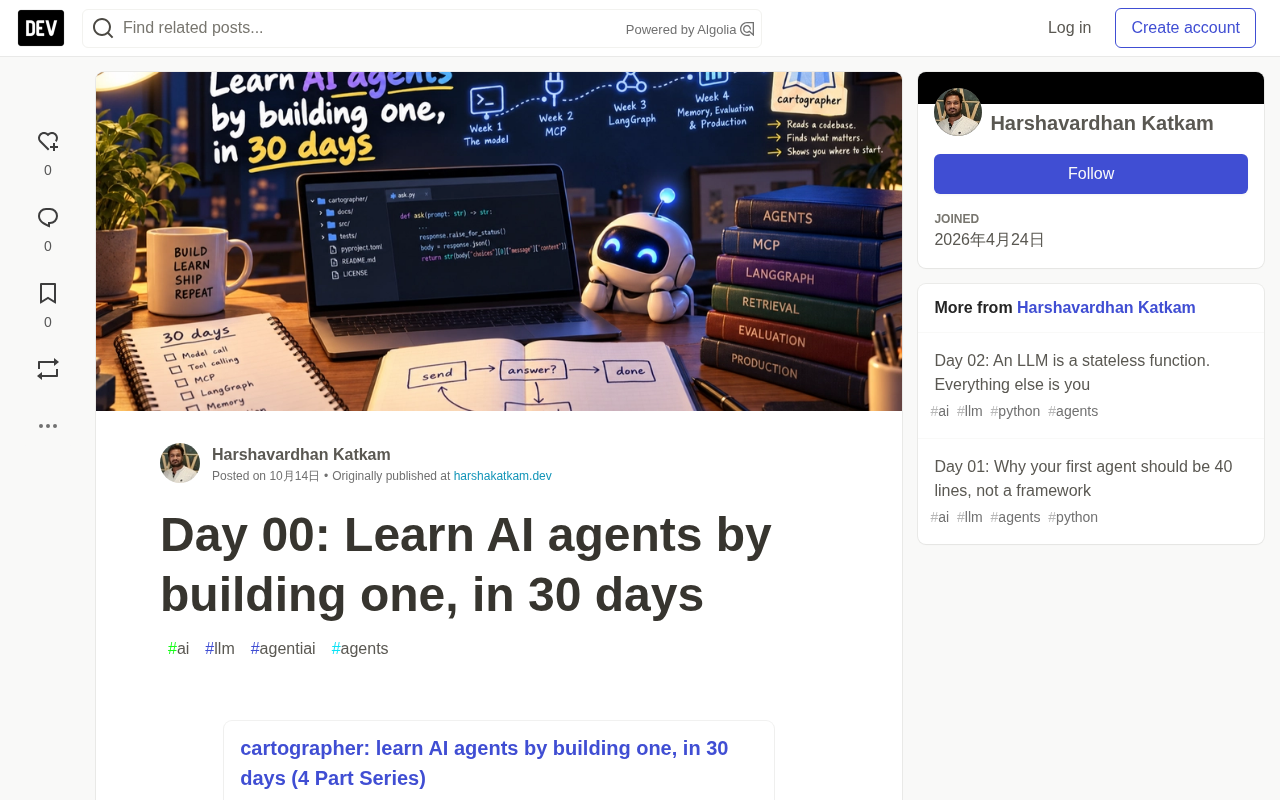
This project builds a from-scratch AI Agent called cartographer over thirty days, one concept per day: it reads unfamiliar repositories and produces onboarding maps. The core constraint is that a repo can't fit any context window, forcing the Agent to decide what to read, making tool calling, retrieval, and cost control necessities rather than demos. Week 1 uses ~40 lines of Python calling the model over raw HTTP, hand-writing the loop and memory; week 2 covers MCP and its 2026-07-28 revision; week 3 brings in LangGraph for loops, persistence, and human approval; week 4 completes evaluation, observability, and cost routing. The series insists on describing nothing unbuilt and inventing no numbers, with all model calls on the free tier.
30 Days Building an AI Agent by Hand: Constructing a Code-Map Agent from Scratch
Most people learn about AI Agents by opening a framework's quickstart doc. Three lines of code later, something impressive is running — but the genuinely interesting parts, the loop, the judgment about what to send, the place where it breaks at scale, all happen inside a function you never open.
This isn't the learner's fault. Nearly every tutorial about Agents is demonstrating a library, so it teaches you vocabulary, not mechanism.
A series called "Learn AI agents by building one" takes a harder but more solid path: thirty days, one concept per day, all implemented by hand, ultimately assembled into a genuinely usable tool.
Why One Project Instead of Thirty Demos
Most tutorials habitually pair each concept with a brand-new toy: tool calling gets a weather lookup, retrieval gets a PDF Q&A bot. Each runs fine, but none teaches you much — because toys don't push back. You never hit the wall that makes the concept necessary, so you learn the API, not the reason.
This series does the opposite: over thirty days it builds a single tool, chosen precisely because it fights back.
The tool is called cartographer. You point it at a code repository you've never seen, and it returns an onboarding map: where execution actually begins, which small set of files carries the whole system, an end-to-end trace of a data path, and where your first change should go. Anyone who has joined a new team knows this week-long pain of figuring it out.
It's a good teacher for one reason: the repo doesn't fit. A mid-sized open-source project easily runs into millions of tokens; no context window is large enough to hold it, no prompt is clever enough to skirt it, and no bigger model next year makes this problem vanish. The Agent has to decide for itself what to read.
That single constraint turns every concept in the curriculum from a demo into a necessity. Tool calling becomes the only entry point, retrieval stops being a phase you're told to add, and cost control becomes an arithmetic problem. You meet each concept at the moment you need it — the only time knowledge actually sticks.
It has a second useful property: there is a correct answer. Point it at a codebase you know, and you can check whether the map is right. That makes genuine evaluation on day 25 possible, instead of relying on "it looks like it works" gut feeling.
What Each of the Four Weeks Builds
Week 1: The Bare Model, Nothing in Front of It
Using roughly forty lines of Python, call the model directly over raw HTTP — no SDK, no Agent library. You'll handle by hand the field that distinguishes a "complete answer" from a "truncated answer," manually build conversation memory and understand why the word "memory" is misleading, do the token arithmetic that runs through every later design decision, get the model to return typed records rather than prose, and hand-write tool calling — so you see with your own eyes what actually travels over the wire. By the end of week one, you have a working Agent and a clear list of "what still ails it."
The difference between a raw HTTP call and an SDK deserves elaboration. The vast majority of tutorials use SDKs like openai or anthropic, which wrap up the auth header, request-body serialization, chunked parsing of streamed responses, retries, and error mapping for you. When you POST directly to /v1/chat/completions, none of that can be omitted: you set Authorization: Bearer <key> and Content-Type: application/json yourself, assemble the messages array, model, max_tokens, temperature and other fields into a JSON body, then parse the returned choices[0].message.content. The field distinguishing a complete answer from a truncated one is finish_reason — when it's stop the model finished naturally, when it's length you hit the max_tokens cap and the answer was cut off mid-sentence. The biggest value of hand-writing this layer: afterward, when you use any framework, you can see exactly what it wraps up, instead of treating the black box as magic.
Week 2: The MCP Protocol
MCP is the protocol that lets any editor or client talk to your Agent, rather than trapping it inside a script. It's the right time to learn it, because MCP's 2026-07-28 revision removed the initialization handshake and protocol-level sessions. That means a large number of current tutorials on how MCP works are describing a protocol that no longer exists. You'll learn the version that's real today, build a server worth keeping, and confront the security problem that inevitably arises when an Agent reads code it didn't write itself.
MCP (Model Context Protocol) is an open protocol proposed by Anthropic in late 2024, aiming to let models or Agents connect to external tools, resources, and prompt templates in a uniform way, without adapting separately for each client. Its core communication mechanism is based on JSON-RPC 2.0, transported over stdio or HTTP/SSE, decoupling "what capabilities a server provides" from "how a client uses them." Historically, MCP used an initialization initialize handshake to exchange protocol versions and capability manifests, and maintained a stateful session object. The 2026-07-28 revision removed this handshake and protocol-level session, shifting to a more nearly stateless request-response model, which simplifies deployment and horizontal scaling — but also invalidates a large number of tutorials and example server code built around the old handshake. When learning, always follow the latest official spec, not the old articles ranked highest in search engines.
Week 3: LangGraph, and Why a Loop Alone Isn't Enough
Reading a codebase is not a pipeline. You read a file, don't understand it, go back for more context — that's a loop, and a loop is precisely what chained structures can't express. You'll also add three features that turn a script into software: the ability to recover after crashing while scanning four thousand files, and the ability to stop and ask a human before performing operations with consequences.
LangGraph is an orchestration library in the LangChain ecosystem for building stateful, cyclical Agents. It models a workflow as a graph: nodes are execution units (calling the model, running tools, making judgments), edges define control flow, and "state" is a shared data structure passed between nodes. The most essential difference from a chain structure is that a graph permits conditional edges and cycles, so it can express repetitive processes like "read file — didn't understand — go back for more context." Its built-in checkpointer mechanism persists state at each step, letting you recover from the nearest checkpoint after a crash instead of rerunning from scratch; it also supports interrupting before specific nodes and waiting for human input — exactly the basis for recovering after crashing while scanning four thousand files, and for requesting consent before performing consequential operations. Understanding this layer requires grasping the "state machine + persistence" abstraction first, not memorizing the API.
Week 4: The Half That Decides Whether It's Genuinely Usable
Split memory into three separate problems rather than one word, turn retrieval into a tool the Agent chooses to call on its own, build an evaluation set with known correct answers so "has it gotten worse?" has evidence. Observability tracing, cost routing, and the seven ways it fails in production — the parts most tutorials skip.
An eval set is the benchmark for measuring whether an Agent has gotten worse: a set of input-output samples with known correct answers, run after every change, quantifying shifts with pass rates, accuracy, and other metrics, rather than relying on the "it looks like it works" gut feeling. For cartographer, using a codebase you know well as input and manually verifying whether the entry points, core files, and call paths it generates are correct gives you a reproducible reference answer. The accompanying observability usually means tracing: recording each model call, tool call, token consumption, and latency, stringing the whole execution path together. Without traces, when something goes wrong you can only print logs and guess; with traces, you can pinpoint whether retrieval recalled the wrong file or whether the model took a wrong turn at some judgment node. Cost routing is dividing simple tasks to cheaper models and complex tasks to stronger models based on request complexity, making a trade-off between accuracy and expense.
How to Follow Along
Each day's content comes in two parts: an article explaining the concept and why it matters, plus concrete development notes telling you which file to create in which folder, what to type into it, and what each line does.
Day zero's build contains no Agent code at all — it just creates the repository structure. Each file has a clear responsibility: pyproject.toml declares the project name, Python version, and the single runtime dependency; src/cartographer/__init__.py makes the folder an importable package and stores the version number; .gitignore keeps environments, caches, and secrets out of version history; LICENSE makes the code reusable; README.md states what the tool will do and honestly admits that nothing works yet; .github/workflows/ci.yml runs lint, type checking, and tests on every push; tests/test_package.py is a real test. It also clones click 8.5.0 — the repository the Agent studies throughout the series — pinned to a version so every day measures the same code.
You'll need Python 3.12, a terminal, and about an hour a day. All model calls run on a free model via an OpenAI-compatible endpoint, with no billing whatsoever.
You don't need any Agent experience. If Agents are entirely new to you, start with the introductory piece "Before Any Code, the Six Concepts That Explain Every AI Agent": about fifteen minutes, no code, covering what a model call is, tokens, context windows, why the model remembers nothing, tool calling, and the loop that makes it an Agent. If you're already familiar, start straight from day one. But you do need to be comfortable reading Python code.
Two Rules for the Writing
Nothing gets described that hasn't been built. Code ships before the article. When something doesn't work, that's the day's article — and there will surely be several, because building something hard over thirty days is not thirty days of triumph.
No invented numbers. Any claim about accuracy comes from day 25's evaluation, against a repository with known correct answers, with the methodology published alongside. If a number is illustrative, the sentence says so explicitly.
The series' core value lies here: it doesn't teach you how to use a framework, it has you write that loop by hand before you adopt a framework. When you actually use a framework, you can articulate exactly what it does for you.
If you've ever burned a week in an unfamiliar codebase — most of us have — which step actually consumed your time: finding the entry point, or figuring out which files matter?
Related articles

Chain of Thought Isn't Just for AI: How Humans Can Use CoT to Improve Thinking Quality
Chain of Thought isn't just a prompt trick for large models. Starting from a Hacker News discussion, this article analyzes why CoT works for human thinking too, breaks down actionable ways to transfer it, and highlights the key differences between human CoT and machine CoT.
Cloudflare Teams Up with OpenAI: Closi…
Cloudflare Teams Up with OpenAI: Closing the Loop from Vulnerability Discovery to Defense with AI
Cloudflare uses OpenAI Daybreak to investigate security vulnerabilities and generate reviewable remediation plans, while developers use Codex to boost coding efficiency and quality.

Orca Multi-Agent Orchestration in Practice: A Guide to Parallel Collaboration with Claude and Codex
Orca is Stable AI's free open-source agent workbench supporting 34 agents like Claude Code and Codex in parallel. Learn its Git worktree isolation, multi-model orchestration, and mobile management.