42-Ring Roadmap for Local LLM Deployment: 5-Segment Breakdown and Completion Guide

A 42-ring roadmap to locate where you're stuck in local LLM deployment and avoid silent-failure traps.
This article presents a Bilibili creator's 42-ring roadmap for local LLM deployment, divided into five segments (Decision, Environment, Integration, Application, Long-Term) forming the sequence 98898. It helps users pinpoint which ring they're stuck on, explains why Segment B has the least public material yet the highest cost, categorizes users into three paths with exit criteria, provides eight self-check questions, and highlights four silent-failure high-risk rings. It also sets time expectations—two to three weeks for a first full run—explains that producing output is only Ring 17 while true usability requires decode speed, prefill speed, and VRAM headroom, and lists three things not to do plus three things you can do tonight.
Many people who try to deploy large AI models locally go through a similar loop: they buy a GPU, install an inference engine, pull down a model, and successfully generate the first line of output—then they have no idea what to do next. A Bilibili creator has broken the entire path from "should I buy a GPU" to "how do I sell it in three years" into 42 steps. Instead of teaching how to perform any single step, the goal is to help you locate: which ring you're on now, why you keep getting stuck at the same place, and which ring you should tackle tonight.
The Full Picture of 42 Rings: A 5-Segment Structure at a Glance
The whole route is divided into five segments, and the segment counts form the sequence "98898":
- Segment A · Decision (9 rings): From "what do you want it to do" all the way to "I advise you not to buy." This segment costs money.
- Segment B · Environment & Getting It Running (8 rings): From installing the OS to how to recover when VRAM overflows for the first time. This segment costs time.
- Segment C · Integration (8 rings): Making the model actually usable by people.
- Segment D · Application (9 rings): Knowledge bases, Agents, fine-tuning.
- Segment E · Long-Term Operation (8 rings): From auto-start on boot all the way to selling it three years later.
Memorize this segment structure, and later, whenever you hear about any ring, you'll immediately know which segment it belongs to.
Why You Always Get Stuck in Segment B: Supply Is Skewed, and the Middle Is the Most Expensive
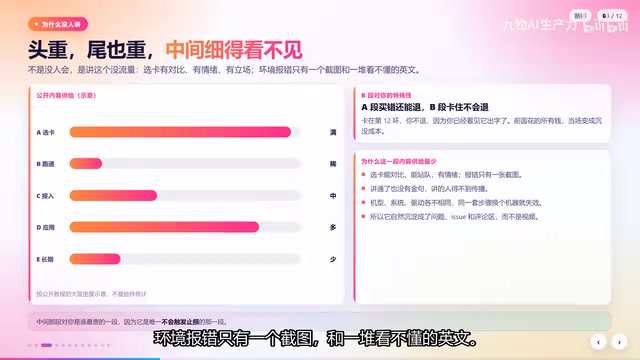
Among the five segments, publicly available material on Segment B is especially scarce. You can scroll through GPU selection reviews all day, and there's plenty on knowledge bases, but very little on "what to do when it won't run after installation." The creator's assessment is blunt: it's not that no one knows how—it's that this topic gets no traffic. GPU selection has comparisons, emotions, and opinions; environment errors just give you a screenshot and a bunch of incomprehensible English. As a result, content supply is heavy at both ends and razor-thin in the middle.
But for beginners, the middle segment is precisely the most expensive. If you buy wrong in Segment A, you can still return it; if you get stuck in Segment B, all the money you spent earlier becomes a sunk cost—and you won't return it, because you've already seen it produce output.
The eight rings of Segment B deserve to be laid out separately: Ring 4, which OS to install; Ring 11, whether the driver and CUDA match up; Ring 12, whether the Python environment is clean; Ring 13, which installation method to use; Ring 14, the first successful run; Ring 15, where to put model weights; Ring 16, don't download the wrong format; Ring 17, the first VRAM overflow. What they all share: the error messages never tell you what to do. The GPU doesn't recognize you—it just says device not found, not that your driver version is two years behind; environment conflicts just say a package is missing, not that you've installed three copies; VRAM overflow just says out of memory, not that your context window is actually eating it all. What beginners lose here isn't technical skill—it's judgment. You don't know whether the error is normal or fatal.
CUDA (Compute Unified Device Architecture) is NVIDIA's parallel computing platform and programming interface. Most local LLM inference engines (such as llama.cpp, vLLM, TensorRT-LLM) rely on it to access GPU compute. The driver is the low-level software that lets the operating system communicate with the GPU, while the CUDA runtime is a compute library built on top of the driver. The two versions must be compatible: a driver that's too old will cause CUDA initialization to fail, often with the error "CUDA driver version is insufficient." In addition, frameworks like PyTorch bundle specific CUDA versions; if they don't match the system driver, the GPU still won't be enabled. So Ring 11, "whether the driver and CUDA match up," is essentially checking whether the driver version meets the minimum requirements of the CUDA runtime. Typically you use nvidia-smi to see the highest CUDA version the driver supports, then compare it with the version the framework requires.
GGUF and AWQ are two common quantization formats for large models, and they directly affect whether a model can run on your hardware and how efficiently. GGUF (GPT-Generated Unified Format) is the format used by llama.cpp, supports mixed CPU/GPU inference, has flexible VRAM requirements, and suits consumer GPUs; AWQ (Activation-aware Weight Quantization) is a 4-bit quantization method for GPUs, typically used with high-performance inference engines like vLLM, requiring sufficient VRAM and specific GPU architectures. Downloading the wrong format will prevent the engine from loading the model, or cause performance far below expectations. Ring 16, "don't download the wrong format," means choosing the quantization format and level (such as Q4_K_M, Q5_K_M, etc.) that matches your inference engine and hardware—otherwise you may waste download time and storage space.
First, Locate Yourself: Which Type of User Are You?
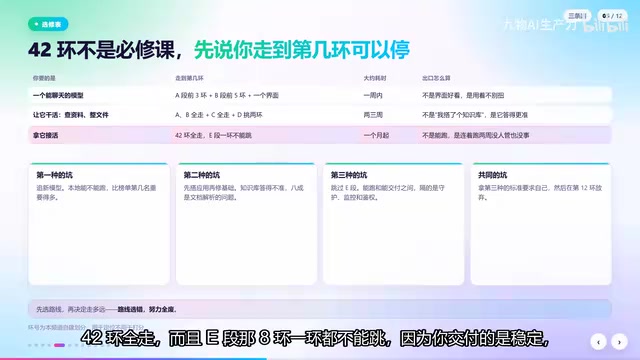
The 42 rings are not a required course. The creator divides the path into three routes based on needs:
The first: you just want a local model you can chat with. Go through the first 3 rings of Segment A, the first 5 rings of Segment B, then pick an interface, and you can stop at Ring 18. About a week, under 3,000 yuan. The exit criterion isn't a pretty interface—it's that using it doesn't feel awkward.
The second: you want it to do work, like look up information or organize files. Complete Segments A and B, all of Segment C, and pick two rings from Segment D—knowledge base and scheduled tasks—stopping at Ring 34. Two to three weeks. The exit criterion isn't "I built a knowledge base"—it's "it's more accurate than asking the model directly."
The third: you want to take on paid work with it. Go through all 42 rings. None of the 8 rings in Segment E can be skipped, because what you deliver is stability, not "it can run." The exit criterion is that it runs for two weeks unattended without issues.
First figure out which type you are, then decide how far to go. Otherwise you'll hold yourself to the third type's standards and end up stuck between the third and the first.
Eight Questions to Find Out Which Ring You're Stuck On
Answer the following eight questions; for each "yes," move to the next ring:
- Is the OS installed?
- Do the GPU driver and CUDA match?
- Have you installed three versions of the same package?
- Do you know which engine and which installation method you're using?
- How long did it take you to get the first output?
- Which drive are the model weights on, and how much space do they take?
- Is the file you downloaded a GGUF or an AWQ?
- When VRAM first overflowed, did you fix it by lowering the settings, or did you reinstall the OS?
The creator says most people get stuck on question 3—if you're stuck there, you're on Ring 12. This isn't a capability issue, because question 3 is never written in tutorials.
Four High-Risk Rings That "Don't Error When Skipped"
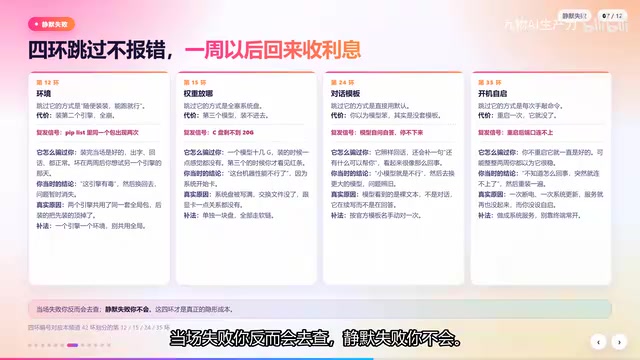
Some rings can be skipped silently, and the problem only finds you a week later:
- Ring 12 · Clean Environment: The way to skip it is "just install whatever, as long as it runs"—then everything collapses when you install a second engine.
- Ring 15 · Model Weight Location: The way to skip it is stuffing everything onto the system drive—then when the third model comes along, you can't even install it.
- Ring 24 · Chat Template: The way to skip it is using the default—the model seems dumb, and you think it's because the model is too small.
- Ring 35 · Auto-Start on Boot: The way to skip it is typing the command manually every time—one reboot and it's gone.
What these four rings share is silent failure—no error, so you don't investigate, and the problem only surfaces a week later.
The chat template (Chat Template) is the prompt structure that determines how a model understands user input and generates replies. Different models (such as Llama 3, Qwen, ChatGLM) have their own template formats, including how system prompts, user messages, and assistant replies are marked. If you use the default or wrong template, the model may fail to correctly distinguish conversation roles, leading to degraded response quality, irrelevant answers, or even garbled output. Ring 24, "chat template," is high-risk because template errors don't trigger program errors—they just make the model seem "dumber," and beginners often mistake this for a small model's limited capability. The correct approach is to explicitly specify a template matching the model in the inference engine, or use the engine's built-in automatic template detection.
Time Expectations: First Full Run-Through Takes Two to Three Weeks
The creator shared their own time budget: Segment A, if done carefully, takes two or three days—but most people spend two hours buying a GPU, which is why they regret it later. Segment B takes two to three days the first time and half an hour the second time; the difference isn't that you got smarter, but that you won't repeat the same mistakes. Segment C takes one day, mostly spent on the interface and templates. Segment D takes at least one day per ring, with the knowledge base taking two days. Segment E takes half a day, but must be verified repeatedly over two weeks.
The first full run-through is about two to three weeks, not two or three hours. This is where expectations go wrong: you plan for two or three hours, then spend three days and still haven't cleared Ring 12, and you conclude "I'm not cut out for this."
Producing Output Is Only Ring 17; "Usable" Requires Three Numbers
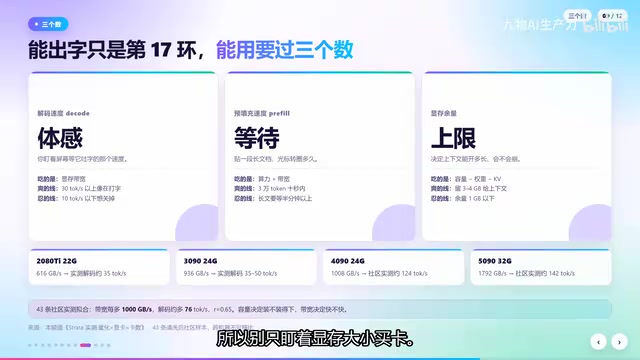
- Decode speed: Determines whether you feel it's fast.
- Prefill speed: Determines how long you wait after pasting a long document.
- VRAM headroom: Determines how long a context you can open and whether it will crash the next day.
The creator mentions that someone in the community compiled over forty real-world measurements: for every additional 1,000 GB/s of VRAM bandwidth, decoding improves by about 7.6 tokens per second, with a correlation coefficient of 0.65. This is community sample data, not lab data—it gives direction, not absolute values. But the conclusion is solid: capacity determines whether it fits, bandwidth determines whether you feel it's fast. So don't buy a GPU based only on VRAM size.
Decode speed (Decode Speed) is the reciprocal of the time the model takes to generate each output token, usually measured in tokens/s, reflecting conversational fluency; prefill speed (Prefill Speed) is the number of tokens per second the model can process when handling input prompts (such as long documents), determining how long you wait for the first token. Both are affected by VRAM bandwidth, model quantization level, batch size, and other factors. VRAM headroom refers to the remaining VRAM space after loading the model, which determines the context length (Context Length) you can set and whether you can run other tasks simultaneously. The longer the context, the more KV cache (KV Cache) it consumes, and insufficient VRAM headroom will cause inference to fail. Therefore, evaluating "usable" requires looking at all three metrics at once, not just whether the model can produce output.
Three Things Not Recommended
First, don't buy a new GPU just to run a demo. Use the card you already have and go through Ring 17—only then will you know whether you're actually short on capacity or bandwidth. Getting the order wrong guarantees a bad purchase.
Second, don't start building a knowledge base or doing fine-tuning right away. That's for Ring 26 and beyond. If you haven't even cleared Ring 12, whatever you build won't work well, and you'll think the model is the problem.
Third, don't fine-tune without a way to validate. You'll get a bunch of "I think it got better," then discover in real scenarios that it's actually worse.
These three aren't telling you not to do them—they're telling you to get the order right. With the right order, every step can be validated; with the wrong order, you won't even know where you went wrong.
Three Things You Can Do Tonight
- Answer the eight questions and write down which ring you're stuck on. Once you write it down, you'll find your problem is more specific than what's described above.
- If you're stuck on Ring 12, don't touch anything new for now. Clean up your environment, go through a minimal reproducible path, and note which version you used at each step.
- Leave three pieces of information in the comments: your GPU model, the model you're running and its quantization method, and which ring you're stuck on. Compare by ring number and you'll find many people stuck on the same ring as you.
Once these three are done, you'll know which ring to tackle tomorrow. The creator's final tip: screenshot the five-segment "98898" diagram—Segment A asks three numbers, Segment B solves eight error types, Segment C makes it usable, Segment D makes it do work, Segment E makes it survive two weeks. The high-risk rings are Ring 4 (the physical ring—skip it and there's no error) plus Rings 12, 15, 24, and 35. Follow-up videos will start with the most frustrating Segment B's eight rings, one ring per episode.
Related articles
Claude Fable 5.2 Hands-On: Top Intelligence but Absurdly Expensive
Anthropic releases Claude Fable 5.2 and Mythos 5.2, topping the Artificial Analysis intelligence leaderboard with big gains in scientific reasoning, strong game and hardware design, but max mode costs ~$26.54 per task. Hands-on game, circuit board design, and pricing advice.

1,000 AI Agents Formalize Fermat's Last Theorem in 30 Hours, Anthropic Releases New Claude Models
Anthropic releases Claude Fable 5.2 and Mythos 5.2: 1,000 agents formalize Fermat's Last Theorem in 30 hours, coding costs halved, plus hardware design and physics.

Claude Fable 5.2 Released: A Thousand AI Agents Build a Bootable OS in 8 Days
Anthropic releases Claude Fable 5.2 and Mythos 5.2—same model, two safety tiers. Demo shows 1,000 AI agents build a bootable OS in 8 days, formalize Fermat proof in 30 hours, score 64.6 beating Gemini 4 Carbon, price cut 20%.