5 Claude Code Productivity Tips: From Going Off-Track to Supercharged Workflow

Five practical habits to stop Claude Code from going off-track and dramatically reduce rework.
This article presents 5 proven workflow habits for Claude Code users: crafting clear initial system prompts, using constraints to prevent over-generation, assigning specific expert roles, building in phases rather than all at once, and structuring data with lists and tables. Each technique eliminates a specific category of errors, and when stacked together, they transform the AI coding experience from constant rework to efficient, predictable output.
Why Does Claude Code "Go Off-Track" After Extended Use?
If you've been using Claude Code (or Claude-based AI site-building tools like Base44) for more than a week, you've probably hit that familiar plateau: it starts forgetting things you've told it, or produces something that technically works but isn't remotely what you wanted.
This "going off-track" phenomenon is closely related to Claude's context window mechanism. Although Claude 3.5 Sonnet supports a 200K token input context, the context window isn't simply "memory" — the model doesn't "remember" previous conversations like a human would. Instead, it reprocesses the entire conversation history each time. As conversations grow longer, earlier information gradually loses weight in the attention mechanism. This is what NLP research calls the "lost in the middle" phenomenon. Studies show that models handle information at the beginning and end of context best, while the middle is most easily overlooked — this is the technical root cause of instruction loss in long conversations.
What's most frustrating is that this isn't entirely Claude's fault. Much of the time, the problem lies in how we organize the information we feed it. This article, based on the practical experience of a Bilibili content creator, summarizes 5 work habits that can fundamentally change how well Claude understands and executes instructions. These aren't prompt engineering tricks or hidden features — they're simple yet extremely effective work methods, each eliminating a specific category of errors.
It's worth noting upfront: all techniques in this article are built on the premise of Claude as the current model. According to Menlo Ventures' State of Generative AI in the Enterprise report, Claude currently holds an estimated 54% of the enterprise coding model market, while OpenAI has roughly 21%. Claude's dominance in coding scenarios is inseparable from Anthropic's focused optimization on instruction-following capabilities during training. Anthropic uses a combination of Constitutional AI and RLHF (Reinforcement Learning from Human Feedback) training methods, with particular emphasis on the model's precise understanding and execution of user intent. Compared to the GPT series' outstanding performance in creative generation, Claude typically demonstrates higher consistency when strictly executing code tasks according to structured instructions — this is the core reason it has become the preferred engine for AI programming.
Tip 1: Treat Claude Like a "Genius on Their First Day at Work"
Anthropic has an incredibly apt analogy: think of Claude as a genius new hire on their first day. They're extremely capable but know nothing about your project — unless you proactively tell them. So, if your prompt would confuse a human, it will probably confuse Claude too.
This analogy isn't merely marketing speak — it reflects a fundamental characteristic of large language models: the lack of persistent memory and project-specific knowledge. LLM knowledge comes from statistical learning on massive text during pre-training, not from real-time interaction with you. The "common ground" theory in cognitive science states that effective communication depends on shared background knowledge between parties. In human-AI interaction, the responsibility for establishing this common ground falls entirely on the human side — you must explicitly convey all relevant information to the model rather than relying on assumptions about what "it should know."
Instead of rushing to start building, invest extra effort in your first prompt. A high-quality initial prompt should contain four things:
- What you're building (project type)
- Who it's for (target users)
- What features are needed (functional requirements)
- What visual style you want (design direction)
Skip the visual style, and you'll typically get something generic-looking; skip the functional requirements, and the result might look good but be completely off-target.

The good news is that once you've communicated this background clearly, you don't need to repeat it every few messages — Claude has understood the project. This means fewer revisions, less rework, and consistent results from start to finish. For projects like a personal finance dashboard, a well-structured initial prompt can directly produce results close to your final goal, rather than getting a basic version and then spending a dozen follow-up rounds making changes.
Tip 2: Use Constraints to Stop Claude from Being "Overly Helpful"
Claude has a characteristic: it always wants to help. When it sees an opportunity to improve your app, it often takes initiative — adding a seemingly useful feature, rearranging the layout, or simply building what it thinks "every app in this category should have."
This "overly helpful" behavior has deep technical roots. During the RLHF training phase, the model is continuously rewarded for producing "helpful" output, which causes it to tend toward providing content beyond the scope of the request — in NLP research, this is called "over-generation." Specifically in coding scenarios, the model's training data contains vast amounts of complete application code, and it will automatically fill in "features a complete app should typically have" based on pattern matching, regardless of whether you actually need them.
The problem is that helpful doesn't always equal correct. For example, you want a lightweight task manager, but Claude might stuff in team workspaces, user accounts, tag filters, productivity charts, AI suggestions, calendar views... These ideas aren't bad individually, but none of them are what you asked for. Then you have to spend five or six prompts removing them one by one.
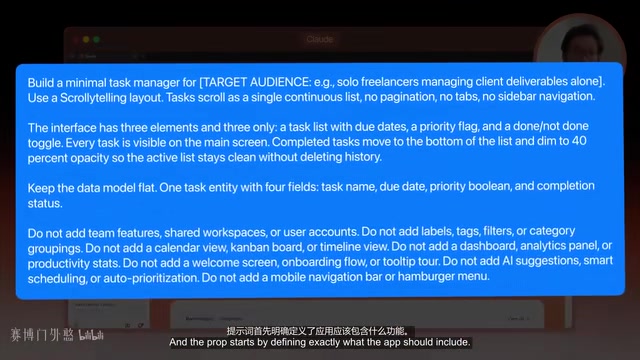
This is precisely where constraints prove their value. Constraints essentially narrow the model's output distribution through negative prompting, focusing its attention on the subset you actually need. Many people think constraints limit Claude's creativity, but in reality, constraints give it a clearer target. Anthropic's recommended approach is: first describe what you want, then follow with a short list of "what you don't want."
The key word is "short." An overly long list of restrictions makes it hard for Claude to prioritize, and some constraints end up being ignored. Experience shows that 5 to 8 carefully chosen constraints are typically more effective than 20. Just focus on the few critical points that would truly derail the project.
This is especially important in credit-based tools like Base44 — every unnecessary feature Claude generates is a feature you'll need to remove; every removal is another prompt, and every prompt costs credits.
Tip 3: Role Assignment Shapes Judgment
The third tip is role assignment: before describing your requirements, tell Claude what kind of expert it should play.
The effectiveness of role prompting stems from large language models' conditional probability generation mechanism. When you tell the model "you are a senior product designer," you're actually activating the knowledge subset related to that role within the model's parameters, biasing the subsequent token distribution toward that domain's professional expression patterns and decision-making logic. This isn't "tricking" the model — it's guiding its vast parameter space to focus on a specific professional domain.
Note that this isn't about giving it an exaggerated persona ("you are the world's greatest designer" usually doesn't help much), but rather a specific role that matches your target outcome. For example, when building a SaaS landing page, don't just say "make a SaaS landing page." Instead, add: "You are a senior product designer specializing in clean, conversion-focused SaaS landing page design."
With just that one sentence, Claude's decisions about hierarchy, copy, button placement, section order, and visual noise control become completely different.

However, there's an important boundary here: role prompting does not make Claude more rigorous or reliable. Multiple 2023 studies (including papers from Microsoft Research) confirmed that role prompting can significantly improve output quality for subjective tasks, but its effects on tasks requiring objective reasoning are inconsistent or even harmful — because an "expert role" can make the model more confidently output incorrect information, producing so-called "confident hallucinations." So if you need verified facts, legal, or medical advice, this technique is not appropriate.
But for building apps and websites, it's perfectly suited — because interface design is full of subjective decisions: how clean the layout should be, how impactful the CTA should be, whether the overall feel should be playful or corporate premium. These are all taste-based choices, and role assignment gives Claude better direction when making these judgments.
Tip 4: Build in Phases — Do One Thing at a Time
Many people try to cram everything into a single massive message: pages, database, user flows, login system, filters, styling, dashboard, mobile layout, final polish... Sometimes it works, but the more you ask Claude to handle at once, the more likely something gets missed.
This phenomenon can be understood from two dimensions. First, at the model level: the Transformer architecture's attention mechanism faces attention dilution when processing extremely long, multi-objective instructions — the more targets that need simultaneous attention, the fewer attention resources allocated to each, causing some targets to be "ignored." Second, from a software engineering perspective: phased building is essentially the application of "Separation of Concerns" principle in AI-assisted development. In traditional software development, architectural design, business logic implementation, and UI polish are inherently different phases of work — this engineering practice, validated over decades, remains effective in the AI era.
The solution is to build in phases, splitting the project into three stages:
Phase 1: Structure
Define pages, navigation, and data models. Give the app a stable foundation before adding interactions.
Phase 2: Functionality
Add the real logic: creating entries, assigning tasks, filtering lists, marking completions, adding authentication, etc.
Phase 3: Design
Clean up the visual design without changing how the app works.
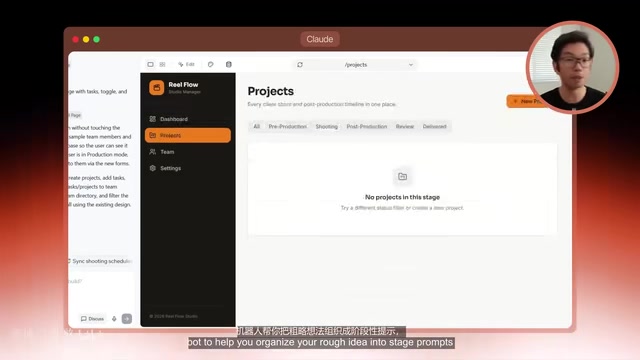
There's research backing this: a code generation study found that phased prompting achieves significantly higher accuracy than single-shot prompting, because the model doesn't have to track one oversized instruction block all at once. Anthropic has also noted that as context fills up, Claude may start ignoring earlier details.
It's also cost-effective — fixing a chaotic one-shot build often costs more. And Base44's rollback and edit features make phased building safer: if Phase 2 breaks something, you can roll back directly to the clean Phase 1 version and try again, rather than trying to salvage the entire project from scratch. You can even have another AI help you organize rough ideas into phased prompts before bringing them into the tool.
Tip 5: Structure Your Data to Make It Easier for Claude to Understand
The final tip isn't about "writing better prompts" — it's about how you organize information before Claude even sees it.
Many people stuff everything — pricing plans, feature descriptions, team information — into one long paragraph, then expect Claude to sort it all out correctly. It does reasonably well when the information is small, but as it grows, that "reasonably well" falls apart.
The principle behind this relates directly to the "signal-to-noise ratio" concept in information theory. Natural language paragraphs contain substantial redundant information — conjunctions, modifiers, filler words — and the model needs extra computational resources to extract core semantics. Structured formats like Markdown tables and numbered lists directly expose data relationships and hierarchy, dramatically reducing the model's parsing burden. Additionally, structured input triggers the model's "format mirroring" behavior: the more structured the input, the more structured the output tends to be, with cleaner code organization, more consistent variable naming, and more standardized component structures.
A better approach is to structure your content:
- Put related information into clearly labeled sections
- Use numbered lists when sequence matters
- Use simple tables when describing multiple items with the same fields
The good news is you don't need to learn JSON or any technical format — a clean Markdown table or well-organized list is usually sufficient. One study found that merely changing how information is presented can significantly reduce factual errors.
This is especially useful for content-heavy pages: pricing tables, feature comparisons, team member profiles. For example, when adding a team page to your app, putting department, name, title, bio, contact info, and photo placeholders into clearly labeled fields produces cleaner, more consistent cards with every field in the right place, and Claude won't start making up extra details.
Stacking All Five: From Tug-of-War to Supercharged
What these five tips have in common is that they all help Claude reduce guesswork:
- System prompts provide context from the start
- Constraints control project scope
- Role assignment shapes tone and design direction
- Phased building keeps it focused on one task at a time
- Structured data makes content easier to understand
They don't replace each other — they stack — with each tip eliminating a different source of errors.
A typical workflow looks like this: start with a system prompt defining the app, audience, core features, and overall aesthetic; in the same prompt, assign Claude a role and add 5-8 key constraints; continue in phases as the project progresses rather than building everything at once; when encountering content-heavy pages, switch from long paragraphs to structured lists and tables.
When you truly integrate these five habits into your workflow, Claude not only generates better apps but requires far fewer corrections. The time you save can be spent refining your ideas rather than wasted on fixing avoidable mistakes.
Key Takeaways
Related articles

CSS Anchor Positioning: A New UI Positioning Approach Without JavaScript
A deep dive into CSS Anchor Positioning: from anchor-name and position-anchor to the anchor() function, position-area shorthand, position-try-fallbacks, anchor-size, and upcoming anchor queries.

New AI Chart Interaction: Continuous Follow-up Questions and Visualization in Conversation
Explore a new AI interaction method for continuously generating charts in conversation. Use the /visualize command to ask follow-up questions and visualize answers in the same chat window, improving data analysis efficiency.

Cursor Merges Into X Subscription: Paid Plans Share Unified Usage Pool, Grok Model Coding Usage Doubled
Cursor joins The X Subscription with a unified usage pool and doubled Grok coding quota. Third-party models shift to API pricing. Existing users can keep or migrate plans.