62 Lines of Bash Builds an AI Agent: How the Minimal Harness Works

62 lines of Bash reveal the AI Agent core: stateless LLM, caller-maintained context, tool-calling loop.
Through a 62-line Bash script, the article breaks down the minimal implementation of an AI Agent. It starts with a plain curl call to an LLM parsed with jq; then stores conversation history in a Bash variable and resends it in full each request to enable multi-turn chat; then uses tool calling so the model returns function names and parameters, with the Harness executing bash commands and sending results back to form a request-execute-return loop. With only bash as a tool, the model autonomously completes a full planning chain: checking the environment, writing files, validating syntax, and rewriting a fallback after discovering missing dependencies. The author notes that products like Claude Code are built on this same loop, with added value in permissioning, context compression, and session persistence — and warns that the script executes any command the model requests with no safeguards.
Most people think building an AI Agent that can write code and execute commands requires a massive framework and complex dependencies. But developer Anton proved one thing with a 62-line Bash script: the core logic of an Agent is far simpler than you'd imagine — what's complex is the engineering polish around it.
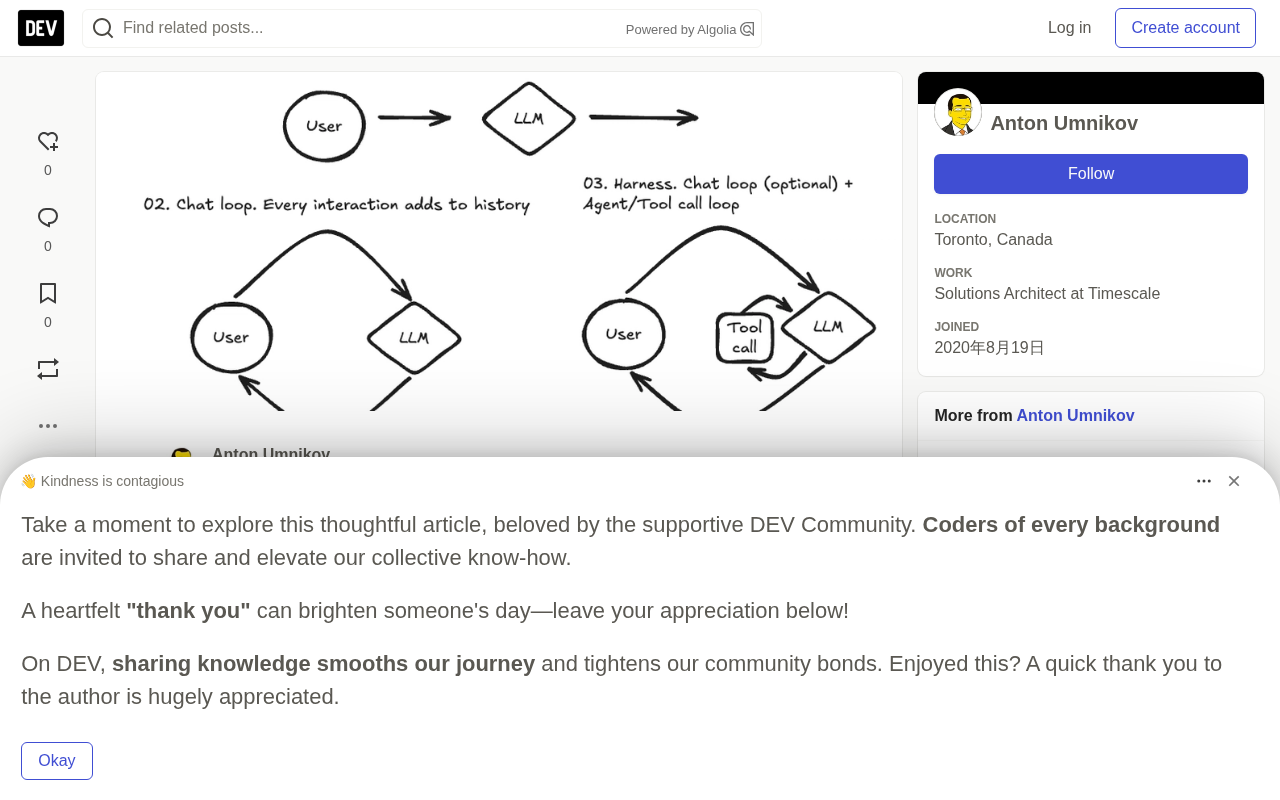
Starting With a Single LLM Call
Every AI Harness starts with an ordinary HTTP request. The author uses OpenRouter to call OpenAI models, and the core only needs two command-line tools: curl and jq:
curl https://openrouter.ai/api/v1/chat/completions \
  -H "Content-Type: application/json" \
  -H "Authorization: Bearer $OPENROUTER_API_KEY" \
  -d '{"model": "openai/gpt-6-luna", "messages": [{"role": "user", "content": "What is jq?"}]}'
The LLM returns a chunk of JSON, and jq '.choices[0].message.content' extracts the answer text.
There's a key fact that's easy to overlook here: every LLM call is completely stateless. The model doesn't remember what you asked a second ago; it generates a reply based solely on the context in the current request. So-called "memory" is entirely the caller's responsibility to maintain — which is precisely why the Harness exists.
OpenRouter is an aggregating LLM API gateway that forwards requests to models from different vendors through a unified OpenAI-compatible interface, so developers can switch models with just one API Key and a consistent request format. The openai/gpt-6-luna in the article is OpenRouter's model identifier format: the part before the slash is the provider, and after the slash is the specific model name. This design avoids having to adapt an SDK separately for each vendor and makes it easy to call models with plain HTTP requests in a script.
jq is a command-line JSON processor that supports extracting fields from JSON using path expressions (like .choices[0].message.content), as well as injecting variables with --arg and reading file contents with --rawfile. In Bash scripts, jq is often paired with curl to complete the loop of "send a JSON request and parse the JSON response" — and this tool combination is also the key to keeping the 62-line Harness minimal.
A Chatbot in 40 Lines
To turn a single call into a multi-turn conversation, you only need two things: remembering what was said, and a loop.
The author uses a Bash variable MESSAGES to store a JSON array as the conversation history, appending a user message after each user input, appending the reply as an assistant message after calling the LLM, and resending the entire array on the next call.
MESSAGES='[]'

add_message() {
  MESSAGES=$(jq --arg role "$1" --arg content "$2" \
    '. + [{role: $role, content: $content}]' <<<"$MESSAGES")
}
When the user says "My name is Anton" and then asks "What's my name?", the only reason the model gets it right is that the second request includes the first round of conversation. There's no memory on the server side — the Harness itself is the memory.
This chat loop is about 40 lines of Bash and is already a usable chatbot. But it can only chat — it's not yet an Agent.
Tool Calling: The Agent's Critical Leap
The essence of tool calling isn't mysterious. You tell the model "here's a function you can ask me to execute," and when needed, instead of returning text, the model returns "please run this function with these parameters." The Harness executes it and sends the result back, and the model continues reasoning.
The author gives only one tool, but it's the most powerful one: bash. The tool definition is a JSON schema describing the function name, purpose, and parameters. This JSON is sent as the tools field with every request.
The function that executes tools is as concise as it gets:
run_tool() {
  local output status=0
  output=$(bash -c "$1" 2>&1) || status=$?
  printf '%s\n[exit code: %d]' "$output" "$status"
}
It packages stdout, stderr, and the exit code and returns them to the model. When the model sees [exit code: 0], it knows the command succeeded; when it sees an error message, it tries to fix it — exactly the way a human developer reads terminal output.
The loop structure is upgraded to two layers accordingly: the outer layer waits for user input, and the inner layer executes tools when the model returns tool_calls, appends the results, and calls the model again, until the model stops requesting tools.
Two Details That Are Easy to Get Wrong
The author specifically points out two implementation points. First, the assistant message containing tool_calls must be sent back into the history exactly as-is and cannot be reconstructed, or the API won't match it correctly. Second, every tool result message must carry the corresponding tool_call_id.
Another engineering detail: the conversation history is fully resent every time and only grows, while the macOS command-line argument limit is 1MB. So curl uses -d @- to read the request body from stdin, and jq uses --rawfile together with process substitution to handle large file output, avoiding stuffing the entire conversation into command-line arguments.
Tool Calling (Function Calling) is an API capability introduced by OpenAI in 2023: a set of JSON Schema-described functions is passed in via the tools field in the request, and when needed, instead of returning ordinary text, the model returns a tool_calls array containing the function name and JSON-formatted parameters. After the caller executes the corresponding function, it sends the result back as a message with role: "tool", and the model continues reasoning based on that.
This mechanism turns the LLM from "only generating text" into "able to request external actions" — the dividing line between a chatbot and an Agent. The model itself doesn't execute any code; it's only responsible for planning and decision-making. The actual execution, result capture, and send-back are all done by the Harness. That's why the reliability of tool calling depends heavily on whether the caller correctly maintains the message sequence, especially the pairing relationship of tool_call_id.
-d @- is a common curl idiom that means reading the request body from standard input rather than putting the data in command-line arguments. This not only bypasses macOS's roughly 1MB ARG_MAX limit but also avoids escaping issues with overly long arguments in the shell. Together with jq's --rawfile option, you can inject file contents into JSON as a string variable, then use process substitution <(…) to feed jq's output directly to curl's stdin.
The conversation history "only growing" is an inevitable consequence of the full-resend strategy: every round of requests carries all previous messages, and token consumption grows linearly with the number of rounds. This is also why mature Agent products introduce context compression, summary replacement, and sliding windows — the 62-line script chooses the simplest correctness and leaves optimization to the engineering layer.
Hands-On Test: A Runnable Tetris From a Single Sentence
The most telling demonstration is asking this 62-line Harness to "write a Tetris game in Python and make sure it runs."
The model's behavior chain is as follows: first it checks the Python version, then writes the tetris.py file, validates the syntax with ast.parse, then discovers that Tkinter isn't available (ModuleNotFoundError: No module named '_tkinter'), so it rewrites it as a terminal curses version, and finally delivers a game that runs directly.
Nobody told it to check the environment, validate syntax, or prepare a fallback plan. The author provided only a bash tool and a loop — all the planning came from the model itself. This also explains why, if you ask a chatbot the same question, it will answer "I can't access real-time data" — the same model, and the only difference is that the tools field is added to the request. When the model sees that a shell is available, it deduces on its own that it can use curl to access a weather service — the script never mentions curl or wttr.in.
Real Agent Frameworks Just Do Engineering on Top of This
The author's judgment is worth taking seriously: the core of products like Claude Code, Codex, and Cursor is exactly this loop plus a lot of polish. The core logic fits on one screen, and the added value lies in engineering layers such as permission management, context compression, input experience, and session persistence.
At the end, he lists several improvement directions you could add in an afternoon: load the project directory's AGENTS.md into the system prompt; implement input history with read -e plus history -s; add an approval step before tool execution; add an output cap and timeout to run_tool; persist MESSAGES to a file for session recovery; and extend with more tools like read_file and write_file — each tool is nothing more than a schema plus a function.
The security reminder is equally blunt: this script will indiscriminately execute any command the model asks for, with your permissions. As a teaching project, the author suggests watching the scrolling commands and not running it in important directories.
Why This Matters
For developers who want to understand how AI Agents work, this project provides an excellent specimen for dissection. Agent frameworks on the market run to tens of thousands of lines of code with layer upon layer of abstraction, which instead obscures the plain essence of the core mechanism. 62 lines of Bash strip away all the intermediate layers, and what's left are three facts: the LLM is stateless, the context is maintained by the caller, and tool calling is a request-execute-send-back loop.
Once you understand these three points, any Agent product's architecture documentation will become much clearer. The complete source code is in the antonum/bash-harness repository on GitHub, with three scripts corresponding to the article's three steps, which you can read line by line.
Related articles

Workbuddy for Absolute Beginners: How a Desktop AI Agent Fits Into Real Workflows
A beginner's guide to the Workbuddy desktop AI agent: installation, claiming credits, file management, and building automated workflows—compared with CodeX for fit and cost, helping professionals shift from AI question-askers to AI managers.

OpenAI's New Agent Stack: Computer Use, Decisions API, and Ultra-Fast Workflows
OpenAI Dev Day unveiled a new agent stack: Computer Use outperforms humans, Decisions API delivers ultra-low-latency classification via Luna, Agents API opens the same Computer Use capabilities, and GPT-6.1 Sol costs only one-seventh of Astra. Core updates, benchmark data, and developer insights.

Liang Wenfeng Open-Sources DeepInfo Inference Framework, Takes On U.S. Ban
DeepSeek open-sources its DeepInfo inference framework after its models, featuring GPU/CPU cross-pipelining, small-model prediction with large-model verification, and full Huawei Ascend and NVIDIA chip support—facing the U.S. federal ban head-on. This article analyzes its significance for AI deployment and open-source strategy.