$7,000 Local AI Full Setup Revealed: Hardware, Models, and Speed Optimization Tips

How a $7,000 local AI box with 128GB memory, the right inference engines, and smart software tricks runs 120B models at near-cloud speed.
A creator details his ~$7,000 local AI setup built around an NVIDIA Grace Blackwell superchip with 128GB unified memory. Using llama.cpp+llama-swap as the primary inference stack, Ollama for quick access, and vLLM for large models, he layered Q6 quantization, speculative decoding (MTP), and quantized KV cache to push a 120B-parameter Nemotron Super from 16.6 to 27.2 tokens/second — a 64% speedup. MoE architecture models like Qwen3 and Nemotron Lightning are central to balancing intelligence and speed on local hardware.
Local AI is often underestimated. Many people try it, find it slow and frustrating, and give up — but the problem usually isn't the hardware. It's the configuration. A Bilibili content creator shared his complete local AI setup, which cost around $7,000, covering everything from hardware selection and inference engines to a series of software-level optimizations. The result is a setup that addresses nearly every critical aspect of self-hosted local LLMs. This article systematically breaks down his approach for anyone looking to build their own local AI system.
Core Hardware: Why Large Memory Beats Raw Compute
The centerpiece of the setup is a device equipped with an NVIDIA GB-series (Grace Blackwell architecture) superchip — referred to as the "Dell Pro Max." Its key spec isn't peak inference speed, but rather 128GB of unified memory, a 20-core ARM CPU, and 4TB of storage. Large memory means you can load very large models; large storage accommodates model files that routinely run into hundreds of gigabytes. The machine is compact, extremely quiet, and can sit on a desk. Price: around $7,000.
To justify this choice, he compared it against his RTX 4090. Consumer flagship GPUs (4090/5090) are indeed faster at inference, but they're capped at 24GB of VRAM — a hard bottleneck. Truly powerful models simply don't fit, let alone running multiple models simultaneously. And once the GPU is maxed out by AI workloads, the display stutters, screen recording breaks, and gaming is out of the question. A standalone, headless AI box connected via SSH, by contrast, is always available like a cloud service — except it's entirely self-hosted.
He also addressed the Mac route: modern Macs have larger unified memory and can run bigger models, but they're slower and less reliable than this kind of dedicated box. The conclusion: large memory buys you feasibility, at the cost of slightly lower memory bandwidth compared to top-tier GPUs.
The Model Lineup He Actually Runs

After real-world testing, here are the models he settled on — all running locally:
- Qwen3 series (~35B parameters, ~3B active): Extremely fast, his go-to coding model.
- NVIDIA Nemotron 3.5 Lightning (30B): Excellent all-around agent performance, used to power his Hermes Agent.
- GPT-OSS: Mid-size, decent speed.
- Nemotron Super (~120B-class): Large, slower, but better for advanced planning and reasoning tasks — only switched to when needed.
- Qwen large model (~120B): Used for highly complex coding and deep work; speed varies based on configuration and concurrency.
MoE Architecture Is the Key to Speed
Many models in the list carry suffixes like "A3B," indicating that despite having a large total parameter count, only about 3 billion parameters are activated per token. This is the value of the Mixture of Experts (MoE) architecture: it retains the intelligence of a large model while achieving the inference speed of a small one — the best of both worlds. He emphasized that this is a point many people overlook when discussing local AI.
The core idea behind MoE is that the model consists of multiple "expert" sub-networks. During each inference pass, a lightweight "router" dynamically selects a small subset of experts to participate in the computation, rather than activating all parameters. Take Qwen3 235B A22B as an example: the total parameter count is 235 billion, but only about 22 billion are activated per token. The computational load is comparable to a dense model of equivalent activated size, while memory requirements are far lower than a dense model of equivalent "intelligence." The trade-off is that all expert weights must remain in memory simultaneously (since different tokens may route to different experts), so MoE models have higher memory capacity requirements — but relatively relaxed demands on memory bandwidth and compute. This is precisely why 128GB unified memory paired with MoE models is such a cost-effective combination.
Inference Engines: The Model Is Just a File — How You Serve It Determines Speed
A commonly overlooked fact: a model is just a file on disk. What actually determines tokens per second is the inference engine. The right engine can double or even triple throughput, especially under parallel workloads. His stack:
- llama.cpp + llama-swap: The primary setup. Clear interface, full visibility into logs, TPS, and hardware status. Achieves 75–80 tokens/second in testing — faster and more capable than Ollama.
- Ollama: Used when quick model access is needed, such as from code or Hermes Daily. Its built-in connectors are convenient.
- vLLM: A data-center-grade inference engine, used specifically for very large models. Supports parallel requests and batching.
llama-swap's Memory Scheduling Logic
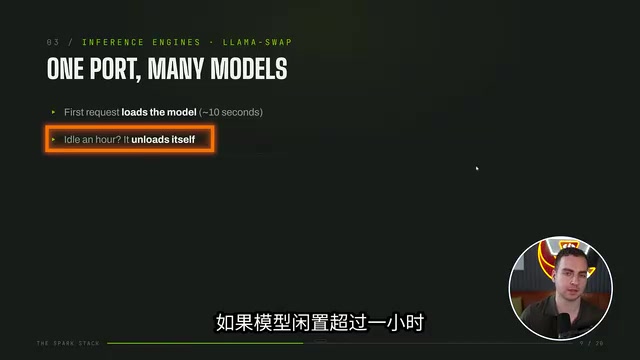
llama-swap works similarly to Ollama: when a request arrives and the model isn't loaded into memory, it loads it temporarily (taking roughly 10–60 seconds depending on model size); if a model sits idle for more than an hour, it's automatically unloaded. This lets multiple smaller models share the memory pool and switch on demand. For 120B-class large models, a YAML configuration file designates them as "exclusive" — when loaded, they automatically evict other models to avoid running out of memory. He had Claude Code generate this config file for him.
It's worth distinguishing between the main inference engines: llama.cpp is a cross-platform inference framework written in pure C/C++, with excellent support for CPU and various accelerators. It's highly optimized for GGUF-format models and well-suited for consumer and edge devices. llama-swap sits on top of it as a lightweight HTTP proxy, handling dynamic loading and unloading of multiple models — solving the problem of not being able to keep multiple large models in memory at once. Ollama is an all-in-one tool designed for ease of use, with built-in model management, API serving, and client connectors. The barrier to entry is very low, though it also calls llama.cpp under the hood and is less flexible for advanced parameter tuning. vLLM is a high-throughput inference serving framework designed for data-center GPU clusters. Its core strengths are PagedAttention for fine-grained KV cache management and continuous batching for concurrent requests — ideal for serving multiple simultaneous users, though it's more complex to deploy and offers limited benefit on a single consumer GPU.
Software-Level Speed Optimizations
The most valuable part of this setup is a series of purely software-level optimizations that push a 120B-parameter model to 46 tokens/second.
Quantization: Trading Precision for Space
Quantization is the biggest optimization on the model side — it stores weights at lower numerical precision. Since he has plenty of memory headroom, he uses Q6 quantization rather than Q4 for better quality; users with tighter memory budgets can drop to Q4 GGUF format. He also compressed the large model weights into "INT4 + FP8" format, reducing a 120B model from ~120GB down to 64GB so it fits within 128GB of memory — without this, anything over ~100GB simply won't load.
The core idea of quantization is reducing the numerical precision used to store model weights. Original models are typically trained in FP16 or BF16, using 2 bytes per parameter. Q8 compresses this to 1 byte, Q6 to ~0.75 bytes, and Q4 to ~0.5 bytes — model file sizes and memory footprints shrink proportionally. GGUF is the standard model format in the llama.cpp ecosystem, providing a unified packaging approach across quantization levels. In terms of quality degradation, Q6 has minimal impact compared to Q4; below Q4, noticeable output quality degradation may appear. The "INT4 + FP8" mixed format mentioned here is a more nuanced strategy: layers that are more sensitive to precision (such as attention layers) are kept in FP8, while the remaining weights are compressed to INT4 — striking a finer balance between compression ratio and quality. This is also the approach used in official quantized releases from some model vendors.
Three "Free" Speed Boosts
- Speculative Decoding: Uses the MTP version of the model, where a small draft model pre-generates about 7 tokens per round, and the large model only needs to verify them — accepting correct ones and regenerating only the wrong ones. This nearly doubles tokens per second with minimal setup.
- Quantized KV Cache + Flash Attention: KV cache grows with context length and can end up consuming more memory than the model itself. Storing it at 8-bit precision saves memory and supports larger context windows.
- Manually Increasing Context Window: Ollama imposes a default token input limit that must be overridden manually. He typically uses context lengths between 130K and 260K tokens.
The benchmark results are compelling: running Nemotron Super (~120B parameters), the baseline was ~16.6 tokens/second. After enabling MTP, Flash Attention, and KV cache quantization, it jumped to 27.2 tokens/second at 17,000 context length — a ~64% speedup.
Speculative decoding is worth explaining in more detail. LLM inference is autoregressive — only one token can be generated at a time, since each new token depends on the previous one, leaving GPU/NPU parallel compute capacity largely idle. Speculative decoding breaks this bottleneck by introducing a very small "draft model": it rapidly predicts several tokens in sequence (typically 4–8), which the main model then verifies in parallel in a single pass — a process far less computationally expensive than generating them one by one. Correct drafts are accepted directly; incorrect ones trigger regeneration from the failure point. Since draft models are typically from the same model family as the main model (the "MTP version" — Multi-Token Prediction — mentioned in the article), the hit rate is high. In practice, this significantly increases effective throughput with zero degradation in output quality compared to running the main model alone.
Speed Benchmarks by Model
His measured results: Qwen3 series ~72–87 tokens/s; Nemotron Lightning (30B) ~57 tokens/s; Qwen3 Coder ~67–81 tokens/s; GPT-OSS ~40 tokens/s; Qwen large model (120B-class) ~46 tokens/s.
Networking and Clients: Using Your Box Like a Cloud Service
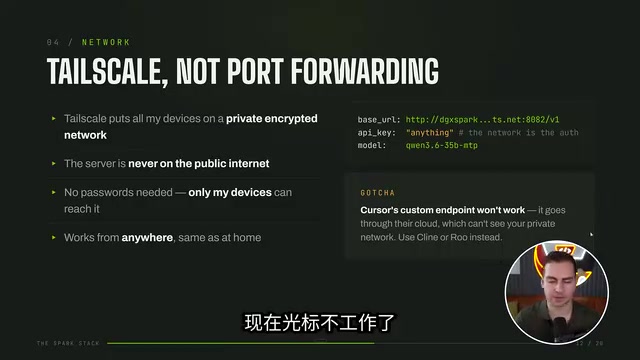
For networking, he uses Tailscale to build a private VPN tunnel connecting the box to his laptop, phone, PC, and other devices. The benefit is automatic SSH key and authentication handling — no manual key or API key configuration needed; just connect via the Tailscale IP. He did mention hitting a few "gotchas" along the way.
On the client side, the setup is rich: VSCode + the Cline extension on desktop (which he considers one of the best extensions for using local models), PI for the command line, and Hermes Agent running persistently in a Discord server 24/7 in the background. In demos, connecting to Qwen3 with MTP and speculative decoding, requests like refactoring a codebase respond at around 70–80 tokens/second — faster than reading speed, and even faster than many cloud models. With two inference engines running simultaneously, he can write code in his editor while Hermes Agent autonomously handles background tasks.
Local Isn't Everything: Hybrid Use Is the Reality
He's candid that he doesn't use only local models. He leans local for privacy-sensitive tasks or scenarios where an agent needs to run extended coding sessions (which would be expensive on cloud), but for genuinely hard problems with extremely complex context, he still tries Claude Code, Cursor, Grok, and other cloud models in parallel. That said, the overall trend is clear — as local models continue to improve, he's shifting more and more toward running things locally.
The key takeaway from this setup: "slow" local AI is usually a configuration problem, not a capability problem. Choose the right large-memory hardware, use the right inference engine, and stack quantization with speculative decoding and other software optimizations — and even a desktop device can deliver a near-cloud experience, with your data entirely under your own control.
Related articles

The Millionaire's Secret Cinema: How Kaleidescape Outperforms 4K Blu-ray
Kaleidescape, the millionaire's secret Netflix, offers 4K Cinematic picture surpassing 4K Blu-ray, but requires a dedicated player, high film prices, and a crude interface. This in-depth analysis covers its technology, experience, and value—and whether it's worth it.

Benny Blanco on Failure: 95% of His Work Goes in the Trash
Hitmaker Benny Blanco breaks down fear of failure at Google: 95% of his work goes in the trash, a No. 1 single was rejected by every artist, and he fell apart at 20 from overwork. He offers a practical framework for escaping shame.

DeepSeek V4.1 Pro Enters Testing, Gemini 4 Pro Benchmark Leaked
DeepSeek V4.1 Pro enters early per-account testing and is hidden from the public selector; MiniMax M3.1 Flash preview hits TokenPlan; Gemini 4 Pro benchmarks leak with 2M token context and pricing.