8 Common Myths About Local AI Deployment: Does More Parameters Really Mean Smarter?

8 myths about local AI deployment — from parameter worship to privacy illusions — that lead your shopping list astray.
This article systematically debunks 8 common myths about local AI deployment. Parameter count doesn't equal intelligence — a mini audition with real documents beats benchmarks. MoE active parameters measure compute, not memory load; total parameters still need full loading. Higher quantization precision doesn't automatically improve answer quality. Maxing out context consumes memory without improving retrieval accuracy. Fine-tuning is a poor fit for frequently changing facts — RAG is more direct. Speed should be measured end-to-end, not just generation rate. A local UI doesn't guarantee local computation — verify privacy by going offline. Finally, hardware payback periods often stretch years. The recommendation: validate your workflow with compact models and retrieval on existing hardware before upgrading.
Running a large language model locally sounds like the perfect solution — privacy-preserving, cost-effective, and efficient. But a 12GB VRAM RTX 3060 can either run genuinely useful AI or spend an entire afternoon "confidently citing the wrong documents." When you're trying to build an assistant for a small freelance team — handling 20 project documents, a few invoices, and answering questions like "what did we promise the client and when" — every disappointing response tempts you to buy more RAM, a bigger model, or even a new machine.
A content creator abroad recently published a video systematically breaking down 8 common myths about local AI deployment. These misconceptions can send your shopping list in completely the wrong direction — and the last one might even flip your understanding of what "cost-effective" really means.
Myth #1: More Parameters = Smarter
The most common intuition is: more parameters = more intelligence = fewer mistakes. But the assistant's real job is to find deadlines, catch revised agreements, and cite sources as evidence. A beautifully written answer that references an outdated date is still a failure.
Look at the actual options: the Qwen series has a 9-billion-parameter model with image understanding and optional chain-of-thought reasoning; Ministral has an 8-billion-parameter instruction model designed for compact assistants, also with vision capabilities. Both are serious candidates for reading project briefs. A 27-billion-parameter model is positioned for stronger planning and complex tasks — it only makes sense when the task escalates from "find a date" to "reconcile multiple conflicting agreements."
The key point: public benchmarks can't prove which compressed download works best for your own documents. The right approach is a "mini audition" — test each candidate model with the same 10 questions (including one whose answer isn't in the files), and score them on "correctly citing evidence" and "acknowledging missing information." Extra memory has to earn its place by solving harder cases, not by sporting a bigger number in the filename.
Myth #2: Confusing Active Parameters with Total Parameters
This is where shopping gets tricky. You see a model with 26 billion parameters but only 4 billion active parameters and think "4 billion should fit in VRAM." But active parameters describe the portion of the model involved in computing each token (a chunk of text) — the rest of the expert networks still exist.
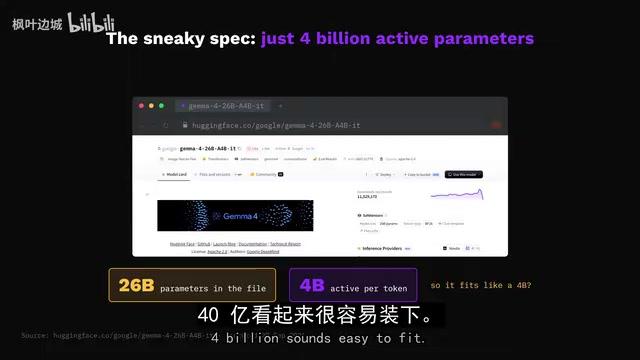
Google's official documentation is clear: all 26 billion parameters are loaded to maintain inference speed. Fewer active parameters means less computation per step — not a smaller download, and not less memory needed to load the model.
Also, assume a desktop has 32GB of system RAM plus 12GB of VRAM — those are two separate pools and don't add up to 44GB of VRAM. Software can split work across CPU and GPU to run larger models, but splitting is not the same as maintaining GPU-level speed. The right approach: check total parameters, actual download size, and load-time memory under your target setup. Ollama can report whether a model is running on GPU, CPU, or a split between both. Extra system RAM may expand what you can fit, but it won't give you the speed you're after.
The architecture involved here is called Mixture of Experts (MoE). Unlike traditional dense models, MoE splits the model into multiple "expert" sub-networks, and a "router" dynamically selects a small number of experts to participate in each inference pass. Take Mixtral 8×7B as an example: it has roughly 46.7 billion total parameters, but each token only activates two experts, making the actual computation equivalent to a dense model with about 13 billion parameters. That's where the "active parameters far fewer than total parameters" comes from.
The advantage of MoE is greater model capacity under the same compute budget. The downside — exactly as described above — is that all expert weights must reside in memory during inference. If the router directs a query to an expert that's not in memory, it triggers a slow memory swap. Therefore, total parameter count determines memory capacity requirements, while active parameter count determines per-step inference speed and compute consumption. These two metrics address different concerns entirely, and confusing them leads to serious configuration mistakes.
Myth #3: Higher Precision = Better Answers
When things go wrong, some people blame compression and download the highest-precision version hoping for better answers. This advice can turn a working configuration into one that barely runs.
Quantization stores the values a model has learned using fewer bits. Simplified math: an 8-billion-parameter model at 16-bit precision takes about 16GB; at 4-bit precision, the raw values take about 4GB (actual files have additional overhead, and running requires more memory). That difference can determine whether the model stays in VRAM.
Compression can make a capable model practical on your existing machine, but "smaller" doesn't automatically mean "worse." Precision loss depends on the model, the compression method, and the specific task — a fluent answer can still miss a critical condition. The right approach: compare two supported versions on the same tricky questions. If both preserve answers and citations, higher precision isn't worth upgrading to; if the smaller version repeatedly gets deadlines wrong or drops conditions, then higher precision has a concrete use case.
Myth #4: Maxing Out Context Makes It Smarter
Once the model loads comfortably, the temptation is to feed it all documents and drag the context slider to maximum. Memory issues come back here.
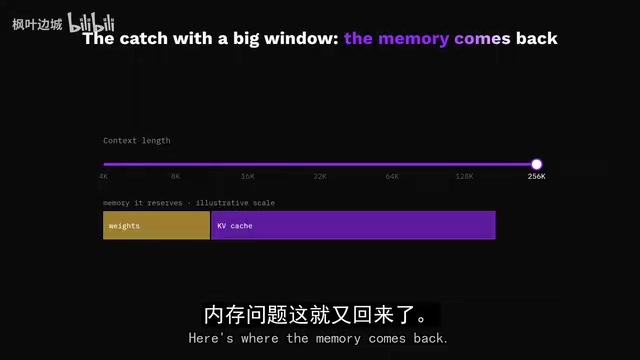
The model file isn't the entire workload. Processing a conversation generates working data, including what's called the KV cache. More context can require more memory, and different architectures handle this differently. A "256K" label describes the supported context window — it doesn't guarantee your current machine can fill it quickly.
Allocating space for text and actually reading text are two different costs. Feeding more text increases processing work, and moving the slider doesn't make buried deadlines easier to find. For client questions, start by providing only the current agreement and its revisions, leaving room for the question, answer, and follow-ups — add more budget when the task genuinely spans more documents. Long context is absolutely worth it when multiple clauses interact across large distances in a document. The mistake is paying its memory cost for every simple lookup.
Myth #5: Fine-Tuning to Memorize Business Facts
When the assistant makes up a delivery date, it's tempting to think "train it to know our business." But when the client changes the deadline next week — a constantly changing set of facts is a terrible reason to keep retraining.
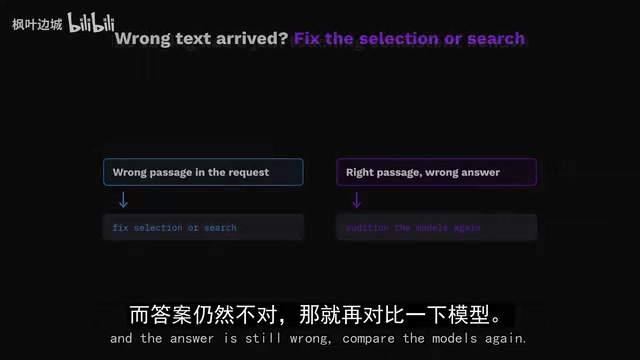
There's another path: retrieval (RAG). It finds relevant passages and places them into the model's request, giving the model evidence to work with when answering. LM Studio's document chat can include short documents in full and retrieve passages from longer ones.
This also exposes a failure mode often mistaken for "the model isn't smart enough": if retrieval finds the original agreement but misses the revision, the model may give a perfectly reasonable answer based on the wrong evidence. Check the cited passages — do they include the updated date for this client? Can you find that text yourself in the document? If the wrong text is coming through, fix the document selection or search. If the correct text is arriving and the answer is still wrong, then go back to comparing models. Fine-tuning genuinely helps when teaching consistent behavior or specialized response patterns — but for changing deadlines, providing current evidence is the more direct solution.
RAG (Retrieval-Augmented Generation) is worth unpacking in detail. When a user asks a question, the system first converts the query into a vector, runs a similarity search against a pre-built document vector database, retrieves the most relevant passages, and then concatenates those passages with the original question into the model's context — letting the model answer based on "evidence submitted on the spot."
The key limitation of this mechanism is exactly what's described above: the quality ceiling of RAG depends on whether the retrieval stage can find the right passages. Common failure modes include: when both an original agreement and its revision exist in the document store, the one with the higher retrieval score may be the outdated version; or the chunking granularity is misconfigured, splitting a key clause across two fragments and destroying its semantic meaning. These problems cannot be self-corrected by a more powerful model — the debugging direction should be to inspect the actual retrieved passage content, rather than immediately suspecting insufficient model intelligence.
Myth #6: Chasing the Biggest Speed Number
Once you have the right evidence, the biggest speed number seems like it'll deliver answers fastest. But follow the entire request flow: the application first loads the model, then processes the document, then generates the response. A fast final stage can mask a very slow beginning.
llama.cpp's benchmarks separate "prompt processing" from "text generation" for exactly this reason. Example: Config A takes 20 seconds to read the document and 5 seconds to write the answer; Config B takes 5 seconds to read and 10 seconds to write. B writes more slowly but finishes a full 10 seconds earlier.
Chain-of-thought adds another variable. Models with reasoning capability generate a thinking process before the final response — useful for handling conflicting requirements, but wasteful for tasks like "extract one invoice number." Compare configurations with and without reasoning enabled, and measure by "total time from clicking send to receiving a correct, usable answer." Ollama exposes load time, prompt processing time, and generation time separately, turning that mysterious stall into a concrete problem.
In llama.cpp performance reports, prompt processing speed (prefill, typically measured in tokens/s) and text generation speed (decode, also in tokens/s) have entirely different hardware bottlenecks. The prompt processing stage needs to compute attention across the entire input sequence in parallel, making it more sensitive to GPU compute (FLOPS); the text generation stage produces only one token per step, and the bottleneck is typically the memory bandwidth required to repeatedly read model weights from VRAM into compute units.
This explains why high-end consumer GPUs (like the RTX 4090) sometimes lag behind professional cards or Apple Silicon in generation speed — the latter have higher memory bandwidth. When documents are long, prompt processing time becomes significantly amplified, making it misleading to evaluate a configuration based solely on "generation speed."
Myth #7: Assuming Local = Private
Your privacy configuration might be completely undermined. The app is installed on your machine, but the model you selected may not be running locally. Ollama supports both local and cloud models — a familiar interface doesn't tell you where the computation is happening.
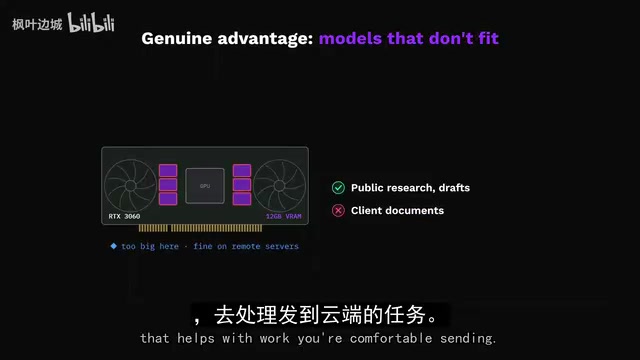
Additional search tools and external services introduce even more connections. Cloud execution has real advantages: access to models that won't fit locally, handling work you're comfortable sending out. But client documents should stay on device — so choose a locally downloaded model, check the configured target in the app, and audit any connected tools. Ollama offers settings to disable cloud features, and LM Studio documents offline chat and local document processing once a download is complete.
Try real document queries while disconnected, and check for remote dependencies (though this can't prove what an extension might transmit when reconnected). Verify the path from document to answer — no amount of RAM can relocate a cloud model you accidentally selected.
Myth #8: Buying Hardware Saves Money
The final myth puts a "saving money" label on all the previous mistakes. Say you're considering spending $1,200 on a machine to replace a $20/month subscription — that's 60 months to break even, not counting electricity, maintenance, and your time. Five years, and that assumes the monthly cost truly disappears entirely.
These are illustrative numbers, of course. Heavy daily use changes the comparison dramatically, as does already owning the machine or needing private access offline. But "buying hardware while keeping the same subscription" doesn't create any savings.
Conclusion: Spend Money Closer to the Answer
For this 20-document assistant, the recommendation is: compact local model + retrieval on your existing machine. Start with a mini audition of supported compressed versions of Qwen 9B and Ministral 8B, and pick the one that passes the evidence questions with less waiting. Prove the workflow runs before spending money on a bigger machine.
Upgrading only earns its place when larger models repeatedly resolve conflicts that compact options consistently fail on, given the same correct passages. For permitted work, cloud is worth considering when better answers or lower total cost outweigh local execution.
The original question was "what did we promise the client and when." The winning configuration returns the revised deadline — in the sentence that proves it. Spend money on what gets you closer to that answer, because an expensive wrong date is still a wrong date.
Related articles

Chain of Thought Isn't Just for AI: How Humans Can Use CoT to Improve Thinking Quality
Chain of Thought isn't just a prompt trick for large models. Starting from a Hacker News discussion, this article analyzes why CoT works for human thinking too, breaks down actionable ways to transfer it, and highlights the key differences between human CoT and machine CoT.
Cloudflare Teams Up with OpenAI: Closi…
Cloudflare Teams Up with OpenAI: Closing the Loop from Vulnerability Discovery to Defense with AI
Cloudflare uses OpenAI Daybreak to investigate security vulnerabilities and generate reviewable remediation plans, while developers use Codex to boost coding efficiency and quality.

Orca Multi-Agent Orchestration in Practice: A Guide to Parallel Collaboration with Claude and Codex
Orca is Stable AI's free open-source agent workbench supporting 34 agents like Claude Code and Codex in parallel. Learn its Git worktree isolation, multi-model orchestration, and mobile management.