8 Viral AI Coding Tools on GitHub: Filling the Gaps in Your Agent Workflow

8 open-source tools that patch AI coding agents' blind spots in verification, planning, token efficiency, and design.
AI coding agents can generate plenty of code but fall short on result verification, decision planning, token efficiency, and design standards. This article covers eight targeted open-source tools: Image to 3JS for code-driven 3D models; Reticle to auto-verify agent-built apps; Chisel to cut token usage from ~1,500 to ~600 on the same task; UISkills and SwiftUI Skills for smarter design skill selection and native iOS UI; Ouroboros for pre-build planning and post-build validation; Caliper for testing whether custom skills actually help; and Antislop for auto-removing bad coding patterns. Together, they apply external constraints to compensate for what current models still can't do on their own.
AI coding agents can now build most of what you ask for — but there's still plenty they can't do on their own. The developer community has been building tools to fill those gaps. The AI Labs channel recently rounded up eight battle-tested open-source projects, two of which have already hit GitHub's trending list. These tools cover everything from 3D modeling and result verification to token optimization, targeting the most painful weak spots in agent workflows. Here's a breakdown of what each one does and how to use it.
Turn Images into Interactive 3D Models: Image to 3JS
Those scrollable, animated product landing pages you see online? Many of them rely on 3D models. Image to 3JS is built for exactly that use case — and it's currently trending on GitHub.
The core idea: convert objects from an image into fully code-generated 3D models. Because the model is built in code, agents can freely tweak it — changing colors, adjusting lighting, adding animations — without you ever touching complex 3D modeling software.
The workflow is straightforward: hand the agent an image of what you want to recreate and ask it to use Image to 3JS. The agent builds the object in stages, comparing each iteration against the original image and correcting any discrepancies before adding more detail.
A heads-up: this process is token-heavy and time-consuming. The first pass may not hit your target fidelity, but you can keep asking the agent to refine specific parts until it matches the level of detail you're after.
Verify Whether the Agent Actually Finished: Reticle
One of the most persistent agent problems: marking a task as "done" when it isn't. Agents typically check whether the app loads and whether the design landed — but plenty can still be broken underneath. The only way to catch those issues is to give the agent better visibility into what's actually running in the browser.
Reticle does exactly that. After the agent claims the app is complete, this tool checks whether it actually works as intended. It gives the agent the ability to track everything happening inside the running app at runtime, so it can pinpoint exactly where things go wrong.
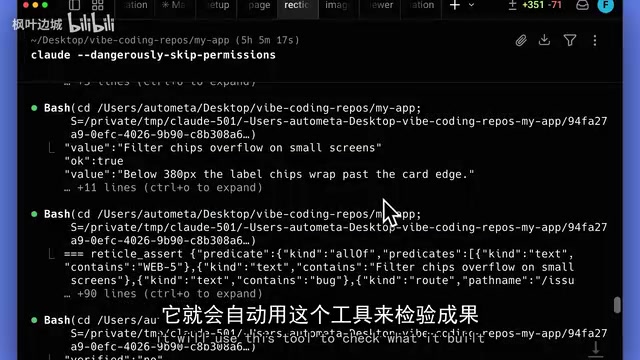
Once installed, Reticle kicks in automatically every time the agent builds an app — no need to mention it in your prompt. It opens and interacts with the app like a real user, then delivers one of three verdicts for each section it tests: pass, fail, or insufficient information to judge.
When something fails, Reticle explains what went wrong, lets the agent fix it, and retries. When you open the app yourself, a small interactive popup appears in the corner where you can also review the history of past checks and see how issues were resolved.
Compress Verbose Responses and Save Tokens: Chisel
LLM responses have been getting longer lately — especially end-of-task summaries, and Claude models are particularly prone to this. Some of these explanations are so poorly structured they're more confusing than helpful, making it hard to understand what the agent is actually trying to say.
Chisel pushes agents to say more with fewer words, avoid writing unnecessary code, and cut down on tokens wasted on redundant explanations and boilerplate.
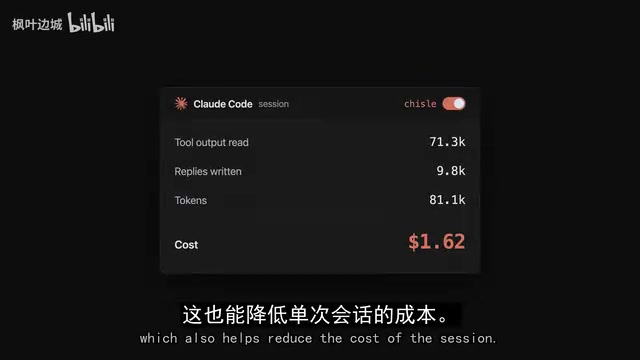
The author published benchmark data: in a test involving modifying a search box feature, the agent's response consumed roughly 1,500 tokens without Chisel — and only around 600 tokens for the same task with Chisel. The author also compared it against similar tools like Caveman and Ponytail; Chisel came out ahead on overall token reduction.
It installs as a Claude Code plugin and comes with four skills and three hooks (hooks are commands that run automatically at specific points in a session) — triggering at session start, when you send a prompt, and after the agent uses a tool. There's an added benefit for Claude Code users: Chisel strips out duplicate or unnecessary text from tool outputs before the agent reads them, preventing the context window from being clogged with useless content.
Tokens are the basic unit language models use to process text — roughly equivalent to words or sub-word fragments. In English, one word is approximately 1–2 tokens. Token usage directly determines API cost and speed, and also limits how much context the model can retain in a single conversation. When agent sessions accumulate verbose explanations, repeated code, and useless tool outputs, the context window fills up fast — causing the model to "forget" critical earlier information while driving up costs. Hooks are scripts or commands that execute automatically when specific events are triggered, similar to checkpoints on an assembly line. They run without manual intervention whenever a precondition is met (e.g., session start, user message sent, tool call completed). Chisel uses hooks to filter content before it enters the model rather than cleaning things up after the fact, which is why it achieves more thorough token reduction.
Smart Design Skill Matching: UISkills
There are countless design skills out there, each bundled with its own set of design principles. But with so many options, figuring out which one actually fits your needs becomes its own problem.
UISkills is a library that aggregates design skills from different authors. It lets the agent search the collection and pick the one that best matches what you're trying to build. The tool supports both MCP and terminal modes. The video's author recommends MCP, since its tools stay available throughout the entire agent session; the terminal mode requires you to explicitly tell the agent when to invoke it.
Once connected via MCP, it appears in the agent's MCP tool list. Just ask the agent to use UISkills for your design task, and it will search the library for relevant skills, narrow down the matches, and retrieve the instructions. No need to manually browse and install design skills before you start.
MCP (Model Context Protocol) is an open protocol introduced by Anthropic in late 2024, designed to standardize how large language models connect to external tools and data sources. Think of it as the "USB standard" for AI: tool developers expose interfaces according to the MCP spec, and any MCP-compatible model or agent can call them directly — no per-model adaptation required. Compared to manually invoking tools from the terminal, MCP's advantage is that tools remain continuously available throughout the session, allowing the agent to call them on demand without relying on the user to remind it in the prompt. Claude, Cursor, and other major AI coding tools now support MCP, which is why many tools in this article prioritize MCP as the primary integration method.
Think First, Build Later: Ouroboros
If you don't spell out exactly how your app should work, the agent will make those decisions for you. Ouroboros helps the agent clarify those details before building and then checks the result afterward, feeding any issues back to the agent for fixes.
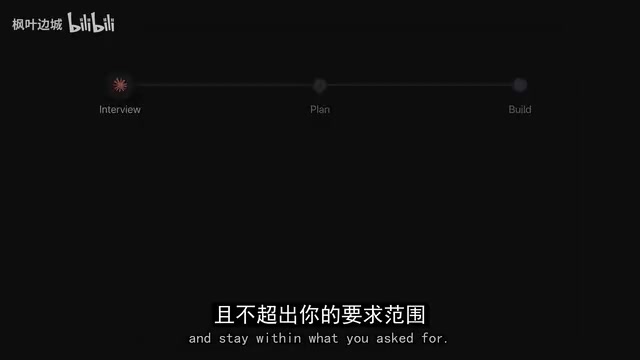
After setup, you describe the app you want to build and ask it to use Ouroboros. It starts with a "self-interview": generating questions about your requirements, then answering them based on what you've described and the current state of the project. It only fills in minor missing details on its own when those choices are easy to change later and don't deviate from your stated goals. The moment a decision could change the fundamental nature of the app, it pauses and asks you — while logging all assumptions it makes.
Those answers are compiled into a plan describing what the finished product should do. Ouroboros reviews the plan and resolves any issues before building begins. Once construction is complete, it checks whether the app matches the plan. Notably, the agent's build instructions never include how these checks should run or what outcomes to expect — preserving the independence of the verification. If problems are found, it sends the agent back to fix them and re-checks to make sure the fix didn't break anything else.
Specialized Tools: SwiftUI Skills, Caliper, and Antislop
For iPhone apps, design skills are relatively scarce. When asked to build iOS interfaces, agents typically try to mimic Apple's "liquid glass" style using generic blurs and backgrounds — usually resulting in nothing more than a semi-transparent button that doesn't keep up with Apple's latest API changes.
SwiftUI Skills provides instructions for building interfaces correctly with Apple's native SwiftUI framework, and stays current with Apple's latest updates. The repo includes two skills: one covering how to use iOS 26's built-in buttons and menus while avoiding common mistakes, and another focused on how to lay out content for the newly released iPhone Duo widescreen form factor.
As you accumulate more and more skills, it becomes hard to know which ones are still actually helping the agent. This gets worse after model updates — a new model might already have a skill's capability built in, meaning the skill just burns extra tokens for no benefit.
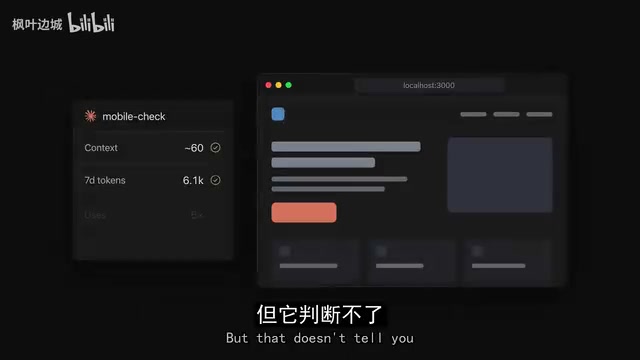
Caliper is designed to test whether the skills you've created actually do what they claim and make a real difference to your workflow. It runs comparisons of agent performance with and without a given skill. The repo ships with two helper tools: GrillSkill interviews you about what the skill is supposed to achieve, keeping tests aligned with your intent; EvaluateSkill helps the agent create and run those tests (called evals). Caliper can run the same comparisons for other configurations like MCP servers.
Finally, there's Antislop, which targets the bad coding patterns agents habitually reach for. It checks code against a set of rules the author wrote, and reports any issues to the agent for correction — no need to read the code yourself. You can either have it run automatically after every task, or ask for a final review pass once the work is done.
Liquid Glass is the new design language Apple unveiled at WWDC 2025 alongside iOS 26 and macOS Tahoe. Its defining visual characteristics are dynamic refraction, real-time blur, and material-aware transparency — replacing the flat design language that had defined Apple's aesthetic for years. This effect relies heavily on Apple's proprietary graphics framework and requires specific native SwiftUI components to render correctly. Developers who try to "fake" it with generic blur filters or semi-transparent backgrounds end up with visually off results and compatibility issues across devices and OS versions. This is precisely the bind AI agents find themselves in when working on iOS interfaces — they lack real-time awareness of Apple's latest API changes and fall back on approximations. SwiftUI Skills addresses this lag by continuously tracking Apple's official documentation.
Final Thoughts
The common thread running through all eight tools is an honest acknowledgment of current AI coding agents' limitations — they can generate code, but they still need external guardrails around result verification, decision planning, token efficiency, and design standards. Rather than waiting for models to evolve on their own, these specialized tools patch the gaps in your workflow right now. For developers who rely heavily on agents like Claude Code, Reticle and Ouroboros address the "fake completion" problem, while Chisel's token optimization may offer the most immediate practical value.
Related articles

Random Pruning of the DPO Computation Graph: 1.4x Training Speedup and Lower Peak Memory
DPO training too slow and memory-hungry? This paper proposes a random pruning framework for the DPO computation graph, sampling independently across position, sequence, and branch dimensions; branch pruning achieves a 1.426x step-time speedup and cuts training time by about 30%, with in-depth attribution of memory and time gains.

Why Does JEPA Underperform MLM in Longitudinal EHR Representation Learning?
New study compares JEPA and MLM for longitudinal EHR representation learning on MIMIC-IV: three JEPA variants train stably without collapse but underperform MLM; target size, not heterogeneity, drives prediction error.

Transfer Learning + Visible Light Communication: A New Approach to Energy-Efficient Indoor Positioning
A study proposes a transfer learning-based visible light communication indoor positioning method, achieving 47% accuracy improvement on the BOSCH factory dataset, 67.5% model efficiency under high noise, and introducing the ME composite metric for energy-efficient positioning in energy-constrained industrial IoT scenarios.