9 Hands-On Projects to Build a Skill Agent: The AI Advancement Roadmap for Test Engineers
Nine progressive projects to build a workflow-driven AI Skill Agent for end-to-end test automation.
This article presents a structured AI Skill learning roadmap for test engineers, built around the core insight that Skills must follow the testing workflow — requirements → test cases → scripts → reports — to deliver real value. Nine hands-on projects are organized into three stages: Manual (Skill mechanics and case generation), Semi-Automated (Checklist, performance reports, and JMeter scripts), and One-Click Generator (Web/mobile automation and a full-pipeline Agent). The training takes about one month but doubles end-to-end efficiency, with the true payoff being a transferable methodology for turning any testing workflow into a Skill.
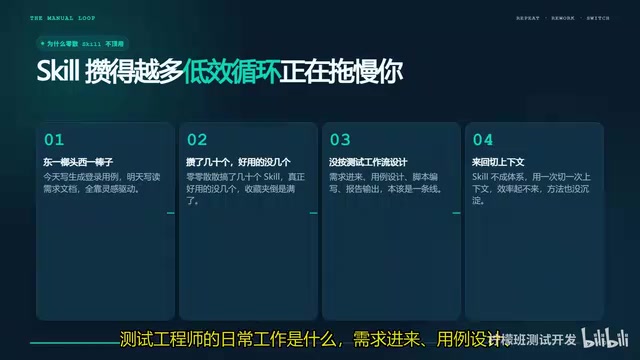
In the software testing world, more and more engineers are experimenting with AI Skills to replace repetitive manual work. But many people — like the Bilibili testing blogger who inspired this post — fall into the same trap at the start: writing one Skill here, another Skill there, accumulating dozens of scattered ones, yet ending up with very few that are actually useful. The root cause isn't the tools — it's failing to design Skills around your actual workflow.
This article lays out a complete roadmap from hand-crafting Prompts to building a full-pipeline Skill Agent, using nine hands-on projects that map to real testing scenarios — turning fragmented skills into a coherent system.
Why You Should Design Skills Around the Testing Workflow
A test engineer's daily work follows a clear throughline: requirements come in → test cases designed → scripts written → reports delivered. It's a linear, tightly coupled process.
When Skills are scattered with no cohesive structure, you constantly have to context-switch during actual use — and efficiency never improves. After reflecting on his own early failures, the blogger reached a clear conclusion: the value of a Skill isn't in quantity, but in whether it covers a complete workflow loop.
With that in mind, he grouped the nine projects into three progressive stages — the Manual Stage, the Semi-Automated Stage, and the One-Click Generator Stage — so every Skill has a defined place within the workflow.
Stage One: The Manual Stage — Build a Solid Foundation First
The goal at this stage is to understand the underlying mechanics of Skills and be able to independently run a working Skill end to end.
Project 1: Using Skills in Cursor. This is the entry-level project. There's really only one thing to accomplish: understand how a Skill is configured, invoked, and debugged. Without a solid foundation, everything built on top will be unstable.
Project 2: Auto-generate test cases from documents, text, and screenshots. Feed a requirements document or UI screenshot into a Skill, and it outputs a complete set of test cases with steps and expected results. This is the highest-frequency task in testing work, and the blogger calls it the "first major challenge project."
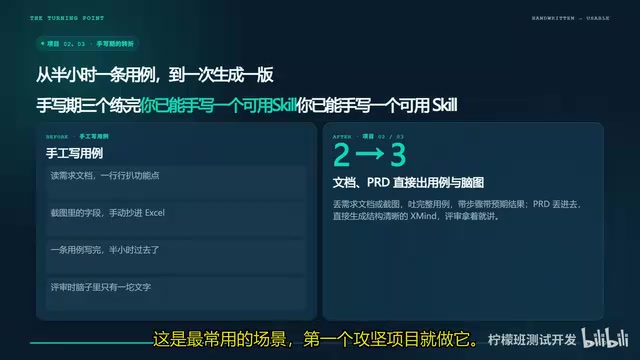
Project 3: From PRD to XMind test cases. Convert a PRD directly into a clearly structured XMind mind map that you can walk through in a review meeting. After completing these three projects, you'll have the ability to independently write a functional Skill.
AI Skill is a reusable automation unit integrated into AI coding tools (such as Cursor, GitHub Copilot, etc.). At its core, it's a structurally packaged Prompt template that typically consists of four components: role definition, input format constraints, processing logic, and output specification. Unlike "bare Prompts" typed freely into a chat box, Skills can be saved, versioned, shared across teams, and adapted to different scenarios through parameter injection. In Cursor, Skills are configured via .cursorrules files or the Rules panel, and can have context files (such as API docs or screenshots) attached at invocation — allowing the model to produce output in the expected format under constrained conditions. Understanding how a Skill is structured — especially how to define input variables and control output format — is a prerequisite for all subsequent projects, which is exactly why the blogger lists "Using Skills in Cursor" as the very first project.
Stage Two: The Semi-Automated Stage — Expand Into Specialized Domains
The key leap at this stage is moving from single scenarios to specialized capabilities.
Project 4: Requirements analysis and test Checklist generation. Rather than jumping straight to generating test cases, this Skill first surfaces all the test checkpoints clearly, then expands them into full cases — a "draw the target before shooting" approach that leads to more thorough test coverage.
Project 5: Performance test analysis report generation. Feed in load test data, and the Skill automatically produces a professional report complete with charts, analytical conclusions, and tuning recommendations — extending Skill coverage into performance testing.
Project 6: JMeter script generation. Provide an API document, and the Skill outputs a complete load-testing script with assertions and parameterization already in place — no more writing scripts by hand.
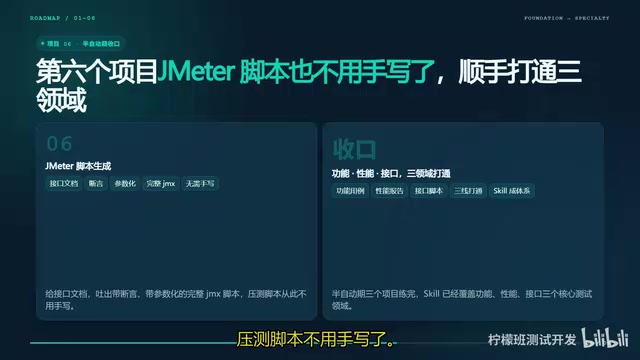
After completing these three projects, your Skill capabilities will cover both functional testing and performance testing — two of the most critical domains.
JMeter is an open-source performance testing tool maintained by the Apache Foundation, widely used for concurrent load testing of HTTP APIs. A complete JMeter script (.jmx file) typically includes a Thread Group (simulating concurrent users), HTTP Request Samplers, Assertions (verifying that responses match expectations), and parameterization config (replacing hard-coded data with CSV files or functions). Writing these scripts by hand requires familiarity with JMeter's XML structure — a non-trivial barrier for functional test engineers who don't do performance testing regularly. Generating JMeter scripts via a Skill essentially has the model infer the request structure from API documentation, set up sensible assertion rules, and generate parameterization placeholders automatically. Engineers only need to verify the key fields before importing the script directly into JMeter to run — dramatically lowering the barrier to participation in performance testing.
Stage Three: The One-Click Generator — Build a Full-Pipeline Agent
The final stage is about integrating everything built so far into a complete Skill Agent.
Project 7: Web automation Skill. Covers everything from element locating to Page Object encapsulation — a consistent style throughout and strong maintainability.
Project 8: Mobile app automation Skill. Supports both Android and iOS, with device configuration handled automatically.
Project 9: Full-pipeline automation integration. Connects all eight previous projects into a complete Skill Agent — from requirements intake to test case output to script generation to report delivery — achieving end-to-end automation.
Page Object pattern is the dominant design pattern in Web automation testing, popularized by the Selenium community. Its core idea is to encapsulate a page's element locators (such as CSS selectors and XPaths) and action methods (such as clicking, typing, and waiting) inside dedicated "page classes." Test cases only call methods on these classes rather than directly manipulating the browser API. The payoff: when a page's UI changes, you only update the corresponding Page Object class instead of modifying every individual test case. Skill Agent takes the concept a step further beyond a single Skill — it can automatically orchestrate the execution order of multiple Skills based on input, forming a workflow with conditional logic and state passing, similar to how an Agent works in LangChain. Project 9's "full-pipeline integration" is precisely this: upgrading the previous eight independent Skills into a single Agent with task-planning capability, making the entire testing pipeline triggerable from one entry point.
Time Investment and the Real Competitive Edge
The blogger offers a practical time estimate: each project takes roughly two to three days to work through carefully, putting the full nine-project journey at about one month.
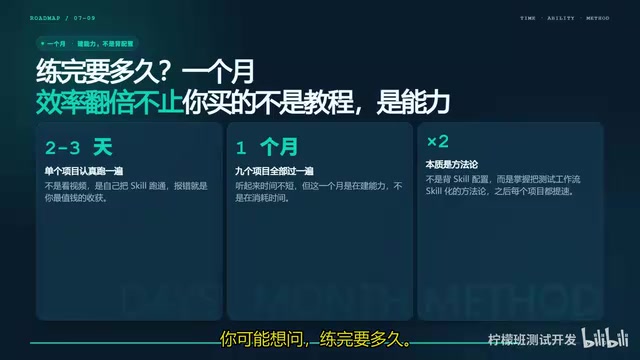
A month might sound like a lot, but it pays off with an overall doubling of efficiency from requirements intake to delivery. More importantly, the real point of this training isn't to memorize Skill configurations — it's to internalize a methodology for translating testing workflows into Skills.
Once you grasp this mindset, you'll be able to design the right Skill for any new testing scenario you encounter. That's the true moat for a test engineer in the age of AI.
Closing Thoughts
The value of this roadmap isn't in the nine specific projects themselves — it's the structured thinking it cultivates: first understand the workflow, then use AI capabilities to fill each stage, and finally integrate everything into a closed loop. For testing professionals who want to stay competitive in the AI wave, instead of blindly collecting scattered Prompts, it's worth taking the time to walk one complete automation pipeline all the way through.
Related articles
Letting AI Build AI Tools: A 7-Day, 31-Commit Bootstrapping Post-Mortem
An engineer ran a fully autonomous AI-builds-AI pipeline for 7 days, 31 commits, with a 1-in-6 success rate. This post-mortem covers 5 failure types, 11 structural rules, and how every mistake became a permanent immunity gate.
Building an AI-Powered E-Commerce Business from Scratch: A Real-World Account of Multi-Agent Architecture for Print-on-Demand
A blogger builds a print-on-demand e-commerce company from scratch using AI agents — documenting specialized Agent profiles, GPT-5.6 vs Claude Fable multi-model orchestration, and reusable skill accumulation.

AI Agent Earns $10K in One Week: 3 Key Upgrades Explained
A blogger shares how he earned $10K in a week with an AI Agent — not by adding more skills, but through verification, approval gates, and subagents to raise trust and enable true automation.