A Complete Zero-Cost Guide to Getting Started with Claude Code for Beginners in China

Breaking down the hands-on path to zero-cost Claude Code using a free domestic model instead of the official API.
Aimed at beginners in China, this article breaks down a zero-cost approach to using Claude Code. It explains that Claude Code is a terminal-based AI agent that reads/writes files and executes commands, so it demands strong agent and reasoning capabilities. Installation comes in two routes—command line and IDE plugin—with the plugin being friendlier for beginners. The core step is replacing the official API with a free domestic model adapted for Claude Code (e.g., Meituan's LongCat Flash Thinking), requiring edits to settings.json and claude.json and skipping official login. A hands-on demo shows how having the AI ask about requirements first reduces rework. It ends by noting that free quota and compatibility policies change frequently, so check official docs first.
Claude Code is one of the most talked-about AI agent tools right now. It doesn't just write code—it can also write copy and control your computer to handle everyday chores. But for users in China, the official subscription is expensive and network access is restricted, so many people get stuck at the installation and configuration stage. A Bilibili creator made a hands-on tutorial aimed at complete beginners, and the core idea is to replace the official API with a free domestic model to achieve zero-cost usage. This article breaks down the key steps and underlying principles to help you avoid detours.
What Exactly Is Claude Code, and Why Is It Worth the Effort
Claude Code is essentially an AI agent that runs in the terminal. Unlike ordinary chat-based AI, it can directly read and write files, execute terminal commands, and modify codebases—it's a "hands-on" tool. You tell it what to do, and it plans the steps, calls tools, and verifies results on its own.
Precisely because it genuinely modifies code and runs commands, ordinary models tend to "rush in headfirst and just wing it," producing a pile of bugs. This is why Claude Code places high demands on the underlying model's agent capabilities and reasoning ability. Once you understand this, you have a criterion for choosing substitute models later on.
AI Agent refers to an AI system that can autonomously perceive its environment, plan steps, and call external tools to complete tasks—fundamentally different from a chatbot that can only do one question and one answer. In coding scenarios like Claude Code, the agent first breaks down the requirement, decides which file to read and which command to execute, then adjusts its next action based on the command's returned result, forming a "think—act—observe" loop. This loop places high demands on the model's ability to follow tool-calling formats, long-context memory, and multi-step reasoning stability; any formatting error in a single step can cause the task to break down. That's why the same model can perform well in casual chat but frequently stumble when plugged into an agent framework—which is exactly why agent capability must be examined when evaluating substitute models.
Two Installation Methods: Command Line and IDE Plugin
According to the Bilibili creator's demonstration, installation mainly falls into two camps.
Command-line method (the hardcore route): On Windows, for example, search for and open PowerShell, paste the official installation command, and wait for installation to complete. At this point you still can't use it directly, because the Claude Code installation path isn't in the environment variables. You need to open the environment variable settings, add the directory containing Claude Code to the user variable Path, restart PowerShell, and then you can invoke it.
IDE plugin method (recommended for beginners): All AI coding tools built on VS Code—including the international Cursor and domestic tools like Trae, Coder, and CodeBuddy—allow you to search for and install Claude Code in the plugin marketplace, then open and use it directly within the software.
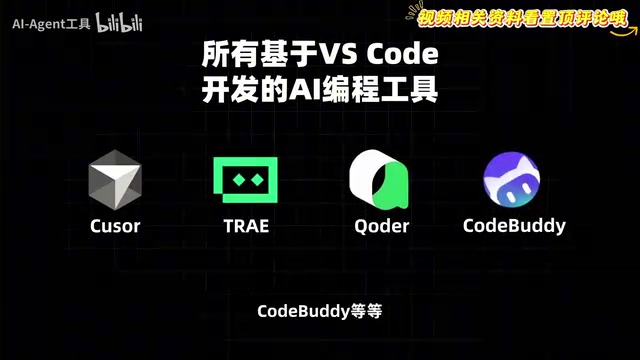
For users unfamiliar with the command line, the plugin method is clearly friendlier and saves you the hassle of configuring environment variables.
The Key Step: Replacing the Official API with a Free Domestic Model
Installation is only the first step; you also need to configure the large model's API address and Key. If you have an official Claude account and a paid subscription, you can simply log in and authorize via the web page as prompted. But the vast majority of users in China don't have this option.
The alternative is to choose a domestic large model that has been adapted for Claude Code. In the video, the creator highlighted Meituan's open-source LongCat Flash Thinking model, for these reasons: it's currently free, each person gets a considerable daily token quota, and its performance is in the top tier. The model has 560 billion parameters and specializes in agent capabilities and deep thinking. It comes with a built-in deep reasoning mode—before acting, it stops to break down complex logic, then generates code—which precisely matches Claude Code's requirement for models to "think first, then act."
It should be noted that this is a single-source recommendation from the creator. There is more than one domestic model adapted for Claude Code on the market, and readers can compare them on their own based on free quota, agent capability, and community reputation.
Breaking Down the Configuration Steps
- Open the LongCat API open platform, register and log in. The platform grants free token quota (500,000 at the time of the creator's demonstration, refreshed daily), and you can also apply for more quota by filling in your industry and use case.
- In the API Key menu, create a new Key and copy it.
- Open the API documentation page; the official docs already provide a configuration example for connecting to Claude Code.
- Find the Claude folder in your user directory, open
settings.json, paste the configuration, replace the Key with the value you just copied, and change the model name consistently to the corresponding flash thinking model identifier. - Find
claude.jsonin your user directory and add a new configuration item at the end to skip Claude's official login authentication; otherwise you'll be repeatedly asked to log in.
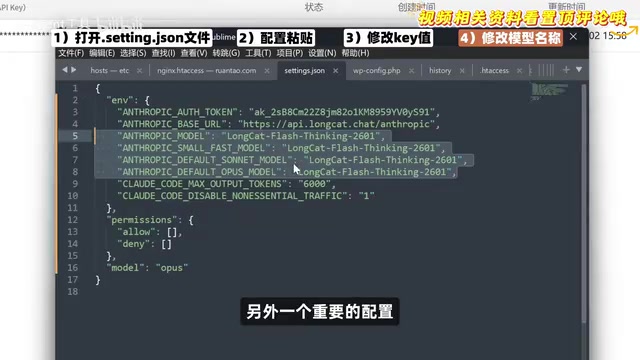
After configuration is complete, create a new project directory on your desktop, switch into it using PowerShell, and run the Claude command to start a conversation. During the creator's verification, when asked "Who are you?", the model replied that it was an official Claude model—but what was actually being consumed was LongCat's tokens, as the usage records in the API backend show.
API (Application Programming Interface) is the calling channel that large model vendors open to the outside world: instead of going through a web chat interface, developers use a program to send the conversation content as a request to the model server and receive the returned result. Using an API requires an API Key, which serves as both an identity credential and a billing account—if leaked, others can use up your quota. Claude Code itself doesn't contain a model; it's just a shell, and all reasoning is forwarded through the API address to the model service provider behind it. Therefore, as long as you replace the API address and Key in the configuration with another compatible provider, you can switch the underlying model without modifying the tool itself—this is the principle behind replacing the official API with a domestic model in this article.
The settings.json and claude.json mentioned in the article are configuration files for Claude Code, usually located in the .claude folder under the user's home directory, storing key-value pairs in JSON format. settings.json mainly records runtime parameters such as the model service address, API Key, and default model name; claude.json stores session information such as login status and project history. When editing JSON directly, be careful about matching commas, quotation marks, and brackets—formatting errors will cause the program to fail to start. It's advisable to back up the original files before making changes, and restart the terminal afterward for the configuration to take effect.
Hands-On Demo: Building a Small Tool with Natural Language
So what can you do once it's configured? The creator demonstrated a typical scenario: building a to-do list web tool.
What's interesting is the way he asked. Rather than directly listing a feature checklist, he had the model ask him questions instead—first the model listed the core feature options for him to choose from, then it confirmed the data storage method, interface style, and advanced features one by one. When the options weren't sufficient, he could manually add requirements. Once the requirements were confirmed, the model completed the development fully automatically, and the final web tool covered all the features confirmed earlier.
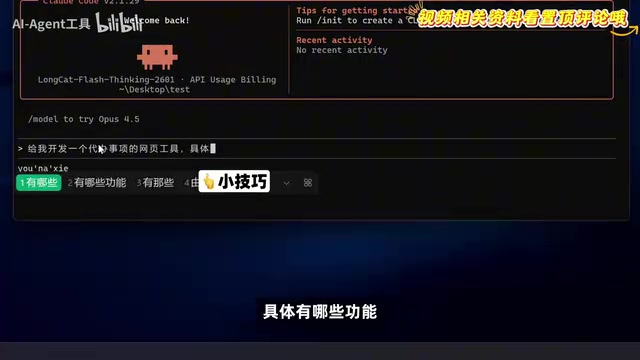
This interaction technique of "letting the AI ask before answering" is worth borrowing: the clearer the requirement boundaries, the lower the probability of the agent redoing work.
In addition, LongCat's flash thinking model can also be used directly on the official website. After enabling deep thinking, it can call multiple "thinkers" to reason independently in parallel and then aggregate the results—suitable for breaking down complex problems.
A Few Reminders
The Claude Code ecosystem changes quickly, and model compatibility and free quota policies may be adjusted at any time. Before configuring, it's advisable to check the latest instructions in the official documentation. The configuration item that skips login authentication is an unofficial usage, and whether future versions remain compatible is uncertain. For beginners in China, the lowest-cost path is to first get the process working with the IDE plugin plus a free domestic model, then decide whether to go deeper.
One-line Summary
Breaking down the hands-on path to running Claude Code at zero cost by replacing the official API with a free domestic model.
Paragraph Summary
Aimed at beginners in China, this article systematically breaks down a zero-cost approach to using Claude Code. It first explains that Claude Code is an AI agent running in the terminal that can read and write files and execute commands, and thus places high demands on a model's agent and reasoning capabilities. Installation has two routes—command line and IDE plugin—with the latter being friendlier for beginners. The core step is replacing the official API with a free domestic model adapted for Claude Code (such as Meituan's LongCat Flash Thinking), which requires modifying the two configuration files settings.json and claude.json and skipping official login authentication. The hands-on section demonstrates the interaction technique of having the AI ask about requirements before developing, which can significantly reduce rework. The article ends by reminding readers that free quota and model compatibility policies change frequently, so they should check the latest official documentation before configuring.
Related articles

Grok Bot vs ChatGPT Agent: Which AI Agent Is More Powerful?
How does Grok Bot differ from ChatGPT Agent? This comparison examines how they work: Grok Bot has a cloud computer and runs persistently inside tools to execute multi-step tasks automatically; ChatGPT Agent operates web pages in a browser and is more mature at general tasks. Includes selection advice.

Walmart Agent Gateway: AI Shops for You Automatically—Why Is Amazon Going the Opposite Way?
Walmart's Agent Gateway lets ChatGPT, Gemini and other AI assistants access its product catalog to search, compare and add to cart, with spending limits and per-purchase approval. Amazon blocks external AI agents—two retail giants, opposite paths. Currently US-only, India may follow.

Walmart Opens Shopping to AI Agents: ChatGPT and Gemini Can Place Orders
Walmart launches Agent Profiles, allowing AI agents like ChatGPT, Gemini, and Meta Muse to shop for users with spending limits, per-transaction approval, and isolated orders—no Walmart Plus required. This article analyzes how it works and its industry impact, in stark contrast to Amazon's blocking of AI agents.