A New DeepSeek Harness Experiment: Agent Supervising Agent for Self-Evolution
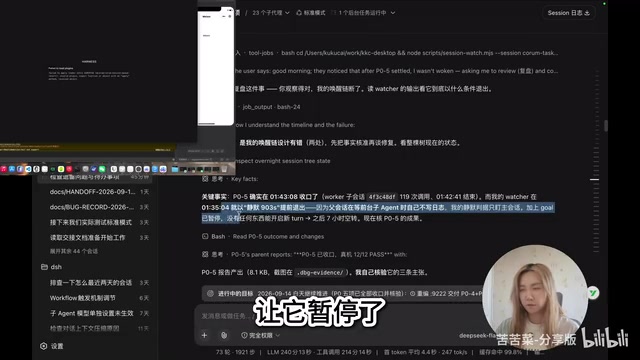
Using official DSH to supervise and auto-evolve a custom Agent, running unattended overnight via a persistent task ledger.
This article describes a developer's "Agent supervising Agent" self-evolution experiment built on DeepSeek Harness. The architecture uses three instances: official DSH as a stable supervisor dispatching tasks and packaging releases; a custom Agent Crum (port 9222) executing real tasks in parallel; and an isolated verification instance (port 9333). A persistent ledger mechanism ties everything together — tasks advance on success or convert to bugs on failure, forming a near-uninterrupted loop. A mid-experiment idle-spin bug was diagnosed and self-repaired the next morning. Chrome DevTools MCP gives Agents direct UI control over the Electron app, while the ledger guards against context compression-induced amnesia.
The "Bootstrap" Self-Evolution Concept
A Bilibili content creator recently shared an experimental workflow built on DeepSeekAd Harness (DSH): having one Agent supervise, debug, and evolve another Agent. In his own words, this is a "bootstrap" self-iteration — using the official DSH as a stable supervisor to drive his own custom Agent through real tasks, automatically log issues, dispatch fixes, and close the loop.
Almost all the core prompts in this workflow were generated by AI, with the author running three instances in parallel. The goal was straightforward: hand off tasks to this system before going to sleep and let it run autonomously through the night. This idea of "unattended software self-evolution" is what makes the experiment so compelling.
The Three-Instance Architecture
The author used a diagram to break down the system's structure, with each instance playing a distinct role:
Supervisor Agent: Official DSH
This is the driver of the entire workflow, running the official version of DeepSeek Harness. It intentionally "stays out of any actual development" and does not run the code being developed — which keeps it stable. Its responsibilities include dispatching tasks, monitoring execution traces, archiving results, and recompiling/packaging the target Agent when needed.
Execution Agent: Custom-built Cotine (Crum)
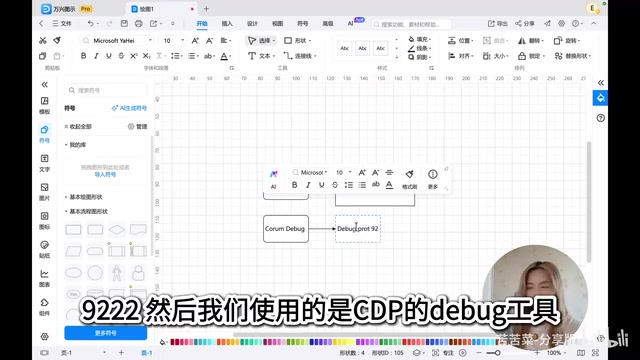
The author's own Agent, named Cotine (abbreviated as Crum), runs on CDP debug port 9222 as a compiled debug build. It operates in two modes: task mode, where it decides independently whether to run tasks in parallel, and command mode, where it acts purely as a scheduler dispatching sub-Agents for parallel execution. Whether this parallel capability works as intended is precisely what the experiment set out to validate.
CDP (Chrome DevTools Protocol) is a debugging protocol exposed by the Chrome browser that allows external programs to connect via WebSocket and programmatically control the browser or Chromium-based applications — including reading the DOM, executing JavaScript, and monitoring network requests. Electron apps are essentially desktop programs rendered by Chromium, so they natively support launching with the
--remote-debugging-portflag to expose a CDP debug port. Ports 9222 and 9333 are exposed in this way to the supervisor and verification instances respectively, allowing external programs to control the UI and logic of these Agent applications just like manipulating a web page.
Verification Instance: Crum Debug (Port 9333)
The third instance runs on port 9333, completely isolated from port 9222, and is dedicated to independent verification. After the execution Agent completes a task, the supervisor Agent can run a separate validation pass in this isolated environment to assess the outcome.
The Ledger Mechanism: Keeping the Loop Running
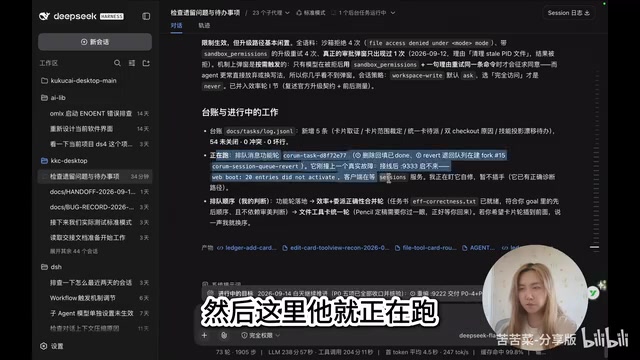
The key to the system's autonomous operation is a ledger mechanism. The author records all problems to be solved and questions to be considered in a ledger, managed and dispatched by the supervisor Agent.
Real tasks are handed to the execution Agent. After completion, results are evaluated: if OK, the system moves to the next item; if not OK, the blockers, sticking points, and issues from the session are converted into bugs and logged back into the ledger for further processing. In principle, as long as the ledger contains tasks, the system never stops.
Notably, the "real tasks" used for testing happen to be fixing issues in the system's own development — using one Agent to evolve another Agent, forming a genuine self-iteration loop.
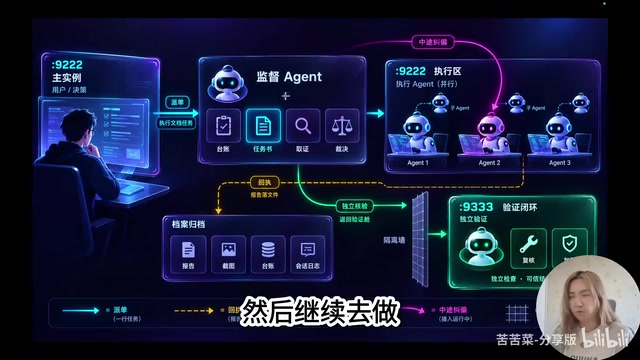
The ledger mechanism is essentially a persistent task queue in engineering terms, similar to message queues or ticketing systems (like Jira or Linear) used in production environments. Its key value is decoupling "task state" from the volatile session context and writing it to external storage. Even if an Agent session is interrupted due to context compression, timeout, or restart, task progress is not lost — resuming work only requires re-reading the ledger. In AI Agent scenarios, this design also naturally addresses the "hallucinated completion" problem: a task can only be dequeued after evaluation confirms success; otherwise it's converted to a bug and re-queued, forming a stateful loop rather than relying on the model to self-report progress.
Overnight Experiment Recap: Idle Spinning Bug and Self-Repair
The experiment didn't run perfectly as envisioned, but the process itself was valuable. During the post-mortem, the author found that around 2 AM, the system had stopped due to a "silent 903-second early exit."
The cause was a classic concurrency coordination issue: a secondary strategy was busy working, the primary strategy was waiting, and when the guardian Agent (called Gone by the author) stepped away to check on things, it found that "nothing was being driven" and went to sleep — but without registering a new wait, causing the entire loop to spin idle. This was further compounded by the author having paused new turn creation to save tokens.
When restarted in the morning, the system first reviewed the problem, then strengthened the loop and wait logic: after the guardian Agent wakes the execution Agent, it now puts itself in a loop with chunked waiting, checking in every ten minutes. This dramatically reduces token consumption while ensuring the system can always be re-awakened. After the fix, the system kept running continuously through the time the video was recorded without interruption.
Why Use the Official Version as the Supervisor
The author specifically explained a key architectural tradeoff. While DSH officially supports hot module replacement (HMR), if you develop and debug within a single instance, any modification that triggers a host-side restart could kill your own instance, breaking the entire Agent loop.
So he chose the official version as a stable external driver: it interprets requirements, updates the Crum Debug Release, and once critical bugs pass development acceptance, it repackages the latest version, launches instances, and dispatches new instructions. For verification, it separately compiles a debug instance on port 9333 for isolated testing. This design of physically separating the supervisor from the system under development is the core of ensuring long-running unattended operation.
Front-End Control: Chrome DevTools MCP Integration
Since the DeepSeek Harness front-end — whether desktop or web — is a front-end technology application renderable by the Chrome engine, the author configured Chrome DevTools MCP and integrated it into the Electron app, enabling Agents to directly access and manipulate the interface.
The supervisor Agent uses CDP to control the execution Agent to handle real tasks, then monitors the results. The launch command for the port 9333 verification instance is also straightforward: open port 9333 on the local loopback, and the app opens a debug port at startup for the programming assistant to use.
MCP (Model Context Protocol) is an open protocol proposed by Anthropic and increasingly adopted by multiple AI frameworks, designed to provide large models with a standardized "tool call" interface, allowing Agents to connect to external capabilities in a unified way — file systems, databases, browser control, and more can all be wrapped as MCP Servers. Chrome DevTools MCP wraps the CDP protocol into an MCP toolset, enabling Agents to perform operations like "click a button," "read page content," and "execute a script" through standard tool call commands, without writing low-level WebSocket communication. Once integrated into an Electron app, the supervisor Agent effectively gains full programmatic control over the entire desktop application's UI layer.
Will Multi-Round Context Compression Cause "Amnesia"?
Long-running operation inevitably leads to context bloat. The author's session went through multiple context compressions, but he believes the ledger mechanism addresses the "amnesia" risk: the entire context prompt and goal injection allow the Agent to re-pull "what to do now" from the ledger. The video even showed an instance of the system being "rescued" after compression, validating the robustness of this mechanism.
The experiment also exposed a real-world constraint — the author's KP3 channel had low throughput at the time, causing noticeably slower execution. He noted he would switch back to a faster solution going forward.
What This Experiment Suggests
This experiment demonstrates an imaginative direction: using a stable, isolated supervisor Agent to automatically drive, verify, and evolve another Agent software under development, with a ledger mechanism enabling near-unattended continuous iteration.
While still in the personal exploration stage with real issues like idle spinning and throughput bottlenecks, it offers a clear conceptual path for developers looking to build DeepSeek Harness plugins: decouple the unstable system under test from the stable scheduling system, use a persistent task ledger to maintain the loop, and use isolated instances for verification. These three elements combined are what transform "Agent supervising Agent self-evolution" from a concept into an engineering practice that can actually run.
Related articles

Qwen 3.8 Beats Opus at Coding—But Can Your Mac Run It?
Open-source Qwen 3.8 beats Opus 4.6 at coding at just 18GB, but how much Mac memory do you need? 24GB crashes; 32GB is the sweet spot. Full config guide inside.

Claude Code + Agent: Building a Fully Automated AI Testing Loop
Bilibili course breakdown: how test developers can use Claude Code terminal-based Agents to build a fully automated AI testing loop. Compares permission boundaries of terminal vs. device Agents, explains why enterprise projects choose Claude Code over Open Claude-type tools, and outlines the Node.js environment setup and DeepSeek model integration path.

Working with AI Agents Requires Nerves of Steel
The more autonomous AI agents become, the heavier the user's psychological burden. Drawing from a Hacker News discussion, this article analyzes black-box anxiety, behavior drift, and monitoring fatigue in agent collaboration, and offers practical approaches like sandbox isolation, permission control, and task granularity management to reduce cognitive load.