A Three-Month Python Roadmap for Beginners: Syntax and Web Scraping in Full

Breaking down the three-stage learning path of a Bilibili Python tutorial, with practical tips and a sober analysis of "employment in three months."
Based on a zero-foundation Python tutorial on Bilibili, the article outlines a three-month path from beginner to independently building projects: stage one drills core syntax (data structures, loops, functions, OOP), emphasizing typing code rather than passively watching videos; stage two practices with scrapers and office automation projects, building debugging skills by modifying small projects; stage three chooses either Flask full-stack or pandas data analysis, and suggests joining open source through low-barrier contributions. The author also notes the gap between "can independently build projects in three months" and "meeting corporate hiring standards," since corporate roles also require databases, Git, Linux, and other fundamentals. Finally, three practical tips: break into a weekly plan, get it running before optimizing, and use Git early—emphasizing that a roadmap cannot replace daily coding.
How can self-taught learners avoid the "from beginner to giving up" trap with Python? There's a beginner tutorial on Bilibili with solid view counts that proposes a three-month learning path from zero foundation to independently building projects. Although the video itself has a lead-generation angle, its three-stage framework—core syntax, hands-on practice, and advanced expansion—does align with how skills are actually acquired. Drawing on the content of this tutorial, I've organized the key actions and common pitfalls at each stage for readers who want to systematically get started with Python.
Stage One: Drill Core Syntax into Muscle Memory
The first stage the video emphasizes is "relentlessly grinding through core fundamentals," specifically covering data structures like variables, lists, and dictionaries, conditional branching and loops, functions, and object-oriented programming. This list looks unremarkable, but it is precisely the foundation for all subsequent hands-on work. Many beginners are eager to write scrapers and build projects, only to get stuck repeatedly on nested dictionary value access, function scope, and the relationship between classes and instances—which actually slows down overall progress.
One line in the tutorial hits the mark: this stuff looks dry, but persisting in typing code every day is far more useful than just binge-watching tutorials.
From a learning science perspective, programming syntax is procedural knowledge, and passive video watching has a far lower retention rate than actively hitting the keyboard. I suggest setting a hard target for yourself in stage one: hand-write at least three complete examples for every syntax point, rather than copy-pasting in the IDE. List comprehensions, the dictionary get method, function default parameters, class inheritance and polymorphism—these high-frequency usages only become useful once you can write them without thinking, so that later you can focus your attention on solving problems.
Procedural knowledge is a category in cognitive psychology referring to knowledge about "how to do" something—like riding a bike, swimming, or programming syntax. Its key difference from "declarative knowledge" (knowing a fact) is that procedural knowledge must be internalized through repeated practice and cannot be acquired merely by reading or watching. When learning programming, understanding the syntax of a for loop is declarative knowledge; being able to write nested loops without reference and debug them correctly is procedural knowledge. Research shows that passive input (watching videos, reading tutorials) typically yields only 5%–20% memory retention, while active operation (typing code, solving problems) can reach over 75%. This explains why video tutorials repeatedly emphasize "type it yourself"—because only when syntax is written to the point of automaticity can the brain's working memory be freed up to handle real logic problems.
Stage Two: Practice with Scrapers and Automation Projects
Once basic syntax is mastered, the video suggests focusing on high-utility directions like web scraping, office automation, and data processing. This choice is pragmatic: scraping simultaneously trains HTTP requests, data parsing, file reading and writing, and exception handling—it's a natural comprehensive practice ground; office automation, meanwhile, lets you quickly build small tools that directly help with daily work, so positive feedback comes fast.
It's worth noting that the tutorial repeatedly stresses that "only writing the code yourself counts as truly mastering it," and this is especially critical at the scraping stage. Watching the instructor write requests calls and BeautifulSoup parsing seems simple, but when you actually do it you'll encounter encoding issues, anti-scraping strategies, page structure changes, and various other surprises. I suggest trying to modify a small project with every knowledge point you learn—for example, extending scraping a single page to scraping a paginated list, or changing output from printing to the console to writing to a CSV file. This kind of gradual modification trains debugging ability better than copying a complete project from scratch.
Web scraping is a program that automatically extracts information from web pages. Its basic process includes: sending an HTTP request to the target URL, obtaining the response content, parsing the HTML to extract the needed data, and storing the results. In Python, the commonly used request library is requests, and parsing libraries include BeautifulSoup, lxml, and regular expressions. Common obstacles in actual scraping include: inconsistent page encoding causing garbled Chinese text (you need to set response.encoding correctly), websites detecting User-Agent or rate-limiting by IP for anti-scraping (you need to set request headers or use proxies), and dynamic page structure changes causing selectors to fail. Beginners should start with static pages and small-scale data, gradually adding pagination handling and exception catching—this builds debugging confidence better than jumping straight into complex scrapers.
Stage Three: Frameworks, Data Analysis, and Open Source Participation
The third stage is about digging deeper into advanced topics and expanding development directions. The video mentions two paths: one is learning a web framework like Flask to move toward full-stack development, and the other is diving into data analysis and visualization.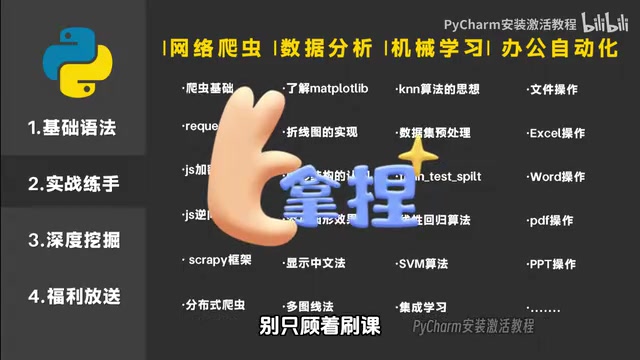
Neither path is superior—it depends on your target role. For backend and API development, choose Flask or Django; for data-oriented roles, you need to get comfortable with libraries like pandas and matplotlib. The video also suggests browsing GitHub to discover quality open source projects, participating in technical exchanges and code contributions, calling this a shortcut to rapidly boosting your skills. The direction is right, but for someone with zero foundation at three months, directly submitting PRs to large open source projects is a high bar. A more realistic approach is to start with low-barrier contributions like documentation fixes, example supplements, and issue reproduction—first get familiar with the collaboration workflow.
Flask is a lightweight web framework for Python that provides only core functionality like routing, request handling, and template rendering; other capabilities (databases, form validation, user authentication) are added on demand through extensions, making it suitable for beginners to understand the basic structure of web applications. In contrast, Django is a "batteries-included" heavyweight framework with built-in ORM, admin panel, and authentication system, suitable for rapidly developing complete sites. For selection: Flask is good for learning principles and building small API services, while Django suits medium-to-large projects that need rapid delivery. The data direction inevitably involves pandas (tabular data processing) and matplotlib (plotting)—the former is the core tool for data analysis, the latter for visualization. At the introductory stage, you can spend a week or two experiencing each path, then decide your main direction based on your target role—no need to lock in too early.
A Sober View on "Reaching Employability in Three Months"
The video makes an appealing claim: there's an obvious talent gap in the Python industry, companies have strong hiring demand, and after three months of systematic learning—whether joining a company as a developer or freelancing full-time—your income can be very substantial.
Some distinction is needed here. Three months of systematic learning is indeed enough for a zero-foundation person to independently complete small projects and build a complete knowledge framework—the video isn't exaggerating on that point. But there's still a gap between "can independently build projects" and "meets the hiring standards of corporate development roles." Corporate development roles typically also require database design, version control, Linux fundamentals, API conventions, and even a certain grounding in computer science—none of which can be fully covered in three months. Framing the three months as "from beginner to able to build things" keeps your mindset steadier and gives you clearer direction for filling gaps afterward.
Additionally, the tutorial promises supporting materials like mind maps, software installation packages, course notes, and e-books, obtainable by commenting.
For self-learners, having a ready-made roadmap does reduce confusion, but obtaining the supporting materials often comes with conditions like following and liking—readers need to judge for themselves whether it's worth it. More importantly, materials cannot replace hands-on practice: no matter how clear the roadmap, you won't learn without typing code.
Git is a distributed version control system used to record every change to code, supporting multi-person collaboration and version rollback. For self-learners, Git's value has three layers: first, a local repository is like an "undo button"—if you make a mistake, you can always revert to a previous version; second, hosting on GitHub or Gitee creates a remote backup, preventing code loss from computer failure; third, commit history and project repositories themselves are the most direct proof of ability when job hunting. To get started, you only need to master a few commands—git init, git add, git commit, git push, git pull—and you can pick it up in half a day. I suggest bringing practice projects under Git management in stage two, rather than waiting until you've "learned it well enough to use it," because version control is itself part of the development workflow.
Three Practical Tips for Self-Learners
First, break the three months into a weekly plan, focusing on only one topic per week—for example, week one on variables and data structures, week two on conditionals and loops, week three on functions, week four on object-oriented programming—and use a small exercise at the end of each week to check your mastery. Second, for stage-two projects, don't chase completeness or polish: get it running first, then optimize; when you hit an error, read the error message first instead of immediately searching for the answer. Third, in stage three, whether you choose web or data, get in touch with Git as early as possible and host your practice code in a remote repository—this is both a backup and a portfolio for future job hunting.
The value of this tutorial lies in providing an executable stage breakdown, not some secret formula. What really determines learning outcomes is still those hours you sit down and type code every day.
One-line Summary
Breaking down the three-stage learning path of a Bilibili Python tutorial, adding practical tips and a sober analysis of "employment in three months."
Paragraph Summary
Based on a zero-foundation Python tutorial on Bilibili, the article outlines a three-month path from beginner to independently building projects: stage one drills core syntax (data structures, loops, functions, OOP), emphasizing typing code rather than passively watching videos; stage two practices with scrapers and office automation projects, building debugging skills by modifying small projects; stage three chooses either Flask full-stack or pandas data analysis, and suggests participating in open source through low-barrier ways. The author also points out the gap between "can independently build projects in three months" and "meeting corporate hiring standards," since corporate roles also require databases, Git, Linux, and other fundamentals. Finally, three practical tips are given: break into a weekly plan, get it running before optimizing, and use Git early—emphasizing that a roadmap cannot replace daily coding.
Related articles

LLM Application Development: A High-Paying Career Guide for Ordinary People
LLM application development offers fresh graduates up to 35K/month, with SP offers reaching 600K. This article explains the core skills, how to break in, and how ordinary people can seize AI opportunities through learning by doing.

Say Goodbye to AI Influencer Faces: A Complete Guide to Creating Visual Assets for AI Comic Dramas from Scratch
Bilibili creator shares a full workflow for zero-basics AI comic drama visual assets: use Doubao Work skills with script-first, visual references, and real-person texture to escape AI influencer faces, then lock character and scene consistency with asset sheet layouts, weapon detail images, scene nine-grids, and cinematic color palettes.

The AI Production Pipeline Behind Great Videos: From Research to Agent Validation
AI video production isn't just a model race. This article breaks down a transferable four-step pipeline: researching professional workflows, organizing a skill checklist, configuring agents, and experimental validation—and explains how general-purpose LLMs like DeepSeek can replace paid tools to run the entire process.