AB-620 Exam Prep Guide: Master AI Agent Builder Core Skills in 10 Lessons

What AB-620 tests: a complete knowledge framework for planning, integrating, testing, and managing enterprise AI agents in Copilot Studio.
This article systematically outlines the Microsoft AB-620 certification exam's core knowledge framework for developers building enterprise-grade AI agents. The exam covers planning and configuration (30-35%), integration and extension (40-45%, largest weight), and testing and management (20-25%), with a maximum score of 1000 and a passing score of 700. Topics include agent audience and authentication choices, Agent Flow automation and its 100-second response constraint, topic and variable scope design, four knowledge source trade-offs, tool extensions like Computer Use and MCP, multi-agent splitting and A2A protocol, Application Insights telemetry with KQL, and ALM with solutions, environment variables, and Power Platform pipelines.
Microsoft has introduced the AB-620 certification exam within the Copilot Studio ecosystem, targeting professional developers and advanced builders who construct enterprise-grade AI agents. Passing the exam earns the "Microsoft Certified: AI Agent Builder Associate" certification, with a maximum score of 1000 and a passing score of 700, offered in 13 languages. This article systematically outlines the exam's core knowledge framework based on a complete 10-lesson prep course and 24 original practice questions.
You may not have noticed that AB-620 is positioned above the PL-900 foundational level. Microsoft expects candidates to have intermediate knowledge of generative AI, model orchestration, RAG, MCP, and the Agent-to-Agent protocol, along with familiarity with prompt engineering, REST APIs, and integration patterns. This certification requires periodic online renewal, but renewal is free.
The exam covers three domains: Plan and configure agent solutions (30-35%), Integrate and extend agents (40-45%, the largest weight), and Test and manage agents (20-25%). Let's walk through each one following the course rhythm.
Planning First: Audience, Authentication, and Integration Strategy
Before building any agent, the team must answer three questions: who the agent talks to, how users sign in, and what data the agent can access. Internal agents serve employees, while external agents face customers or partners—the audience determines the delivery channel (customer-facing typically uses websites or mobile apps, while employee-facing uses Teams or Microsoft 365 Copilot) and also determines how much data the agent can expose.
Copilot Studio offers three authentication options:
- No authentication: Anyone with the link can chat, so the agent can only use public information
- Microsoft authentication: Connects through Microsoft Entra ID to channels like Teams, Power Apps, and Microsoft 365 Copilot
- Manual authentication: Supports Entra ID or any OAuth2 identity provider, suited for customer website scenarios
For example, an internal HR agent in Teams needs to identify each employee to display only their personal data—the correct answer is to use Microsoft authentication. A retailer's website needs to let customers sign in with Google or Facebook accounts, so manual authentication is the right choice.
Integration planning should determine early which systems the agent reads from, which it writes to, and through what method (connectors, APIs, or Agent Flows). Component Collections let makers share topics, tools, and even child agents across agents, with control over editing permissions—they can also be restricted to a single parent agent to prevent unintended reuse.
Data Policies centrally control which connectors agents can use across all environments in the Power Platform admin center, making this a key element of enterprise governance.
Component Collections are a mechanism in Copilot Studio for packaging and reusing related topics, tools, knowledge sources, and even child agents. Makers can bundle a set of components that logically belong to the same business scenario into a collection, then reference the same collection across multiple agents instead of copying and pasting individually. Collections support permission control: they can be set as editable, letting different teams extend from the same base, or locked as read-only to ensure core logic isn't accidentally modified. Additionally, collections can be restricted to a single parent agent, preventing other agents from unexpectedly reusing them and causing inconsistent behavior. In enterprise governance scenarios, component collections are a key design mechanism for balancing reuse efficiency with change safety.
Agent Flow: Deterministic Automation and Human-in-the-Loop
Agent Flow is deterministic automation in Copilot Studio—the same input always produces the same output. It consists of a trigger and at least one action, where actions can be connector operations, condition checks, or prompts. In terms of rates, each action consumes Copilot Studio capacity, so design should only do what's necessary.
When an agent calls a flow, the trigger condition is "When an agent calls the flow," ending with a "Respond to the agent" action. Input parameters go on the trigger, output parameters go on the response, and data flows bidirectionally. Key constraint: the response must return within 100 seconds. If a step takes five minutes (like generating a report), the response should come first, with the long step executing after the response, so the conversation isn't blocked.
For scenarios requiring human intervention, Copilot Studio provides the "Request for Information" action—pausing the flow, sending a request via email to a specified reviewer, and continuing after their response. Approval scenarios (including multi-level approvals and AI approvals in preview) cover the classic approve/reject decision.
Before publishing, Flow Checker lists all errors, and flows with errors cannot be published. After publishing, the Activity tab shows each run and its failures, while the Analytics tab displays run counts, failure rates, and trends. Runtime error handling can use Scope with "Configure Run After" to send alerts or fallback responses, and pass clear output parameters back to the agent so it can tell the user what happened.
Topics, Variables, and Generative Answers: The Core of Conversation Design
A common misconception: if the agent answers poorly, swap in a better model. In reality, many problems stem from insufficient topic design. For example, a travel agent can answer policy questions, but when a user asks to change a booking, it starts guessing instead of following a process—the solution is a better topic, not a stronger model.
Topics define the conversation flow through nodes on a canvas, including messages, questions, and conditions. Under generative orchestration, the agent selects which to use based on descriptions of topics, tools, and knowledge bases, so description quality is crucial. Topics can internally call Agent Flows or other tools, passing inputs and using their outputs—this keeps fixed processes predictable while letting the language model handle the surrounding conversation.
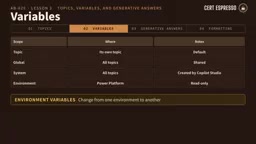
Variables have four scopes:
| Scope | Characteristics |
|---|---|
| Topic variables | Exist only within their topic (default) |
| Global variables | Shared across all topics |
| System variables | Created by Copilot Studio, contain user and conversation context |
| Environment variables | Come from Power Platform, read-only in Copilot Studio, vary across environments |
If a user's preferred language is captured in one topic and needs to be reused by all other topics, the correct answer is a global variable. When greeting a signed-in user by name, system variables provide that context.
Generative answer nodes answer from knowledge sources and can be limited to specific sources like an HR policy site. Sources set on the node override the agent's own knowledge sources, which is an important way to control answer accuracy. When no topic matches the user's question, generative answers can also serve as a fallback mechanism.
For response formatting, Adaptive Cards provide structured layouts, buttons, and form fields. The "Ask with Adaptive Card" node displays a card and stores submitted values in variables. If the agent needs to collect date, destination, and seat preference all at once, an adaptive card node is the most suitable choice.
Connecting Enterprise Knowledge: Trade-offs Among Four Knowledge Source Types
Knowledge sources ground agent answers in your data, and can be set at the agent level or within generative answer nodes. Built-in sources include public websites, SharePoint, Dataverse tables, and uploaded files. For more complex enterprise systems, Copilot Studio offers connectors and Azure AI Search.
Copilot Connectors (formerly Microsoft Graph Connectors) index content from non-Microsoft systems into Microsoft Graph. Content is copied and semantically indexed, so Copilot, Microsoft Search, and agents can all search it. It's suited for broadly searchable knowledge (like knowledge bases or ticket history), but content freshness depends on the last crawl time—it's not real-time.
Power Platform Connectors are real-time API bridges to thousands of systems. As tools, they read data, write data, and trigger actions at runtime; as knowledge sources (preview feature), they can answer based on live data without copying it. When data must stay current, or when the agent also needs to perform actions (like creating records), choose this type of connector.
Azure AI Search is a search engine for large-scale document collections, typically paired with vector indexes for semantic retrieval. Copilot Studio can add Azure AI Search indexes as knowledge sources through connectors. When a legal team has 2 million chunked and vectorized documents, Azure AI Search is the only option that can handle that scale.
Which knowledge source to choose depends on where the data lives, how fresh it needs to be, and who can access it.
RAG (Retrieval-Augmented Generation) is the core paradigm for letting large language models answer based on external data. Its basic process: after a user asks a question, the system first retrieves the most relevant document chunks from the knowledge base, then feeds those chunks as context to the language model to generate an answer. RAG's value is that it enables answers grounded in the latest, most proprietary enterprise data without retraining the model, while reducing hallucinations. In Copilot Studio, whether the knowledge source is SharePoint, Dataverse, or Azure AI Search, the underlying logic follows similar retrieval-augmented principles. Understanding that retrieval quality and generation quality are independent helps diagnose why an agent gives irrelevant answers: either retrieval didn't find the right chunks, or the model didn't properly use the retrieved content.
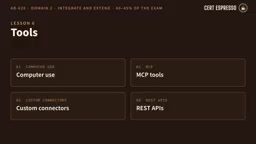
Tool Extensions: Computer Use, MCP, and Custom Connectors
When an agent needs to interact with external systems, tool selection is equally critical.
Computer Use lets agents operate websites and desktop applications on Windows machines—selecting buttons, menus, input fields. It's driven by a computer-using agent model, combining vision and reasoning to adapt to interface changes. Since it operates a real screen, human supervision should be planned and runs observed through Computer Use Monitoring. When the target system is a 20-year-old desktop application with no API and no connector, Computer Use is the only viable option.
MCP (Model Context Protocol) is an open standard for connecting agents with tools and data. After connecting an existing MCP server in Copilot Studio, the agent can use its tools and resources. When the server adds or changes tools, the agent automatically picks up the changes. Note: MCP requires generative orchestration, because the agent needs to select tools based on descriptions. If an MCP server is connected but the agent never uses its tools, the most likely reason is that generative orchestration isn't enabled.
Custom connectors wrap APIs into reusable definitions, including authentication, operations, and parameters. They're the best choice when multiple agents or flows reuse the same API—security configuration is centralized in one place.
REST API tools (preview) allow providing an OpenAPI specification directly, and Copilot Studio converts operations into actions the agent can call, ideal for quickly integrating well-documented APIs.
MCP (Model Context Protocol) is an open protocol proposed by Anthropic and increasingly adopted across the industry, aiming to connect AI applications with external tools and data sources in a unified way. MCP servers expose Tools and Resources through a standard interface, and an agent client only needs to integrate once per the protocol to dynamically discover and invoke all capabilities the server provides. Compared to traditional custom connectors, MCP's advantage is that tool definitions are centrally maintained by the server; when the server adds or modifies tools, the agent side needs no reconfiguration to pick up changes. Enabling MCP connections in Copilot Studio requires generative orchestration to be turned on, because the agent needs to dynamically decide when to call which tool based on natural language descriptions, rather than relying on preset fixed flows.
Multi-Agent Architecture and Observability
When an agent has 60 topics and tools and starts making wrong choices, that's a common scaling bottleneck. A rule of thumb: beyond 30-40 options, consider splitting into multiple agents. The first step should be improving descriptions, not splitting immediately.
Child Agents are lightweight agents that exist within an existing agent, grouping related instructions, tools, and knowledge so the parent agent can delegate an entire work domain. They're managed alongside the parent agent and are suited for organizing a single agent's work, not cross-team sharing. Published standalone agents can be connected and reused—for example, when a service agent needs an HR agent owned by another team, connect it rather than copy it.
Additionally, Copilot Studio can connect to Foundry Agents and Fabric Data Agents (both in preview). Fabric Data Agent answers questions about Microsoft Fabric data through selected connections. Foundry Agents require exposing their Activity Protocol endpoint (enabled via REST API or Python SDK).
The Agent-to-Agent (A2A) protocol is an open standard for inter-agent communication. Copilot Studio can connect to agents that support the A2A protocol, enabling orchestration across vendors and platforms.
Telemetry and Evaluation
When agents fail in production, you need to know which conversations failed and which model performs best for a given task. The answer is in Application Insights.
Prompts can use models from the Microsoft Foundry model catalog—which contains over a thousand models. When adding from a prompt's model list, you need to provide the deployment name and base model name, exactly matching those in Foundry. Each prompt can independently use a connected Foundry model without affecting the agent's other prompts.
Telemetry has two levels: agent-level (managed by the build team) and environment-level (preview, typically configured centrally by administrators). In Application Insights, use KQL (Kusto Query Language) to query agent events, track errors, response times, and which topics or tools are running, and build alerts based on key metrics.
For evaluation, a test set contains up to 100 test cases. AI can generate questions from the agent design—Quick question set generation produces 10 questions, suitable for a first quick check. Evaluation methods include:
- General quality: Scores relevance and completeness, no expected answer needed
- Meaning comparison: Checks whether the answer means the same as the expected answer
- Keyword match: Checks whether expected words or phrases are included
- Text similarity: Compares the wording itself
- Tool use: Checks whether the agent called the expected tools or resources
Evaluations run as the signed-in user, so knowledge source and tool access permissions affect results. This is why two testers running the same evaluation may get different results.
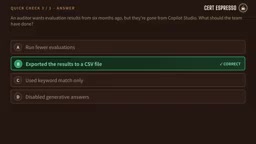
Evaluation results are retained in Copilot Studio for 89 days; export to CSV if longer retention is needed. Comparing runs before and after changes can catch regression issues before users do.
KQL (Kusto Query Language) is the query language used by services like Azure Data Explorer, Application Insights, and Log Analytics, with syntax resembling a combination of SQL and pipeline operations. In Copilot Studio's telemetry scenario, agent conversation events, errors, response times, and more are written to Application Insights, and operations staff write KQL queries to filter and analyze this data. For example, KQL can count failed conversations over the past 24 hours, find the topic with the longest response time, or group tool call types to see usage frequency. Mastering basic KQL syntax (such as where, summarize, project, join) is a prerequisite for building effective alerts and dashboards, and a key skill for quickly pinpointing root causes within massive telemetry data.
Application Lifecycle Management: Solutions, Environments, and Pipelines
Building an agent directly in the production environment, and a single Friday change brings down the whole company's HR agent—no test copy, no history, no rollback path. This is a classic case of missing ALM.
Every agent in Copilot Studio is created within a Power Platform solution—the solution is the vehicle that moves it between environments. You can set a preferred solution so new agents and components automatically go into a custom solution rather than the default solution. Exporting solutions or deploying through pipelines is standard practice.
Separating development, test, and production environments, with solutions moving progressively from development to production, ensures production doesn't receive untested changes. Downstream deployments use managed solutions, making production directly uneditable.
Environment variables store settings that need different values across environments—like API addresses or the SharePoint site used as a knowledge source. When an administrator changes an environment variable's value, published agents still use the value from the last publish, so the agent must be republished for it to take effect. This is an error-prone point that recurs on the exam.
Power Platform pipelines bring ALM into the service itself, for both makers and administrators. Pipelines deploy solutions through stages (like test and production), and production stages can be protected with approvals. Each stage receives the same artifacts, ensuring what passed testing is what goes live. Pipelines also support extensions, such as adding approval flows or custom steps.
One-line Summary
What does AB-620 certify: a complete knowledge framework for planning, integrating, testing, and managing enterprise-grade AI agents in Copilot Studio.
Paragraph Summary
This article systematically outlines the core knowledge framework for the Microsoft AB-620 certification exam, aimed at professional developers building enterprise-grade AI agents. The exam covers three domains: planning and configuration (30-35%), integration and extension (40-45%, the largest weight), and testing and management (20-25%), with a maximum score of 1000 and a passing score of 700. Content is organized around a 10-lesson prep course, including: choosing agent audiences and authentication methods (none, Microsoft, manual), Agent Flow's deterministic automation and 100-second response constraint, topic and variable scope design, trade-offs among four knowledge source types (Copilot Connectors, Power Platform Connectors, Azure AI Search, built-in sources), tool extensions like Computer Use/MCP/custom connectors, multi-agent splitting strategy and A2A protocol, Application Insights telemetry and KQL queries, and application lifecycle management covering solutions, environment variables, and Power Platform pipelines.
Related articles

ChatGPT Space Launches: Team Collaboration and New Pages Features Explained
ChatGPT Space is OpenAI's new team collaboration feature with Pages, real-time collaboration, and Slack/Google Drive sync. We break down its privacy design, multi-platform integration, and the full workflow from conversation to document.

Migrating Apache Spark UDFs to GPU Acceleration with AI Agents
NVIDIA developer blog explains how AI Agents rewrite Apache Spark UDFs for GPU acceleration, covering migration criteria, agent rewriting and verification workflows, plus pitfalls like result consistency and CPU-GPU transfer overhead.

Zed Editor v0.40.4-rc2 Released: Usage Credits Now Available Without Upgrading
Zed editor releases v0.40.4-rc2, allowing users to use usage credits for AI features without upgrading to a paid plan, lowering the trial barrier.