Aboard Sign: Complete Contract Signing by CC'ing sign@aboard.com
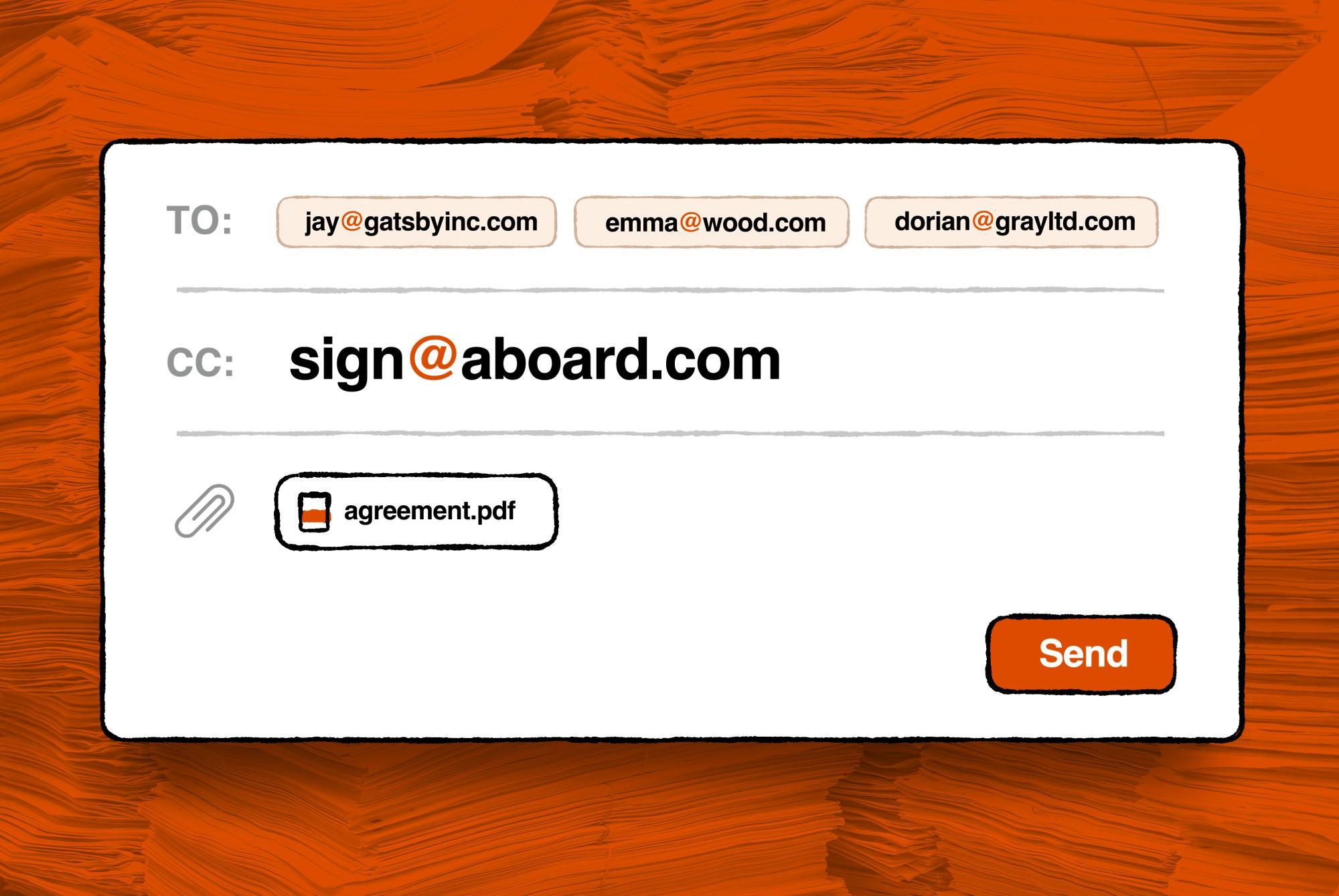
Aboard Sign collects e-signatures via email CC, requiring no account or app, focusing on privacy and zero barrier.
Aboard Sign is a lightweight e-signature tool on Product Hunt. Users CC sign@aboard.com on a contract email; signers read and sign via a browser link, and all participants receive a PDF cryptographically signed on every page. It requires no account or app and promises no document retention, selling on privacy and zero configuration. It suits one-off, lightweight signing but has clear limits in archiving, multi-party workflows, and verification details. Built by Paul Ford, it ranked #14 on Product Hunt that day with 68 votes.
Goodbye Accounts and Apps — Contract Signing Returns to Email
At a time when most e-signature tools require account registration, app installation, or subscription purchases, a product called Aboard Sign has appeared on Product Hunt, attempting to solve contract signing in the most primitive way possible. Its tagline is straightforward: email the contract to all signers, CC sign@aboard.com, and collect signatures.
According to its Product Hunt page, Aboard Sign was built by Paul Ford and is categorized under Productivity, Privacy, and Legal. It ranked #14 on the day's Product Hunt leaderboard with 68 votes. From a product-design perspective, it pulls e-signing away from "platform operations" and back to "an email action" — no account system, no app download; signers simply receive a browser link.
Workflow: One Email, One Link, One Signed PDF
Using Aboard Sign can be summarized in three steps:
- Send the contract via email to everyone who needs to sign;
- Put sign@aboard.com in the CC field;
- Each recipient receives a link and reads and signs in the browser.
Once signing is complete, all participants receive a signed PDF, and according to the official description, every page is cryptographically signed. This means the signature is not simply an overlaid image but a cryptographic proof bound to the document's contents.
The value of this workflow lies in its "zero barrier" — for small teams or individuals who occasionally need to sign contracts and don't want to purchase a full e-signature service for it, email itself is the most familiar collaboration entry point. The product doesn't change users' work habits; it embeds itself into the existing email flow.
Collecting signatures via email CC relies on a basic feature of email systems: CC addresses receive the same message content as the primary recipients. Aboard Sign designs sign@aboard.com as an automated processing address — when it appears in the CC field, it can obtain the original contract and the email list of all signers, then send each signer a unique signing link. This mechanism requires no plugin installation or email authorization from the sender, but it does require the sender to initiate the email, and signer identity is by default based on the email address — in other words, control of the mailbox equals signing authority. This trust model is simple and direct, but it also means it cannot layer on stronger identity verification methods like SMS verification or ID document checks the way dedicated platforms can.
Privacy Orientation: No Document Retention
Aboard Sign makes a clear promise on privacy: documents are not stored. Combined with the "no account required" design, this product subtracts from the data retention layer.
For users concerned about the sensitivity of contract contents, this is a notable design choice. Traditional e-signature platforms typically need to store documents in the cloud to support subsequent auditing, template reuse, and management features, whereas Aboard Sign has chosen a lighter path — once signing is complete and emails are delivered, the document is no longer retained. The trade-off is sacrificing document management and historical archiving capabilities in exchange for a smaller data exposure surface.
This trade-off aligns with the "Privacy" positioning in the product's tags. It does not attempt to be an enterprise contract management system; it solves the specific action of "getting this one contract signed."
Cryptographic Signature in the e-signature context usually refers to digital signatures based on public key infrastructure (PKI): the signer computes a cryptographic hash of the document contents, then encrypts that hash with a private key, forming a signature value bound one-to-one with the document contents. Any modification to the document will cause a hash mismatch, invalidating the signature. This is fundamentally different from a handwritten signature simply embedded as an image — the latter provides no integrity verification. The PDF format supports digital signature standards (such as PAdES), and mainstream readers (Adobe Acrobat, Foxit, etc.) can display signature validity and verify certificate chains. Aboard Sign's claim of "cryptographic signature on every page" means each page's content receives independent integrity protection, but the verification experience depends on whether its certificate is publicly trusted or needs manual import.
Applicable Boundaries and Potential Limitations
Based on the product description, Aboard Sign's positioning is very restrained: suitable for one-off, lightweight signing scenarios. But it also has clear boundaries.
Not retaining documents means no retrospective access. If a signatory later needs to retrieve the original contract or signing records, they can only rely on the PDF copies in their respective mailboxes. For enterprises with compliance archiving requirements, this may not be sufficient.
The collaboration capability of the email CC model is limited. How complex processes like multi-party signing, sequential signing, and signing status tracking would be implemented in a pure email model is not elaborated on the product page. The original text only mentions that "each signer receives a link," with no further explanation of sequencing and notification mechanisms in multi-signer scenarios.
The verification method for cryptographic signatures is not disclosed. The official description emphasizes cryptographic signing on every page, but the specific signing mechanism used and how to verify it in a PDF reader are not detailed in the source material; actual reliability remains for users to verify themselves.
Sequential signing and multi-party signing status tracking are common capabilities of e-signature platforms: in sequential signing, the document is sent to signers A, B, and C in order, with each subsequent step triggered only after the previous signer completes; status tracking lets the initiator view in real time who has signed and who hasn't. A pure email model lacks a centralized status dashboard and can only rely on email notifications or signers checking links themselves. For multi-party signing, Aboard Sign does not state whether it supports parallel signing (all links valid simultaneously) or sequential constraints. If it's a parallel model, signers might modify simultaneously and cause conflicts; if it's a sequential model, additional queuing and triggering mechanisms would be needed. The absence of these details makes the product's usability in complex contract workflows questionable; users should primarily consider simple one-off bilateral signing scenarios when choosing it.
Conclusion: An "Anti-Platform" Approach to E-Signatures
Aboard Sign's appeal lies not in stacking features but in re-simplifying the e-signature process. It assumes that what users want is just a clean signing, not a contract management ecosystem. Treating sign@aboard.com as an email address is essentially replacing a dedicated platform with existing protocols (email + browser). This "anti-platform" product philosophy has its place in privacy-sensitive and lightweight collaboration scenarios.
For teams that need to handle contracts frequently and value archiving and auditing, it may not be a replacement; but for users who sign occasionally and want zero configuration, this CC email might be the least troublesome choice.
One-line Summary
Aboard Sign collects e-signatures via email CC, requiring no account or app, with a focus on privacy and zero barrier.
Paragraph Summary
Aboard Sign is a lightweight e-signature tool launched on Product Hunt. Its core usage is to CC sign@aboard.com on a contract email; signers read and sign via a browser link, and all participants ultimately receive a PDF with cryptographic signatures on every page. The product requires no account registration or app installation and promises not to retain documents, selling on privacy and zero configuration. It suits one-off, lightweight signing scenarios but has clear boundaries in document archiving, multi-party signing workflow support, and signature verification details. The product was built by Paul Ford and ranked #14 on Product Hunt that day with 68 votes.
Related articles
Daybreak Red Deployment Guide: A Reference Architecture for Supervised Security Investigation
A breakdown of the Daybreak Red reference architecture: security control design, deployment configuration process, and runtime monitoring for supervised security investigation.

Gemini 4 Neon Tops the Models Engineering Index
Gemini 4 Neon tops the Models Engineering Index, sparking Hacker News debate over ranking credibility and evaluation methods. Here's what it means for developers.

Apple's Self-Developed AI Agent: An Agent That Can Operate Your Mac Is Coming
Apple is reportedly developing an AI agent that can operate a Mac, targeting Meta Muse, Claude, OpenAI Dots, and others. This article analyzes Apple's system-level advantages, the competitive landscape, and likely rollout paths in the agent race.